Hard drive constantly read/writing

tanzanos

New member
Member
Local time
2:23 AM
Messages
33
My HDD is constantly read writing for more than a week now. I checked for malware and viruses and found none. Also on the processes the one using 98% of the CPU was system idle?????? Any help as to why this is happening??????
 

My Computer

OS
windows 7 home premium x64
CPU
i7 920
Motherboard
asus p6t se
Memory
6 gb corsair
Graphics Card(s)
gtx 260
Hard Drives
wd 640gb
Start Menu->Search programs and files->Type in Resource Monitor->Press Enter->Click the Disk tab

Which program is at the top if you sort by Total (B/sec)?
 

My Computer

Computer Manufacturer/Model Number
HP Pavilion e9110t
OS
Windows 7 Home Premium 64 Bit
CPU
Intel(R) Core(TM)2 Quad CPU Q9550 @ 2.83GHz
Motherboard
Pegatron IPIEL-LA3
Memory
6.00 GB Hundai HMT125U6BFR8C-H9
Graphics Card(s)
ATI Radeon HD 4850
Sound Card
Realtek High Definition Audio/ATI High Definition Audio
Monitor(s) Displays
Acer AL2216W
Screen Resolution
1680x1050
Hard Drives
Hitachi HDP725050GLA360 ATA Device 500 GB
PSU
Unknown/installed by HP
Case
HP generic case
Cooling
Intel Stock Cooling
Keyboard
HP Keyboard
Mouse
HP Mouse
Internet Speed
Download: 19.15 Mbps Upload: 1.67 Mbps
Other Info
Network Adapter Realtek RTL8168D/8111D Family PCI-E Gigabit Ethernet NIC (NDIS 6.20)
Network Adapter 802.11n Wireless PCI Express Card LAN Adapter
If "idle" is 98% that just means the total processes running on your system are only using 2%. In other words, there's 98% not being used for anything.

So something is a disk hog rather than a CPU hog.
 

My Computer

Computer Manufacturer/Model Number
HP Media Center
OS
Windows 7 32 bit
CPU
AMD 5200+ dual core
Memory
2 GB
Graphics Card(s)
NVidia GeForce 6150SE 128 MB
Monitor(s) Displays
CRT
Screen Resolution
1280x1024
Hard Drives
500 GB Sata internal :

SIIG USB 3.0 docking stations w/WD Caviar Black 6 Gb/s drives
Keyboard
PS/2
Mouse
PS/2 Wheel Mouse
Other Info
SIIG USB 3.0 PCIexpress card.
have a look at "Backup and restore" settings?
 

My Computer

OS
W7 Ultimate 32bit
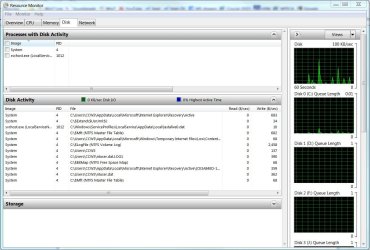
Open Resource Monitor, click on the Disk tab and you can see exactly what's using the disk(s).

Forgot to mention: What you'll probably see is that Windows is using the disk.

Here's sample:
 

Attachments

  • Resorce Monitor - Disk.JPG
    Resorce Monitor - Disk.JPG
    138.3 KB · Views: 274

My Computer

Computer type
PC/Desktop
Computer Manufacturer/Model Number
Built 2/11/2011
OS
Windows 7 Pro-x64
CPU
i7-2600 3.4GHz - 3.8GHz Turbo
Motherboard
Intel DH67BL-B3
Memory
8Gb - 2x4GB, Muskin 991770 PC3-1333
Graphics Card(s)
Integrated Intel HD 2000
Sound Card
Integrated Intel 10.1 HD, RealTek ALC892
Monitor(s) Displays
Asus LCD VH222H, Haier HL24XSL2a
Screen Resolution
1920x1080, 1920x1080
Hard Drives
Crucial SSD C300-128Gb,
Western Digital WD5002AALX - 500Gb,
Western Digital WD7501AALS - 750Gb
PSU
Seasonic 650W 80+ Gold Modular
Case
Rosewill Defender
Cooling
Stock CPU, Four 120mm case fans, PCH fan added
Keyboard
Logitech EX100 Y-RBH94 Wireless
Mouse
Logitech EX100 M-RCE95 Wireless
Internet Speed
3.0/1.5 Mbs
Antivirus
Microsoft Security Essentials
Browser
Microsoft Internet Explorer 11
Other Info
Antec Veris Premier-Multimedia IR Station,
Cyber Accoustics-3602 Speakers,
AFT XM-5U Card Reader,
Hauppauge TV-HVR-2250,
Sony LX300 USB Turntable
Start Menu->Search programs and files->Type in Resource Monitor->Press Enter->Click the Disk tab

Which program is at the top if you sort by Total (B/sec)?
It is SYSTEM and PERFMON.EXE!
 

My Computer

OS
windows 7 home premium x64
CPU
i7 920
Motherboard
asus p6t se
Memory
6 gb corsair
Graphics Card(s)
gtx 260
Hard Drives
wd 640gb

My Computer

Computer Manufacturer/Model Number
HP Pavilion e9110t
OS
Windows 7 Home Premium 64 Bit
CPU
Intel(R) Core(TM)2 Quad CPU Q9550 @ 2.83GHz
Motherboard
Pegatron IPIEL-LA3
Memory
6.00 GB Hundai HMT125U6BFR8C-H9
Graphics Card(s)
ATI Radeon HD 4850
Sound Card
Realtek High Definition Audio/ATI High Definition Audio
Monitor(s) Displays
Acer AL2216W
Screen Resolution
1680x1050
Hard Drives
Hitachi HDP725050GLA360 ATA Device 500 GB
PSU
Unknown/installed by HP
Case
HP generic case
Cooling
Intel Stock Cooling
Keyboard
HP Keyboard
Mouse
HP Mouse
Internet Speed
Download: 19.15 Mbps Upload: 1.67 Mbps
Other Info
Network Adapter Realtek RTL8168D/8111D Family PCI-E Gigabit Ethernet NIC (NDIS 6.20)
Network Adapter 802.11n Wireless PCI Express Card LAN Adapter

My Computer

OS
windows 7 home premium x64
CPU
i7 920
Motherboard
asus p6t se
Memory
6 gb corsair
Graphics Card(s)
gtx 260
Hard Drives
wd 640gb
Try this:

1. Click :orb:
2. In the search box type snipping
3. Select the Snipping Tool, then draw a boundary around the part you want to capture, then save it to a file and upload it here.

Regards,
Golden
 

My Computer

Computer type
PC/Desktop
Computer Manufacturer/Model Number
Golden Mk. I.4
OS
Windows 10 Pro x64 ; Xubuntu x64
CPU
Intel i7 860 @ 2.80 GHz O/C'ed to 4.0GHz
Motherboard
Gigabyte P55A-UD3R Rev.1. Award BIOS F13
Memory
16GB Corsair Vengance DDR3 @ 661 MHz Dual Channel (9-9-9-24)
Graphics Card(s)
EVGA NVidia GTX 560 1024MB
Sound Card
Realtek Integrated
Monitor(s) Displays
Dual Samsung SyncMaster 2494HS
Screen Resolution
1920*1080 and 1920*1080
Hard Drives
1*Samsung 840 EVO 120GB SSD;
1*OCZ Vertex 2 60GB SSD;
2*Samsung F3 SpinPoint 1TB in RAID0;
1*Samsung F1 SpinPoint 1TB;
2*Western Digital 1TB External USB 3.0
1*Western Digital 500GB External USB 3.0
1*Seagate 500GB External USB 2.0
PSU
Thermaltake ToughPower QFan 750W
Case
Thermaltake Element S VK60001W2Z
Cooling
Corsair H60 Water Cooling, 2*230mm and 2*80mm case fans
Keyboard
Logitech G110
Mouse
Logitech MX518
Resource image:
 

Attachments

  • Capture.PNG
    Capture.PNG
    12.5 KB · Views: 293

My Computer

OS
windows 7 home premium x64
CPU
i7 920
Motherboard
asus p6t se
Memory
6 gb corsair
Graphics Card(s)
gtx 260
Hard Drives
wd 640gb
It could be INDEXING! The drive seems to have finally calmed down after one week of constant read / writing. Cross my fingers! Thanks to all who responded! :party:
 

My Computer

OS
windows 7 home premium x64
CPU
i7 920
Motherboard
asus p6t se
Memory
6 gb corsair
Graphics Card(s)
gtx 260
Hard Drives
wd 640gb
It could be INDEXING! The drive seems to have finally calmed down after one week of constant read / writing. Cross my fingers! Thanks to all who responded! :party:

When in doubt, pull up Indexing Options (via Control Panel) and it will show you if it's complete or if in-progress, you can see the # items get incremented.
 

My Computer

Computer type
PC/Desktop
Computer Manufacturer/Model Number
Custom
OS
Windows 7
CPU
AMD Phenom II X2 (dual-core)
Motherboard
GA-MA785GM-US2H
Memory
4G
Graphics Card(s)
integrated ATI HD 4200
Sound Card
integrated
Monitor(s) Displays
Samsung 24"
Screen Resolution
1920x1080
Hard Drives
1 SSD - Samsung 840 - 500 GB - OS and DATA partitions
1 SSD - Intel 320 - 120 GB (used for backups) - Misc/BACKUP
1 SATA HD - WD, 500 GB - BACKUP
PSU
Ultra X4 500W
Case
Ultra X-blaster
Keyboard
Microsoft Digital Media Pro
Mouse
Logitech WIRED!
Internet Speed
15 Mbps FIOS
OK, I'm new to this posting--but I tried to take the screenshot mentioned previously. The hard drive on my ASUS is always busy and it's pretty distracting. It's not indexing since it says it's complete in Control Panel>Indexing Options. Anyway, if the .jpg uploads correctly, can somebody tell me if the processes look normal. The hard drive just never quits being active--unless I put it to sleep. Thanks for any help.

Richard

resource mon.jpg
 

My Computer

Computer type
PC/Desktop
Computer Manufacturer/Model Number
Asus CM1630
OS
Windows 7 Home Premium
CPU
AMD Phenom II X4 830
Memory
10 GB
Antivirus
Norton 360
Browser
IE 9
It could be INDEXING! The drive seems to have finally calmed down after one week of constant read / writing. Cross my fingers! Thanks to all who responded! :party:

It can be Superfetch as well. It runs on low priority so it won't be a problem. Superfetch "learns" what you do at what time and preloads your program exes and dlls into the RAM so that they launch faster.

Hope that helped a bit.
 
Hi rcan1015, welcome to 7F! :)

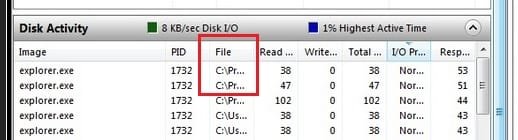
They look normal, but you sure have a lot of explorer.exe with a 1732PID. :shock:

Indexing, Pre, and Superfetch can cause a lot of HDD activity, but there can be other reasons to; Domain Name Server (DNS), scans by your security products (Norton360), and Malware.

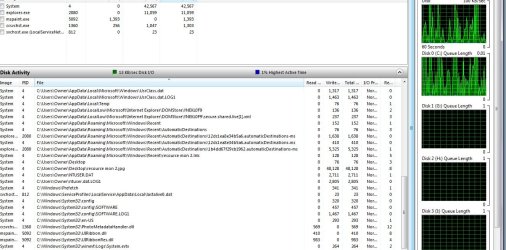
Please go back to Resource Monitor and expand the column shown in red, that will give us an idea as to what file(s) are in use.
HDD busy.jpg
   Information
How to; Place your cursor arrow over the column separator line, it will turn into a double arrow, left double click and the column should expand or you can left click and hold the separator line and drag it to the right, far enough to expose all listings.

If you can, please try to capture the entire column. You will have to scroll down and take several snips and post them in your next reply.

You can also search for the 1732PID in: http://www.sevenforums.com/tutorials/4590-task-manager-show-services-running-under-svchost-exe.html
It will show the PID under all the processes tab, but only the services that are running tab.
It would help if you could show a snip of any processes and/or services that are associated with 1732PID.


Richard,
We understand your being new to Forum etiquette, but it is never advised to add your situation to another members thread, especially one that is almost 1year, and 5months old. It would be okay to start your own thread and then link back to this one if it is similar to your problem.

Even though your situation may look similar on the face of it, it could be vastly different because your system in all probability is nowhere similar to the original thread starter's, and this will demand a different solution.

This comes under "Cause and Effect"; Even though the effect may be the same, the cause can be vastly different.

Windows 7 Help Forums - Board FAQ
 

My Computer

Computer type
PC/Desktop
Computer Manufacturer/Model Number
Gateway DX4831-01e (Mid-Tower Desktop)
OS
Originally Win 7 Hm Prem x64 Ver 6.1.7600 Build 7601-SP1 | Upgraded to Windows 10 December 14, 2019
CPU
Intel i3 530 2.93GHz, 2933MHz 2 Cores 4 Logical Processors
Motherboard
Gateway H57M01 133 megahertz
Memory
6GB of 1,333MHz DDR3 SDRAM
Graphics Card(s)
32MB Intel Graphics Media Accelerator HD IGChip
Sound Card
Realtek High Definition Audio
Monitor(s) Displays
Gateway HX2000 20inch TFT active matrix TN
Screen Resolution
1600 x 900 x 59 hertz
Hard Drives
WDC WD10EADS-00M2B0 [HDD] (1000.20 GB) -- drive 0,
HL-DT-ST DVDRAM GH41N [CD-ROM dr]
Four card readers, and Four USB 2.0
PSU
300watts.
Case
Mid-Tower Desktop
Cooling
Stock from Gateway
Keyboard
Natural Ergonomic Keyboard 4000, see Other Info
Mouse
Orig. Gateway wore out now using Insignia USB wired optical
Internet Speed
Vz FIOS 10ms png 57.64Mbps down 65.53Mbps up Speedtest.org
Antivirus
Zamana Anti-logger with Anti-malware, MSE, Windows Firewall,
Browser
IE11.0.9600.19399-Upd ver11.0.135, Firefox 68.0.1 x64
Other Info
System Specs by Belarc.

BIOS: American Megatrends Inc. P01-A0 11/17/2009

Replaced the MS 'Natural' Standard PS/2 Enhanced 101-102 Keyboard with a new Natural Ergonomic Keyboard 4000 on August 1st 2014.

Canon Pixma MG3222 Printer.

Updated to IE11 on 12102015 | Fios Quantum Router g1100

Additional AV: SpywareBlaster, manual Mbam, SAS
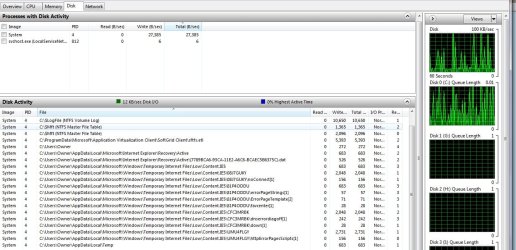
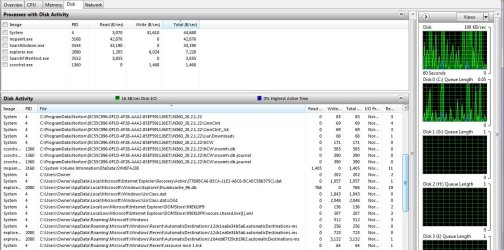
Thanks for the quick replies. Anak, I've tried to capture the column you requested. They are constantly changing--sometimes just a page or two and a few seconds later three or four pages. If the attachments upload correctly, maybe somebody can explain what all the activity is about. I do see that Norton has some activity, but I disabled it and the constant hard drive noises continued. Anybody know what all the IE5 activity is about?

resource mon 1.jpg

resource mon 2.jpg

resource mon 3.jpg

Sorry about posting in the wrong place/time. I've been searching for similar topics and this thread seemed like the most similar. Plus, I was reluctant about starting a new thread, when I'm not sure what that really means.

Richard
 

My Computer

Computer type
PC/Desktop
Computer Manufacturer/Model Number
Asus CM1630
OS
Windows 7 Home Premium
CPU
AMD Phenom II X4 830
Memory
10 GB
Antivirus
Norton 360
Browser
IE 9
I was not able to locate anything with 1732PID. If I understand the question correctly, it was mostly PID 4 that displayed in the resource monitor.

Thanks
 

My Computer

Computer type
PC/Desktop
Computer Manufacturer/Model Number
Asus CM1630
OS
Windows 7 Home Premium
CPU
AMD Phenom II X4 830
Memory
10 GB
Antivirus
Norton 360
Browser
IE 9
Hi there
assuming you have enough RAM a lot of this type of stuff can be caused by Third party A/V software.

I think by now most people on these boards know what I feel about typical 3rd party A/V software on HOME computers (not corporate) so I won't repeat again.

Some of these don't show up on any W7 performance info but can slow a machine down so it really runs about as fast as a One Legged dog attempting to run on a perfectly smooth ice pond --or in plain English -- cold treacle would flow faster.

Disable / uninstall all A/V software as a test (disconnect from Internet while doing this of course).

If you just stick with the MSE from Ms you won't go wrong. Also don't start or have running any unnecessary services.

BTW Norton which is often thrown in when you buy a PC is one of the WORST offenders in slowing systems down.

Cheers
jimbo
 

My Computer

Computer type
PC/Desktop
Computer Manufacturer/Model Number
Custom built, several laptops HP/ASUS
OS
Linux CENTOS 7 / various Windows OS'es and servers
CPU
Intel i7 Intel i5
Memory
8GB, 16GB
Graphics Card(s)
On Motherboard
Sound Card
Realtek HD audio
Monitor(s) Displays
Apple Cinema display, Samsung LCD
Screen Resolution
1920 X 1080
Hard Drives
4 X 1TB SATA
Mouse
Toshiba wireless laser
Internet Speed
> 20MB up
Jimbo, I've got 10GB RAM and I think my system is fast enough. It's just the constant noise and constant activity that bother me. I just got this ASUS system a couple months ago from my son (when he decided to go for a Mac) and I added the Norton 360 software. I had the same software installed on my previous Compaq Presario and did not experience any of the noise/activity issues. My older system came with Windows XP and after several years I upgraded to Windows 7. It had almost all the same software as my ASUS, but was much quieter. Also, I disabled Norton and it didn't seem to have any effect on the hard drive activity.

Thanks,
Richard
 

My Computer

Computer type
PC/Desktop
Computer Manufacturer/Model Number
Asus CM1630
OS
Windows 7 Home Premium
CPU
AMD Phenom II X4 830
Memory
10 GB
Antivirus
Norton 360
Browser
IE 9
Your welcome rc, I'm going to drill down and answer your recent posts along with jimbo's.

You did capture the column I wanted to see, and all the activity is from windows dynamically changing things on the fly..you're doing okay with the attachments.

I hope you restarted Norton, you don't want to be online without protection. The IE5 activity will have to be investigated.
There are no problems with where you posted, we will just try to figure out what your machine is doing right here in this thread.
I was reluctant about starting a new thread, when I'm not sure what that really means.
It means you are unique and the situation you are in is unique and it requires its own solution. :)

As stated before, the pid's are changing dynamically there is nothing to worry about. I'll will look at your pid4's

jimbo has some valid points especially about moving over to MSE If you do change to MSE use this Norton removal tool then install MSE. You can uninstall Norton from programs and features in Control Panel then use the removal tool to get the scraps.

This http://www.sevenforums.com/tutorials/220165-troubleshooting-steps-windows-7-a.html tutorial will help, for now concentrate on #'s 3-Startups and 7- process monitor for now.

Before you disable any startups remove Norton, and install MSE do all the necessary reboots. then take a snip of the startups in msconfig. as shown how to get there in step 3.
We can then advise which ones to disable.

See if that calms your machine down, but I still want you to download/install and run process monitor in step #7 and take a snip of that.

We'll try to nail this down, but you have to realize that you are comparing apples (ASUS) to oranges (Compaq).

I have to go out soon, but will stay for a few minutes to see your reply for questions before you start on all this. Your looking at an hour at least, depending on your duties.

 

My Computer

Computer type
PC/Desktop
Computer Manufacturer/Model Number
Gateway DX4831-01e (Mid-Tower Desktop)
OS
Originally Win 7 Hm Prem x64 Ver 6.1.7600 Build 7601-SP1 | Upgraded to Windows 10 December 14, 2019
CPU
Intel i3 530 2.93GHz, 2933MHz 2 Cores 4 Logical Processors
Motherboard
Gateway H57M01 133 megahertz
Memory
6GB of 1,333MHz DDR3 SDRAM
Graphics Card(s)
32MB Intel Graphics Media Accelerator HD IGChip
Sound Card
Realtek High Definition Audio
Monitor(s) Displays
Gateway HX2000 20inch TFT active matrix TN
Screen Resolution
1600 x 900 x 59 hertz
Hard Drives
WDC WD10EADS-00M2B0 [HDD] (1000.20 GB) -- drive 0,
HL-DT-ST DVDRAM GH41N [CD-ROM dr]
Four card readers, and Four USB 2.0
PSU
300watts.
Case
Mid-Tower Desktop
Cooling
Stock from Gateway
Keyboard
Natural Ergonomic Keyboard 4000, see Other Info
Mouse
Orig. Gateway wore out now using Insignia USB wired optical
Internet Speed
Vz FIOS 10ms png 57.64Mbps down 65.53Mbps up Speedtest.org
Antivirus
Zamana Anti-logger with Anti-malware, MSE, Windows Firewall,
Browser
IE11.0.9600.19399-Upd ver11.0.135, Firefox 68.0.1 x64
Other Info
System Specs by Belarc.

BIOS: American Megatrends Inc. P01-A0 11/17/2009

Replaced the MS 'Natural' Standard PS/2 Enhanced 101-102 Keyboard with a new Natural Ergonomic Keyboard 4000 on August 1st 2014.

Canon Pixma MG3222 Printer.

Updated to IE11 on 12102015 | Fios Quantum Router g1100

Additional AV: SpywareBlaster, manual Mbam, SAS
Back
Top