Hard Drive Dying How To Rescue Data

lostincable

New member
Local time
1:07 PM
Messages
2
Hi all, I have two hard disks in my windows box.

The disk with the windows OS is perfectly fine and boots normally.

The second disk is a 1TB Seagate SATA disk where I store personal files. I have about 160 gigs of files on it. This is the disk that has issues.

If I boot to windows with the second drive connected windows either doesn't boot or boots but runs extremely slowly and just doesn't respond.

If I disonnect the second drive with my personal files on then Windows boots normally and works fine which indicates the hard drive with windows on it is normal.

I used a Linux live cd to see if the failing second disk is there and its size to validate if there are any files on it.

In Linux on the live CD I can see the disk size and that 160 gigs is used so my files are there.

When I try to mount the disk in linx I get the following errors -

Code:
Input/output error NTFS is either inconsistent, or there is a hardware fault, or it's a SoftRAID/FakeRAID hardware. In the first case run chkdsk /f on Windows then reboot into Windows twice. The usage of the /f parameter is very important! If the device is a SoftRAID/FakeRAID then first activate it and mount a different device under the /dev/mapper/ directory.

I can boot to windows with the disk connected to try this so I used the windows install CD and access recovery tools but it does not seem to reconize the disk is there as when I run

Code:
checkdsk /f

It tells me the disk is write protected, which I am guessing indicates its referencing the CD I am booting of as it can not see my hard drive.

So couple of questions -

1) When at the command prompt with the windows repair tools what command can I issue to see what disks it has detected and drive letter paths mounted?

2) Is there anything else anyone can suggest?

Thanks!
 

My Computer My Computer

OS
Windows 7 Home
Boot into Windows with the drive connected, right click on the drive and select properties, then go to the tools tab and click "Check now" in the error-checking block.

Also, the command isn't "checkdsk", it's "chkdsk". If you have two drives, and the one you want to check is the F drive, then the syntax is "chkdsk f:". I use the following flags: f (for fixing problems) and r (for recovering data): "chkdsk f: /f /r".

The best way to get the data off the drive is to get a removable USB drive and copy the files from the problem drive to the USB drive.
 

My Computer My Computer

Computer Manufacturer/Model Number
Dell XPS 15 L502x
OS
Windows 7 Ultimate x64 SP1
CPU
Core i7-2670QM
Memory
8GB DDR3 PC3-10600
Graphics Card(s)
Intel HD Graphics 3000 + GeForce GT 540M
Screen Resolution
1920x1080
Hard Drives
1TB 5400RPM Seagate
Hi, thanks for the response...

Couple of points -

1) I can not even access the drive in windows, if I have the drive connected it takes about half an hour for windows to load and once I see the desktop the disk is not accessible as the computer continually stalls and I can't browse any menus etc.

2) If I remove the broken disk and reboot windows boots normally but the broken disk is obviously disconnected so thats not of any use :).

So I am guessing windows is struggling to mount the disk and throwing errors hence Windows not loading when it is connected.

The only way to see what the dissc is doing is by booting with a live Linux CD as it doesn't mount the disk so it allows me to see the OS desktop and check the partion is there but as soon as you try to mount the disk even Linux errors out.

So I am still at a point where -

1) I need run chkdsk, the only way to do this is by booting with a windows CD to command and running it but it is struggling to access the disk.

2) It could be that the disk is to far gone and if I can not run chkdsk on it then I may to accept the loss?

I could be wrong but thats how I see it at the moment!

This is what I see is happening.
 

My Computer My Computer

OS
Windows 7 Home
You can try putting the drive in a USB enclosure - then try connecting it to a different computer. Or, you could try connecting the drive to a different port on your motherboard to see if that helps.
 

My Computer My Computer

Computer Manufacturer/Model Number
Dell XPS 15 L502x
OS
Windows 7 Ultimate x64 SP1
CPU
Core i7-2670QM
Memory
8GB DDR3 PC3-10600
Graphics Card(s)
Intel HD Graphics 3000 + GeForce GT 540M
Screen Resolution
1920x1080
Hard Drives
1TB 5400RPM Seagate
gotta be honest i've come across drives like this at work, and the results are fairly varied.

i often times get an identical hard drive and swap the boards over which gives us an opportunity to remove the data.

using a usb caddy can help at times as well but again it doesn't always work.

frankly it really will depend on what tools you have at your disposal, with linux live not working you have limited options if it's causing issues with windows when it is connected, pretty much leaves you with replace board on drive and hope that works. or hand it over to a data retrieval company.
 

My Computer My Computer

Computer Manufacturer/Model Number
.
OS
.
CPU
.
Motherboard
.
Memory
.
Graphics Card(s)
.
Monitor(s) Displays
.
Screen Resolution
.
Hard Drives
.
PSU
.
Case
.
Cooling
.
Keyboard
.
Mouse
.
Internet Speed
.
Other Info
.
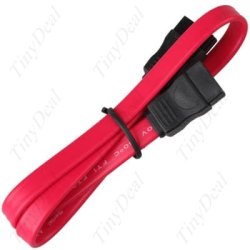
Also, try a different SATA data cable. These have been known to break or fail :(
 

Attachments

  • Sata_Data_Cable.jpg
    Sata_Data_Cable.jpg
    21.2 KB · Views: 2

My Computer My Computer

Computer type
PC/Desktop
Computer Manufacturer/Model Number
Built them myself, Science Experiments !
OS
Win7 Enterprise, Win7 x86 (Ult 7600), Win7 x64 Ult 7600, TechNet RTM on AMD x64 (2.8Ghz)
CPU
AMD fx8350 4ghz, AMD-32 2400mhz, AMD-64 3200mhz, AMDx64 2.8G
Motherboard
SIS 755, ECS-K8M890M-M (Ult 7600), GigaByte & others
Memory
2gb, 4gb on the Ult 7600, 4gb on Technet RTM, 32gb on FX8350
Graphics Card(s)
Draw my own Graphics, several nVidia cards
Sound Card
on motherboard
Monitor(s) Displays
19" flat scr, 28" I-Inc widescr,22" Emprex Widescr, 23" Acer
Screen Resolution
1280 x 1024, 1440 x 900, 1920 x 1080
Hard Drives
6 pata Ide HD's & 2 Sata HD's
added 80gb external on Ult 7600 computer,
numerous extra 1tb, 2TB, 3Tb SATA HD's
A collection of ext HD Docks w/ HDs
PSU
430w, 550w, 600w, 700, 800, etc
Case
All Generic Full Towers
Cooling
Open Air & a few fans, some w/ colored LEDs
Keyboard
Compaq & Dell recycled from GoodWill
Mouse
Made in China Optical Wired Mouse
Internet Speed
Fast Cable InterNet
Antivirus
AVG Free on 24 different Desktops, NO Problems!
Browser
IE 8 is preferred, but use FireFox sometimes
Other Info
Linksys Routers, switches, & Hubs
Too Many USB Flash Drives to count, Biggest is 64GB !
Eight computers in my home network.
Sixteen computers at my business network.
Linked via TeamViewer !
Lots of old used spare computer parts everywhere!
Back
Top