Hard drive full capacity not recognized

Jaunty

New member
Local time
12:58 AM
Messages
10
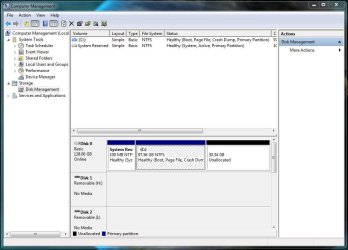
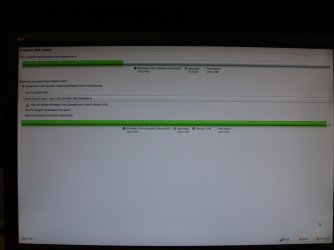
Only in Windows 7 at the install screen. Even after a fresh install and adding updates, it won't see it. However, if I plug drive in as slave, xp sp3 will recognize the full capacity. Bios recognizes full capacity and all the partitioning softwares recognize the full 320GB. Ironically, I can only access 137 gb. This makes me wonder about the 48bit LBA. But this can't be the case since everything else sees it, right? Why won't windows 7 see the hard drive's full capacity but other OS, partitioning softwares, and the bios recognize the full 320gb? Trying to install Windows 7 x86 Ultimate.
 

Attachments

  • Comp manage.JPG
    Comp manage.JPG
    74.9 KB · Views: 366
  • PICT0014.jpg
    PICT0014.jpg
    320.8 KB · Views: 206
Last edited:

My Computer

Computer Manufacturer/Model Number
Home built
OS
Ubuntu 9.04, Win XP sp3, Windows 7
CPU
AMD ahlon64 X2 4200+ Brisbane 2.2GHz socket AM2
Motherboard
Biostar NF520-A2 SE AM2 nVidia nForce 520D
Memory
Corsair XMS2 2x1GB 240 pin DDR2 800
Graphics Card(s)
EVGA nVidia 8400 GS PCI-E 512mb DDR2
Sound Card
integrated
Monitor(s) Displays
Viewsonic 19" widescreen
Screen Resolution
1680x1050
Hard Drives
WD Caviar Blue 320GB IDE - attempting Win7
WD Caviar 160GB IDE - Ubuntu Linux 8.10
WD Caviar 80GB IDE - WinXP
Maxtor 40GB IDE - Ubuntu Linux 9.04
Maxtor 20GB IDE - Ubuntu Linux 8.04
PSU
450w forgot brand name
Case
forgot
Cooling
thermaltake
I'm not sure about what might be causing the problem, but it may have been that the disk has an error? Go to computer and right click your C drive and check the volume for errors on one of the tabs. If there isn't an error, you might want to check your hard drive from your bios. If that doesn't work, go to your internal hard drive company and download another driver, one that is updated for windows 7 perhaps.
 

My Computer

OS
Windows 7 Home Premium (64 bit)
That's one of the first things I did. The drive in question is a western digital WD3200AAJB. Went to the site just now to check again. There are no drivers expect for a specific controller card, which I am not using. As I said earlier, everything else recognizes the drive and it's full capacity. There are no error either. BTW, I never did mention that I am not using any type of RAID.
 

My Computer

Computer Manufacturer/Model Number
Home built
OS
Ubuntu 9.04, Win XP sp3, Windows 7
CPU
AMD ahlon64 X2 4200+ Brisbane 2.2GHz socket AM2
Motherboard
Biostar NF520-A2 SE AM2 nVidia nForce 520D
Memory
Corsair XMS2 2x1GB 240 pin DDR2 800
Graphics Card(s)
EVGA nVidia 8400 GS PCI-E 512mb DDR2
Sound Card
integrated
Monitor(s) Displays
Viewsonic 19" widescreen
Screen Resolution
1680x1050
Hard Drives
WD Caviar Blue 320GB IDE - attempting Win7
WD Caviar 160GB IDE - Ubuntu Linux 8.10
WD Caviar 80GB IDE - WinXP
Maxtor 40GB IDE - Ubuntu Linux 9.04
Maxtor 20GB IDE - Ubuntu Linux 8.04
PSU
450w forgot brand name
Case
forgot
Cooling
thermaltake
" I never did mention that I am not using any type of RAID" ...wait does that mean you are using raid? :(
Also, don't forget especially to check your chipset driver. Many chipsets control the hard drive.
Sorry im no help...
 

My Computer

OS
Windows 7 Home Premium (64 bit)
Sorry for the confusion. NO RAID.
 

My Computer

Computer Manufacturer/Model Number
Home built
OS
Ubuntu 9.04, Win XP sp3, Windows 7
CPU
AMD ahlon64 X2 4200+ Brisbane 2.2GHz socket AM2
Motherboard
Biostar NF520-A2 SE AM2 nVidia nForce 520D
Memory
Corsair XMS2 2x1GB 240 pin DDR2 800
Graphics Card(s)
EVGA nVidia 8400 GS PCI-E 512mb DDR2
Sound Card
integrated
Monitor(s) Displays
Viewsonic 19" widescreen
Screen Resolution
1680x1050
Hard Drives
WD Caviar Blue 320GB IDE - attempting Win7
WD Caviar 160GB IDE - Ubuntu Linux 8.10
WD Caviar 80GB IDE - WinXP
Maxtor 40GB IDE - Ubuntu Linux 9.04
Maxtor 20GB IDE - Ubuntu Linux 8.04
PSU
450w forgot brand name
Case
forgot
Cooling
thermaltake
Theog, I looked at that link you posted. I appreciate your posting that link. My motherboard controller supports 48bit LBA. The bios shows the capacity as 320GB. Most of the partitioning softwares out there show the whole capacity. If I was experiencing the 137GB barrier, how can the bios, all partitioning programs that I have tried, and windows xp see the full 320GB?
 

My Computer

Computer Manufacturer/Model Number
Home built
OS
Ubuntu 9.04, Win XP sp3, Windows 7
CPU
AMD ahlon64 X2 4200+ Brisbane 2.2GHz socket AM2
Motherboard
Biostar NF520-A2 SE AM2 nVidia nForce 520D
Memory
Corsair XMS2 2x1GB 240 pin DDR2 800
Graphics Card(s)
EVGA nVidia 8400 GS PCI-E 512mb DDR2
Sound Card
integrated
Monitor(s) Displays
Viewsonic 19" widescreen
Screen Resolution
1680x1050
Hard Drives
WD Caviar Blue 320GB IDE - attempting Win7
WD Caviar 160GB IDE - Ubuntu Linux 8.10
WD Caviar 80GB IDE - WinXP
Maxtor 40GB IDE - Ubuntu Linux 9.04
Maxtor 20GB IDE - Ubuntu Linux 8.04
PSU
450w forgot brand name
Case
forgot
Cooling
thermaltake
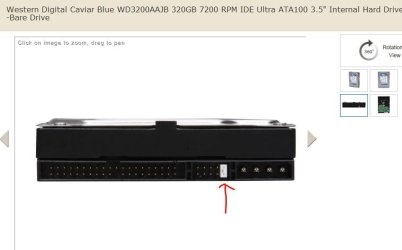
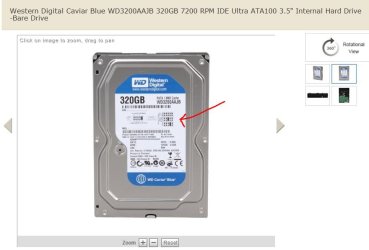
Have you checked the jumpers so it does not limit the size when formatted ?
 

Attachments

  • WD_320CaviarBlue.JPG
    WD_320CaviarBlue.JPG
    31.8 KB · Views: 250
  • WD_320CaviarBlue_2.JPG
    WD_320CaviarBlue_2.JPG
    43.4 KB · Views: 329

My Computer

Computer type
PC/Desktop
Computer Manufacturer/Model Number
Built them myself, Science Experiments !
OS
Win7 Enterprise, Win7 x86 (Ult 7600), Win7 x64 Ult 7600, TechNet RTM on AMD x64 (2.8Ghz)
CPU
AMD fx8350 4ghz, AMD-32 2400mhz, AMD-64 3200mhz, AMDx64 2.8G
Motherboard
SIS 755, ECS-K8M890M-M (Ult 7600), GigaByte & others
Memory
2gb, 4gb on the Ult 7600, 4gb on Technet RTM, 32gb on FX8350
Graphics Card(s)
Draw my own Graphics, several nVidia cards
Sound Card
on motherboard
Monitor(s) Displays
19" flat scr, 28" I-Inc widescr,22" Emprex Widescr, 23" Acer
Screen Resolution
1280 x 1024, 1440 x 900, 1920 x 1080
Hard Drives
6 pata Ide HD's & 2 Sata HD's
added 80gb external on Ult 7600 computer,
numerous extra 1tb, 2TB, 3Tb SATA HD's
A collection of ext HD Docks w/ HDs
PSU
430w, 550w, 600w, 700, 800, etc
Case
All Generic Full Towers
Cooling
Open Air & a few fans, some w/ colored LEDs
Keyboard
Compaq & Dell recycled from GoodWill
Mouse
Made in China Optical Wired Mouse
Internet Speed
Fast Cable InterNet
Antivirus
AVG Free on 24 different Desktops, NO Problems!
Browser
IE 8 is preferred, but use FireFox sometimes
Other Info
Linksys Routers, switches, & Hubs
Too Many USB Flash Drives to count, Biggest is 64GB !
Eight computers in my home network.
Sixteen computers at my business network.
Linked via TeamViewer !
Lots of old used spare computer parts everywhere!
Currently, I have it pinned as cable select. But I have tried it as master and got the same results. I have even tried disconnecting all devices and booting/installing from a usb. Still got the same result.

Since my last posts on here, I have messed with it much. But the last thing I tried was to install win7, setting the partition to only 100gb. This way it showed two partitions, a 100gb and a 30.27 unallocated space. I let windows create it's little 100mb partition but then I deleted the 100gb partition and resized the 100mb to 100gb and chose to install windows 7 there. So I got the system up and running and used it for a couple of days, checking for updates, yada, yada. Then I decided that I would try dual booting with ubuntu 9.10. Using the ubuntu live cd with gParted, I took the unallocated space (200gb in gparted, but win7 only showed 30gb), and created an extended partition with three logical partitions. One 50gb for ubuntu, one 5gb for swap, and the remainder for files. I installed ubuntu and let it rewrtie the mbr so I could use grub. As you can imagine, when I went to boot win7, I got the bootmgr missing error. Normally, I'd be fine with that. But when I let windows "fix" it's errors, it finds no operating system. I have searched the web and tried all kinds of solutions but nothing works. Yes, even the command line solutions, like bootrec.exe /fixboot. That one tells me "element not found" This one doesn't work either,
bcdedit /export C:\bcd_backup
c:
cd boot
attrib bcd -s -h -r
ren c:\boot\bcd bcd.old
bootrec /rebuild bcd
This one is supposed work if the system repair finds no operating system, according to microsoft's website. Well it doesn't in my case. I've tried it 4-5 times. When I type the export command, I get the message "export operation failed, requested system device cannot be found". WTF? Anyway, I went anyway and typed the rest of the commands anyway just for kicks. When I type the rebuild bcd command, I get this message, "rebuild - found 0 identified windows installations"

So I have concluded that I have a bad win7 disk or something because I have even wiped the hd clean and went with a clean install of win7, no fancy partitioning, nothing. Simply boot to win7 disk, install to hd and let it be even though that's not what I want. The install went well, as expected. So I resized the partition with gparted and I still have the same exact problems as above when I try to fix the bootmgr after simply just resizing the existing partition. And I only shrunk it from 127gb to 100gb and left the rest to unallocated space. Even doing that, the windows 7 repair can't fix it's own problem. I did the same thing again this time trying partition wizard v4.2.2, getting the same result.

So currently, I am writing zeroes to the hard drive. Completely erasing it. If that doesn't make windows 7 installation disk see the whole hard drive, then I am going to try a different installation disk. I am using Windows 7 ultimate 32bit and I have a 64 bit system.

 

My Computer

Computer Manufacturer/Model Number
Home built
OS
Ubuntu 9.04, Win XP sp3, Windows 7
CPU
AMD ahlon64 X2 4200+ Brisbane 2.2GHz socket AM2
Motherboard
Biostar NF520-A2 SE AM2 nVidia nForce 520D
Memory
Corsair XMS2 2x1GB 240 pin DDR2 800
Graphics Card(s)
EVGA nVidia 8400 GS PCI-E 512mb DDR2
Sound Card
integrated
Monitor(s) Displays
Viewsonic 19" widescreen
Screen Resolution
1680x1050
Hard Drives
WD Caviar Blue 320GB IDE - attempting Win7
WD Caviar 160GB IDE - Ubuntu Linux 8.10
WD Caviar 80GB IDE - WinXP
Maxtor 40GB IDE - Ubuntu Linux 9.04
Maxtor 20GB IDE - Ubuntu Linux 8.04
PSU
450w forgot brand name
Case
forgot
Cooling
thermaltake
Back
Top