
hard drive - help please

taylor1794

New member
Local time
8:38 AM
Messages
3
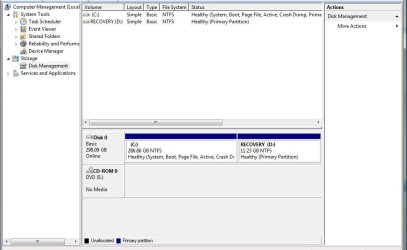
ive got a hp laptop running vista 32bit.. if i shrink my hardrive to make another partition around like 50gb to install windows 7 release candidate and have a dual boot installation with vista, would i be able to later delete that 50gb partition (and delete the release candidate) and extend the main partition back? because im hoping ill be able to do that then when the actual OS comes out, i can get rid of that other partition (so i only have one) then upgrade vista.

also i have a revovery drive or something that came with hp.. would that make any difference to the process?

cheers, taylor
 

Attachments
  • Untitled.jpg
    Untitled.jpg
    47.3 KB · Views: 19

My Computer

OS
vista
yes once you decide you don't need the windows 7 RC anymore, you can simply delete that partition, and relcaim the space, you will need bcdedit to edit your boot menu and remove the windows 7 rc.
 

My Computer

Computer Manufacturer/Model Number
home made
OS
Windows 7 7264x64(main), 7260x86(secendary), XP SP3 Triple Boot
CPU
Intel Core 2 Duo E7400 2.8Mhz
Motherboard
Intel G33 express chipset
Memory
2GB DD2 667
Graphics Card(s)
Intel(R) 82G33 Graphics and Memory Controller Hub
Sound Card
Realtek Built into the G31
Monitor(s) Displays
19"
Screen Resolution
1280x1024
Hard Drives
320GB SATA (Main), 160GB IDE (Backup)
Case
Gigabyte SETTO
Keyboard
Genius
Mouse
Logitech
Internet Speed
1MB Download, 128k Upload
ive got no idea what a bcdedit is?
no need for it. just boot with vista and open diskmgmt.msc and right click on the drive that you want to delete and click Delete. Then right click on your main drive and click Expand to get that 50 GB back. Its as simple as that.
 

My Computer

Computer Manufacturer/Model Number
Samsung NP530U4B-S02IN
OS
Windows® 8 Pro (64-bit)
CPU
Intel® Core™ i5 Processor 2467M (1.60GHz, 3MB L3 Cache)
Motherboard
Samsung Electronics
Memory
6GB DDR3 System Memory at 1,333MHz (on BD 4GB + 2GB x 1)
Graphics Card(s)
AMD Radeon™ HD7550M 1GB DDR3 (Ext. Graphic)
Sound Card
Realtek High Definition Audio
Monitor(s) Displays
35.56cm (14.0) SuperBright 300nit HD LED Display
Screen Resolution
1366x768
Hard Drives
1TB S-ATA II Hard Drive (5400RPM) with ExpressCache 16GB SSD
Internet Speed
sucks
Antivirus
Microsoft Security Essentials
Browser
Google Chrome (Sync enabled)
no need for it. just boot with vista and open diskmgmt.msc and right click on the drive that you want to delete and click Delete. Then right click on your main drive and click Expand to get that 50 GB back. Its as simple as that.

+1, BCDEDIT is for use to get XP dual booting with Vista/Se7en.

As dinesh says, just boot into Vista & delete the Se7en partition and expand your Vista partition. Windows will register that there is only 1 OS when it boots :D
 

My Computer

Computer Manufacturer/Model Number
Compaq Desktop
OS
Windows 7 Ultimate x64
CPU
AMD Sempron Dual Core
Memory
3GB
Graphics Card(s)
NVIDIA GeForce 6150SE nForce 430
Screen Resolution
1024x768
Hard Drives
150GB Sata
Also, the bcdedit(boot configuration database) commands are used if you have problems booting into windows and do not wish to reinstall windows. for a list of complete bcdedit know-how, look at this excellent tutorial by our forum member. ;)
 

My Computer

Computer Manufacturer/Model Number
Samsung NP530U4B-S02IN
OS
Windows® 8 Pro (64-bit)
CPU
Intel® Core™ i5 Processor 2467M (1.60GHz, 3MB L3 Cache)
Motherboard
Samsung Electronics
Memory
6GB DDR3 System Memory at 1,333MHz (on BD 4GB + 2GB x 1)
Graphics Card(s)
AMD Radeon™ HD7550M 1GB DDR3 (Ext. Graphic)
Sound Card
Realtek High Definition Audio
Monitor(s) Displays
35.56cm (14.0) SuperBright 300nit HD LED Display
Screen Resolution
1366x768
Hard Drives
1TB S-ATA II Hard Drive (5400RPM) with ExpressCache 16GB SSD
Internet Speed
sucks
Antivirus
Microsoft Security Essentials
Browser
Google Chrome (Sync enabled)
you are welcome. :)
 

My Computer

Computer Manufacturer/Model Number
Samsung NP530U4B-S02IN
OS
Windows® 8 Pro (64-bit)
CPU
Intel® Core™ i5 Processor 2467M (1.60GHz, 3MB L3 Cache)
Motherboard
Samsung Electronics
Memory
6GB DDR3 System Memory at 1,333MHz (on BD 4GB + 2GB x 1)
Graphics Card(s)
AMD Radeon™ HD7550M 1GB DDR3 (Ext. Graphic)
Sound Card
Realtek High Definition Audio
Monitor(s) Displays
35.56cm (14.0) SuperBright 300nit HD LED Display
Screen Resolution
1366x768
Hard Drives
1TB S-ATA II Hard Drive (5400RPM) with ExpressCache 16GB SSD
Internet Speed
sucks
Antivirus
Microsoft Security Essentials
Browser
Google Chrome (Sync enabled)
Back
Top