Solved hard drive help

Wicca

New member
Local time
2:53 AM
Messages
546
i use my c drive for all the time as it is the main and i back thing up on my d drive is there anyway to put my hard drive d drive into sleep or to turn it off as i do not use it suggestion welcome
 

My Computer

Computer Manufacturer/Model Number
i power x8870
OS
7
CPU
intel 2 core quad Q6600 2.40 ghz
Memory
3.00GB 350 mhz each
Graphics Card(s)
geforce 8800gtx
Sound Card
realtek
Screen Resolution
1440by900
Hard Drives
5400rpm 2 of them
PSU
OCZ 600 watt power supply
Internet Speed
nvidia nforce networking controller 90kb/s
Other Info
total virtual memory is 7.88 GB
this is a 32-bit system
hi there :)

is the d drive a partition of c drive? or a separate drive.
 

My Computer

Computer Manufacturer/Model Number
packard bell IXTREME M5722
OS
Operating System : Windows 7 Home Premium Edition 6.01.7600 SP1 (x64)
CPU
Processor : Intel Core 2 Quad Q8300 @ 2500 MHz
Motherboard
Mainboard : Packard Bell (Acer EG43M )
Memory
Physical Memory :8GB Corsair4x 2GB 800MHz C5 DDR2
Graphics Card(s)
Video Card : XFX 6700 AMD
Monitor(s) Displays
Maestro 234DL - BenQ V2220 - BenQ VW2420H
Screen Resolution
Current Display :1920x1080p pixels at 60 Hz in HD LED
Hard Drives
Hard Disks : WDC (1000 GB)
Drive C: (Hard Disk) : 428 GB available on 491 GB
Drive D: (Hard Disk) : 426 GB available on 492 GB
SAMSUNG spinpoint HD103SJ 1000.2 GB
(X 2) KINGSTON SSD NOW V 30GB
PSU
XFX ProSeries 550W PSU
Case
PACKARD BELL IXTREME
Cooling
System Blower Current: 150mA Air Flow16CFM ;Akasa 90mm rear
Keyboard
Gigabyte Aivia K8100
Mouse
TRUST-Wireless Laser Mouse - Carbon edition MI-7770C
Internet Speed
TP-LINK > TL-WN951N / AV500 Gigabit Powerline Adapters
Browser
chrome dev
Other Info
EXTRA COOLING>(FAN CONTROLLER) PC Bay Cooler 3 x 40mm fans; Akasa AK-HD-BL Blue hard drive cooler 2 x 40 mm fan 4500 rpm 29.7 dBA
Bios> American Megatrends Inc.
Version : P01-A1
Date : 08/31/2009
it is a seperate drive
 

My Computer

Computer Manufacturer/Model Number
i power x8870
OS
7
CPU
intel 2 core quad Q6600 2.40 ghz
Memory
3.00GB 350 mhz each
Graphics Card(s)
geforce 8800gtx
Sound Card
realtek
Screen Resolution
1440by900
Hard Drives
5400rpm 2 of them
PSU
OCZ 600 watt power supply
Internet Speed
nvidia nforce networking controller 90kb/s
Other Info
total virtual memory is 7.88 GB
this is a 32-bit system
So I can under stand this; C: drive is main drive, you back it up to the D: drive. you don't use D: drive and want to turn it off. If I have this right, you backup to D: drive which you don't use anymore. If you backup the C: drive to the D: drive you in-fact use the D: drive. The only way to turn off/sleep additional HDD's is to remove them from the system. Your alternative is to setup a RAID of 0, 1, 5 or 10. Basically this will combine both drives in to one virtual drive and quit a common pratice these days.
 

My Computer

Computer Manufacturer/Model Number
Custom built
OS
Windows 7 Ultimate 64 bit
CPU
AMD Phenom II X4 965 Black Edition
Motherboard
Gigabyte GA-MA790X-DS4
Memory
GSkill 4 X 2 GB PC 8500
Graphics Card(s)
XFX Radeon HD 6790 D
Sound Card
On board RealTek HD
Monitor(s) Displays
Dual monitors:Samsung SyncMaster S20B300
Screen Resolution
1600 X 900
Hard Drives
Seagate Barracuda 1TB (primary)
Seagate Barracuda 2 X 320 GB
PSU
Ultra X4 750 watt fully modular
Case
Thermaltake Overseer RX 1 full tower
Cooling
Core-Contact 92 mm CPU Cooler
Keyboard
Logitech G510
Mouse
Razor DeathAdder
Internet Speed
50/5 Mbps UL/DL
Other Info
Optical: Super Muliti DVD burner w/lightscribe, Hauppauge WinTV HVR-1800
i think if you have not been using the hard drive after boot up windows put it to standby you will have to check the power option settings but i think these settings will alter both drives is it a external drive?
 

My Computer

Computer Manufacturer/Model Number
packard bell IXTREME M5722
OS
Operating System : Windows 7 Home Premium Edition 6.01.7600 SP1 (x64)
CPU
Processor : Intel Core 2 Quad Q8300 @ 2500 MHz
Motherboard
Mainboard : Packard Bell (Acer EG43M )
Memory
Physical Memory :8GB Corsair4x 2GB 800MHz C5 DDR2
Graphics Card(s)
Video Card : XFX 6700 AMD
Monitor(s) Displays
Maestro 234DL - BenQ V2220 - BenQ VW2420H
Screen Resolution
Current Display :1920x1080p pixels at 60 Hz in HD LED
Hard Drives
Hard Disks : WDC (1000 GB)
Drive C: (Hard Disk) : 428 GB available on 491 GB
Drive D: (Hard Disk) : 426 GB available on 492 GB
SAMSUNG spinpoint HD103SJ 1000.2 GB
(X 2) KINGSTON SSD NOW V 30GB
PSU
XFX ProSeries 550W PSU
Case
PACKARD BELL IXTREME
Cooling
System Blower Current: 150mA Air Flow16CFM ;Akasa 90mm rear
Keyboard
Gigabyte Aivia K8100
Mouse
TRUST-Wireless Laser Mouse - Carbon edition MI-7770C
Internet Speed
TP-LINK > TL-WN951N / AV500 Gigabit Powerline Adapters
Browser
chrome dev
Other Info
EXTRA COOLING>(FAN CONTROLLER) PC Bay Cooler 3 x 40mm fans; Akasa AK-HD-BL Blue hard drive cooler 2 x 40 mm fan 4500 rpm 29.7 dBA
Bios> American Megatrends Inc.
Version : P01-A1
Date : 08/31/2009
I backup to an external drive which I disconnect with an electric switch (with remote) from Home Depot. That is the easiest solution. I did that after I found no way to switch off one of the internal drives.
 

My Computer

Computer Manufacturer/Model Number
HP, Dell, Gateway, Toshiba - 4 laptops and 2 desktops
OS
Vista, Windows7, Mint Mate, Zorin, Windows 8
CPU
from 1.6GHz Duo to i7
Monitor(s) Displays
2x HP w2207
Hard Drives
5x HDD, 7x SSD, 12x Externals
Keyboard
with trackball - no mices
Mouse
Trackball mice
Internet Speed
DSL 6000
no i do not use the d drive only drag data to it and have not touched it in days
 

My Computer

Computer Manufacturer/Model Number
i power x8870
OS
7
CPU
intel 2 core quad Q6600 2.40 ghz
Memory
3.00GB 350 mhz each
Graphics Card(s)
geforce 8800gtx
Sound Card
realtek
Screen Resolution
1440by900
Hard Drives
5400rpm 2 of them
PSU
OCZ 600 watt power supply
Internet Speed
nvidia nforce networking controller 90kb/s
Other Info
total virtual memory is 7.88 GB
this is a 32-bit system
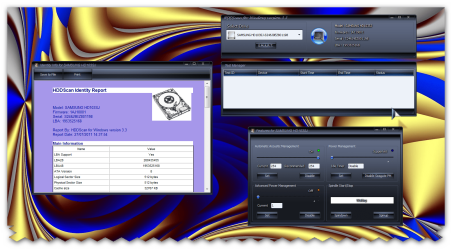
i use this program to control my HHD HDDScan – free HDD diagnostic utility HDDScan

Additional features:

Reading and analyzing identity information from ATA/SATA/USB/FireWire/SCSI HDD.
Changing AAM, APM, PM parameters on ATA/SATA/USB/FireWire HDD.
Reporting defect information on SCSI HDD.
Spindle start/stop function on ATA/SATA/USB/FireWire/SCSI HDD.
Reports can be saved in MHT format.
Reports can be printed.
Skins support.
Command line support.
SSD SMART and Identity reports (NEW).


one of the best features it has (if your disc uses it) is Automatic Acoustic Management
(basically makes the disc quiet)


Additional features

The program allows changing some parameters for ATA/SATA/USB/FireWire HDD:
AAM – this function changes drive’s acoustic. If this function is enabled drive’s noise may be decreased by smoothing HSA’s seek operations. HDD could lose some performance.
APM – this function allows power savings by temporary decreasing spindle’s rotation speed (including complete stop) when drive is in idle.
PM – this function allows setting spin-down timer. If drive is in idle spindle will be stopped after the time set in the timer. If any program requests HDD access timer will be reset and spindle will spin up.
Disable Seagate PM – theoretically should turn off some Seagate drives spin-down timer but I was unable to find drives where this command would work.
The program can also start or stop spindle immediately. If any program requests HDD access drive’s spindle will spin up.
 

Attachments

  • Brys snap ?27 ?July ?2011 14h39m26s 01.png
    Brys snap ?27 ?July ?2011 14h39m26s 01.png
    263 KB · Views: 12

My Computer

Computer Manufacturer/Model Number
packard bell IXTREME M5722
OS
Operating System : Windows 7 Home Premium Edition 6.01.7600 SP1 (x64)
CPU
Processor : Intel Core 2 Quad Q8300 @ 2500 MHz
Motherboard
Mainboard : Packard Bell (Acer EG43M )
Memory
Physical Memory :8GB Corsair4x 2GB 800MHz C5 DDR2
Graphics Card(s)
Video Card : XFX 6700 AMD
Monitor(s) Displays
Maestro 234DL - BenQ V2220 - BenQ VW2420H
Screen Resolution
Current Display :1920x1080p pixels at 60 Hz in HD LED
Hard Drives
Hard Disks : WDC (1000 GB)
Drive C: (Hard Disk) : 428 GB available on 491 GB
Drive D: (Hard Disk) : 426 GB available on 492 GB
SAMSUNG spinpoint HD103SJ 1000.2 GB
(X 2) KINGSTON SSD NOW V 30GB
PSU
XFX ProSeries 550W PSU
Case
PACKARD BELL IXTREME
Cooling
System Blower Current: 150mA Air Flow16CFM ;Akasa 90mm rear
Keyboard
Gigabyte Aivia K8100
Mouse
TRUST-Wireless Laser Mouse - Carbon edition MI-7770C
Internet Speed
TP-LINK > TL-WN951N / AV500 Gigabit Powerline Adapters
Browser
chrome dev
Other Info
EXTRA COOLING>(FAN CONTROLLER) PC Bay Cooler 3 x 40mm fans; Akasa AK-HD-BL Blue hard drive cooler 2 x 40 mm fan 4500 rpm 29.7 dBA
Bios> American Megatrends Inc.
Version : P01-A1
Date : 08/31/2009
Back
Top