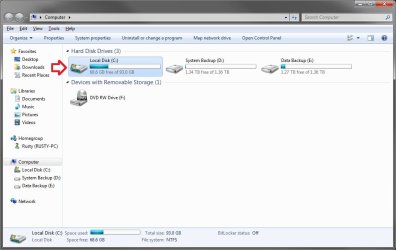
Hard Drive Icon

iluvink

New member
Local time
3:32 AM
Messages
16
New to the forum, so if I have repeated something let me know. I recently had some external drive issues and have seemed to have those resolved. However, in the meantime, I have noticed that the computer hard drive, C:, has changed it's icon from the standard hard drive icon to the hard drive icon with the little Windows symbol just above it. Any ideas as to how this happen, and is it something to be concerned about?
 

My Computer

OS
Windows 7 Ultimate x64
hi iluvink, welcome to sevenforums,

i don't think you have anything to worry about - afaik the icon with the windows logo on it just shows that it's your system disc where your os is installed.
 

My Computer

Computer Manufacturer/Model Number
mickey megabyte 1234
OS
ultimate 64 sp1
CPU
i5 2500K [email protected]
Motherboard
MSI P67A-GD53
Memory
8 gigs GSkill Ripjaws 1600
Graphics Card(s)
amd hd6950
Sound Card
creative x-fi gamer
Monitor(s) Displays
samsung 24"
Screen Resolution
1920x1080
Hard Drives
ocz vertex 2e 60 gig, samsung f3 1tb, buffalo 2tb ext
PSU
antec 550
Case
antec three hundred
Cooling
i'm a cooling fan
Keyboard
saitek eclipse ii
Mouse
logitech g3
Internet Speed
about 4 Mbps
Other Info
i love win7
Hi Mickey...thanks for the reply and welcome. It does seem to work ok, but the change is what concerns me. I have two other laptops and one identical desktop to this one, same Op system, and they have the normal icons for the computer drive. I just wanted to make sure that nothing in all the blue screens, restores and such, would cause that, and if it were a problem.
 

My Computer

OS
Windows 7 Ultimate x64
There's nothing to worry about my friend!

But if you truly want to change it back, here are a few resources for you:

Do a search on Google Images for "Windows 7 boot drive icon" or just "drive icon" or something similar.
Locate the icon you want, and download it. Next, if it is not in PNG format yet, then then put it in PNG format and remove any white areas around it using Photoshop. (if you do not have Photoshop, then Gimp will also work and it is free) But most icons that you can download from Google are in PNG format, so no need to worry.

Now, go to iConvert: Convert ico, icns, and png icons online for Windows, Mac OS X, and Linux and convert it to an ico. Simply select the PNG file and click CONVERT!

Now, scroll down and find the one that is in ".ico" format and download the biggest icon there is. (right click and save as)

Now, download this program: DRIVE ICON CHANGER and change the icon!

If you have any other questions or issues while attempting this, please let us know!
 

My Computer

Computer Manufacturer/Model Number
HP Pavilion dv4i-2100
OS
Windows 7 Ultimate x86
CPU
Intel Core i3 M350 @ 2.27 GHz
Motherboard
Stock
Memory
3.00 GB
Graphics Card(s)
Intel 1GB HDMI Graphics Card
Sound Card
Stock
Monitor(s) Displays
14.6" HD
Screen Resolution
1200x800 current setting.
Hard Drives
320GB samsung internal
500GB ADATA portable
PSU
Stock
Case
Stock
Cooling
Targus twin-fan chill mat.
Internet Speed
At home, 300kb/sec downloads. At work, 1028kb/sec downloads.
Other Info
Purchased through HP direct, custom build. I highly recommend HP to anyone.
Thanks Benjamin..I won't worry on it, but just for curiosity’s sake...any ideas on why it changed?
 

My Computer

OS
Windows 7 Ultimate x64
I haven't a clue, to be honest. Computers just do very strange things at times. Like mine, it removed the icons for my Office 2010 pack... grrr.. Not worried cuz I have them backed up, but I still gotta go back and change them all... all 9 of them.
 

My Computer

Computer Manufacturer/Model Number
HP Pavilion dv4i-2100
OS
Windows 7 Ultimate x86
CPU
Intel Core i3 M350 @ 2.27 GHz
Motherboard
Stock
Memory
3.00 GB
Graphics Card(s)
Intel 1GB HDMI Graphics Card
Sound Card
Stock
Monitor(s) Displays
14.6" HD
Screen Resolution
1200x800 current setting.
Hard Drives
320GB samsung internal
500GB ADATA portable
PSU
Stock
Case
Stock
Cooling
Targus twin-fan chill mat.
Internet Speed
At home, 300kb/sec downloads. At work, 1028kb/sec downloads.
Other Info
Purchased through HP direct, custom build. I highly recommend HP to anyone.
New to the forum, so if I have repeated something let me know. I recently had some external drive issues and have seemed to have those resolved. However, in the meantime, I have noticed that the computer hard drive, C:, has changed it's icon from the standard hard drive icon to the hard drive icon with the little Windows symbol just above it. Any ideas as to how this happen, and is it something to be concerned about?

Hello Iluvink, and welcome to Seven Forums.

Yep, it's as Mickey posted above. The Windows flag icon on a drive is to indicate that is your Windows 7 operating system drive. Nothing to worry about. :)

Windows.jpg
 

My Computer

Computer type
PC/Desktop
Computer Manufacturer/Model Number
Self built custom
OS
64-bit Windows 11 Pro for Workstations
CPU
Intel i7-8700K OC'd to 5 GHz
Motherboard
ASUS ROG Maximus XI Formula Z390
Memory
64 GB (4x16GB) G.SKILL TridentZ RGB DDR4 3600 MHz
Graphics Card(s)
ASUS ROG-STRIX-GTX1080TI-O11G-GAMING
Sound Card
Integrated
Monitor(s) Displays
2 x Samsung Odyssey G7 27"
Screen Resolution
2560x1440
Hard Drives
1TB Samsung 990 PRO M.2,
4TB Samsung 990 PRO PRO M.2,
TerraMaster F8 SSD Plus NAS
PSU
Seasonic Prime Titanium 850W
Case
Thermaltake Core P3
Cooling
Corsair Hydro H115i
Keyboard
Logitech wireless K800
Mouse
Logitech MX Master 4
Internet Speed
2 Gb/s Download and 100 Mb/s Upload
Antivirus
Malwarebyte Anti-Malware Premium
Browser
Google Chrome
Other Info
Logitech Z625 speaker system,
Logitech BRIO 4K Pro webcam,
HP Color LaserJet Pro MFP M477fdn,
APC SMART-UPS RT 1000 XL - SURT1000XLI,
Galaxy S23 Plus phone
Thanks Brink, for the info and welcome. After all the BSODs and restores and such, I went through on the computer, I wanted to make sure that I was ok.
 

My Computer

OS
Windows 7 Ultimate x64
Back
Top