Hey guys.
I recently built a new gaming computer with 2 1tb samsung spinpoint HDDS and i remember it was a real pain to get one to appear without thinking it was the boot hdd (didnt have windows on that one) but i i ended up getting it working.
For christmas i got a 2TB HDD and now im worried how to put it in without screwing my computer up (last time i had to reformat again which was lucky cos nothing was on it at the time)
Its asking me for master boot record or that other option GPT i think it was
Which one do i choose and how do i make it just another partition not primary or anything like that. Just want it to be simple
Thanks
Very nice HDD. If you are just going to be using it as a internal data HDD, then you should be able to just connect it, and format it as NTFS in Disk Management (diskmgmt.msc) to then be able to use how you like. You may need to initialize the HDD first in Disk Management before being able to format it.
If you like, post a screenshot of the options it's giving you in Disk Management, and I'll be happy to help.
Hope this helps,
Shawn
My Computer
Computer type
PC/Desktop
Computer Manufacturer/Model Number
Self built custom
OS
64-bit Windows 11 Pro for Workstations
CPU
Intel i7-8700K OC'd to 5 GHz
Motherboard
ASUS ROG Maximus XI Formula Z390
Memory
64 GB (4x16GB) G.SKILL TridentZ RGB DDR4 3600 MHz
Graphics Card(s)
ASUS ROG-STRIX-GTX1080TI-O11G-GAMING
Sound Card
Integrated
Monitor(s) Displays
2 x Samsung Odyssey G7 27"
Screen Resolution
2560x1440
Hard Drives
1TB Samsung 990 PRO M.2,
4TB Samsung 990 PRO PRO M.2,
TerraMaster F8 SSD Plus NAS
PSU
Seasonic Prime Titanium 850W
Case
Thermaltake Core P3
Cooling
Corsair Hydro H115i
Keyboard
Logitech wireless K800
Mouse
Logitech MX Master 4
Internet Speed
2 Gb/s Download and 100 Mb/s Upload
Antivirus
Malwarebyte Anti-Malware Premium
Browser
Google Chrome
Other Info
Logitech Z625 speaker system,
Logitech BRIO 4K Pro webcam,
HP Color LaserJet Pro MFP M477fdn,
APC SMART-UPS RT 1000 XL - SURT1000XLI,
Galaxy S23 Plus phone
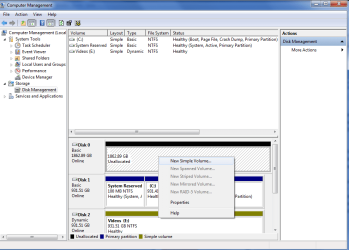
hey, those options arent appearing anymore i think cos i used gpt the first time about some warning with 2tbs and now i can create a simple volume. but how do i make it not a primary and just a healthy one like my videos hdd
screenshot attached
Sorry, but I do not see a screenshot of your Disk Management window in your post.
When you create a partition on a HDD, it will usually be either a "Primary", "Logical", or "Extended" partition. So if the partition is a primary partition with this color bar on it, then it's normal for it to say Healthy(Primary Partition) since that's what it is.
My Computer
Computer type
PC/Desktop
Computer Manufacturer/Model Number
Self built custom
OS
64-bit Windows 11 Pro for Workstations
CPU
Intel i7-8700K OC'd to 5 GHz
Motherboard
ASUS ROG Maximus XI Formula Z390
Memory
64 GB (4x16GB) G.SKILL TridentZ RGB DDR4 3600 MHz
Graphics Card(s)
ASUS ROG-STRIX-GTX1080TI-O11G-GAMING
Sound Card
Integrated
Monitor(s) Displays
2 x Samsung Odyssey G7 27"
Screen Resolution
2560x1440
Hard Drives
1TB Samsung 990 PRO M.2,
4TB Samsung 990 PRO PRO M.2,
TerraMaster F8 SSD Plus NAS
PSU
Seasonic Prime Titanium 850W
Case
Thermaltake Core P3
Cooling
Corsair Hydro H115i
Keyboard
Logitech wireless K800
Mouse
Logitech MX Master 4
Internet Speed
2 Gb/s Download and 100 Mb/s Upload
Antivirus
Malwarebyte Anti-Malware Premium
Browser
Google Chrome
Other Info
Logitech Z625 speaker system,
Logitech BRIO 4K Pro webcam,
HP Color LaserJet Pro MFP M477fdn,
APC SMART-UPS RT 1000 XL - SURT1000XLI,
Galaxy S23 Plus phone
A dynamic disk, like your Disk 2 E: drive, only has volumes instead of partitions, so this is why it only has "Healthy".
If you wanted your Disk 2 E: drive to be a Basic disk like Disk 1 instead of a Dynamic disk, then you would need to convert E: (Disk 2) back to a basic disc using the tutorial below. Afterwards you'll be able to create primary partitions (new simple volumes) on it. Be sure to backup anything that you do not want to lose first though.
Be sure to not make Disk 1 to be a dynamic disk like Disk 2. Doing so will render Windows 7 unbootable.
For Disk 0, you can use the tutorial below to make it a dynamic disk, then create a "New Simple Volume" on the unallocated space for it to be like Disk 2.
thanks alot now i know if i do want to convert to a simple partition, doesnt seem to be that different from a primary anyway, this thread can be closed