
Solved Hard Drive Issue

sefirosu

New member
Local time
2:55 PM
Messages
11
Hi guys,

Let me start off by letting you know what I have. It's a Dell M6600 with 16GB of RAM and a 750GB SATA drive. That's all I know right now. I have the computer torn apart.

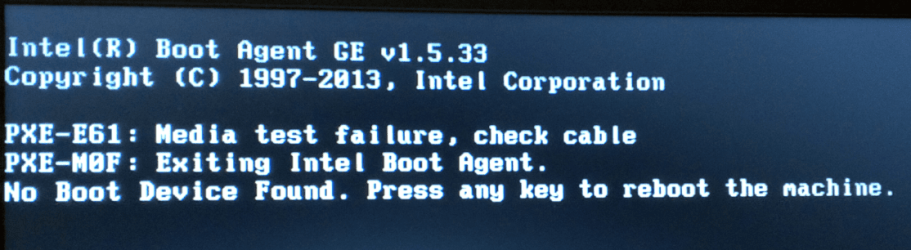
I really don't know what my issue is. I was running Windows 10 and wasn't really happy with it. So I decided to go back to Windows 7. I was able to install it. I downloaded some windows update and upon reboot, I had the error that's shown in the image.

I wiped the hard drive again and tried to install. This time, I went through Dell's website and installed the drivers I was missing. I then ran Windows update and boom. On reboot, attached error.

I had no problems with the drive until I wiped it. For the heck of it, I went out and bought an SSD drive. I haven't opened the box yet. Figured I would come here and seek advice. Any help would bee appreciated.

Thanks in advance.
 

Attachments
  • Capture.PNG
    Capture.PNG
    142.5 KB · Views: 1

My Computer

Computer type
PC/Desktop
Computer Manufacturer/Model Number
HP a6700y
OS
Windows 7 Enterprise 64bit
CPU
AMD Phenom 9150e quad-core 9150e / 1.8 GHz
Motherboard
MCP61PM-HM (Nettle3)
Memory
4.00GB DDR-2 SDRAM
Graphics Card(s)
NVIDIA GeForce 210
Hard Drives
Western Digital WD AV-GP WD20EVDS 2TB 32MB x2
Antivirus
Avast
Browser
Chrome, Firefox, IE
Hello mate now can you elaborate a bit more on what you mean by wiping the drive? Plus the install just what did you install from?

The big mistake really lik e many others is that you tried 10 and in my mind it wrecks any attempt at getting back to 7 properly as we have many who are in your situation posting here.
 

My Computer

Computer type
PC/Desktop
Computer Manufacturer/Model Number
Own build (new) Desk1 / Asus ROG Win 7 / Desk2 1st build
OS
Desk1 7 Home Prem / Desk2 10 Pro / Main lap Asus ROG 10 Pro 2 laptop Toshiba 7 Pro Asus P2520 7 & 10
CPU
Desk1 i5 3750K / Laptop i7 GTX 860M / Desk2 i5 2500
Motherboard
Desk1 Asus P877-V / Desk2 Gigabyte H67 UD3H / Laptop ?
Memory
Desk1 8GB (1866) / Desk2 16GB (1333) / Laptop 8Gb DDR3
Graphics Card(s)
Desk 1& 2NVidia GTX 650 & Laptops on board Intel
Sound Card
Desk 1 & 2 -XONAR DG Realtek High Def audio Laptop
Monitor(s) Displays
Desk 1 Benq HD 2450 / Desk2 Philips 24" / Laptop 17.5"
Screen Resolution
1920x1080 D1 & D2 & Laptop 1
Hard Drives
Desk1 Samsung 120GB 830 SSD
Asus ROG 256GB 850 Pro SSD
Desk2 Samsung 840 256 SSD
Toshiba 120GB EVO
PSU
Desk 1 Corsair HX 1050/ Laptop ? / Desk 2 Corsair HX 650
Case
Desk 1 Cooler HAF XM ? Toshiba laptop / Desk2 Coolermaster
Cooling
Fans on all Desk1 -2 Desk2 - all Coolermasters 5 Laptop ?
Keyboard
Desk 1 MS Sidewinder X6 Desk 2 MS Sidewinder X 4
Mouse
Desk 1&2 - Gigabyte MS 900 gamer - laptop - Logitec wireless
Internet Speed
ADSL2+
Other Info
One other Desktop (tester) and spare Toshba laptop both with SSD's
Running Kaspersky 2016 ISS on all machines config'd identically
Logitec audio stereo systems on each machine (x3)
Canon MG5250MFC
Router/modem TP-Link running WPA2SK
I formatted the hard drive and then I took my ISO and put it on a USB. I was able to successfully install twice but once I install Windows Updates, I get the error message after a reboot.
 

My Computer

Computer type
PC/Desktop
Computer Manufacturer/Model Number
HP a6700y
OS
Windows 7 Enterprise 64bit
CPU
AMD Phenom 9150e quad-core 9150e / 1.8 GHz
Motherboard
MCP61PM-HM (Nettle3)
Memory
4.00GB DDR-2 SDRAM
Graphics Card(s)
NVIDIA GeForce 210
Hard Drives
Western Digital WD AV-GP WD20EVDS 2TB 32MB x2
Antivirus
Avast
Browser
Chrome, Firefox, IE
Now I personally wipe a drive before I reinstall to make absolutely sure that any trace of a previous install is erased - formatting is not guarantee that that happens. Now you can do two things one is to try yet another reinstall or wipe the the drive first and reinstall .

See this for a no nonsense drive clean http://www.sevenforums.com/tutorials/52129-disk-clean-clean-all-diskpart-command.html < you can just use the clean it is much quicker or use the clean all which is much more thorough but takes longer.

Your install media I personally do not like installing from a stick I prefer a DVD but that is your choice my only concern is when you are making the media how you are copying the ISO file to the dsik or stick as it is better to burn it as slow as you can to prevent corruption of the finished bootable media.

I use these two http://www.sevenforums.com/tutorials/52129-disk-clean-clean-all-diskpart-command.htmlwww.imgburn.com or this PowerISO - Create, Burn, Mount, Edit, Compress, Encrypt, Split, Extract ISO file, ISO/BIN converter, Virtual Drive, DAA File the PowerISO is easier to use and you can set the burn rate to a very low rate the fastest you should burn is at 4x in any case.
If you go for PowerISO then watch for the add ons that come with it don't be tempted into downloading any of them.
 

My Computer

Computer type
PC/Desktop
Computer Manufacturer/Model Number
Own build (new) Desk1 / Asus ROG Win 7 / Desk2 1st build
OS
Desk1 7 Home Prem / Desk2 10 Pro / Main lap Asus ROG 10 Pro 2 laptop Toshiba 7 Pro Asus P2520 7 & 10
CPU
Desk1 i5 3750K / Laptop i7 GTX 860M / Desk2 i5 2500
Motherboard
Desk1 Asus P877-V / Desk2 Gigabyte H67 UD3H / Laptop ?
Memory
Desk1 8GB (1866) / Desk2 16GB (1333) / Laptop 8Gb DDR3
Graphics Card(s)
Desk 1& 2NVidia GTX 650 & Laptops on board Intel
Sound Card
Desk 1 & 2 -XONAR DG Realtek High Def audio Laptop
Monitor(s) Displays
Desk 1 Benq HD 2450 / Desk2 Philips 24" / Laptop 17.5"
Screen Resolution
1920x1080 D1 & D2 & Laptop 1
Hard Drives
Desk1 Samsung 120GB 830 SSD
Asus ROG 256GB 850 Pro SSD
Desk2 Samsung 840 256 SSD
Toshiba 120GB EVO
PSU
Desk 1 Corsair HX 1050/ Laptop ? / Desk 2 Corsair HX 650
Case
Desk 1 Cooler HAF XM ? Toshiba laptop / Desk2 Coolermaster
Cooling
Fans on all Desk1 -2 Desk2 - all Coolermasters 5 Laptop ?
Keyboard
Desk 1 MS Sidewinder X6 Desk 2 MS Sidewinder X 4
Mouse
Desk 1&2 - Gigabyte MS 900 gamer - laptop - Logitec wireless
Internet Speed
ADSL2+
Other Info
One other Desktop (tester) and spare Toshba laptop both with SSD's
Running Kaspersky 2016 ISS on all machines config'd identically
Logitec audio stereo systems on each machine (x3)
Canon MG5250MFC
Router/modem TP-Link running WPA2SK
Thanks for the information. I will try this when I get home. As far as the ISO burn, I've used ISO to USB and Windows 7 USB Tool. I will grab one of the below and burn to a disk.
 

My Computer

Computer type
PC/Desktop
Computer Manufacturer/Model Number
HP a6700y
OS
Windows 7 Enterprise 64bit
CPU
AMD Phenom 9150e quad-core 9150e / 1.8 GHz
Motherboard
MCP61PM-HM (Nettle3)
Memory
4.00GB DDR-2 SDRAM
Graphics Card(s)
NVIDIA GeForce 210
Hard Drives
Western Digital WD AV-GP WD20EVDS 2TB 32MB x2
Antivirus
Avast
Browser
Chrome, Firefox, IE
I use these two http://www.sevenforums.com/tutorials/52129-disk-clean-clean-all-diskpart-command.htmlwww.imgburn.com or this PowerISO - Create, Burn, Mount, Edit, Compress, Encrypt, Split, Extract ISO file, ISO/BIN converter, Virtual Drive, DAA File the PowerISO is easier to use and you can set the burn rate to a very low rate the fastest you should burn is at 4x in any case.
If you go for PowerISO then watch for the add ons that come with it don't be tempted into downloading any of them.

Sorry to double post. The first link above is not working.
 

My Computer

Computer type
PC/Desktop
Computer Manufacturer/Model Number
HP a6700y
OS
Windows 7 Enterprise 64bit
CPU
AMD Phenom 9150e quad-core 9150e / 1.8 GHz
Motherboard
MCP61PM-HM (Nettle3)
Memory
4.00GB DDR-2 SDRAM
Graphics Card(s)
NVIDIA GeForce 210
Hard Drives
Western Digital WD AV-GP WD20EVDS 2TB 32MB x2
Antivirus
Avast
Browser
Chrome, Firefox, IE
1. Do a diskpart cleanall. Only cleanall completely wipes the drive writing zeroes to each and every sector of the HDD. Because of this it shall take a longtime to finish depending upon the size of the HDD..( Diskpart clean only writes zeroes to the first 2047 sectors of the drive and a few last sectors in the drive leaving the rest as it was.It is a "convenience wipe" that will finish quicker in seconds rather than a "full wipe" In your case a "full wipe" to restore it to factory condition is recommended and hence diskpart cleanall only.)

2. I would think it wouldn't make any difference whether you write to the DVD or pendrive. Use Rufus to write the ISO to a pendrive. https://rufus.akeo.ie/ If you are a paranoid - like me - suspecting your pen drive :D, put a checkmark against 'Check Device for Bad blocks" and remove the check mark against "Quick Format" to do a full format to eliminate bad sectors. Of course you have to backup any data on the pendrive since all data in it will be lost when Rufus formats the pendrive before writing the ISO. Rufus itself will warn you before formatting.
 
Last edited:

My Computer

OS
Windows 7 Home Premium 32 bit
Before doing the Diskpart cleanall (which could take many hours depending on your hdd) that's being suggested, I would first go into your BIOS and make sure the boot order is set to boot from the disk you just installed the OS on. It could be that the system is somehow trying to boot from a different disk. For instance, if you have a non-bootable USB drive plugged in and the boot order is set to boot from the USB, you could get that error message.

I can't think of what the Windows updates are doing to cause your issue but you may want to create a restore point (or even a complete system image) of your system before allowing Windows to update.
 

My Computer

Computer type
PC/Desktop
Computer Manufacturer/Model Number
Home Built desktop, Dell G15 5511 Gaming laptop,MS Surface Pro 7 tablet
OS
W10 Pro desktop, W11 laptop, W11 Pro tablet (all 64-bit)
CPU
3.7Ghz 8700K i7, i7-11800H, i7-1065G7
Motherboard
ASUS TUF Z370-Pro Gaming in desktop
Memory
16G desktop, 16G laptop, 4G tablet
Graphics Card(s)
AMD Radeon RX580, RTX 3060, Intel Iris Plus
Sound Card
High Definition Audio (Built-in to mobo)
Monitor(s) Displays
Samsung U32J59 32" (2x), 15.6", 12"
Screen Resolution
3840x2160, 3840x2160, 1920x1080, 2160x1440
Hard Drives
500G SSD for OS; 2T, 10T & 15T HDDs for Data on Desktop, 1TB SSD laptop, 128G SSD tablet.
PSU
Corsair CX 750M
Case
Antec 100
Cooling
CM 212+
Keyboard
IBM Model M - used continuously since 1986
Mouse
Microsoft Pro IntelliMouse
Internet Speed
400M down 8M up
Antivirus
Windows Defender
Browser
FireFox
Other Info
Built my first computer (8Mhz 8088cpu, 640K RAM, 20MB HDD, 2 360K floppy drives) in 1985 and have been building them for myself, relatives and friends ever since.
Just an update. I started the diskpart clean all just under 6 hours ago. It's still going. It's only a 750GB drive seen as 698GB. Is it normal to take that long? I'm going to let it run overnight and see what happens in the morning. I'll post back.
 

My Computer

Computer type
PC/Desktop
Computer Manufacturer/Model Number
HP a6700y
OS
Windows 7 Enterprise 64bit
CPU
AMD Phenom 9150e quad-core 9150e / 1.8 GHz
Motherboard
MCP61PM-HM (Nettle3)
Memory
4.00GB DDR-2 SDRAM
Graphics Card(s)
NVIDIA GeForce 210
Hard Drives
Western Digital WD AV-GP WD20EVDS 2TB 32MB x2
Antivirus
Avast
Browser
Chrome, Firefox, IE
Yes it does mate and I find best started before one goes to bed and leave it overnight. Spinners take longer of course than SSD's. When it is done at least you can install without concern.

Just remember if you don't want that 10 crap then do those links I sent you first up including making your updates settings as in my pic.
 

Attachments

  • UPDATE SETTINGS.PNG
    UPDATE SETTINGS.PNG
    23.3 KB · Views: 1

My Computer

Computer type
PC/Desktop
Computer Manufacturer/Model Number
Own build (new) Desk1 / Asus ROG Win 7 / Desk2 1st build
OS
Desk1 7 Home Prem / Desk2 10 Pro / Main lap Asus ROG 10 Pro 2 laptop Toshiba 7 Pro Asus P2520 7 & 10
CPU
Desk1 i5 3750K / Laptop i7 GTX 860M / Desk2 i5 2500
Motherboard
Desk1 Asus P877-V / Desk2 Gigabyte H67 UD3H / Laptop ?
Memory
Desk1 8GB (1866) / Desk2 16GB (1333) / Laptop 8Gb DDR3
Graphics Card(s)
Desk 1& 2NVidia GTX 650 & Laptops on board Intel
Sound Card
Desk 1 & 2 -XONAR DG Realtek High Def audio Laptop
Monitor(s) Displays
Desk 1 Benq HD 2450 / Desk2 Philips 24" / Laptop 17.5"
Screen Resolution
1920x1080 D1 & D2 & Laptop 1
Hard Drives
Desk1 Samsung 120GB 830 SSD
Asus ROG 256GB 850 Pro SSD
Desk2 Samsung 840 256 SSD
Toshiba 120GB EVO
PSU
Desk 1 Corsair HX 1050/ Laptop ? / Desk 2 Corsair HX 650
Case
Desk 1 Cooler HAF XM ? Toshiba laptop / Desk2 Coolermaster
Cooling
Fans on all Desk1 -2 Desk2 - all Coolermasters 5 Laptop ?
Keyboard
Desk 1 MS Sidewinder X6 Desk 2 MS Sidewinder X 4
Mouse
Desk 1&2 - Gigabyte MS 900 gamer - laptop - Logitec wireless
Internet Speed
ADSL2+
Other Info
One other Desktop (tester) and spare Toshba laptop both with SSD's
Running Kaspersky 2016 ISS on all machines config'd identically
Logitec audio stereo systems on each machine (x3)
Canon MG5250MFC
Router/modem TP-Link running WPA2SK
Hi everyone. The disk clean all took care of the issue! I'm happy to report that I have been able to install Windows 7 and its updates without issues. Thank you all for your help!!
 

My Computer

Computer type
PC/Desktop
Computer Manufacturer/Model Number
HP a6700y
OS
Windows 7 Enterprise 64bit
CPU
AMD Phenom 9150e quad-core 9150e / 1.8 GHz
Motherboard
MCP61PM-HM (Nettle3)
Memory
4.00GB DDR-2 SDRAM
Graphics Card(s)
NVIDIA GeForce 210
Hard Drives
Western Digital WD AV-GP WD20EVDS 2TB 32MB x2
Antivirus
Avast
Browser
Chrome, Firefox, IE
Ok mate glad it is fixed - the clean all really is the only way of "wiping" a drive - it depends really on what you are cleaning the drive for. After the 10 upgrade in my own view a clean all is absolutely necessary but perhaps not so important if you are just cleaning a drive a for 7 reinstall. ;)
 

My Computer

Computer type
PC/Desktop
Computer Manufacturer/Model Number
Own build (new) Desk1 / Asus ROG Win 7 / Desk2 1st build
OS
Desk1 7 Home Prem / Desk2 10 Pro / Main lap Asus ROG 10 Pro 2 laptop Toshiba 7 Pro Asus P2520 7 & 10
CPU
Desk1 i5 3750K / Laptop i7 GTX 860M / Desk2 i5 2500
Motherboard
Desk1 Asus P877-V / Desk2 Gigabyte H67 UD3H / Laptop ?
Memory
Desk1 8GB (1866) / Desk2 16GB (1333) / Laptop 8Gb DDR3
Graphics Card(s)
Desk 1& 2NVidia GTX 650 & Laptops on board Intel
Sound Card
Desk 1 & 2 -XONAR DG Realtek High Def audio Laptop
Monitor(s) Displays
Desk 1 Benq HD 2450 / Desk2 Philips 24" / Laptop 17.5"
Screen Resolution
1920x1080 D1 & D2 & Laptop 1
Hard Drives
Desk1 Samsung 120GB 830 SSD
Asus ROG 256GB 850 Pro SSD
Desk2 Samsung 840 256 SSD
Toshiba 120GB EVO
PSU
Desk 1 Corsair HX 1050/ Laptop ? / Desk 2 Corsair HX 650
Case
Desk 1 Cooler HAF XM ? Toshiba laptop / Desk2 Coolermaster
Cooling
Fans on all Desk1 -2 Desk2 - all Coolermasters 5 Laptop ?
Keyboard
Desk 1 MS Sidewinder X6 Desk 2 MS Sidewinder X 4
Mouse
Desk 1&2 - Gigabyte MS 900 gamer - laptop - Logitec wireless
Internet Speed
ADSL2+
Other Info
One other Desktop (tester) and spare Toshba laptop both with SSD's
Running Kaspersky 2016 ISS on all machines config'd identically
Logitec audio stereo systems on each machine (x3)
Canon MG5250MFC
Router/modem TP-Link running WPA2SK
Back
Top