Hard drive keeps disappearing

Alloneword

New member
Member
Local time
3:45 PM
Messages
80
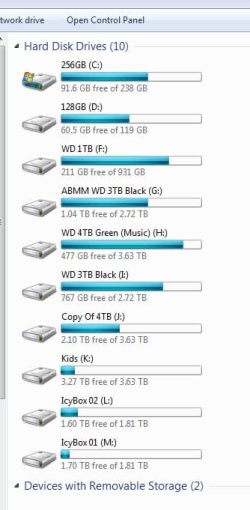
I run 3 SSD's 2 x Samsung boot drives and a MX500 for take images (C,D & E) but over the last few weeks my E drive just keeps on disappearing i bought DiskGenius (£70) thinking I had partition issue as disk managemengt (DM) told me i need to format the drive so i thong maybe i had lost a partition table somehow, and DG got it and all was fine for a few days, now it's going all the time, i am able to load up DG and put the partition table back and gain access to the drive with no issue for a while (after i have given a drive letter in DM) but then she will go again, i have done nothing else, i dont think replaceing cables will help but what are your thoughts, should i take everything out and replace the wiring or is there a software issue at work that others have heard of, this is how my drives stand right now,


7U x64 Asus Z87 Deluxe MB first 3 HDD runnning of the chipset of the board.


All1
 

Attachments
  • Drives.jpg
    Drives.jpg
    30.5 KB · Views: 13

My Computer

Computer Manufacturer/Model Number
Home Brew
OS
Windows 7 64bit Ultimate (Retail)
CPU
Intel Core 2 Duo 8400 @ 3Ghz
Motherboard
Asus P5E3 Premium
Memory
8GB DDR3 @ 1333
Graphics Card(s)
ATI 1GB 4350 (Passive)
Sound Card
Creative Audigy 2 ZS
Monitor(s) Displays
BenQ G2420HDBL (Digital) [24" LCD]
Screen Resolution
1920x1080
Hard Drives
Floppy Drive (Still come in handy sometimes)
WDC WD6400AAKS-22A7B0 (596 GB)
WDC WD7501AALS-00J7B0 (698 GB)
WDC WD1002FAEX-00Y9A0 (931 GB)
SAMSUNG HD204UI (2000 GB)
SAMSUNG HD204UI (
PSU
Corsair HX 750W ATX Modular
Case
Antec SX-1030
Cooling
Can't remember
Keyboard
Airkey Wireless
Mouse
MS Intellimouse Explorer 2.0
Internet Speed
about 5 mbits
Do you do images automatically or manually stop it and see if it's that doing it
 

My Computer

Computer type
PC/Desktop
OS
win 8 32 bit
Do you do images automatically or manually stop it and see if it's that doing it
I do them manually but the drive is dropping out while in windows sometimes when i'm doing nothing, when i take an image i always come out of windows and use a boot disk


All1
 

My Computer

Computer Manufacturer/Model Number
Home Brew
OS
Windows 7 64bit Ultimate (Retail)
CPU
Intel Core 2 Duo 8400 @ 3Ghz
Motherboard
Asus P5E3 Premium
Memory
8GB DDR3 @ 1333
Graphics Card(s)
ATI 1GB 4350 (Passive)
Sound Card
Creative Audigy 2 ZS
Monitor(s) Displays
BenQ G2420HDBL (Digital) [24" LCD]
Screen Resolution
1920x1080
Hard Drives
Floppy Drive (Still come in handy sometimes)
WDC WD6400AAKS-22A7B0 (596 GB)
WDC WD7501AALS-00J7B0 (698 GB)
WDC WD1002FAEX-00Y9A0 (931 GB)
SAMSUNG HD204UI (2000 GB)
SAMSUNG HD204UI (
PSU
Corsair HX 750W ATX Modular
Case
Antec SX-1030
Cooling
Can't remember
Keyboard
Airkey Wireless
Mouse
MS Intellimouse Explorer 2.0
Internet Speed
about 5 mbits
Hi

just to check its not the drive but the connection, loose wire etc, have you tried another drive in it


Roy

EDIT it must be recognising it at boot otherwise F would be E, DM alphabetizes them in order
 

My Computer

Computer type
PC/Desktop
Computer Manufacturer/Model Number
medionl/Aspire 6930G/acer x55a
OS
W7 home premium 32bit/W7HP 64bit/w10 tp insider ring
CPU
E5300 dual core
Motherboard
medion MS7366
Memory
3gb
Graphics Card(s)
Nvidia Geforce 7100 Nforce 630i
Monitor(s) Displays
avixc
Internet Speed
n (isp resticted to 72)
Antivirus
mse/pands
Browser
palemoon
Other Info
Belkin Fd7050 n USB using Railink RT2870 drivers, more upto date
I do them manually but the drive is dropping out while in windows sometimes when i'm doing nothing, when i take an image i always come out of windows and use a boot disk


All1


Had the same issue, the following worked for me.
If it is a USB drive, use USBoblivion first.

Take it offline in disk management, reboot, then take it online again, then give it another drive letter, (use USBoblivion), reboot again, then give it again your chosen drive letter.
 

My Computer

Computer type
Laptop
Computer Manufacturer/Model Number
Dell, Inc.
OS
Windows 7 Ultimate x64 SP1, updated to latest Java and .NET
CPU
Mobile Intel Core i7-4800MQ, 8x 3500 MHz (35 x 100)
Motherboard
Dell Precision M4800
Memory
32 GB ie 4x 8GB SODIMM
Graphics Card(s)
AMD FirePro M5100 and Intel(R) HD Graphics 4600
Sound Card
Realtek Audio and AMD High Definition Audio Device
Monitor(s) Displays
Built-in 1080p, ext 2x 27" 1080p, ext 1x 55" 1080p
Screen Resolution
4x 1920 x 1080 x 32 bits
Hard Drives
2x 1 TB SSD
multiple external drives
PSU
210W for docking station & laptop
Case
Metal
Cooling
2 Fans
Keyboard
US QWERTY
Mouse
touchpad, pointstick, ext mouse
Internet Speed
1Gbps Eth, 512Mbps cable
Antivirus
Avast latest
Browser
various
Hi


svnfrms2r,
Thats actually a good idea, i remember know, for some reason certain drive types were eroniously treated as USB's

Roy
 

My Computer

Computer type
PC/Desktop
Computer Manufacturer/Model Number
medionl/Aspire 6930G/acer x55a
OS
W7 home premium 32bit/W7HP 64bit/w10 tp insider ring
CPU
E5300 dual core
Motherboard
medion MS7366
Memory
3gb
Graphics Card(s)
Nvidia Geforce 7100 Nforce 630i
Monitor(s) Displays
avixc
Internet Speed
n (isp resticted to 72)
Antivirus
mse/pands
Browser
palemoon
Other Info
Belkin Fd7050 n USB using Railink RT2870 drivers, more upto date
No it's not a USb drive, set up is as follows:
SATA 1 - Samsung 840Pro 128GB (Win 7 boot) C

SATA 2 - Samsung 840Pro 256GB (Win 7 boot) D

SATA 3 - Crucial MX500 1TB (This is the problem drive) E

SATA 4 - WD 1TB Black F

SATA 5 - WD 3TB Black G

SATA 6 - DVD Burner Z (yes some of us still have them in place)


I also have another 6-8 drives running of a Adaptec SAS Adapter 7805H controller card


This system has been running fine for donkeys and never any issues, when i fire up CrystalDiskInfo it gives no issues with this drive nor does Crucial own software, I do have some spare power SATA cable i could swap out but won't get a chance to do this till Tuesday daytime, i was just wondering if there was a issue within windows that i could try before opening the case up.


All1
 

My Computer

Computer Manufacturer/Model Number
Home Brew
OS
Windows 7 64bit Ultimate (Retail)
CPU
Intel Core 2 Duo 8400 @ 3Ghz
Motherboard
Asus P5E3 Premium
Memory
8GB DDR3 @ 1333
Graphics Card(s)
ATI 1GB 4350 (Passive)
Sound Card
Creative Audigy 2 ZS
Monitor(s) Displays
BenQ G2420HDBL (Digital) [24" LCD]
Screen Resolution
1920x1080
Hard Drives
Floppy Drive (Still come in handy sometimes)
WDC WD6400AAKS-22A7B0 (596 GB)
WDC WD7501AALS-00J7B0 (698 GB)
WDC WD1002FAEX-00Y9A0 (931 GB)
SAMSUNG HD204UI (2000 GB)
SAMSUNG HD204UI (
PSU
Corsair HX 750W ATX Modular
Case
Antec SX-1030
Cooling
Can't remember
Keyboard
Airkey Wireless
Mouse
MS Intellimouse Explorer 2.0
Internet Speed
about 5 mbits
I would check the cables.
Enter BIOS to see if the MX500 is recognized on the SATA port.
When the disk isn't seen on Explorer, open Disk Manager (C:\Windows\System32\diskmgmt.msc). Is the disk seen there?
 

My Computers

System One System Two

  • Computer type
    PC/Desktop
    Computer Manufacturer/Model Number
    custom build
    OS
    Windows 7 HP 64
    CPU
    i5 6600K - 800MHz to 4200MHz
    Motherboard
    GA-Z170-HD3P
    Memory
    4+4G GSkill DDR4 3000
    Graphics Card(s)
    IG - Intel 530
    Monitor(s) Displays
    Samsung 226BW
    Screen Resolution
    1680x1050
    Hard Drives
    (1) -1 SM951 – 128GB M.2 AHCI PCIe SSD drive for Windows 7 and Lubuntu
    (2) -1 WD SATA 3 - 1T for Data
    (3) -1 WD SATA 3 - 1T for backup
    PSU
    Thermaltake 450W TR2 gold
    Keyboard
    Old and good Chicony mechanical keyboard
    Mouse
    Logitech mX performance - 9 buttons (had to disable some)
    Internet Speed
    500Mb/s
    Browser
    Firefox 64
    Other Info
    TinyWall firewall
  • Computer type
    Laptop
    System Manufacturer/Model Number
    Asus Q550LF
    OS
    Windows 7 Pro
    CPU
    i7-4500U 800MHz to 3.0GHz
    Motherboard
    Asus Q550LF
    Memory
    (4+4)G DDR3 1600
    Graphics Card(s)
    IG intel 4400 + NVIDIA GeForce GT 745M
    Sound Card
    Realtek
    Monitor(s) Displays
    LG Display LP156WF4-SPH1
    Screen Resolution
    1920 x 1080
    Hard Drives
    BX500 120G SSD for Windows and programs +
    1T HDD for data
    Internet Speed
    500 Mb/s
    Browser
    Firefox
    Other Info
    TinyWall firewall
It is seen in the bios with no issues, just windows is a problem, i have just had a thought i never use the 128GB windows drive it's just there as a back up if case my 256GB drive dies i will reboot into that OS and see if it's there.


Yes it's seem in DM but no letter is given to it when i right click and hit "chnage drive letter etc" i add the letter E to it which is it's normal allocation it comes up in explorer with no issues but will not stay there for long.


All1
 

My Computer

Computer Manufacturer/Model Number
Home Brew
OS
Windows 7 64bit Ultimate (Retail)
CPU
Intel Core 2 Duo 8400 @ 3Ghz
Motherboard
Asus P5E3 Premium
Memory
8GB DDR3 @ 1333
Graphics Card(s)
ATI 1GB 4350 (Passive)
Sound Card
Creative Audigy 2 ZS
Monitor(s) Displays
BenQ G2420HDBL (Digital) [24" LCD]
Screen Resolution
1920x1080
Hard Drives
Floppy Drive (Still come in handy sometimes)
WDC WD6400AAKS-22A7B0 (596 GB)
WDC WD7501AALS-00J7B0 (698 GB)
WDC WD1002FAEX-00Y9A0 (931 GB)
SAMSUNG HD204UI (2000 GB)
SAMSUNG HD204UI (
PSU
Corsair HX 750W ATX Modular
Case
Antec SX-1030
Cooling
Can't remember
Keyboard
Airkey Wireless
Mouse
MS Intellimouse Explorer 2.0
Internet Speed
about 5 mbits
Did you checked the cables?
When it disappears from Explorer, open Disk manager. What you see?
 

My Computers

System One System Two

  • Computer type
    PC/Desktop
    Computer Manufacturer/Model Number
    custom build
    OS
    Windows 7 HP 64
    CPU
    i5 6600K - 800MHz to 4200MHz
    Motherboard
    GA-Z170-HD3P
    Memory
    4+4G GSkill DDR4 3000
    Graphics Card(s)
    IG - Intel 530
    Monitor(s) Displays
    Samsung 226BW
    Screen Resolution
    1680x1050
    Hard Drives
    (1) -1 SM951 – 128GB M.2 AHCI PCIe SSD drive for Windows 7 and Lubuntu
    (2) -1 WD SATA 3 - 1T for Data
    (3) -1 WD SATA 3 - 1T for backup
    PSU
    Thermaltake 450W TR2 gold
    Keyboard
    Old and good Chicony mechanical keyboard
    Mouse
    Logitech mX performance - 9 buttons (had to disable some)
    Internet Speed
    500Mb/s
    Browser
    Firefox 64
    Other Info
    TinyWall firewall
  • Computer type
    Laptop
    System Manufacturer/Model Number
    Asus Q550LF
    OS
    Windows 7 Pro
    CPU
    i7-4500U 800MHz to 3.0GHz
    Motherboard
    Asus Q550LF
    Memory
    (4+4)G DDR3 1600
    Graphics Card(s)
    IG intel 4400 + NVIDIA GeForce GT 745M
    Sound Card
    Realtek
    Monitor(s) Displays
    LG Display LP156WF4-SPH1
    Screen Resolution
    1920 x 1080
    Hard Drives
    BX500 120G SSD for Windows and programs +
    1T HDD for data
    Internet Speed
    500 Mb/s
    Browser
    Firefox
    Other Info
    TinyWall firewall
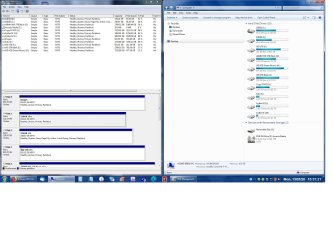
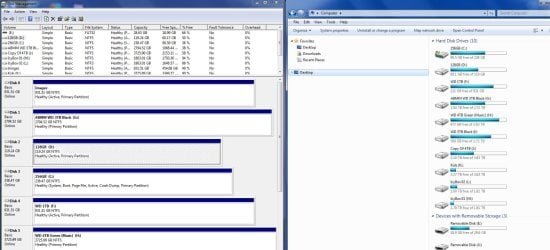
Yes gets seen in the BIOS with no issues, on boot, here is a screenshot showing DM on the left with the drive in question called IMAGES but if you notice it does not have a letter next to it and on the right is windows explorer showing the drives in the system right now, after this posti will go into other OS and see what happens


All1
 

Attachments

  • Both.jpg
    Both.jpg
    217.8 KB · Views: 2

My Computer

Computer Manufacturer/Model Number
Home Brew
OS
Windows 7 64bit Ultimate (Retail)
CPU
Intel Core 2 Duo 8400 @ 3Ghz
Motherboard
Asus P5E3 Premium
Memory
8GB DDR3 @ 1333
Graphics Card(s)
ATI 1GB 4350 (Passive)
Sound Card
Creative Audigy 2 ZS
Monitor(s) Displays
BenQ G2420HDBL (Digital) [24" LCD]
Screen Resolution
1920x1080
Hard Drives
Floppy Drive (Still come in handy sometimes)
WDC WD6400AAKS-22A7B0 (596 GB)
WDC WD7501AALS-00J7B0 (698 GB)
WDC WD1002FAEX-00Y9A0 (931 GB)
SAMSUNG HD204UI (2000 GB)
SAMSUNG HD204UI (
PSU
Corsair HX 750W ATX Modular
Case
Antec SX-1030
Cooling
Can't remember
Keyboard
Airkey Wireless
Mouse
MS Intellimouse Explorer 2.0
Internet Speed
about 5 mbits
One thing I noticed is that are a lot of disks mark as active. Active means MBR set to boot from the disk.
As the images disk isn't a boot able disk, you should mark it non active (also to all others disks without a OS)
 

My Computers

System One System Two

  • Computer type
    PC/Desktop
    Computer Manufacturer/Model Number
    custom build
    OS
    Windows 7 HP 64
    CPU
    i5 6600K - 800MHz to 4200MHz
    Motherboard
    GA-Z170-HD3P
    Memory
    4+4G GSkill DDR4 3000
    Graphics Card(s)
    IG - Intel 530
    Monitor(s) Displays
    Samsung 226BW
    Screen Resolution
    1680x1050
    Hard Drives
    (1) -1 SM951 – 128GB M.2 AHCI PCIe SSD drive for Windows 7 and Lubuntu
    (2) -1 WD SATA 3 - 1T for Data
    (3) -1 WD SATA 3 - 1T for backup
    PSU
    Thermaltake 450W TR2 gold
    Keyboard
    Old and good Chicony mechanical keyboard
    Mouse
    Logitech mX performance - 9 buttons (had to disable some)
    Internet Speed
    500Mb/s
    Browser
    Firefox 64
    Other Info
    TinyWall firewall
  • Computer type
    Laptop
    System Manufacturer/Model Number
    Asus Q550LF
    OS
    Windows 7 Pro
    CPU
    i7-4500U 800MHz to 3.0GHz
    Motherboard
    Asus Q550LF
    Memory
    (4+4)G DDR3 1600
    Graphics Card(s)
    IG intel 4400 + NVIDIA GeForce GT 745M
    Sound Card
    Realtek
    Monitor(s) Displays
    LG Display LP156WF4-SPH1
    Screen Resolution
    1920 x 1080
    Hard Drives
    BX500 120G SSD for Windows and programs +
    1T HDD for data
    Internet Speed
    500 Mb/s
    Browser
    Firefox
    Other Info
    TinyWall firewall
Had the same issue, the following worked for me.
If it is a USB drive, use USBoblivion first.

Take it offline in disk management, reboot, then take it online again, then give it another drive letter, (use USBoblivion), reboot again, then give it again your chosen drive letter.
Well for the hell of it i have done this and we will see what happens, thanks everyone so far for trying to help.


All1
 

My Computer

Computer Manufacturer/Model Number
Home Brew
OS
Windows 7 64bit Ultimate (Retail)
CPU
Intel Core 2 Duo 8400 @ 3Ghz
Motherboard
Asus P5E3 Premium
Memory
8GB DDR3 @ 1333
Graphics Card(s)
ATI 1GB 4350 (Passive)
Sound Card
Creative Audigy 2 ZS
Monitor(s) Displays
BenQ G2420HDBL (Digital) [24" LCD]
Screen Resolution
1920x1080
Hard Drives
Floppy Drive (Still come in handy sometimes)
WDC WD6400AAKS-22A7B0 (596 GB)
WDC WD7501AALS-00J7B0 (698 GB)
WDC WD1002FAEX-00Y9A0 (931 GB)
SAMSUNG HD204UI (2000 GB)
SAMSUNG HD204UI (
PSU
Corsair HX 750W ATX Modular
Case
Antec SX-1030
Cooling
Can't remember
Keyboard
Airkey Wireless
Mouse
MS Intellimouse Explorer 2.0
Internet Speed
about 5 mbits
Well it was going well, until i rebooted and i'm back to having no E drive :(
Even changed drive letter and still goes missing after reboot
 
Last edited:

My Computer

Computer Manufacturer/Model Number
Home Brew
OS
Windows 7 64bit Ultimate (Retail)
CPU
Intel Core 2 Duo 8400 @ 3Ghz
Motherboard
Asus P5E3 Premium
Memory
8GB DDR3 @ 1333
Graphics Card(s)
ATI 1GB 4350 (Passive)
Sound Card
Creative Audigy 2 ZS
Monitor(s) Displays
BenQ G2420HDBL (Digital) [24" LCD]
Screen Resolution
1920x1080
Hard Drives
Floppy Drive (Still come in handy sometimes)
WDC WD6400AAKS-22A7B0 (596 GB)
WDC WD7501AALS-00J7B0 (698 GB)
WDC WD1002FAEX-00Y9A0 (931 GB)
SAMSUNG HD204UI (2000 GB)
SAMSUNG HD204UI (
PSU
Corsair HX 750W ATX Modular
Case
Antec SX-1030
Cooling
Can't remember
Keyboard
Airkey Wireless
Mouse
MS Intellimouse Explorer 2.0
Internet Speed
about 5 mbits
Well that didn't work either, i was abole to boot into true image with boot cd and able to create and check the image with no issues, before i check the cable etc, i have changed the drive letter from E to U to see if that makes any difference, if not I'll check the hardware cable etc and see what gives
 

My Computer

Computer Manufacturer/Model Number
Home Brew
OS
Windows 7 64bit Ultimate (Retail)
CPU
Intel Core 2 Duo 8400 @ 3Ghz
Motherboard
Asus P5E3 Premium
Memory
8GB DDR3 @ 1333
Graphics Card(s)
ATI 1GB 4350 (Passive)
Sound Card
Creative Audigy 2 ZS
Monitor(s) Displays
BenQ G2420HDBL (Digital) [24" LCD]
Screen Resolution
1920x1080
Hard Drives
Floppy Drive (Still come in handy sometimes)
WDC WD6400AAKS-22A7B0 (596 GB)
WDC WD7501AALS-00J7B0 (698 GB)
WDC WD1002FAEX-00Y9A0 (931 GB)
SAMSUNG HD204UI (2000 GB)
SAMSUNG HD204UI (
PSU
Corsair HX 750W ATX Modular
Case
Antec SX-1030
Cooling
Can't remember
Keyboard
Airkey Wireless
Mouse
MS Intellimouse Explorer 2.0
Internet Speed
about 5 mbits
One more thing came to mind. If there is more than one drive the same except the serial number, and the same goes for the enclosure/controller, then windows may drop additional similar drives and only work with one of those, except if you connect them as originally connected and with the same drive letters associated.
Happened to me after travels when connecting USB drives to the docking station and just plugged 1 into 2 and vice versa. One dropped, and no reboot or repeated drive letter assignment helped, only to swap the cables on one end to connect them as windows already knew from earlier connections.
 

My Computer

Computer type
Laptop
Computer Manufacturer/Model Number
Dell, Inc.
OS
Windows 7 Ultimate x64 SP1, updated to latest Java and .NET
CPU
Mobile Intel Core i7-4800MQ, 8x 3500 MHz (35 x 100)
Motherboard
Dell Precision M4800
Memory
32 GB ie 4x 8GB SODIMM
Graphics Card(s)
AMD FirePro M5100 and Intel(R) HD Graphics 4600
Sound Card
Realtek Audio and AMD High Definition Audio Device
Monitor(s) Displays
Built-in 1080p, ext 2x 27" 1080p, ext 1x 55" 1080p
Screen Resolution
4x 1920 x 1080 x 32 bits
Hard Drives
2x 1 TB SSD
multiple external drives
PSU
210W for docking station & laptop
Case
Metal
Cooling
2 Fans
Keyboard
US QWERTY
Mouse
touchpad, pointstick, ext mouse
Internet Speed
1Gbps Eth, 512Mbps cable
Antivirus
Avast latest
Browser
various
What i don't understand is the system was working fine for years and then just gone funny.
When the drive goes missing i fire up DM and it's still there just without a letter


Considering pulling the plug and just starting from scratch right now
 

Attachments

  • Drives 2.jpg
    Drives 2.jpg
    165.5 KB · Views: 2

My Computer

Computer Manufacturer/Model Number
Home Brew
OS
Windows 7 64bit Ultimate (Retail)
CPU
Intel Core 2 Duo 8400 @ 3Ghz
Motherboard
Asus P5E3 Premium
Memory
8GB DDR3 @ 1333
Graphics Card(s)
ATI 1GB 4350 (Passive)
Sound Card
Creative Audigy 2 ZS
Monitor(s) Displays
BenQ G2420HDBL (Digital) [24" LCD]
Screen Resolution
1920x1080
Hard Drives
Floppy Drive (Still come in handy sometimes)
WDC WD6400AAKS-22A7B0 (596 GB)
WDC WD7501AALS-00J7B0 (698 GB)
WDC WD1002FAEX-00Y9A0 (931 GB)
SAMSUNG HD204UI (2000 GB)
SAMSUNG HD204UI (
PSU
Corsair HX 750W ATX Modular
Case
Antec SX-1030
Cooling
Can't remember
Keyboard
Airkey Wireless
Mouse
MS Intellimouse Explorer 2.0
Internet Speed
about 5 mbits
Does BIOS and MBR have a finite number of partitions it can effectively work with? I thought I read somewhere BIOS and MBR does have a limit.
 

My Computer

Computer type
PC/Desktop
Computer Manufacturer/Model Number
Antec desktop; Acer Aspire laptops
OS
Windows 7 Professional 64-bit
CPU
Desktop i5; Acers i5 & i7
Memory
desktop 16GB; 1 Acer 8GB & 1 Acer 16GB
Hard Drives
1TB split into 2 equal partitions [OS and data] usable by RJS
Internet Speed
AT&T DSL
Browser
FF, GChrome, msIE
Other Info
Windows 7 Firewall, Emsisoft AM/AV, MSE [scan-only], SpywareBlaster, Ruiware/BillP combine
DOn't know but it has been working for well over 18 months so doubt it will be that i do have to alter some of the partitions as MH said too many that are active
 

My Computer

Computer Manufacturer/Model Number
Home Brew
OS
Windows 7 64bit Ultimate (Retail)
CPU
Intel Core 2 Duo 8400 @ 3Ghz
Motherboard
Asus P5E3 Premium
Memory
8GB DDR3 @ 1333
Graphics Card(s)
ATI 1GB 4350 (Passive)
Sound Card
Creative Audigy 2 ZS
Monitor(s) Displays
BenQ G2420HDBL (Digital) [24" LCD]
Screen Resolution
1920x1080
Hard Drives
Floppy Drive (Still come in handy sometimes)
WDC WD6400AAKS-22A7B0 (596 GB)
WDC WD7501AALS-00J7B0 (698 GB)
WDC WD1002FAEX-00Y9A0 (931 GB)
SAMSUNG HD204UI (2000 GB)
SAMSUNG HD204UI (
PSU
Corsair HX 750W ATX Modular
Case
Antec SX-1030
Cooling
Can't remember
Keyboard
Airkey Wireless
Mouse
MS Intellimouse Explorer 2.0
Internet Speed
about 5 mbits
Yeah, my BIOS and MBR never complained (that I know of) when I have a C partition, a D partition, and four other tiny 1GB partitions for testing my ability to do first responder level data recovery :)
 

My Computer

Computer type
PC/Desktop
Computer Manufacturer/Model Number
Antec desktop; Acer Aspire laptops
OS
Windows 7 Professional 64-bit
CPU
Desktop i5; Acers i5 & i7
Memory
desktop 16GB; 1 Acer 8GB & 1 Acer 16GB
Hard Drives
1TB split into 2 equal partitions [OS and data] usable by RJS
Internet Speed
AT&T DSL
Browser
FF, GChrome, msIE
Other Info
Windows 7 Firewall, Emsisoft AM/AV, MSE [scan-only], SpywareBlaster, Ruiware/BillP combine
Back
Top