Hard Drive Management Gone Haywire

Also, should I try to recover the Paragon images to my hard drive of my other computer (I'm typing on this one right now).
My computer (BTW, this is dual boot of Vista and Windows 7) Disk Management looks like this. The left partition is Vista, right partition is 7.
TestDisk is at 45%, still looks like the same.
 

My Computer My Computer

At a glance

N/A
OS
N/A
Tell me what approach you want to take. Pick ONE.

I can't see what you see, so you're going to have to post some screen shots. If you don't "put some eyes" on the issue, I'll gracefully back off this thread. You seem to be spinning your wheels, slow down.

When running recovery software, NEVER write to the disk you're recovering... not even to a different partition.

You'll need a seperate HD to recover data so that the bits on the original problematic drive aren't overwritten.

It sounds as though you have another machine - that's a good thing. I'm not sure what you're attempting, but it's good to know.

Right now, I am running TestDisk deep scan, at 32%. I have recovered the Paragon images from my hard drive (I have 3 different ones, not exactly sure what they are, but pretty sure 1 is for my documents, 1 is for my Chrome profiles, and 1 is the System Reserved partition).
Will the backup of the System Reserved partition help? :P

I will boot the Paragon DVD and see if I can recover the images to another partition on another computer's hard drive, will see if that's possible.
 

My Computer My Computer

At a glance

x64 (6.3.9600) Win8.1 Pro & soon dual boot x6...AMD A6-3420M APU with Radeon(tm) HD Graphics6.00 GBAMD Radeon(TM) HD 6520G
Computer type
Laptop
Computer Manufacturer/Model Number
HP Pavilion dv6-6c10us
OS
x64 (6.3.9600) Win8.1 Pro & soon dual boot x64 (6.1.7601) Win7_SP1 HomePrem
CPU
AMD A6-3420M APU with Radeon(tm) HD Graphics
Motherboard
Hewlett-Packard 1805
Memory
6.00 GB
Graphics Card(s)
AMD Radeon(TM) HD 6520G
Sound Card
(1) AMD High Definition Audio Device (2) IDT High Definiti
Monitor(s) Displays
HP W2072a 20" LCD (1600 x 900) @ 60 Hz
Screen Resolution
1366 x 768 x 32 bits (4294967296 colors) @ 60 Hz
Hard Drives
ST640LM0 00 HM641JI SATA Disk Device
Keyboard
Logitech k520 wireless KB
Mouse
Logitech m320 wireless mouse (bundled with KB)
Internet Speed
15/5 | 54 MB Wireless 'n'
Antivirus
Realtime: Defender or Avast | On-demand: Malwarebytes, ESET
Browser
IE 11 on Win8, IE 10 on win 7
Other Info
Media: [Gimp, Audacity, VLC] || Comm: [WEmail 2012, Skype] || Productivity: [OpenOffice,| Textpad] || Utils: [Sysinternals, cCleaner, Speccy, Defraggler]
Tell me what approach you want to take. Pick ONE.

I can't see what you see, so you're going to have to post some screen shots. If you don't "put some eyes" on the issue, I'll gracefully back off this thread. You seem to be spinning your wheels, slow down.

When running recovery software, NEVER write to the disk you're recovering... not even to a different partition.

You'll need a seperate HD to recover data so that the bits on the original problematic drive aren't overwritten.

It sounds as though you have another machine - that's a good thing. I'm not sure what you're attempting, but it's good to know.

Right now, I am running TestDisk deep scan, at 32%. I have recovered the Paragon images from my hard drive (I have 3 different ones, not exactly sure what they are, but pretty sure 1 is for my documents, 1 is for my Chrome profiles, and 1 is the System Reserved partition).
Will the backup of the System Reserved partition help? :P

I will boot the Paragon DVD and see if I can recover the images to another partition on another computer's hard drive, will see if that's possible.

So, this is what I have. A laptop, which the hard drive I am running TestDisk is on. The laptop cannot boot.
I have a desktop computer. Dual-booting Vista and 7. It works fine.
I also have an external HD. That is where I recovered my deleted Paragon images from. I have recovered them to the desktop HD. Yes, I know never to recover to the same drive. The external HD's condition is the same as the day I deleted the images. I have never touched it since then.

I have recovered THREE different images, created within the same week, off of my external HD. 1 image of my documents, 1 of my Chrome profile, and 1 of the System Reserved partition.
I have all 3 of them on my desktop HD. What should I do now?
Also, I do not have Paragon B&D program installed ANYWHERE, but I do have the recovery disc, which can perform the same functions.

I can use my external HD to recover the bits, as I can backup everything on there. The deleted Paragon images are ON my desktop HD right now.

And yes, I have TWO sets of recovered Paragon images. One of them I am preserving in case anything goes wrong.
 

My Computer My Computer

At a glance

N/A
OS
N/A
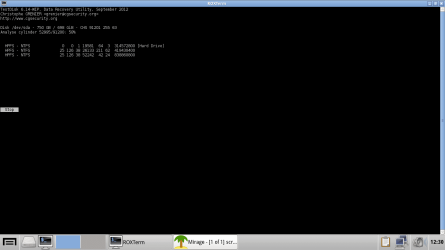
TestDisk at 58%, just found a third partition, with no label.
 

Attachments

  • 2.png
    2.png
    17.3 KB · Views: 6

My Computer My Computer

At a glance

N/A
OS
N/A
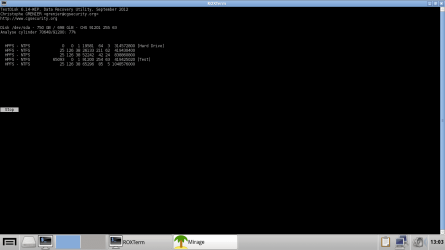
TestDisk hit 77%.
Total, 5 partitions found.
The "Test" partition was manually created by me, it's useless, just an empty 200GB partition.
 

Attachments

  • 3.png
    3.png
    17.8 KB · Views: 2

My Computer My Computer

At a glance

N/A
OS
N/A
Let the scan finish - don't do anything until instructed.

Post a screenshot
 

My Computer My Computer

At a glance

x64 (6.3.9600) Win8.1 Pro & soon dual boot x6...AMD A6-3420M APU with Radeon(tm) HD Graphics6.00 GBAMD Radeon(TM) HD 6520G
Computer type
Laptop
Computer Manufacturer/Model Number
HP Pavilion dv6-6c10us
OS
x64 (6.3.9600) Win8.1 Pro & soon dual boot x64 (6.1.7601) Win7_SP1 HomePrem
CPU
AMD A6-3420M APU with Radeon(tm) HD Graphics
Motherboard
Hewlett-Packard 1805
Memory
6.00 GB
Graphics Card(s)
AMD Radeon(TM) HD 6520G
Sound Card
(1) AMD High Definition Audio Device (2) IDT High Definiti
Monitor(s) Displays
HP W2072a 20" LCD (1600 x 900) @ 60 Hz
Screen Resolution
1366 x 768 x 32 bits (4294967296 colors) @ 60 Hz
Hard Drives
ST640LM0 00 HM641JI SATA Disk Device
Keyboard
Logitech k520 wireless KB
Mouse
Logitech m320 wireless mouse (bundled with KB)
Internet Speed
15/5 | 54 MB Wireless 'n'
Antivirus
Realtime: Defender or Avast | On-demand: Malwarebytes, ESET
Browser
IE 11 on Win8, IE 10 on win 7
Other Info
Media: [Gimp, Audacity, VLC] || Comm: [WEmail 2012, Skype] || Productivity: [OpenOffice,| Textpad] || Utils: [Sysinternals, cCleaner, Speccy, Defraggler]
While it's scanning I would mount the image found on the other PC to see if you can extract the data to external. If the imaging app or boot disk doesn't have the ability to do this, find out how it is done similar to this: Virtual Hard Disk - Create and Attach VHD. Having the data would take a lot of pressure off.

I'd continue to work with Bill to see if you can recover the lost partitions and restore your HD, or at least determine with certainty its condition. You might be able to eventually reimage it with the image you've recovered, or if there is any doubt I would instead get a perfect Clean Reinstall - Factory OEM Windows 7.

Off on a bike ride for the rest of the day. Good luck! :geek:
 
TestDisk screenshot
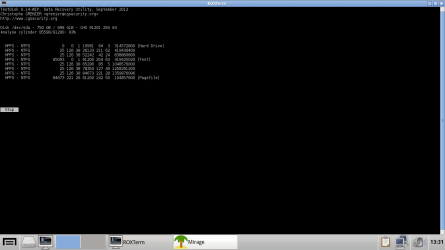
Yes, the Pagefile partition was created by me a while ago, then deleted.
I used it to contain a pagefile. :P It's empty and useless, AFAIK.
Just FYI, I created the Pagefile partition at the END of the hard drive, so there's probably no more partitions to be found.
 

Attachments

  • 4.png
    4.png
    19.3 KB · Views: 2

My Computer My Computer

At a glance

N/A
OS
N/A
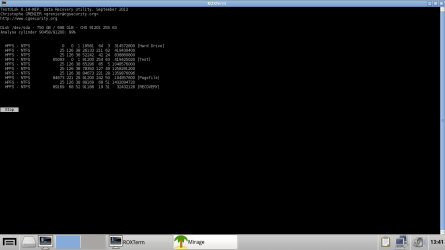
TestDisk found another 2 partitions.
 

Attachments

  • 5.png
    5.png
    19.6 KB · Views: 8

My Computer My Computer

At a glance

N/A
OS
N/A
let me know when it's done - 58,77,98% doesn't tell me anything I need to know.
 

My Computer My Computer

At a glance

x64 (6.3.9600) Win8.1 Pro & soon dual boot x6...AMD A6-3420M APU with Radeon(tm) HD Graphics6.00 GBAMD Radeon(TM) HD 6520G
Computer type
Laptop
Computer Manufacturer/Model Number
HP Pavilion dv6-6c10us
OS
x64 (6.3.9600) Win8.1 Pro & soon dual boot x64 (6.1.7601) Win7_SP1 HomePrem
CPU
AMD A6-3420M APU with Radeon(tm) HD Graphics
Motherboard
Hewlett-Packard 1805
Memory
6.00 GB
Graphics Card(s)
AMD Radeon(TM) HD 6520G
Sound Card
(1) AMD High Definition Audio Device (2) IDT High Definiti
Monitor(s) Displays
HP W2072a 20" LCD (1600 x 900) @ 60 Hz
Screen Resolution
1366 x 768 x 32 bits (4294967296 colors) @ 60 Hz
Hard Drives
ST640LM0 00 HM641JI SATA Disk Device
Keyboard
Logitech k520 wireless KB
Mouse
Logitech m320 wireless mouse (bundled with KB)
Internet Speed
15/5 | 54 MB Wireless 'n'
Antivirus
Realtime: Defender or Avast | On-demand: Malwarebytes, ESET
Browser
IE 11 on Win8, IE 10 on win 7
Other Info
Media: [Gimp, Audacity, VLC] || Comm: [WEmail 2012, Skype] || Productivity: [OpenOffice,| Textpad] || Utils: [Sysinternals, cCleaner, Speccy, Defraggler]
Scan's done.
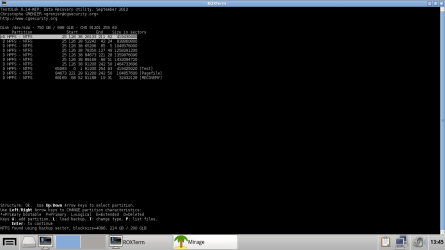
Just like the first time I did the Deep Scan, I can see the partition "Hard Drive" DURING the scan, but in the results list, it's not there :P
 

Attachments

  • Deep Scan Result.png
    Deep Scan Result.png
    24.7 KB · Views: 41

My Computer My Computer

At a glance

N/A
OS
N/A
ok, it will take me a while to decipher this. Essentially all partitions are marked Deleted

The key is Cylinder | Head | Sector (CHS)
There are start and end values
For example:
[Test] starts at cylinder 65093 | head 0 | sector 1

The first 7 "partitions" all start at C 25, H 126, S 38 - but they end in different locations on the disk and are differnt sizes.

Now all I have to do is work out the geometry. Sit tight, this might take a while - leave Testdisk where it is so you don't have to scan the disk again.
 

My Computer My Computer

At a glance

x64 (6.3.9600) Win8.1 Pro & soon dual boot x6...AMD A6-3420M APU with Radeon(tm) HD Graphics6.00 GBAMD Radeon(TM) HD 6520G
Computer type
Laptop
Computer Manufacturer/Model Number
HP Pavilion dv6-6c10us
OS
x64 (6.3.9600) Win8.1 Pro & soon dual boot x64 (6.1.7601) Win7_SP1 HomePrem
CPU
AMD A6-3420M APU with Radeon(tm) HD Graphics
Motherboard
Hewlett-Packard 1805
Memory
6.00 GB
Graphics Card(s)
AMD Radeon(TM) HD 6520G
Sound Card
(1) AMD High Definition Audio Device (2) IDT High Definiti
Monitor(s) Displays
HP W2072a 20" LCD (1600 x 900) @ 60 Hz
Screen Resolution
1366 x 768 x 32 bits (4294967296 colors) @ 60 Hz
Hard Drives
ST640LM0 00 HM641JI SATA Disk Device
Keyboard
Logitech k520 wireless KB
Mouse
Logitech m320 wireless mouse (bundled with KB)
Internet Speed
15/5 | 54 MB Wireless 'n'
Antivirus
Realtime: Defender or Avast | On-demand: Malwarebytes, ESET
Browser
IE 11 on Win8, IE 10 on win 7
Other Info
Media: [Gimp, Audacity, VLC] || Comm: [WEmail 2012, Skype] || Productivity: [OpenOffice,| Textpad] || Utils: [Sysinternals, cCleaner, Speccy, Defraggler]
Yep, okay :)
Thanks.
The first time, I accidentally tapped quit, so I lost all the details :P
Also, the partition I want is the partition with the label "Hard Drive", the one that starts with C 0, H 0, S 1.
It appears on the screenshots before the final result, but not on the last result :P
 

My Computer My Computer

At a glance

N/A
OS
N/A
use the up/down arrows to highlight each unamed "partition", then hit 'P'
If your files are found, then that's the part we need to work on.
if not hit 'Q' to return

I think it's going to be the part just above [test], but start at the top and work down. post screen shots if anything is displayed.

When (if) you find the files you're looking for - stop there and make sure I see what you see. If you don't find the files, we might have to change the type - don't do that yet - just look for now.
 

My Computer My Computer

At a glance

x64 (6.3.9600) Win8.1 Pro & soon dual boot x6...AMD A6-3420M APU with Radeon(tm) HD Graphics6.00 GBAMD Radeon(TM) HD 6520G
Computer type
Laptop
Computer Manufacturer/Model Number
HP Pavilion dv6-6c10us
OS
x64 (6.3.9600) Win8.1 Pro & soon dual boot x64 (6.1.7601) Win7_SP1 HomePrem
CPU
AMD A6-3420M APU with Radeon(tm) HD Graphics
Motherboard
Hewlett-Packard 1805
Memory
6.00 GB
Graphics Card(s)
AMD Radeon(TM) HD 6520G
Sound Card
(1) AMD High Definition Audio Device (2) IDT High Definiti
Monitor(s) Displays
HP W2072a 20" LCD (1600 x 900) @ 60 Hz
Screen Resolution
1366 x 768 x 32 bits (4294967296 colors) @ 60 Hz
Hard Drives
ST640LM0 00 HM641JI SATA Disk Device
Keyboard
Logitech k520 wireless KB
Mouse
Logitech m320 wireless mouse (bundled with KB)
Internet Speed
15/5 | 54 MB Wireless 'n'
Antivirus
Realtime: Defender or Avast | On-demand: Malwarebytes, ESET
Browser
IE 11 on Win8, IE 10 on win 7
Other Info
Media: [Gimp, Audacity, VLC] || Comm: [WEmail 2012, Skype] || Productivity: [OpenOffice,| Textpad] || Utils: [Sysinternals, cCleaner, Speccy, Defraggler]
While it's scanning I would mount the image found on the other PC to see if you can extract the data to external. If the imaging app or boot disk doesn't have the ability to do this, find out how it is done similar to this: Virtual Hard Disk - Create and Attach VHD. Having the data would take a lot of pressure off.

I'd continue to work with Bill to see if you can recover the lost partitions and restore your HD, or at least determine with certainty its condition. You might be able to eventually reimage it with the image you've recovered, or if there is any doubt I would instead get a perfect Clean Reinstall - Factory OEM Windows 7.

Off on a bike ride for the rest of the day. Good luck! :geek:

I successfully made the VHD, but it won't work because to extract the files, I'd either have to install Paragon B&D or use the boot disc. I tried using the boot disc, but it won't let me mount the VHD in that environment, so that's a dead end.
I'll try installing Paragon's software now.
 

My Computer My Computer

At a glance

N/A
OS
N/A
The TEstdisk screen shot also shows an NTFS found using backup sector 214 GB. This might be your partition [Hard Drive].

I need to see what 'L' load backup does in Testdisk.

The neat thing about Testdisk is you're in research mode until you tell it to write. Having said that, you still need to respect the utility. One slip (as you did with 'q'uit) will make further efforts either impossible or much more difficult.

I'll read more on the Testdisk site and ask another member to jump in.

Bill
.
 

My Computer My Computer

At a glance

x64 (6.3.9600) Win8.1 Pro & soon dual boot x6...AMD A6-3420M APU with Radeon(tm) HD Graphics6.00 GBAMD Radeon(TM) HD 6520G
Computer type
Laptop
Computer Manufacturer/Model Number
HP Pavilion dv6-6c10us
OS
x64 (6.3.9600) Win8.1 Pro & soon dual boot x64 (6.1.7601) Win7_SP1 HomePrem
CPU
AMD A6-3420M APU with Radeon(tm) HD Graphics
Motherboard
Hewlett-Packard 1805
Memory
6.00 GB
Graphics Card(s)
AMD Radeon(TM) HD 6520G
Sound Card
(1) AMD High Definition Audio Device (2) IDT High Definiti
Monitor(s) Displays
HP W2072a 20" LCD (1600 x 900) @ 60 Hz
Screen Resolution
1366 x 768 x 32 bits (4294967296 colors) @ 60 Hz
Hard Drives
ST640LM0 00 HM641JI SATA Disk Device
Keyboard
Logitech k520 wireless KB
Mouse
Logitech m320 wireless mouse (bundled with KB)
Internet Speed
15/5 | 54 MB Wireless 'n'
Antivirus
Realtime: Defender or Avast | On-demand: Malwarebytes, ESET
Browser
IE 11 on Win8, IE 10 on win 7
Other Info
Media: [Gimp, Audacity, VLC] || Comm: [WEmail 2012, Skype] || Productivity: [OpenOffice,| Textpad] || Utils: [Sysinternals, cCleaner, Speccy, Defraggler]
Paragon might not use VHD format but should have a mounting utility in its full program. I found more about it here: Can you mount Paragon images? - Wilders Security Forums

If not our colleague SIW2 will know how to manually mount the image if you tell it's file extension.

The images are made up of multiple file extensions. PBF, PFI, 000, and PFM.
I also have another image, I believe that it's corrupted but all the data is there. The extensions are PFI, PFP, and PFT.
 

My Computer My Computer

At a glance

N/A
OS
N/A
use the up/down arrows to highlight each unamed "partition", then hit 'P'
If your files are found, then that's the part we need to work on.
if not hit 'Q' to return

I think it's going to be the part just above [test], but start at the top and work down. post screen shots if anything is displayed.

When (if) you find the files you're looking for - stop there and make sure I see what you see. If you don't find the files, we might have to change the type - don't do that yet - just look for now.

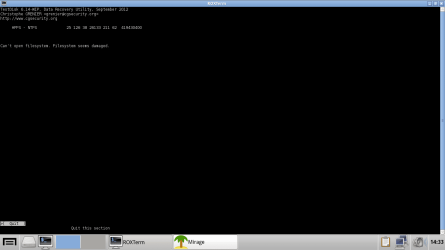
All the partitions with no label return a message, "Cannot open partition, filesystem seems damaged".
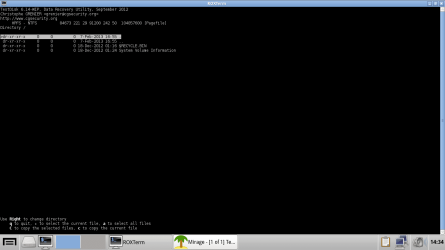
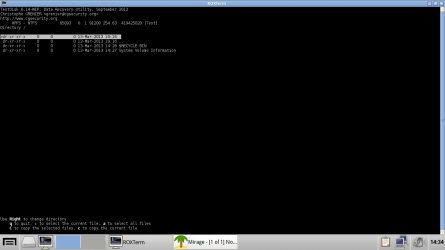
The "Pagefile" and "Test" partitions have nothing by a "Recycle Bin" and a "System Volume Information" folder. The "Recovery" partition has more files, but not my files.
 

My Computer My Computer

At a glance

N/A
OS
N/A
Here are screenshots of all the partitions, but I wasn't able to get a screenshot of the Recovery partition, sorry. My keyboard double-tapped quit and I exited the analysis results screen :P
But I have everything else.
In post 76, you said that you wondered what the L key did. Should I press it the next time the analysis is done?
I'll do an analysis right now.
As for mounting the image, I'm downloading the program now and will try later.
 

Attachments

  • No Label Partitions.png
    No Label Partitions.png
    15.3 KB · Views: 1
  • Pagefile Partition.png
    Pagefile Partition.png
    18.2 KB · Views: 1
  • Test Partition.png
    Test Partition.png
    17.4 KB · Views: 1

My Computer My Computer

At a glance

N/A
OS
N/A
Back
Top