Hard drive management

Leimone

New member
Member
Local time
2:05 PM
Messages
91
Is there any good program where I can see what each harddrive is doing and what's actually stored on them etc?
 

My Computer

OS
Win7 Ultimate x64
CPU
Intel Core i7 2600K 3,4GHz
Motherboard
Asus P8Z68-V Pro
Memory
Corsair 8GB (2x4096MB) CL9 1600Mhz XMS3
Graphics Card(s)
GK PCIe EVGA GF GTX 670 FTW
Monitor(s) Displays
Philips PHI32PFL3614
Screen Resolution
1920 x 1080
Hard Drives
Corsair SSD Force 3 Series 120GB
1TB Western Digital Caviar Black
PSU
XFX XXX Edition 750W
Case
Corsair Graphite 600T Svart
Cooling
Arctic Cooling Freezer 7 Pro rev.2
Internet Speed
100MB
WinDirStat will tell you what is taking up the space on the drive.

WinDirStat - Windows Directory Statistics

You can use the drive manufacturer's utilities to ensure that the drive is functioning properly.
 

My Computer

Computer type
PC/Desktop
Computer Manufacturer/Model Number
Ignatz Special; 4 speed manual gearbox; factory air conditioning; one of one
OS
Windows 7 Home Premium SP1, 64-bit
CPU
Intel Skylake i5-6600K, not overclocked
Motherboard
AsRock Z170M Extreme 4, micro ATX
Memory
8 GB HyperX DDR4-2666 (2 x 4 GB)
Graphics Card(s)
none; graphics are integrated on CPU
Sound Card
onboard: Realtek ALC1150; external: USB Behringer UF0-202
Monitor(s) Displays
Dell S2340M 23 inch IPS
Screen Resolution
1600 x 900
Hard Drives
System: Crucial MX100 series SSD, 128 GB;
Data: Samsung Spinpoint 103SJ, 1 TB;
Backup: WD Caviar Green WD30EZRX-00D8PB0, 3 TB
PSU
Rosewill SilentNight 500 watt fanless, semi-modular
Case
Antec Solo II
Cooling
Noctua NH-U12S; Noctua F12 intake, Noctua S12A exhaust
Keyboard
Microsoft 200 6JH-00001 USB
Mouse
Dell or Microsoft optical wired; USB
Antivirus
Microsoft Security Essentials and Malwarebytes Premium
Browser
Pale Moon
Other Info
All fans PWM; speeds at idle: CPU circa 500 rpm; intake circa 600 rpm; exhaust circa 600 rpm; CPU temps 27 idle and 47 C load in a warm room (27 C/81 F) when running Intel Extreme Tuning Utility stress test.
I hope this is what you are looking for.....
Speccy - Download

It is free and just download it from Piriform.
If it is not what you are looking for post back and we can go to plan 2
THW
 

My Computer

Computer Manufacturer/Model Number
HP M9077c
OS
Windows 7 Home Premium 64bit
CPU
Intel(R)Core(TM)2 quad [email protected] 2.39GHz
Motherboard
ASUSeK
Memory
6GB DDR2 6400
Graphics Card(s)
GeForce 8500/512MB
Sound Card
Realtek High Def Audio
Monitor(s) Displays
HP w2408 LCD 24" widescreen
Screen Resolution
1920x1200
Cooling
6 pack of Bud
Keyboard
MS wireless Inteli
Mouse
MS wireless Inteli
Is there any good program where I can see what each harddrive is doing and what's actually stored on them etc?
Kind of a two-part question, really.


(1) As to the first part, namely "what is each harddrive doing", you can use Win7's Task Manager to show that.

Start -> Run -> Taskmgr, and then select the Performance tab. Now push the "Resource Monitor" button at the bottom of the window to open a second Resource Monitor window.

In Resource Monitor, push the Disk tab, and you will see three sections: (a) Processes with Disk activity, (b) Disk activity, and (c) Storage. Expand/close any or all of these three sections to see the information presented.

I'm sure this is exactly what you're looking for, as far as "what is each harddrive doing", presented at quite a micro-detail level.

There are also graphical presentations of disk usage over on the right side, which are updated each second.


(2) As far as your second question, as to "what's stored on them", there are a variety of 3rd-party products out there to provide this view and perspective of your harddrive utilization. Some are free and others are not.

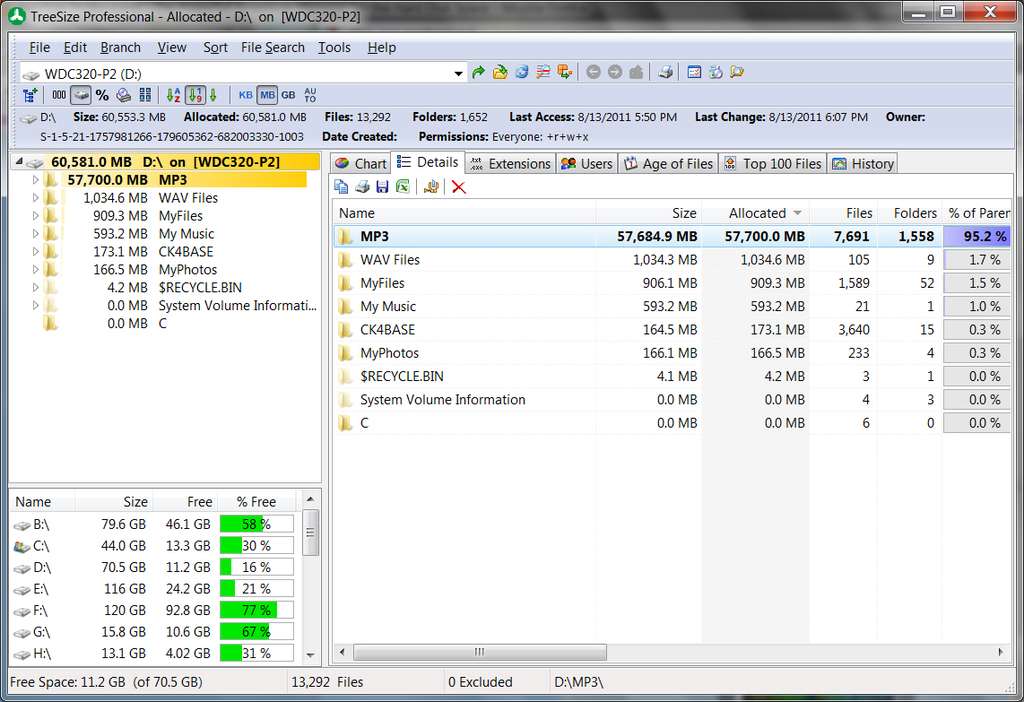
I myself use an excellent (but non-free) multi-pane Explorer-like tab-based product named "TreeSize Professional", which I've used forever. You can look at the vendor site for sample screenshots, or you can try the program yourself for free for 30-days trial. I couldn't live without it.

It has all types of information that it can capture, sort and present, in a large set of alternative interfaces. It can show things arranged ascending or descending arranged alphabetically or by size or any other column heading you choose to sort on.

And it can analyze either drives or specific folders, based on your navigation and possibly filters. It's standard Windows Explorer-like (and therefore familiar and intuitive) in its implementation, right-click context menus, etc., and has many customization options.

For example, here's a very simple and basic "details" view (which is just one of many different possible views), that is not drilled down any deeper yet than on one of my drives:

treesizescreenshot.jpg


Clicking on one of the folders in the upper-left Explorer-tree pane, the right pane would then expand to show the details of the selected folder. For example, selecting my D:\MP3 folder reveals the following:

treesizefolder.jpg


The two panes are independent, so that the folders/files shown in each pane can be expanded or compacted, and sorted and arranged, independently of one another. There are many other customizable and arrangeable columns of information available by scrolling to the right, or by right-click and viewing/using the context menu.


Very very useful and powerful. Output can just be viewed on the screen, or it can also be exported to assorted TXT, HTML, or Excel spreadsheet form.

You can download the product and try it yourself for free for 30-days.

 
Last edited:

My Computer

Computer type
PC/Desktop
Computer Manufacturer/Model Number
Home-built, two systems (1) and (2)
OS
Windows 7 Pro x64 (1), Win7 Pro X64 (2)
CPU
i5-3350p 3.1Ghz/6MB-cache (1); E8400 3.0Ghz/6MB-cache (2)
Motherboard
ASUS P8Z77-V Pro (1); ASUS P5Q3 (2)
Memory
8GB PC3-12800 DDR3 (1); 4GB PC3-10600 DDR3 (2)
Graphics Card(s)
ATI HD7750 (1), (see TV cards); ATI R7 250 (2)
Sound Card
Realtek ALC892 HD Audio (1); Realtek ALC1200 HD Audio (2)
Monitor(s) Displays
Eizo HD2441W LCD, Eizo S2433W (1); Eizo 24" S2433W (2)
Screen Resolution
1920x1200, 1920x1200 (1); 1920x1200 (2)
Hard Drives
(1) 1TB SATA-II (7200RPM), 2x2TB SATA-III (7200RPM), 250GB SATA-III (10000RPM) for OS; 2x2TB external USB 3.0

(2) 320GB SATA-II (7200RPM), 750GB SATA-II (7200RPM), 150GB SATA-II (10000RPM) for OS; 2TB external USB 3.0
PSU
Nesteq ECS-6001 600W (1); Nesteq ECS-5001 500W (2)
Case
Acousti-Case 360 (1) and (2)
Cooling
Noctua NH-U12P SE2 for CPU, 2x120mm case fans (1) and (2)
Keyboard
IBM PS/2 (1) and (2)
Mouse
Logitech MX Revolution wireless (1); Microsoft wired (2)
Internet Speed
100mbps down / 10mbps up
Antivirus
Microsoft Security Essentials; Malwarebyte Anti-Malware Pro
Browser
Firefox
Other Info
Ceton InfiniTV 4-tuner cablecard-enabled TV card as well as Hauppauge HVR-2250 OTA/ATSC 2-tuner TV card in (1), running under Win7 WMC
Back
Top