Hard-drive no longer recognised as a bootable option.

lol0k

New member
Local time
7:46 PM
Messages
7
Hey all,

I was playing Black Ops when my Asus M60J suddenly shut down. At the time, my laptop was quite hot due to Black Ops' considerable usage. Upon starting up again, i received

"Reboot and select proper boot device or insert boot media in selected boot device"

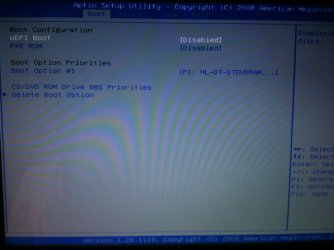
I checked out the booting order and there was only the option of booting from a DVD. I have tried holding down f8 to access the windows 7 inbuilt repairer but it was to no avail. Does this mean that my hard drive has possibly died out on me? I got the laptop in December last year.

As i bought my laptop with a copy of Windows 7 preinstalled, i am unable to use the Windows 7 DVD to repair it. At the bottom of my laptop, the Windows tag reads "Window Pro AO" but i am quite sure that my laptop is Home Premium, however i may be wrong.

Anyway, i would really appreciate any help and thanks in advance.
 
Last edited:

My Computer My Computer

Computer Manufacturer/Model Number
ASUS M60J
OS
Window 7 Home Premium 64bit
hello and welcome.
check your BIOS first.. make sure that's the HDD and DVD-R is detected. and select the first boot to DVD-R
 

My Computer My Computer

Computer Manufacturer/Model Number
built up
OS
windows 7
CPU
Phenom II AMD Dragon 3.5Ghz
Memory
DDR3 4GB
Graphics Card(s)
ATI Radeon 512Mb
Monitor(s) Displays
HP L1506
Screen Resolution
1152 x 864
Hard Drives
WDC 1 TB SATA-II Green Power
Keyboard
HP wireless keyboard
Mouse
HP Optic
Internet Speed
1GB
Thanks for the quick reply,

For my Boot Option Priorities, there is only a single option. It reads "P1: HL-DT-STDVDRAM GT3ON". I'm sorry if this is of not of any use and i apologise for my rooky computer skills.

My harddrive does not appear to be anywhere. Is it possible that by overheating, the Harddrive somehow messed up? :S
 

My Computer My Computer

Computer Manufacturer/Model Number
ASUS M60J
OS
Window 7 Home Premium 64bit
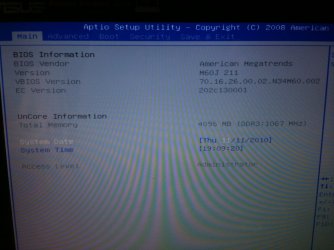
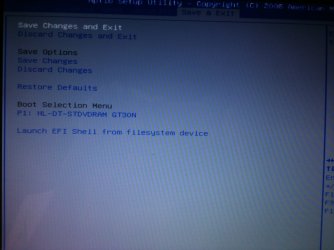
can you take snapshot your BIOS and the information one..
 
Last edited:

My Computer My Computer

Computer Manufacturer/Model Number
built up
OS
windows 7
CPU
Phenom II AMD Dragon 3.5Ghz
Memory
DDR3 4GB
Graphics Card(s)
ATI Radeon 512Mb
Monitor(s) Displays
HP L1506
Screen Resolution
1152 x 864
Hard Drives
WDC 1 TB SATA-II Green Power
Keyboard
HP wireless keyboard
Mouse
HP Optic
Internet Speed
1GB
I hope this is enough
 

Attachments

  • IMG_0721.JPG
    IMG_0721.JPG
    253.8 KB · Views: 39
  • IMG_0722.JPG
    IMG_0722.JPG
    211.4 KB · Views: 35
  • IMG_0723.JPG
    IMG_0723.JPG
    220.3 KB · Views: 24

My Computer My Computer

Computer Manufacturer/Model Number
ASUS M60J
OS
Window 7 Home Premium 64bit
from your snapshot. i don't saw your hdd information.
when startup the computer. press F12 to choose the boot option, and select the DVD device, load your DVD OS and see what you get.
 

My Computer My Computer

Computer Manufacturer/Model Number
built up
OS
windows 7
CPU
Phenom II AMD Dragon 3.5Ghz
Memory
DDR3 4GB
Graphics Card(s)
ATI Radeon 512Mb
Monitor(s) Displays
HP L1506
Screen Resolution
1152 x 864
Hard Drives
WDC 1 TB SATA-II Green Power
Keyboard
HP wireless keyboard
Mouse
HP Optic
Internet Speed
1GB
Hmm, pressing f12 repeatably didnt work and it showed
"Reboot and select proper boot device or insert boot media in selected boot device".
as normal.

When i tried booting the OS it led to that message again. I do not have the Windows 7 DVD as it was preinstalled. Perhaps i need to mount an .ISO of the installation discs and run repairs from there? I really hope there is another method. :\
 

My Computer My Computer

Computer Manufacturer/Model Number
ASUS M60J
OS
Window 7 Home Premium 64bit
Thanks, unfortunately i am not sure of the manufacturer of the laptop's HDD.
Which one of those would i go about downloading? Maybe SeaTools for Windows v1.2.0.4 or SeaTools for DOS v2.20 (Graphical) (04.25.2010)?
 

My Computer My Computer

Computer Manufacturer/Model Number
ASUS M60J
OS
Window 7 Home Premium 64bit
Ok so i ran SeaTools for Windows v1.2.0.4 and it says "No Hard Drives Found"
 

My Computer My Computer

Computer Manufacturer/Model Number
ASUS M60J
OS
Window 7 Home Premium 64bit
The hard drive seems to be dead.
You need to remove it and try to hook it up to another computer in an external drive case to confirm this.
 

My Computer My Computer

Computer type
PC/Desktop
Computer Manufacturer/Model Number
Self Built Custom Computer.
OS
Windows 10 Pro x64
CPU
i7-4770K
Motherboard
Asus Z87 Sabertooth
Memory
16Gig DDR3-2400
Graphics Card(s)
Gigabyte GT740
Sound Card
Onboard
Monitor(s) Displays
Benq 27" - Dell 23' - Benq 22"
Screen Resolution
1680x1050
Hard Drives
Samsung 840 Pro 128g SSD
1xWestern Digital Caviar Green 1tb
2xWestern Digital Caviar Green 2 tb
PSU
Seasonic 760 watt Platinum
Case
Coolermaster Haf - X
Cooling
Noctua NH-C12P CPU Cooler
Keyboard
Logitech illuminated keyboard
Mouse
Logitech Perfomance MX
Internet Speed
Cable = speeds to 20Mbps downsteam and 512kbps upsteam
Antivirus
Avast Internet Security
Browser
Firefox
Yup, just gave ASUS a call and they said that they'd take it in and fix it, but it is most likely that the Hard drive died out on me :\. Anyway thanks for all the help +rep.
 

My Computer My Computer

Computer Manufacturer/Model Number
ASUS M60J
OS
Window 7 Home Premium 64bit
oh that's still have guarantee? but you can try to slave it to another. and see the hdd is detect or not.
and i hope you're backup your data before this issue happen on you. and thanks for the rep. :)
 
Last edited:

My Computer My Computer

Computer Manufacturer/Model Number
built up
OS
windows 7
CPU
Phenom II AMD Dragon 3.5Ghz
Memory
DDR3 4GB
Graphics Card(s)
ATI Radeon 512Mb
Monitor(s) Displays
HP L1506
Screen Resolution
1152 x 864
Hard Drives
WDC 1 TB SATA-II Green Power
Keyboard
HP wireless keyboard
Mouse
HP Optic
Internet Speed
1GB
Back
Top