Solved Hard drive not recognized by laptop, No bootable device.

Yardies

New member
Local time
10:16 PM
Messages
12
Hard drive (500gb) is not recognized in the Windows 7 laptop (daughter's) . I do see it in the Bios.
I removed it, plugged it in externally to another laptop (my windows 10) via encloser case, and it's not recognized there either.

The hard drive is NOT making bad noises. I hear it spin up. I've tried
Troubleshooting in different ways. I would like to try to save the hard drive files & info (including the Win 7 OS) if possible without having to spend money to do so.

I have a spare 120gb HD that has ubuntu 18.04 that I inserted to the LT, so that's good.
But I'd like to get win 7 back.

So here's my questions.
1) Can I reinstall her Windows 7 back to a new clean hard drive?
It came pre-installed on her LTop. There is NO cd disk of it. ☹

2) If yes, where Can I find the product key, or whatever it's called, to authenticate
Win 7 at installation? Stickers are on her LTop bottom.
3) If I can do this, where can I go to get the download?

Of course having made a recovery disk when she purchased her LTop 5 yrs ago, would have
Been the thing to do, but it didn't happen.
Please help, I thank you in advance.
*Gateway Windows 7 home premium laptop
 

My Computer My Computer

Computer type
Laptop
Computer Manufacturer/Model Number
Gateway NV56R06U Pentium
OS
Windows 7 Home premium 64 bit Microsoft sp1
CPU
Intel(R) Pentium(R) CPU B950 @ 2.10GHz, 64 bit,
Motherboard
Gateway VG50_HC_HR
Memory
4 gb
Graphics Card(s)
Intel(R) HD Graphics
Sound Card
(1) High Definition Audio Device (2) Intel(R) Display Audi
Hard Drives
HITACHI HTS541612J9SA00 3H ATA Device, 111.79 GB
Browser
Chrome
Other Info
Network Adapters: Atheros AR5B125 Wireless Network Adapter, Broadcom NetLink (TM) Gigabit Ethernet.
I do see it in the Bios.
I removed it, plugged it in externally to another laptop (my windows 10) via encloser case, and it's not recognized there either.


What do you mean "not recognized"? Bios sees it, does it show in disk management, or Diskpart?

It could possibly be a damaged partition table. If so, a decent 3rd party partition manager might be able to recover it. You could try Aomei Standard (free ) edition.
Free Partition Manager Software - AOMEI Partition Assistant Standard

It is included in my boot media also.
Updated boot media. Minor bug fixes, updated drivers, added drivers for Ryzen, new versions of Aomei Backupper, PartAssist,WinNtSetup, Recuva, Dism++,DiskGenius, added shadowcopyview.

32 bit
17514x86.iso


64 bit
17514x64-v9.iso
 
Last edited:

My Computers My Computers

System One System Two

  • Computer type
    PC/Desktop
    OS
    7 X64
    CPU
    i5 8400
    Motherboard
    gigabyte b365m ds3h
    Memory
    2x8gb 3200mhz
    Hard Drives
    various
    PSU
    pure power 11 400w cm
    Case
    Coolermaster
    Cooling
    cryorig m9i
  • Computer type
    PC/Desktop
    OS
    7x64
    CPU
    g5400
    Motherboard
    ga b365m ds3h
    Memory
    8gb ddr4 2400
    PSU
    xfx pro 450w
Hard drive re-inserted to explain...

To be more specific, I placed HD back in the unit to explain what i see in BIOS.
In bios (information tab): HD toshiba mk5059gsxp... It shows is HD there, however it does not show the capacity.
When i start pc, it goes to:
Pxe-e61: media test failure, check cable.
Pxe-M0f: exciting Broadcom pxe rom.
No bootable device-- insert boot disk & press any key.

I took it out, then connected it to MY laptop via external enclosure case, and my computer does not recognize it either. However, in Disk Management I see it there but it says unallocated and is labeled Disk 1 unknown. I right click on properties, & box says is working properly, lol. Right clicking only gave me 2 options (properties, & help) because everything else is grayed out. I think the only way it'll let me do something is if it gets formatted at that point.
Thank you for your reply. What do you advise?
 

My Computer My Computer

Computer type
Laptop
Computer Manufacturer/Model Number
Gateway NV56R06U Pentium
OS
Windows 7 Home premium 64 bit Microsoft sp1
CPU
Intel(R) Pentium(R) CPU B950 @ 2.10GHz, 64 bit,
Motherboard
Gateway VG50_HC_HR
Memory
4 gb
Graphics Card(s)
Intel(R) HD Graphics
Sound Card
(1) High Definition Audio Device (2) Intel(R) Display Audi
Hard Drives
HITACHI HTS541612J9SA00 3H ATA Device, 111.79 GB
Browser
Chrome
Other Info
Network Adapters: Atheros AR5B125 Wireless Network Adapter, Broadcom NetLink (TM) Gigabit Ethernet.
Pic of disk mgmt on my laptop, where HD in questis attached externally

20180722_120811.jpg
 

My Computer My Computer

Computer type
Laptop
Computer Manufacturer/Model Number
Gateway NV56R06U Pentium
OS
Windows 7 Home premium 64 bit Microsoft sp1
CPU
Intel(R) Pentium(R) CPU B950 @ 2.10GHz, 64 bit,
Motherboard
Gateway VG50_HC_HR
Memory
4 gb
Graphics Card(s)
Intel(R) HD Graphics
Sound Card
(1) High Definition Audio Device (2) Intel(R) Display Audi
Hard Drives
HITACHI HTS541612J9SA00 3H ATA Device, 111.79 GB
Browser
Chrome
Other Info
Network Adapters: Atheros AR5B125 Wireless Network Adapter, Broadcom NetLink (TM) Gigabit Ethernet.
Says not initialized.

Note: partition recovery and file recovery are different things.

1. For safety, scan it with file recovery program first. You may be able to recover important data. You can try free ones , such as Recuva first (select Deep Scan), if it finds your data, copy it somewhere safe.

The paid versions are usually more effective. If Recuva is no use , Active@ File Recovery is one of the better ones, and it is relatively cheap. It will scan for free - if it finds your data, then you need to purchase a license to recover it.

Or, you can try Disk Genius ( free version is in my boot media.)You will also need to purchase a license for file recovery.

2. After that, try partition recovery module on the free Aomei partition Assistant. I am doubtful, because it shows uninitialiazed. DiskGenius also has partition recovery, which is a free function, bit more complicated to use than Aomei.

3. If that doesn't work, only then, use Aomei to rebuild the mbr on the disk then try partition recovery module again.

If you are not bothered about ( possibly ) losing everything on the disk, you can go straight for number 3 above.
 

My Computers My Computers

System One System Two

  • Computer type
    PC/Desktop
    OS
    7 X64
    CPU
    i5 8400
    Motherboard
    gigabyte b365m ds3h
    Memory
    2x8gb 3200mhz
    Hard Drives
    various
    PSU
    pure power 11 400w cm
    Case
    Coolermaster
    Cooling
    cryorig m9i
  • Computer type
    PC/Desktop
    OS
    7x64
    CPU
    g5400
    Motherboard
    ga b365m ds3h
    Memory
    8gb ddr4 2400
    PSU
    xfx pro 450w
Good recovery advice, but..

I tried Recuva and it didnt even "see' the bad hard drive, and I scanned with easeus and nothing.
I did install a few others you mentioned but was not sure I wanted to "risk" using them.

So....
The sticker my daughters Laptop has her product key. It is 25 characters long.
I think she might be ok with my wiping out her hard drive and reinstall back Windows .
On the Microsoft site, there is a place that will let you enter the product key to do the download for free.
.
(1) Which disk repair utility do you recommend I use to try to prepare her "bad" HD for the re-installation of Windows 7 home premium (64 bit) on her same Hard drive?. I will assume it still has some life in it.

(2)Should I download & save the files to MY working laptop, then use Universal USB installer so that it can be copied to a USB flash drive. Then boot up HER laptop to install via USB flash drive and proceed with the installation?

(3) Will it go like mentioned, or will Windows prevent me from installing even though I have the legal product key?

(4) Should I not risk doing the installation to her "bad" HD in case it fails? I guess she should invest in another HD, but for now maybe try to test the original HD again to see if it works. That is why I ask what can be done to prepare the HD. At that point, I may be able to tell if its useable or not prior to windows installation.

Thank you for your help.
 

My Computer My Computer

Computer type
Laptop
Computer Manufacturer/Model Number
Gateway NV56R06U Pentium
OS
Windows 7 Home premium 64 bit Microsoft sp1
CPU
Intel(R) Pentium(R) CPU B950 @ 2.10GHz, 64 bit,
Motherboard
Gateway VG50_HC_HR
Memory
4 gb
Graphics Card(s)
Intel(R) HD Graphics
Sound Card
(1) High Definition Audio Device (2) Intel(R) Display Audi
Hard Drives
HITACHI HTS541612J9SA00 3H ATA Device, 111.79 GB
Browser
Chrome
Other Info
Network Adapters: Atheros AR5B125 Wireless Network Adapter, Broadcom NetLink (TM) Gigabit Ethernet.
If she doesnt mind losing the data currently on there, try rt clicking the disk in disk mgmt and select initialise to mbr. You need to rt click it in the grey bit on the left - exactly where it says disk1 in your screenshot.

Then try partition recovery module from aomei/diskgenius. If you can't recover partitions after initializing the disk, then create one out of the entire disk format as ntfs and run checkdisk.

If check disk is ok, the disk is probably useable.

You can ceate the usb install media on your machine if you like, it doesn't matter

Put the HD back in her machine to install windows.
 

My Computers My Computers

System One System Two

  • Computer type
    PC/Desktop
    OS
    7 X64
    CPU
    i5 8400
    Motherboard
    gigabyte b365m ds3h
    Memory
    2x8gb 3200mhz
    Hard Drives
    various
    PSU
    pure power 11 400w cm
    Case
    Coolermaster
    Cooling
    cryorig m9i
  • Computer type
    PC/Desktop
    OS
    7x64
    CPU
    g5400
    Motherboard
    ga b365m ds3h
    Memory
    8gb ddr4 2400
    PSU
    xfx pro 450w
Welcome to the Forum.

I would try to fix / recover the disk data / partitions. I would also say that if it can't be recovered, the disk is unusable (dead).

Maybe it's time to buy a SSD (256G or 512G) or a 128G SSD and a 512G HDD (installed on a caddy in place of the ODD)

To reinstall Win 7 HP you can use any Win 7 installation disk. Then you use the key on the COA sticker and it will activate.
If the laptop has 4G of memory or less, I would install Win 7 32 bits. If more than 4G of memory then install Win 7 64 bits.

This links from M$ are for Win 7 HP (valid for 24 hours)
- 32 bits https://software-download.microsoft.com/pr/Win7_HomePrem_SP1_English_COEM_x32.iso?t=ffae3572-a110-413e-b586-9e0c0bbc61a6&e=1532527545&h=77291228b60e43154b4da9c4e01df9b0

- 64 Bits https://software-download.microsoft.com/pr/Win7_HomePrem_SP1_English_COEM_x64.iso?t=ffae3572-a110-413e-b586-9e0c0bbc61a6&e=1532527545&h=95fe32a0c0a30b4d114f30db5a697327
 
Last edited:

My Computers My Computers

System One System Two

  • Computer type
    PC/Desktop
    Computer Manufacturer/Model Number
    custom build
    OS
    Windows 7 HP 64
    CPU
    i5 6600K - 800MHz to 4200MHz
    Motherboard
    GA-Z170-HD3P
    Memory
    4+4G GSkill DDR4 3000
    Graphics Card(s)
    IG - Intel 530
    Monitor(s) Displays
    Samsung 226BW
    Screen Resolution
    1680x1050
    Hard Drives
    (1) -1 SM951 – 128GB M.2 AHCI PCIe SSD drive for Windows 7 and Lubuntu
    (2) -1 WD SATA 3 - 1T for Data
    (3) -1 WD SATA 3 - 1T for backup
    PSU
    Thermaltake 450W TR2 gold
    Keyboard
    Old and good Chicony mechanical keyboard
    Mouse
    Logitech mX performance - 9 buttons (had to disable some)
    Internet Speed
    500Mb/s
    Browser
    Firefox 64
    Other Info
    TinyWall firewall
  • Computer type
    Laptop
    System Manufacturer/Model Number
    Asus Q550LF
    OS
    Windows 7 Pro
    CPU
    i7-4500U 800MHz to 3.0GHz
    Motherboard
    Asus Q550LF
    Memory
    (4+4)G DDR3 1600
    Graphics Card(s)
    IG intel 4400 + NVIDIA GeForce GT 745M
    Sound Card
    Realtek
    Monitor(s) Displays
    LG Display LP156WF4-SPH1
    Screen Resolution
    1920 x 1080
    Hard Drives
    BX500 120G SSD for Windows and programs +
    1T HDD for data
    Internet Speed
    500 Mb/s
    Browser
    Firefox
    Other Info
    TinyWall firewall
HD must be dead, used the "loaner" 120gb instead.

[/ATTACH]Thank you for your inputs & great advice, Mega & SIW. I've been at this for a longgggg time now. Come to accept I did not use her disk, but instead, used my spare 120gb HD (I know, it's small ) but at least if I mess something up, it will be better than messing up something bigger or newer.

Here's where I'm at:
I got Windows 7 home premium 64 bit sp1 installed!!.

Upon set up, it allowed me to" skip " the part to enter the 25 character product key. Reason i skipped, was just in case i do another install to a larger drive for this same LT, & i redo this all over again; Maybe had i entered the P.key, i can only use that P.key once?? Just my thought....

Most everything is ok so far EXCEPT for drivers under "other devices" in Dev Manager.
I uninstalled/ reinstalled & nothing. See above photo.
I can't connect to Wi-Fi to see if I can update/ upload drivers (prob cause of this problem).
Should I try via Ethernet cable.?

If that's the way, is there a simple way? I can also Google it if you're all too busy to reply.
Note when I had Ubuntu installed on this same disk, everything worked fine including the Wi-Fi. There is no trace of Ubuntu on this disk. Installation went fine in that area.

Please advise,
I Thank you kindly:-)by
 

My Computer My Computer

Computer type
Laptop
Computer Manufacturer/Model Number
Gateway NV56R06U Pentium
OS
Windows 7 Home premium 64 bit Microsoft sp1
CPU
Intel(R) Pentium(R) CPU B950 @ 2.10GHz, 64 bit,
Motherboard
Gateway VG50_HC_HR
Memory
4 gb
Graphics Card(s)
Intel(R) HD Graphics
Sound Card
(1) High Definition Audio Device (2) Intel(R) Display Audi
Hard Drives
HITACHI HTS541612J9SA00 3H ATA Device, 111.79 GB
Browser
Chrome
Other Info
Network Adapters: Atheros AR5B125 Wireless Network Adapter, Broadcom NetLink (TM) Gigabit Ethernet.
Instead of taking pictures, use the snipping toll to generate the images (%windir%\system32\SnippingTool.exe)

- You can use the COA key only on one computer, as many times is required, but if you do it more than once in 6 months it may ask to activate by phone. So don't activate till you're done all installations.
- You can install everything on the 120G HDD and then clone it to a bigger HDD.
- Use this tutorial to find the hardware specs. We need them to find the proper drivers. System Info - See Your System Specs - Windows 7 Help Forums
- Go to the Gateway site and see if they have the drivers for the laptop.
- Meanwhile, set Windows updates to manual (under services) and never check on WU page. On your computer download SP2 and the security only updates - MS releases SP2 for Windows 7 - Windows 7 Help Forums
 

My Computers My Computers

System One System Two

  • Computer type
    PC/Desktop
    Computer Manufacturer/Model Number
    custom build
    OS
    Windows 7 HP 64
    CPU
    i5 6600K - 800MHz to 4200MHz
    Motherboard
    GA-Z170-HD3P
    Memory
    4+4G GSkill DDR4 3000
    Graphics Card(s)
    IG - Intel 530
    Monitor(s) Displays
    Samsung 226BW
    Screen Resolution
    1680x1050
    Hard Drives
    (1) -1 SM951 – 128GB M.2 AHCI PCIe SSD drive for Windows 7 and Lubuntu
    (2) -1 WD SATA 3 - 1T for Data
    (3) -1 WD SATA 3 - 1T for backup
    PSU
    Thermaltake 450W TR2 gold
    Keyboard
    Old and good Chicony mechanical keyboard
    Mouse
    Logitech mX performance - 9 buttons (had to disable some)
    Internet Speed
    500Mb/s
    Browser
    Firefox 64
    Other Info
    TinyWall firewall
  • Computer type
    Laptop
    System Manufacturer/Model Number
    Asus Q550LF
    OS
    Windows 7 Pro
    CPU
    i7-4500U 800MHz to 3.0GHz
    Motherboard
    Asus Q550LF
    Memory
    (4+4)G DDR3 1600
    Graphics Card(s)
    IG intel 4400 + NVIDIA GeForce GT 745M
    Sound Card
    Realtek
    Monitor(s) Displays
    LG Display LP156WF4-SPH1
    Screen Resolution
    1920 x 1080
    Hard Drives
    BX500 120G SSD for Windows and programs +
    1T HDD for data
    Internet Speed
    500 Mb/s
    Browser
    Firefox
    Other Info
    TinyWall firewall
- Go to the Gateway site and see if they have the drivers for the laptop.

:ditto:

We don't know if it is a Gateway machine. Whoever the manufacturer is, they should have drivers for your daughter's machine on their site.

You can download them on your pc, copy to usb and install them on your daughter's machine
 

My Computers My Computers

System One System Two

  • Computer type
    PC/Desktop
    OS
    7 X64
    CPU
    i5 8400
    Motherboard
    gigabyte b365m ds3h
    Memory
    2x8gb 3200mhz
    Hard Drives
    various
    PSU
    pure power 11 400w cm
    Case
    Coolermaster
    Cooling
    cryorig m9i
  • Computer type
    PC/Desktop
    OS
    7x64
    CPU
    g5400
    Motherboard
    ga b365m ds3h
    Memory
    8gb ddr4 2400
    PSU
    xfx pro 450w
Hi, SIW & Mega, i just wanted to follow up; i am still working on this laptop. I had got the Wi-Fi up last night & it worked good.
Then turned off LT.

But....This morning, i turned it on & Wi-Fi having issues again. I'll troubleshoot more by myself (so as not to bother you kind techs), and post later. Ethernet cable connected works well. I think something caused it to mess up. Did system restore, but no luck.
Anyways, I'll work on this more (googling for answers), before i come back.
My main/first priority now is getting the Wi-Fi working so that I can update install and do anything I need to finish this lt up.
Thx & hopefully i can get this going.

Note that I used the System info tool to get info on her LT for this forum.
 
Last edited:

My Computer My Computer

Computer type
Laptop
Computer Manufacturer/Model Number
Gateway NV56R06U Pentium
OS
Windows 7 Home premium 64 bit Microsoft sp1
CPU
Intel(R) Pentium(R) CPU B950 @ 2.10GHz, 64 bit,
Motherboard
Gateway VG50_HC_HR
Memory
4 gb
Graphics Card(s)
Intel(R) HD Graphics
Sound Card
(1) High Definition Audio Device (2) Intel(R) Display Audi
Hard Drives
HITACHI HTS541612J9SA00 3H ATA Device, 111.79 GB
Browser
Chrome
Other Info
Network Adapters: Atheros AR5B125 Wireless Network Adapter, Broadcom NetLink (TM) Gigabit Ethernet.
:ditto:

We don't know if it is a Gateway machine. Whoever the manufacturer is, they should have drivers for your daughter's machine on their site.

You can download them on your pc, copy to usb and install them on your daughter's machine

Indeed SIW, this is exactly what I did to at least get the Network controller updated, and also the VGA graphics. The graphics updating made the resolution really nice, & modern.

But as I said in my recent reply, I still have things to fix.I will keep at it. Thanks
 

My Computer My Computer

Computer type
Laptop
Computer Manufacturer/Model Number
Gateway NV56R06U Pentium
OS
Windows 7 Home premium 64 bit Microsoft sp1
CPU
Intel(R) Pentium(R) CPU B950 @ 2.10GHz, 64 bit,
Motherboard
Gateway VG50_HC_HR
Memory
4 gb
Graphics Card(s)
Intel(R) HD Graphics
Sound Card
(1) High Definition Audio Device (2) Intel(R) Display Audi
Hard Drives
HITACHI HTS541612J9SA00 3H ATA Device, 111.79 GB
Browser
Chrome
Other Info
Network Adapters: Atheros AR5B125 Wireless Network Adapter, Broadcom NetLink (TM) Gigabit Ethernet.

My Computers My Computers

System One System Two

  • Computer type
    PC/Desktop
    Computer Manufacturer/Model Number
    custom build
    OS
    Windows 7 HP 64
    CPU
    i5 6600K - 800MHz to 4200MHz
    Motherboard
    GA-Z170-HD3P
    Memory
    4+4G GSkill DDR4 3000
    Graphics Card(s)
    IG - Intel 530
    Monitor(s) Displays
    Samsung 226BW
    Screen Resolution
    1680x1050
    Hard Drives
    (1) -1 SM951 – 128GB M.2 AHCI PCIe SSD drive for Windows 7 and Lubuntu
    (2) -1 WD SATA 3 - 1T for Data
    (3) -1 WD SATA 3 - 1T for backup
    PSU
    Thermaltake 450W TR2 gold
    Keyboard
    Old and good Chicony mechanical keyboard
    Mouse
    Logitech mX performance - 9 buttons (had to disable some)
    Internet Speed
    500Mb/s
    Browser
    Firefox 64
    Other Info
    TinyWall firewall
  • Computer type
    Laptop
    System Manufacturer/Model Number
    Asus Q550LF
    OS
    Windows 7 Pro
    CPU
    i7-4500U 800MHz to 3.0GHz
    Motherboard
    Asus Q550LF
    Memory
    (4+4)G DDR3 1600
    Graphics Card(s)
    IG intel 4400 + NVIDIA GeForce GT 745M
    Sound Card
    Realtek
    Monitor(s) Displays
    LG Display LP156WF4-SPH1
    Screen Resolution
    1920 x 1080
    Hard Drives
    BX500 120G SSD for Windows and programs +
    1T HDD for data
    Internet Speed
    500 Mb/s
    Browser
    Firefox
    Other Info
    TinyWall firewall

My Computers My Computers

System One System Two

  • Computer type
    PC/Desktop
    OS
    7 X64
    CPU
    i5 8400
    Motherboard
    gigabyte b365m ds3h
    Memory
    2x8gb 3200mhz
    Hard Drives
    various
    PSU
    pure power 11 400w cm
    Case
    Coolermaster
    Cooling
    cryorig m9i
  • Computer type
    PC/Desktop
    OS
    7x64
    CPU
    g5400
    Motherboard
    ga b365m ds3h
    Memory
    8gb ddr4 2400
    PSU
    xfx pro 450w
Update for where I am at...

Its been a while, so heres where I am at on my daughters LT.

On the "trial" 120gb HD, I got Windows 7 Home premium sp1 on this HD (Drivers and all were updated fine)..

I cloned that small drive to a working 500gb successfully. This will be the now "permanent" HD. The only thing pending is getting it to sp2...

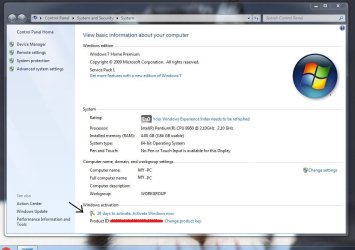
Besides getting it updated to sp2, I have one concern as shown on attached screen shot'. The computer system shows the windows activation countdown....
Yesterday it said "21 days" etc. Today it says "20 days" which means to me that eventually it will get to 0 days.
What is going to happen then? As stated in my older post, I have the 25# product key that is under the LT on the windows sticker. Will that product key work when prompted to enter it on day "0'?
Should I start a new thread on either of these two topics?

Note that the reason I did not continue with updating to sp2 was because I was confused on how to
do it right. I Did some reading on the issues many have had doing the sp2 because it is bundled and causes others problems...Is it necessary to update to sp2?

Thank you kindly,
I truly appreciate your help in getting this far on her LT issues.:-)
 

Attachments

  • Windows System screenshot 8-3-18, diff HD swap-Note activation countdown.JPG
    Windows System screenshot 8-3-18, diff HD swap-Note activation countdown.JPG
    75.3 KB · Views: 0

My Computer My Computer

Computer type
Laptop
Computer Manufacturer/Model Number
Gateway NV56R06U Pentium
OS
Windows 7 Home premium 64 bit Microsoft sp1
CPU
Intel(R) Pentium(R) CPU B950 @ 2.10GHz, 64 bit,
Motherboard
Gateway VG50_HC_HR
Memory
4 gb
Graphics Card(s)
Intel(R) HD Graphics
Sound Card
(1) High Definition Audio Device (2) Intel(R) Display Audi
Hard Drives
HITACHI HTS541612J9SA00 3H ATA Device, 111.79 GB
Browser
Chrome
Other Info
Network Adapters: Atheros AR5B125 Wireless Network Adapter, Broadcom NetLink (TM) Gigabit Ethernet.

My Computers My Computers

System One System Two

  • Computer type
    PC/Desktop
    Computer Manufacturer/Model Number
    custom build
    OS
    Windows 7 HP 64
    CPU
    i5 6600K - 800MHz to 4200MHz
    Motherboard
    GA-Z170-HD3P
    Memory
    4+4G GSkill DDR4 3000
    Graphics Card(s)
    IG - Intel 530
    Monitor(s) Displays
    Samsung 226BW
    Screen Resolution
    1680x1050
    Hard Drives
    (1) -1 SM951 – 128GB M.2 AHCI PCIe SSD drive for Windows 7 and Lubuntu
    (2) -1 WD SATA 3 - 1T for Data
    (3) -1 WD SATA 3 - 1T for backup
    PSU
    Thermaltake 450W TR2 gold
    Keyboard
    Old and good Chicony mechanical keyboard
    Mouse
    Logitech mX performance - 9 buttons (had to disable some)
    Internet Speed
    500Mb/s
    Browser
    Firefox 64
    Other Info
    TinyWall firewall
  • Computer type
    Laptop
    System Manufacturer/Model Number
    Asus Q550LF
    OS
    Windows 7 Pro
    CPU
    i7-4500U 800MHz to 3.0GHz
    Motherboard
    Asus Q550LF
    Memory
    (4+4)G DDR3 1600
    Graphics Card(s)
    IG intel 4400 + NVIDIA GeForce GT 745M
    Sound Card
    Realtek
    Monitor(s) Displays
    LG Display LP156WF4-SPH1
    Screen Resolution
    1920 x 1080
    Hard Drives
    BX500 120G SSD for Windows and programs +
    1T HDD for data
    Internet Speed
    500 Mb/s
    Browser
    Firefox
    Other Info
    TinyWall firewall
You might as well activate now.

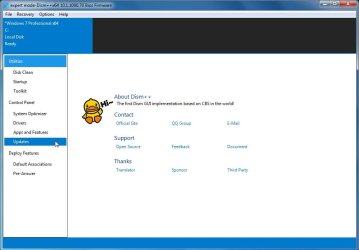
Then run dism++ to get the current updates. It is much better than that ancient roll up.

easy to do. It uses the Microsoft update catalog and the differ engine.
 

My Computers My Computers

System One System Two

  • Computer type
    PC/Desktop
    OS
    7 X64
    CPU
    i5 8400
    Motherboard
    gigabyte b365m ds3h
    Memory
    2x8gb 3200mhz
    Hard Drives
    various
    PSU
    pure power 11 400w cm
    Case
    Coolermaster
    Cooling
    cryorig m9i
  • Computer type
    PC/Desktop
    OS
    7x64
    CPU
    g5400
    Motherboard
    ga b365m ds3h
    Memory
    8gb ddr4 2400
    PSU
    xfx pro 450w
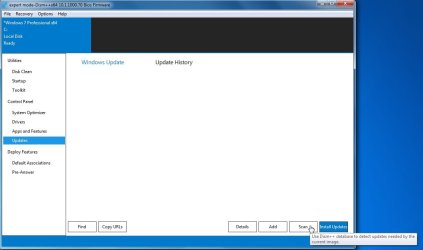
Click Updates

d1.jpg

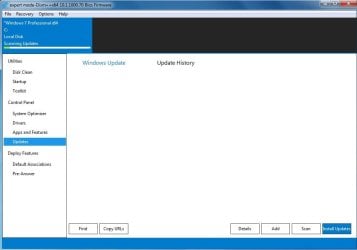
Click Scan and it downloads the MS database , scans your system and gives you a list

d2.jpg

d3.jpg
 

My Computers My Computers

System One System Two

  • Computer type
    PC/Desktop
    OS
    7 X64
    CPU
    i5 8400
    Motherboard
    gigabyte b365m ds3h
    Memory
    2x8gb 3200mhz
    Hard Drives
    various
    PSU
    pure power 11 400w cm
    Case
    Coolermaster
    Cooling
    cryorig m9i
  • Computer type
    PC/Desktop
    OS
    7x64
    CPU
    g5400
    Motherboard
    ga b365m ds3h
    Memory
    8gb ddr4 2400
    PSU
    xfx pro 450w
Windows (3) updates didn't convert to sp2-Win activation a success

Hi,
I have included 2 screenshots (BTW, I love that snipping tool).

1st= (3) Win Updates installed as of shortly ago.
I circled the (3) that Mega suggested. 3020369, 3125574, 3172605.

2nd= I went ahead and activated Windows, & all went fast and smoothly. I am very happy and thank you both Mega and SIW, for all your suggestions.

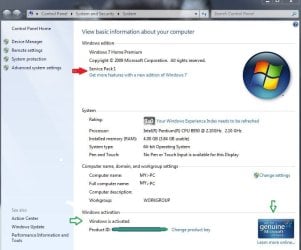
However, in the screenshot, it still shows SP1 even though those three updates shown above are
showing as installed in the other Screenshot. Laptop rebooted as instructed.

And I will definitely make a disk image on an external disk for safe keeping once all is finished.
Question:
Since it appears that it needs MANY updates more, I want to minimize updating the ones not necessary. I dont think daughter will ever update to Win 10 on this unit. So keeping this pc as simple is the goal.
If I can get sp2 installed can updating windows stop there?
And what is the step missing to get sp2? I must have missed something?

Thank you again:-)
 

Attachments

  • WinUpdates installed as of 3.30 pm 8-4-18, for forums.JPG
    WinUpdates installed as of 3.30 pm 8-4-18, for forums.JPG
    94.1 KB · Views: 0
  • Windows activation successfull Vs pc 8-4-2018, 2- for forums.jpg
    Windows activation successfull Vs pc 8-4-2018, 2- for forums.jpg
    65.5 KB · Views: 1

My Computer My Computer

Computer type
Laptop
Computer Manufacturer/Model Number
Gateway NV56R06U Pentium
OS
Windows 7 Home premium 64 bit Microsoft sp1
CPU
Intel(R) Pentium(R) CPU B950 @ 2.10GHz, 64 bit,
Motherboard
Gateway VG50_HC_HR
Memory
4 gb
Graphics Card(s)
Intel(R) HD Graphics
Sound Card
(1) High Definition Audio Device (2) Intel(R) Display Audi
Hard Drives
HITACHI HTS541612J9SA00 3H ATA Device, 111.79 GB
Browser
Chrome
Other Info
Network Adapters: Atheros AR5B125 Wireless Network Adapter, Broadcom NetLink (TM) Gigabit Ethernet.
Back
Top