Hard drive over filling

tomecho

New member
Local time
10:57 PM
Messages
3
Something is filling up my hard drive. Is there a way to to check the size of folders without opening each one? I've done cleaning of caches etc. No viruses found. Transferred videos, pics and docs to external drive. Thanks TJ
 

My Computer

OS
windows 7 home premium 64bit
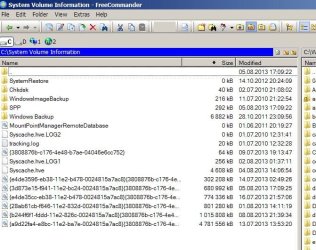
FreeCommander has a folder size button on the Toolbar.

If you haven't run a scan with Malwarebytes antimalware I recommend it.

=============================


Welcome to Windows Seven Forums.


To avoid a lot of Q & A about your hardware and OS configuration, please click on this link to


Edit System Specs


Filling this out, at least partially, will save a lot of time. Another advantage is when posting a new problem, the person answering can just click the My System Specs link in the bottom of your post. No need to search for the information.


If you have multiple systems just indicate that in the System Specs so that we know why many of the fields are blank.
 

My Computer

Computer Manufacturer/Model Number
HP Media Center
OS
Windows 7 32 bit
CPU
AMD 5200+ dual core
Memory
2 GB
Graphics Card(s)
NVidia GeForce 6150SE 128 MB
Monitor(s) Displays
CRT
Screen Resolution
1280x1024
Hard Drives
500 GB Sata internal :

SIIG USB 3.0 docking stations w/WD Caviar Black 6 Gb/s drives
Keyboard
PS/2
Mouse
PS/2 Wheel Mouse
Other Info
SIIG USB 3.0 PCIexpress card.

My Computer

Computer type
PC/Desktop
Computer Manufacturer/Model Number
Self built custom
OS
64-bit Windows 11 Pro for Workstations
CPU
Intel i7-8700K OC'd to 5 GHz
Motherboard
ASUS ROG Maximus XI Formula Z390
Memory
64 GB (4x16GB) G.SKILL TridentZ RGB DDR4 3600 MHz
Graphics Card(s)
ASUS ROG-STRIX-GTX1080TI-O11G-GAMING
Sound Card
Integrated
Monitor(s) Displays
2 x Samsung Odyssey G7 27"
Screen Resolution
2560x1440
Hard Drives
1TB Samsung 990 PRO M.2,
4TB Samsung 990 PRO PRO M.2,
TerraMaster F8 SSD Plus NAS
PSU
Seasonic Prime Titanium 850W
Case
Thermaltake Core P3
Cooling
Corsair Hydro H115i
Keyboard
Logitech wireless K800
Mouse
Logitech MX Master 4
Internet Speed
2 Gb/s Download and 100 Mb/s Upload
Antivirus
Malwarebyte Anti-Malware Premium
Browser
Google Chrome
Other Info
Logitech Z625 speaker system,
Logitech BRIO 4K Pro webcam,
HP Color LaserJet Pro MFP M477fdn,
APC SMART-UPS RT 1000 XL - SURT1000XLI,
Galaxy S23 Plus phone
Option1 in the above link (WinDirStat) is an absolute must to get a first view of what is really on the disk - and you can delete unwanted folders directly from within WinDirStat (right click).

But it is possible that the culprit is in the shadowstorage (where the system restore points are being stored). That space you would not see in WinDirStat. To find the size of that space run this command:

vssadmin list shadowstorage

Look for the Allocated space.
 

My Computer

Computer Manufacturer/Model Number
HP, Dell, Gateway, Toshiba - 4 laptops and 2 desktops
OS
Vista, Windows7, Mint Mate, Zorin, Windows 8
CPU
from 1.6GHz Duo to i7
Monitor(s) Displays
2x HP w2207
Hard Drives
5x HDD, 7x SSD, 12x Externals
Keyboard
with trackball - no mices
Mouse
Trackball mice
Internet Speed
DSL 6000

Attachments

  • fc.JPG
    fc.JPG
    80.4 KB · Views: 10

My Computer

Computer type
Laptop
Computer Manufacturer/Model Number
Dell \ Lenovo\ HP \ Toshiba
OS
W7, W8.1
Antivirus
MSE, Malwarebytes
Browser
FF
Another disk space display app that's incredibly fast is WizTree. It's for NTFS only. I reads the MFTs rather than using sytem calls to get the space used.
 

My Computer

Computer Manufacturer/Model Number
HP Media Center
OS
Windows 7 32 bit
CPU
AMD 5200+ dual core
Memory
2 GB
Graphics Card(s)
NVidia GeForce 6150SE 128 MB
Monitor(s) Displays
CRT
Screen Resolution
1280x1024
Hard Drives
500 GB Sata internal :

SIIG USB 3.0 docking stations w/WD Caviar Black 6 Gb/s drives
Keyboard
PS/2
Mouse
PS/2 Wheel Mouse
Other Info
SIIG USB 3.0 PCIexpress card.
There is this free software named WinDirStat that iirc shows you an image of the files on your computer or any location of your choice. The nice thing about that is that you might discover some files that are both large and otherwise something that qualifies for deletion (not necessary or interesting anymore). Kinda neat looking at the harddrive this way.

http://download.cnet.com/WinDirStat/3000-2248_4-10614593.html

Can't recommend any "clean up" function as I simply delete a file manually myself in any case, nor do I know how all the whole options in that program work. I just use it to spot and identify unusually large files.
 

My Computer

OS
Windows 7 Pro, 64 bit
CPU
Q6600 @ 3.5 GHz
Motherboard
MSI P35 Platinum
Memory
Mushkin, DDR2, 8 GB
Graphics Card(s)
Sapphire Radeon 5850, OC'ed, bios edited
Monitor(s) Displays
Eizo S2431W, 24"
Screen Resolution
1920x1200
PSU
Corsair HX650
Case
Antec P280
Cooling
Noctua fans
Keyboard
Logitech Illuminated
Other Info
HS80M studio monitors, Abrahamsen A-DAC
Back
Top