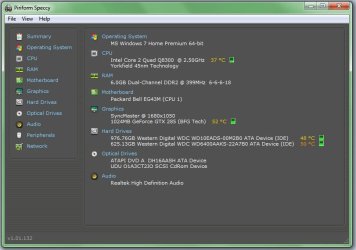
Hard Drive temps too high

adt

New member
Member
VIP
Local time
5:35 AM
Messages
126
Location
London, UK
Hi guys,

I've noticed that my hard drive temps are quite high these days. Is there anyway I can help them cool? I was thinking of leaving the case open for the summer because I never got temps this high in the winter.

Thanks in advance
 

Attachments

  • Untitled.jpg
    Untitled.jpg
    47.8 KB · Views: 98

My Computer

Computer Manufacturer/Model Number
Modified Packard Bell M5772
OS
Windows 7 Ultimate 64 bit
CPU
Intel Core 2 Quad CPU Q8300 @ 2.55GHz
Motherboard
Packard Bell EG43M
Memory
6 GB DDR2
Graphics Card(s)
MSI GTX 570 TWIN FROZR III POWER EDITION
Sound Card
XONAR DG
Monitor(s) Displays
Samsung T200HD
Screen Resolution
1680 x 1050
Hard Drives
Western Digital Caviar Green Hard Disk (1 TB)
Western Digital Caviar Green Hard Disk (500GB)
PSU
EzCool Tornado 800w PSU
Case
Packard Bell Case
Cooling
Stock
Keyboard
Microsoft sidewinder x6
Mouse
Microsoft sidewinder x8
Internet Speed
10 mb/s
Other Info
http://support.packardbell.com/uk/item/index.php?pn=PT.U4002.012&g=1400
Wow, those are high. What are you using for case ventilation? Usually having fans blow air into and out of the case is a much better solution than leaving the case open. Intake in the front where the drives are, and exhaust out the back usually works best for drive cooling, at least for me.

I used to have an average temp of about 38 for my drives in my old case. I picked up a new one with front fans, and the temps are now 28 to 30C on average. My room temp is usually 20 to 24C.
 

My Computer

Computer type
PC/Desktop
Computer Manufacturer/Model Number
Mellon Labs (custom build)
OS
Win 7 Pro x64/Win 10 Pro x64 dual boot
CPU
AMD FX 8350 Vishera @ 4200
Motherboard
ASUS M5A97 R2.0
Memory
16 GB Mushkin Blackline DDR3-2400 @ 1866 (9-10-10-10-31)
Graphics Card(s)
XFX Radeon R9 280 Double D Black Edition
Sound Card
Realtek HD Audio on MB. Sounds great.
Monitor(s) Displays
Acer 24", Acer 22"
Screen Resolution
3840 x 1080
Hard Drives
1 x Mushkin Chronos 120 GB SSD (Win 10)
1 x Samsung 850 EVO 250 GB SSD (Win 7)
1 x WD 1TB SATA Blue
1 x WD 1TB SATA Green
PSU
Corsair TX-750
Case
CoolerMaster HAF 912+
Cooling
Coolermaster Seidon 240M Liquid AIO. 6 case fans
Keyboard
Logitech G710+
Mouse
Logitech G500s
Internet Speed
Much better since I got fiber, but still way overpriced.
Antivirus
MSE, Malware Bytes for scanning
Browser
Firefox
Other Info
Corsair VOID USB headphones.

A Mellon Labs X-1 - LCD Smartie driven system status display.

Brought to you by the letter E
Wow, those are high. What are you using for case ventilation? Usually having fans blow air into and out of the case is a much better solution than leaving the case open. Intake in the front where the drives are, and exhaust out the back usually works best for drive cooling, at least for me.

I used to have an average temp of about 38 for my drives in my old case. I picked up a new one with front fans, and the temps are now 28 to 30C on average. My room temp is usually 20 to 24C.

Hi Mellon Head, thanks for the reply.
Well my computer is pre-built and there is only an exhaust fan at the back. I would install a fan in the front but the case won't allow me to.
 

My Computer

Computer Manufacturer/Model Number
Modified Packard Bell M5772
OS
Windows 7 Ultimate 64 bit
CPU
Intel Core 2 Quad CPU Q8300 @ 2.55GHz
Motherboard
Packard Bell EG43M
Memory
6 GB DDR2
Graphics Card(s)
MSI GTX 570 TWIN FROZR III POWER EDITION
Sound Card
XONAR DG
Monitor(s) Displays
Samsung T200HD
Screen Resolution
1680 x 1050
Hard Drives
Western Digital Caviar Green Hard Disk (1 TB)
Western Digital Caviar Green Hard Disk (500GB)
PSU
EzCool Tornado 800w PSU
Case
Packard Bell Case
Cooling
Stock
Keyboard
Microsoft sidewinder x6
Mouse
Microsoft sidewinder x8
Internet Speed
10 mb/s
Other Info
http://support.packardbell.com/uk/item/index.php?pn=PT.U4002.012&g=1400
Hi Mellon Head, thanks for the reply.
Well my computer is pre-built and there is only an exhaust fan at the back. I would install a fan in the front but the case won't allow me to.
Is a new case an option? At those temps you're going to lose drives after not very long. It isn't too hard to relocate the guts, as long as your PC doesn't have any exotic mounting hardware or "special" brackets to mount the motherboard.

I know you're in the UK, but here in Canada, one can pick up a fairly good case with room for fans for about $35. It might pay off in the long run if you wear your drives out prematurely.

Drives are cheap. The data on them isn't. :)
 

My Computer

Computer type
PC/Desktop
Computer Manufacturer/Model Number
Mellon Labs (custom build)
OS
Win 7 Pro x64/Win 10 Pro x64 dual boot
CPU
AMD FX 8350 Vishera @ 4200
Motherboard
ASUS M5A97 R2.0
Memory
16 GB Mushkin Blackline DDR3-2400 @ 1866 (9-10-10-10-31)
Graphics Card(s)
XFX Radeon R9 280 Double D Black Edition
Sound Card
Realtek HD Audio on MB. Sounds great.
Monitor(s) Displays
Acer 24", Acer 22"
Screen Resolution
3840 x 1080
Hard Drives
1 x Mushkin Chronos 120 GB SSD (Win 10)
1 x Samsung 850 EVO 250 GB SSD (Win 7)
1 x WD 1TB SATA Blue
1 x WD 1TB SATA Green
PSU
Corsair TX-750
Case
CoolerMaster HAF 912+
Cooling
Coolermaster Seidon 240M Liquid AIO. 6 case fans
Keyboard
Logitech G710+
Mouse
Logitech G500s
Internet Speed
Much better since I got fiber, but still way overpriced.
Antivirus
MSE, Malware Bytes for scanning
Browser
Firefox
Other Info
Corsair VOID USB headphones.

A Mellon Labs X-1 - LCD Smartie driven system status display.

Brought to you by the letter E

My Computer

Computer Manufacturer/Model Number
custom
OS
windows 7
CPU
AMD Phenom II X4 965
Motherboard
M4N98TD EVO
Memory
8 gigs Gskill
Graphics Card(s)
GTX470
Sound Card
sound blaster
Monitor(s) Displays
2x hpw1907
Hard Drives
2X WD750
PSU
1100w rosewill
Case
Thermaltake Tsunami VA3000BWA Black Aluminum
Keyboard
g11
Mouse
logitech G7
In the meanwhile, stay cool this summer! That's the one i used stick to the computer a little while ago! At medium speed, gain -7°c
 

Attachments

  • DSC00008 (Small).JPG
    DSC00008 (Small).JPG
    26 KB · Views: 2

My Computer

Computer type
PC/Desktop
Computer Manufacturer/Model Number
Custom Build
OS
Windows 7 Professional SP1 - x64 [Non-UEFI Boot]
CPU
Ivy Bridge Core i5 3570K (Delidded)
Motherboard
Asus P8Z77-V LE PLUS
Memory
G.Skill "Ares" DDR3 PC3-12800 - 1600MHz (16Gb)
Graphics Card(s)
Asus Dual-RX480-O4G
Sound Card
Creative Sound Blaster Z w/5.1 sound system
Monitor(s) Displays
Asus IPS 23"
Screen Resolution
16/9
Hard Drives
Internal:
500Go Sata 6Gb/s (x2)
500Go Sata 3Gb/s (x2)
SSD 60Go Sata 6Gb/s
PSU
In Win C 900W Series 80+ Platinum
Case
Thermaltake Chaser A71
Cooling
Custom Water Cooling Loop
Keyboard
Cooler Master QuickFire XTi
Mouse
Razer Imperator 2012 (4G)
Antivirus
MSE
Browser
IE 11.0.xxx Rtm
Other Info
"Raid0" with Intel Smart Response Technology (HDD/SSD)
In the meanwhile, stay cool this summer! That's the one i used stick to the computer a little while ago! At medium speed, gain -7°c

does the fan use steel blade? :confused:
 

My Computer

OS
window's 7
CPU
core 2 quad
Motherboard
gigabyte
Memory
2gb corsair
Graphics Card(s)
ati hd4850
Monitor(s) Displays
lg
Screen Resolution
1600 X 900
Case
power logic
Other Info
none of the spec above is accurate

My Computer

Computer type
PC/Desktop
Computer Manufacturer/Model Number
Custom Build
OS
Windows 7 Professional SP1 - x64 [Non-UEFI Boot]
CPU
Ivy Bridge Core i5 3570K (Delidded)
Motherboard
Asus P8Z77-V LE PLUS
Memory
G.Skill "Ares" DDR3 PC3-12800 - 1600MHz (16Gb)
Graphics Card(s)
Asus Dual-RX480-O4G
Sound Card
Creative Sound Blaster Z w/5.1 sound system
Monitor(s) Displays
Asus IPS 23"
Screen Resolution
16/9
Hard Drives
Internal:
500Go Sata 6Gb/s (x2)
500Go Sata 3Gb/s (x2)
SSD 60Go Sata 6Gb/s
PSU
In Win C 900W Series 80+ Platinum
Case
Thermaltake Chaser A71
Cooling
Custom Water Cooling Loop
Keyboard
Cooler Master QuickFire XTi
Mouse
Razer Imperator 2012 (4G)
Antivirus
MSE
Browser
IE 11.0.xxx Rtm
Other Info
"Raid0" with Intel Smart Response Technology (HDD/SSD)

My Computer

OS
window's 7
CPU
core 2 quad
Motherboard
gigabyte
Memory
2gb corsair
Graphics Card(s)
ati hd4850
Monitor(s) Displays
lg
Screen Resolution
1600 X 900
Case
power logic
Other Info
none of the spec above is accurate
Hmmm you could mod it, cut a circle (dremel & file/sand) on the side panel/door and mount a 120mm fan.
 

My Computer

Computer Manufacturer/Model Number
self built
OS
Windows 7 Professional 64
CPU
i7 860
Motherboard
ASUS P7P55D-E Pro /onboard SATA 6Gb/s USB 3.0
Memory
8GB Corsair CMX4GX3M2A1600C9 DDR3 1600
Graphics Card(s)
(2) Nvidia EVGA GTX 470 SLI
Sound Card
Onboard VIA VT1828S 8 channels
Monitor(s) Displays
ASUS VW266H 25.5" HDMI Widescreen LCD and HP vs19 LCD 19"
Screen Resolution
1920 x 1200 : 1280 X 1024 dual
Hard Drives
Intel X25-M 80GB SSD (boot)
Seagate Barracuda 80GB
Western Digital Caviar Black 500GB
Asus DRW-24B1ST/BLK/B/AS
PSU
COOLER MASTER Silent Pro 1000W
Case
LIAN LI Lancool PC-K62
Cooling
Prolimatech Megahalems with Scythe "ULTRA KAZE" 120
Keyboard
Saitek
Mouse
Microsoft Optical comfort mouse 3000
Internet Speed
Comcast Ultra tier 30/5
In my travels, depending on where I had to set up my system, I have on many occasions removed the side panel from my case (the side that faces the component side of the mobo) and, from two-three inches away, aimed an 8-inch fan centered between the CPU and HDDs. An alternative, if your case has a largely ventilated front panel, place the fan in front of the grill and it will blow directly across the HDD bays. Go the Amazon for a picture of the fan I use. It is eight inches in diameter, has a high and low speed, and makes little noise.

I dare say there is ABSOLUTELY NO REASON, not to run your system this way. This little fan or equivalent will not let any heat build up inside the case. The obvious precaution: keep dogs, cats, kids, etc. away from the case. I have used this approach for many years on different systems and can testify to the fact that there is no problem doing so. But why would there be?

Monk

P.S. I read some of the reviews at Amazon which are mostly 4/5 stars. Two things I noticed: people talk about the great amount of air this thing puts out - which it does; one person stated that he uses it to cool his receiver. Amen
 
Last edited:

My Computer

Computer Manufacturer/Model Number
Custom
OS
Dual boot XP Pro SP3x86 and Win7 Pro x64
CPU
AMD Phenom II x3 720 BE OCed to 3.3 GHz
Motherboard
Asus M3A79T Deluxe
Memory
2x2GB OCZ OCZ2RPR10664GK PC2-8500 DDR2
Graphics Card(s)
Sapphire ATi Radeon 4830 HD x2 (XFire)
Sound Card
Integrated (SoundMax)
Monitor(s) Displays
Dual: LG L227WTG/LG M237WD
Screen Resolution
1680 x 1050; 1920 x1280
Hard Drives
3 WDC WD7501AALS-00J7B0
PSU
Zalman 750HD Modular
Case
Antec 900
Cooling
4 120mm, 1 200mm fans
Keyboard
Black with lots of keys
Mouse
Razer Lachesis, Logitech RumbePad2, Logitech Marble
Internet Speed
Who counts
Other Info
7:1 SS
Do not run with the side cover off unless you place a table fan blowing into the case.
With the side off the rear fan draws air from the outside (from were the side of the case is open)and therefore does not draw air over your components to cool them.
Your best option is to replace the case with something with decent cooling, it will be cheaper than replacing Drives.
 

My Computer

Computer type
PC/Desktop
Computer Manufacturer/Model Number
Self Built Custom Computer.
OS
Windows 10 Pro x64
CPU
i7-4770K
Motherboard
Asus Z87 Sabertooth
Memory
16Gig DDR3-2400
Graphics Card(s)
Gigabyte GT740
Sound Card
Onboard
Monitor(s) Displays
Benq 27" - Dell 23' - Benq 22"
Screen Resolution
1680x1050
Hard Drives
Samsung 840 Pro 128g SSD
1xWestern Digital Caviar Green 1tb
2xWestern Digital Caviar Green 2 tb
PSU
Seasonic 760 watt Platinum
Case
Coolermaster Haf - X
Cooling
Noctua NH-C12P CPU Cooler
Keyboard
Logitech illuminated keyboard
Mouse
Logitech Perfomance MX
Internet Speed
Cable = speeds to 20Mbps downsteam and 512kbps upsteam
Antivirus
Avast Internet Security
Browser
Firefox
best option imo is to add 1 or more if u can cooling fans 120mm there like 10 bucks. or get a new case n make sure ur mobo can be mounted in there
 

My Computer

OS
Windows 7 Ultimate 64bit
CPU
AMD Phenom II X4 945 @3.0ghz
Motherboard
Asrock
Memory
4gb kingston hyperX
Graphics Card(s)
1gb Radeon HD 5670
best option imo is to add 1 or more if u can cooling fans 120mm there like 10 bucks. or get a new case n make sure ur mobo can be mounted in there

I will not bore folks with CFM data but suffice it to say that a high volume 8-inch fan is gong to envelop all of the case components and exchange more air than all of your case fans combined. Furthermore, with the side panel off, there are no hot spots, dead zones, or interference from overlapping components, cables - especially 40-pin cables - that can obstruct or deflect air from from case fans.

I, obviously, cannot read people's minds; I can say that I have encountered over the years a universal taboo: "What!!! You run your system with a case panel removed!!! OMG!!!!!"

If the components are air cooled and protected from stray animals and fingers, what on earth matter does it make where the air came from and how it cools the components?

Monk
 

My Computer

Computer Manufacturer/Model Number
Custom
OS
Dual boot XP Pro SP3x86 and Win7 Pro x64
CPU
AMD Phenom II x3 720 BE OCed to 3.3 GHz
Motherboard
Asus M3A79T Deluxe
Memory
2x2GB OCZ OCZ2RPR10664GK PC2-8500 DDR2
Graphics Card(s)
Sapphire ATi Radeon 4830 HD x2 (XFire)
Sound Card
Integrated (SoundMax)
Monitor(s) Displays
Dual: LG L227WTG/LG M237WD
Screen Resolution
1680 x 1050; 1920 x1280
Hard Drives
3 WDC WD7501AALS-00J7B0
PSU
Zalman 750HD Modular
Case
Antec 900
Cooling
4 120mm, 1 200mm fans
Keyboard
Black with lots of keys
Mouse
Razer Lachesis, Logitech RumbePad2, Logitech Marble
Internet Speed
Who counts
Other Info
7:1 SS
The Op has only a rear fan and with the side off it will draw air from the side across the mother board but it will not cool the hard drives which are normally mounted in the front of the case
 

My Computer

Computer type
PC/Desktop
Computer Manufacturer/Model Number
Self Built Custom Computer.
OS
Windows 10 Pro x64
CPU
i7-4770K
Motherboard
Asus Z87 Sabertooth
Memory
16Gig DDR3-2400
Graphics Card(s)
Gigabyte GT740
Sound Card
Onboard
Monitor(s) Displays
Benq 27" - Dell 23' - Benq 22"
Screen Resolution
1680x1050
Hard Drives
Samsung 840 Pro 128g SSD
1xWestern Digital Caviar Green 1tb
2xWestern Digital Caviar Green 2 tb
PSU
Seasonic 760 watt Platinum
Case
Coolermaster Haf - X
Cooling
Noctua NH-C12P CPU Cooler
Keyboard
Logitech illuminated keyboard
Mouse
Logitech Perfomance MX
Internet Speed
Cable = speeds to 20Mbps downsteam and 512kbps upsteam
Antivirus
Avast Internet Security
Browser
Firefox
The Op has only a rear fan and with the side off it will draw air from the side across the mother board but it will not cool the hard drives which are normally mounted in the front of the case

What?

If the side panel is off, the rear fan cannot draw significant air across the mobo: it will draw air from its immediate environment. Case designs dictate a closed case which draws air from the open end of a closed tube (a grill in the front of the case) and then expels it through the rear fan port. True, if there are no HDD bay fans, then the HDD temps may increase depending on the ambient temp of the room (v. the closed case) With the side-panel off, HDD fans, if present, will still push or pull air across the HDD bay. Removal of the panel might augment the action of the HDD fan by allowing more air to be moved in the event the fan creates a positive pressure within the case. In fact, removing the side-panel at the worst, will not change the present state; in addition to the above, it may also it may improve cooling by reducing the ambient case temp.

It is at this is the point where many stop thinking. They know the case is "supposed" to be closed in order for air to be channeled through the case. However, with the side panel off and a high volume, high velocity fan blowing air directly on the case components, no channeling is needed; the fan is going to push massive amounts of air in a 360 degree radius cooling your case, all of its components, and your cat sleeping in the next room.

Modest-cost cases (let's call them non-power-user or non-gaming cases), ordinarily have a HDD bay fan and an exhaust fan. Air enters via the HDD bay fan, is warmed by the HDDs, is further warmed by the gfx card if present, is warmed by the mobo, is warmed by the CPU, is warmed by the PSU and exists the rear of the case - at no greater velocity than it entered. As a result, ambient air temps in the case increase - making the already warm "cooling" air even warmer.

Remove the side panel, which automatically decreases the case ambient temp, increase the volume/velocity of air 5-10X using an external fan: now that's cool. :cool:
 
Last edited:

My Computer

Computer Manufacturer/Model Number
Custom
OS
Dual boot XP Pro SP3x86 and Win7 Pro x64
CPU
AMD Phenom II x3 720 BE OCed to 3.3 GHz
Motherboard
Asus M3A79T Deluxe
Memory
2x2GB OCZ OCZ2RPR10664GK PC2-8500 DDR2
Graphics Card(s)
Sapphire ATi Radeon 4830 HD x2 (XFire)
Sound Card
Integrated (SoundMax)
Monitor(s) Displays
Dual: LG L227WTG/LG M237WD
Screen Resolution
1680 x 1050; 1920 x1280
Hard Drives
3 WDC WD7501AALS-00J7B0
PSU
Zalman 750HD Modular
Case
Antec 900
Cooling
4 120mm, 1 200mm fans
Keyboard
Black with lots of keys
Mouse
Razer Lachesis, Logitech RumbePad2, Logitech Marble
Internet Speed
Who counts
Other Info
7:1 SS
Mine run hot also but there doing fine
Samsung 1TB x4 34'c
37'c
33'c
38'c
WD Raptor X 250gb 45'c
Seagate 500gb x4
39'c
40'c
36'c
41'c

some of them are high but being in darwin australia (tropics) its understandable
 
Last edited:

My Computer

Computer Manufacturer/Model Number
build it myself
OS
Windows 8 X64 M3 8102 / Windows 7 Ultimate X64
CPU
Core i7 2600K @3.7ghz
Motherboard
GA-Z68XP-UD3R
Memory
32GB DDR-3 1866mhz
Graphics Card(s)
AMD Radeon 6990 + Geforce GTX560
Sound Card
SB Xfi Fatality
Monitor(s) Displays
4x 23" + 30" Dell
Screen Resolution
4x 1920x1080 + Main 2560x1600 Dell
Hard Drives
2x OCZ Agility 3 120gb SATA3
1x Kingston 120gb SATA3
1x Corsair 120gb SATA3
1x Intel 512gb SATA3 (STEAM)
5x 3TB SATA 3 WD Black (Storage)
PSU
Antec 1300W HC
Case
HAF X (USB3)
Cooling
Swiftech H20-320 Edge Liquid Cooling Kit
Keyboard
Optimus Maximus replaced G19
Mouse
Saitek Cyborg R.A.T. 7 Replaced Sidewinder X5
Internet Speed
Internode 1TB Cap ADSL2+ (NBN Optic)
@Apollodominion

The 1200 is an upgraded but very similar version of the 900 which is the case I have. As you know, the front bezel is entirely perforated. On those really hot days, and without removing the side panels, place a small fan of the type I have been discussing in the front of the case, oh, . . . 5-6 inches in front of the bezel (further away if you want to cover a greater area). Although I do not regard your temps as high, I bet you will notice, at least, a 3-5 degree drop in temps.

Monk
 

My Computer

Computer Manufacturer/Model Number
Custom
OS
Dual boot XP Pro SP3x86 and Win7 Pro x64
CPU
AMD Phenom II x3 720 BE OCed to 3.3 GHz
Motherboard
Asus M3A79T Deluxe
Memory
2x2GB OCZ OCZ2RPR10664GK PC2-8500 DDR2
Graphics Card(s)
Sapphire ATi Radeon 4830 HD x2 (XFire)
Sound Card
Integrated (SoundMax)
Monitor(s) Displays
Dual: LG L227WTG/LG M237WD
Screen Resolution
1680 x 1050; 1920 x1280
Hard Drives
3 WDC WD7501AALS-00J7B0
PSU
Zalman 750HD Modular
Case
Antec 900
Cooling
4 120mm, 1 200mm fans
Keyboard
Black with lots of keys
Mouse
Razer Lachesis, Logitech RumbePad2, Logitech Marble
Internet Speed
Who counts
Other Info
7:1 SS
Back
Top