Hard drive troubles and windows errors

alyseshadow

New member
Local time
10:43 PM
Messages
35
My computer gave me an error saying that it couldn't find the hard drive. I attempted multiple fixes to no avail. I finally was able to re-boot the computer from the windows 7 disk. I thought it was fixed, but I still get the blue screen of death randomly (with a huge windows error, that disappears in 5 seconds so I can't read it) and the computer still runs terribly slow.
Please help??!
Christina
 

My Computer

Computer type
PC/Desktop
Computer Manufacturer/Model Number
dell inspiron
OS
windows 7
Currently completing that, but very very slowly. It's been going for 5 hours and at 13%. I hope it's working!?
 

My Computer

Computer type
PC/Desktop
Computer Manufacturer/Model Number
dell inspiron
OS
windows 7
Not a good sign. Which diagnostics are you running, and for what model/make HD?

Is the HD detected in BIOS setup? If not check or replace the cable.

Have you tried running ▶ Dell Hardware Diagnostics from F12 Menu?

To replace the HD on your Dell, google the model number + replace Hard Drive or disassemble to find a video showing how. You can also google for a replacement drive.

Then Clean Reinstall - Factory OEM Windows 7
 
I just went into the properties of hard drive and I'm scanning/fixing bad 'clusters' according to my computer, but it's been going for days and still only at 14%.?!?
 

My Computer

Computer type
PC/Desktop
Computer Manufacturer/Model Number
dell inspiron
OS
windows 7
As Greg has already said not a good sign Christina can you verify what brand drive it is please? If you can run Speccy Speccy - Download or go to Control Panel and Device Mnager and open out as my pic.
 

Attachments

  • HARD.PNG
    HARD.PNG
    13.6 KB · Views: 22

My Computer

Computer type
PC/Desktop
Computer Manufacturer/Model Number
Own build (new) Desk1 / Asus ROG Win 7 / Desk2 1st build
OS
Desk1 7 Home Prem / Desk2 10 Pro / Main lap Asus ROG 10 Pro 2 laptop Toshiba 7 Pro Asus P2520 7 & 10
CPU
Desk1 i5 3750K / Laptop i7 GTX 860M / Desk2 i5 2500
Motherboard
Desk1 Asus P877-V / Desk2 Gigabyte H67 UD3H / Laptop ?
Memory
Desk1 8GB (1866) / Desk2 16GB (1333) / Laptop 8Gb DDR3
Graphics Card(s)
Desk 1& 2NVidia GTX 650 & Laptops on board Intel
Sound Card
Desk 1 & 2 -XONAR DG Realtek High Def audio Laptop
Monitor(s) Displays
Desk 1 Benq HD 2450 / Desk2 Philips 24" / Laptop 17.5"
Screen Resolution
1920x1080 D1 & D2 & Laptop 1
Hard Drives
Desk1 Samsung 120GB 830 SSD
Asus ROG 256GB 850 Pro SSD
Desk2 Samsung 840 256 SSD
Toshiba 120GB EVO
PSU
Desk 1 Corsair HX 1050/ Laptop ? / Desk 2 Corsair HX 650
Case
Desk 1 Cooler HAF XM ? Toshiba laptop / Desk2 Coolermaster
Cooling
Fans on all Desk1 -2 Desk2 - all Coolermasters 5 Laptop ?
Keyboard
Desk 1 MS Sidewinder X6 Desk 2 MS Sidewinder X 4
Mouse
Desk 1&2 - Gigabyte MS 900 gamer - laptop - Logitec wireless
Internet Speed
ADSL2+
Other Info
One other Desktop (tester) and spare Toshba laptop both with SSD's
Running Kaspersky 2016 ISS on all machines config'd identically
Logitec audio stereo systems on each machine (x3)
Canon MG5250MFC
Router/modem TP-Link running WPA2SK
I just went into the properties of hard drive and I'm scanning/fixing bad 'clusters' according to my computer, but it's been going for days and still only at 14%.?!?

It may be beyond fixing the file system with Disk Check so I would abort it to run the maker's HD Diagnostic extended CD scan.

John has above showed you how to determine your HD brand if you don't know it yet. Let us know if you have any problems finding the bootable diagnostics. For WD you'll need to run it from Windows after attaching the HD, or run Seatools which can test all brands.
 
I found that it was a WD hard drive, ran the diagnostic tests. I keep getting an error
Quick test on drive 1 did not complete! Status code= 07 (failed read test element) Failure checkpoint = 97 (unknown test) Smart self test did not complete on drive 1
 

My Computer

Computer type
PC/Desktop
Computer Manufacturer/Model Number
dell inspiron
OS
windows 7
I found that it was a WD hard drive, ran the diagnostic tests. I keep getting an error
Quick test on drive 1 did not complete! Status code= 07 (failed read test element) Failure checkpoint = 97 (unknown test) Smart self test did not complete on drive 1

Rescue all important files AS SOON AS POSSIBLE!
Your harddrive is faulty
 

My Computer

Computer type
Laptop
Computer Manufacturer/Model Number
ACER ASPIRE 5742G
OS
Microsoft Windows 7 Home Premium 64-bits 7601 Multiprocessor Free Service Pack 1
CPU
Intel(R) Core(TM) i3 CPU M 370 @ 2.40GHz
Motherboard
Acer Aspire 5742G
Memory
4,00 GB
Graphics Card(s)
ATI Mobility Radeon HD 5400 Series
Sound Card
(1) AMD High Definition Audio Device (2) Realtek High Defi
Screen Resolution
1366 x 768 x 32 bits (4294967296 colors) @ 60 Hz
Hard Drives
WDC WD5000BEVT-22ZAT0
I have already lost everything. Is there anything else I can do, besides having someone replace the hard drive?
 

My Computer

Computer type
PC/Desktop
Computer Manufacturer/Model Number
dell inspiron
OS
windows 7
I have already lost everything. Is there anything else I can do, besides having someone replace the hard drive?

Why didn't you make backups of important data? Or even better your whole drive?
There's normally no way to retrieve the data. But.....

"I have already lost everything"=>what do you mean by saying "lost"? No partition, no folders, no files at all anymore?
 

My Computer

Computer type
Laptop
Computer Manufacturer/Model Number
ACER ASPIRE 5742G
OS
Microsoft Windows 7 Home Premium 64-bits 7601 Multiprocessor Free Service Pack 1
CPU
Intel(R) Core(TM) i3 CPU M 370 @ 2.40GHz
Motherboard
Acer Aspire 5742G
Memory
4,00 GB
Graphics Card(s)
ATI Mobility Radeon HD 5400 Series
Sound Card
(1) AMD High Definition Audio Device (2) Realtek High Defi
Screen Resolution
1366 x 768 x 32 bits (4294967296 colors) @ 60 Hz
Hard Drives
WDC WD5000BEVT-22ZAT0
I did all the fixes I knew how to do, the computer couldn't find the hard drive! So, I couldn't restore to previous point because it said there wasn't one. I stuck the windows disk in and re-loaded it. I assumed that would fix all errors, but did not. I'm now stuck here!
 

My Computer

Computer type
PC/Desktop
Computer Manufacturer/Model Number
dell inspiron
OS
windows 7
How are you stuck? Your HD may be failing. I already wrote out what to do to confirm this, how to replace the HD if necessary and get Win7 back up and runnning more perfectly than you've ever had it. Did you miss my post?

Not a good sign. Which diagnostics are you running, and for what model/make HD?

Is the HD detected in BIOS setup? If not check or replace the cable.

Have you tried running ▶ Dell Hardware Diagnostics from F12 Menu?

To replace the HD on your Dell, google the model number + replace Hard Drive or disassemble to find a video showing how. You can also google for a replacement drive.

Then Clean Reinstall - Factory OEM Windows 7

If you have files to rescue from the HD I would back them up now, if necessary using Copy & Paste - in Windows Recovery Console or Paragon Rescue Kit Free Edition 11.0 Free CD.
 
Last edited:
You may be able to use revuca but am not holding my breath Recuva - Undelete, Unerase, File and Disk Recovery - Free Download

Or you can use a Ubuntu boot

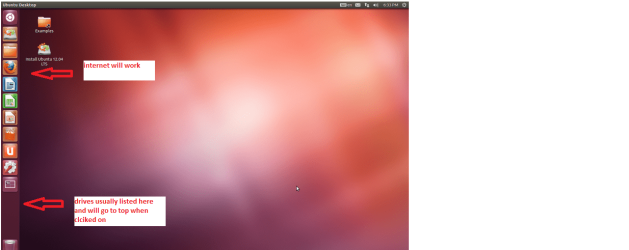
BOOTABLEUBUNTU

Make a bootable Ubuntu disk http://www.ubuntu.com/download

Set the BIOS to boot from theoptical when the machine boots it will show you a screen with TRY or INSTALL> select TRY

When it is finished - it takes verylittle time you will get a screen like in the pic .

Open the drive you want > Userand dig down until you get to the data / settings you may be able to copy /paste the material you want to an external source or other installed drive doingthis.

I am not sure if it will but I haverecovered tons of data etc using this method both on "dead" or justplain drives that you cannot get data from using Windows.

This is a good example of hat happens when we don't do regular backups eh?:(
 

Attachments

  • Ubuntu screen.PNG
    Ubuntu screen.PNG
    123.3 KB · Views: 0

My Computer

Computer type
PC/Desktop
Computer Manufacturer/Model Number
Own build (new) Desk1 / Asus ROG Win 7 / Desk2 1st build
OS
Desk1 7 Home Prem / Desk2 10 Pro / Main lap Asus ROG 10 Pro 2 laptop Toshiba 7 Pro Asus P2520 7 & 10
CPU
Desk1 i5 3750K / Laptop i7 GTX 860M / Desk2 i5 2500
Motherboard
Desk1 Asus P877-V / Desk2 Gigabyte H67 UD3H / Laptop ?
Memory
Desk1 8GB (1866) / Desk2 16GB (1333) / Laptop 8Gb DDR3
Graphics Card(s)
Desk 1& 2NVidia GTX 650 & Laptops on board Intel
Sound Card
Desk 1 & 2 -XONAR DG Realtek High Def audio Laptop
Monitor(s) Displays
Desk 1 Benq HD 2450 / Desk2 Philips 24" / Laptop 17.5"
Screen Resolution
1920x1080 D1 & D2 & Laptop 1
Hard Drives
Desk1 Samsung 120GB 830 SSD
Asus ROG 256GB 850 Pro SSD
Desk2 Samsung 840 256 SSD
Toshiba 120GB EVO
PSU
Desk 1 Corsair HX 1050/ Laptop ? / Desk 2 Corsair HX 650
Case
Desk 1 Cooler HAF XM ? Toshiba laptop / Desk2 Coolermaster
Cooling
Fans on all Desk1 -2 Desk2 - all Coolermasters 5 Laptop ?
Keyboard
Desk 1 MS Sidewinder X6 Desk 2 MS Sidewinder X 4
Mouse
Desk 1&2 - Gigabyte MS 900 gamer - laptop - Logitec wireless
Internet Speed
ADSL2+
Other Info
One other Desktop (tester) and spare Toshba laptop both with SSD's
Running Kaspersky 2016 ISS on all machines config'd identically
Logitec audio stereo systems on each machine (x3)
Canon MG5250MFC
Router/modem TP-Link running WPA2SK
I am currently running the Dell HD hardware diagnostics, I will return with hopefully some results!
Thanks!
 

My Computer

Computer type
PC/Desktop
Computer Manufacturer/Model Number
dell inspiron
OS
windows 7
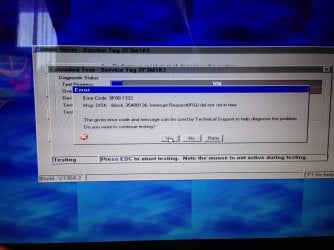
image.jpg I have gotten this error, anyone know if that is my guarantee that the HD is garbage?
 

My Computer

Computer type
PC/Desktop
Computer Manufacturer/Model Number
dell inspiron
OS
windows 7
As Greg says and if you want try the Ubuntu I quoted first - if you need data - it may still not give it up but worth a try.
 

My Computer

Computer type
PC/Desktop
Computer Manufacturer/Model Number
Own build (new) Desk1 / Asus ROG Win 7 / Desk2 1st build
OS
Desk1 7 Home Prem / Desk2 10 Pro / Main lap Asus ROG 10 Pro 2 laptop Toshiba 7 Pro Asus P2520 7 & 10
CPU
Desk1 i5 3750K / Laptop i7 GTX 860M / Desk2 i5 2500
Motherboard
Desk1 Asus P877-V / Desk2 Gigabyte H67 UD3H / Laptop ?
Memory
Desk1 8GB (1866) / Desk2 16GB (1333) / Laptop 8Gb DDR3
Graphics Card(s)
Desk 1& 2NVidia GTX 650 & Laptops on board Intel
Sound Card
Desk 1 & 2 -XONAR DG Realtek High Def audio Laptop
Monitor(s) Displays
Desk 1 Benq HD 2450 / Desk2 Philips 24" / Laptop 17.5"
Screen Resolution
1920x1080 D1 & D2 & Laptop 1
Hard Drives
Desk1 Samsung 120GB 830 SSD
Asus ROG 256GB 850 Pro SSD
Desk2 Samsung 840 256 SSD
Toshiba 120GB EVO
PSU
Desk 1 Corsair HX 1050/ Laptop ? / Desk 2 Corsair HX 650
Case
Desk 1 Cooler HAF XM ? Toshiba laptop / Desk2 Coolermaster
Cooling
Fans on all Desk1 -2 Desk2 - all Coolermasters 5 Laptop ?
Keyboard
Desk 1 MS Sidewinder X6 Desk 2 MS Sidewinder X 4
Mouse
Desk 1&2 - Gigabyte MS 900 gamer - laptop - Logitec wireless
Internet Speed
ADSL2+
Other Info
One other Desktop (tester) and spare Toshba laptop both with SSD's
Running Kaspersky 2016 ISS on all machines config'd identically
Logitec audio stereo systems on each machine (x3)
Canon MG5250MFC
Router/modem TP-Link running WPA2SK
So, I'm back! I bought a new Western Digital Harddrive and now I get an error stating I need to reseat the hard drive . If I try to install windows 7, it can't find the hard drive and in BIOS it says Hard Drive (none)
Anyone have any advice?
 

My Computer

Computer type
PC/Desktop
Computer Manufacturer/Model Number
dell inspiron
OS
windows 7
So, I'm back! I bought a new Western Digital Harddrive and now I get an error stating I need to reseat the hard drive . If I try to install windows 7, it can't find the hard drive and in BIOS it says Hard Drive (none)
Anyone have any advice?
Does harddrive work in other computer? Does harddrive have power, so does it spin (you can feel it)? Is sata cable connected correctly?
 

My Computer

Computer type
Laptop
Computer Manufacturer/Model Number
ACER ASPIRE 5742G
OS
Microsoft Windows 7 Home Premium 64-bits 7601 Multiprocessor Free Service Pack 1
CPU
Intel(R) Core(TM) i3 CPU M 370 @ 2.40GHz
Motherboard
Acer Aspire 5742G
Memory
4,00 GB
Graphics Card(s)
ATI Mobility Radeon HD 5400 Series
Sound Card
(1) AMD High Definition Audio Device (2) Realtek High Defi
Screen Resolution
1366 x 768 x 32 bits (4294967296 colors) @ 60 Hz
Hard Drives
WDC WD5000BEVT-22ZAT0
Back
Top