
Hard drive will not boot

Senator

New member
Local time
4:37 AM
Messages
29
In an attempt to wipe an old laptop hard drive, I think I may have deleted or corrupted the Master Boot Record.

I performed several tasks, mostly ignorant of what I was actually doing. It appeared I was able to successfully re-partitioned and reformatted the hard drive. However, after loading an image file, the PC would not boot into Windows.

I ran a "Primary hard disk self test" and got the following message "Test status: #1 - 04 Fail"

Using another working PC, here is what it looks like in Disk Management

2014-08-05_23-20-48.png

and here is what it looks like in Windows Explorer
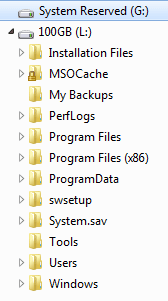
2014-08-05_23-21-33.png

The image files look OK, but there are a few things that are troubling. For example, what is on Drive G? Drive G is actually Drive C when it's placed in the laptop and Windows is on Drive D, which in this picture is Drive L.

I tried to see if I could change the boot order to load from Drive D, but I can't.

I also tried to "repair" the MBR using the Bootrec commands, with no luck.

I'm pretty sure the answer will be pretty obvious to someone who has a good understanding of Master Boot Records, partitioning, volumes, etc.

Many thanks
 

My Computer

Computer type
PC/Desktop
Computer Manufacturer/Model Number
HP
OS
Windows 7 Professional 64bit
CPU
Core2 Duo
Memory
4GB
Hard Drives
1TB WD
For example, what is on Drive G? Drive G is actually Drive C when it's placed in the laptop and Windows is on Drive D, which in this picture is Drive L.

Drive G is a System Reserved partition that contains boot files.

Are you POSITIVE that "Drive G is actually Drive C when it's placed in the laptop and Windows is on Drive D, which in this picture is Drive L"???

System Reserved normally would not have a drive letter at all. It's found in a typical install.

Windows would normally be on C, not D.

What application made this image you refer to?

Is this an image of this very same laptop drive, before you wiped it?
 

My Computer

Computer type
PC/Desktop
Computer Manufacturer/Model Number
Ignatz Special; 4 speed manual gearbox; factory air conditioning; one of one
OS
Windows 7 Home Premium SP1, 64-bit
CPU
Intel Skylake i5-6600K, not overclocked
Motherboard
AsRock Z170M Extreme 4, micro ATX
Memory
8 GB HyperX DDR4-2666 (2 x 4 GB)
Graphics Card(s)
none; graphics are integrated on CPU
Sound Card
onboard: Realtek ALC1150; external: USB Behringer UF0-202
Monitor(s) Displays
Dell S2340M 23 inch IPS
Screen Resolution
1600 x 900
Hard Drives
System: Crucial MX100 series SSD, 128 GB;
Data: Samsung Spinpoint 103SJ, 1 TB;
Backup: WD Caviar Green WD30EZRX-00D8PB0, 3 TB
PSU
Rosewill SilentNight 500 watt fanless, semi-modular
Case
Antec Solo II
Cooling
Noctua NH-U12S; Noctua F12 intake, Noctua S12A exhaust
Keyboard
Microsoft 200 6JH-00001 USB
Mouse
Dell or Microsoft optical wired; USB
Antivirus
Microsoft Security Essentials and Malwarebytes Premium
Browser
Pale Moon
Other Info
All fans PWM; speeds at idle: CPU circa 500 rpm; intake circa 600 rpm; exhaust circa 600 rpm; CPU temps 27 idle and 47 C load in a warm room (27 C/81 F) when running Intel Extreme Tuning Utility stress test.
What does "loading an image file" mean?
 

My Computers

System One System Two

  • Computer type
    PC/Desktop
    OS
    7 X64
    CPU
    i5 8400
    Motherboard
    gigabyte b365m ds3h
    Memory
    2x8gb 3200mhz
    Hard Drives
    various
    PSU
    pure power 11 400w cm
    Case
    Coolermaster
    Cooling
    cryorig m9i
  • Computer type
    PC/Desktop
    OS
    7x64
    CPU
    g5400
    Motherboard
    ga b365m ds3h
    Memory
    8gb ddr4 2400
    PSU
    xfx pro 450w
Are you POSITIVE that "Drive G is actually Drive C when it's placed in the laptop and Windows is on Drive D, which in this picture is Drive L"???

Yes, quite sure. I verified this using the Command prompt.

What application made this image you refer to?

The Windows 7 Control Panel / Backup.... feature

Is this an image of this very same laptop drive, before you wiped it?

Yes it is.
 

My Computer

Computer type
PC/Desktop
Computer Manufacturer/Model Number
HP
OS
Windows 7 Professional 64bit
CPU
Core2 Duo
Memory
4GB
Hard Drives
1TB WD
What does "loading an image file" mean?

I had an internal 100GB hard drive running Windows 7. I created an image backup and placed it on an external hard drive. Then took out internal (100GB) hard drive and inserted a third drive (320GB) that had XP on it. Then used a Repair disc I created to load the image (from the external hard drive) onto the internal 320GB drive (Drive C).
 

My Computer

Computer type
PC/Desktop
Computer Manufacturer/Model Number
HP
OS
Windows 7 Professional 64bit
CPU
Core2 Duo
Memory
4GB
Hard Drives
1TB WD
OK, so you restored a windows system image using the gui from winpe.

How far do you get when you try and boot windows? Any messages?
 

My Computers

System One System Two

  • Computer type
    PC/Desktop
    OS
    7 X64
    CPU
    i5 8400
    Motherboard
    gigabyte b365m ds3h
    Memory
    2x8gb 3200mhz
    Hard Drives
    various
    PSU
    pure power 11 400w cm
    Case
    Coolermaster
    Cooling
    cryorig m9i
  • Computer type
    PC/Desktop
    OS
    7x64
    CPU
    g5400
    Motherboard
    ga b365m ds3h
    Memory
    8gb ddr4 2400
    PSU
    xfx pro 450w
How far do you get when you try and boot windows? Any messages?

The image installs successfully, it automatically reboots and then I get a black screen that says words to the effect (I can recall exactly and I have no way of capturing the screen) Windows cannot boot properly and I think something about the MBR.
 

My Computer

Computer type
PC/Desktop
Computer Manufacturer/Model Number
HP
OS
Windows 7 Professional 64bit
CPU
Core2 Duo
Memory
4GB
Hard Drives
1TB WD
Back
Top