So I'm trying to see if I can recover any files from this hard drive, but not having much luck. Have tried tools like TestDisk and linux command lines. Some more info:
Built-in 802.11 Wireless B/G/N - Stock Wireless Card + Bluetooth™ 4.0 | Internal 9-in-1 Card Reader (MMC/RSMMC/SD/Mini SD/SDHC/SDXC/MS/MS Pro/MS Duo) | Built in 2.0 Megapixel Camera | Rosewill RX-358-S BLACK 3.5" SATA to eSATA External Enclosure with Internal 80mm fan
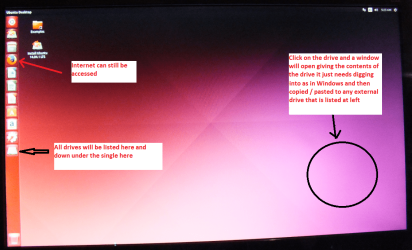
Set the BIOS to boot from the optical when themachine boots it will show you a screen with TRY or INSTALL >select TRY not INSTALL
When it is finished - it takes very little time youwill get a screen like in the pic .
Open the drive you want > User and dig downuntil you get to the data / settings you may be able to copy / paste thematerial you want to an external source or other installed drive doing this.
I am not sure if it will but I have recovered tonsof data etc using this method both on "dead" or just plain drivesthat you cannot get data from using Windows.
Attachments
UBUNTU SCREEN X2.PNG
272.7 KB
· Views: 1
My Computer
Computer type
PC/Desktop
Computer Manufacturer/Model Number
Own build (new) Desk1 / Asus ROG Win 7 / Desk2 1st build
OS
Desk1 7 Home Prem / Desk2 10 Pro / Main lap Asus ROG 10 Pro 2 laptop Toshiba 7 Pro Asus P2520 7 & 10
One other Desktop (tester) and spare Toshba laptop both with SSD's
Running Kaspersky 2016 ISS on all machines config'd identically
Logitec audio stereo systems on each machine (x3)
Canon MG5250MFC
Router/modem TP-Link running WPA2SK
Built-in 802.11 Wireless B/G/N - Stock Wireless Card + Bluetooth™ 4.0 | Internal 9-in-1 Card Reader (MMC/RSMMC/SD/Mini SD/SDHC/SDXC/MS/MS Pro/MS Duo) | Built in 2.0 Megapixel Camera | Rosewill RX-358-S BLACK 3.5" SATA to eSATA External Enclosure with Internal 80mm fan
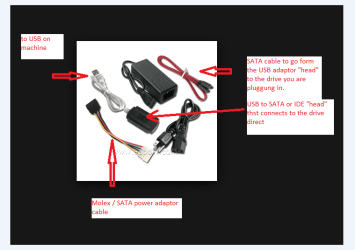
Not sure if your issue is the one I have had before. If it just won't boot, have you tried a hard drive enclosure connected to another working PC via usb. Also I have connected a hard drive to a working PC via a sata cable to an empty sata port. In both cases the hard drive was unable to boot but I was able to access the data and transfer it.
My Computer
Computer type
PC/Desktop
Computer Manufacturer/Model Number
All
OS
Windows 7 Home Premium
Other Info
I work on many PCs/Laptops for people to get hands on experience. I am a student at a technical college learning about computers and networks.
Yes, I have tried a hard drive enclosure and connected via esata (not usb). I could only get it to show up rarely, and only to tell me to format it prior to being able to mount.
And I've tried with sata while booted on a live usb Ubuntu
My Computer
Computer type
Laptop
Computer Manufacturer/Model Number
Sager NP2650 (Clevo W650SZ) - Custom Built
OS
Windows 7 Ultimate 64 bit (6.1, Build 7601) Service Pack 1
Built-in 802.11 Wireless B/G/N - Stock Wireless Card + Bluetooth™ 4.0 | Internal 9-in-1 Card Reader (MMC/RSMMC/SD/Mini SD/SDHC/SDXC/MS/MS Pro/MS Duo) | Built in 2.0 Megapixel Camera | Rosewill RX-358-S BLACK 3.5" SATA to eSATA External Enclosure with Internal 80mm fan
Built-in 802.11 Wireless B/G/N - Stock Wireless Card + Bluetooth™ 4.0 | Internal 9-in-1 Card Reader (MMC/RSMMC/SD/Mini SD/SDHC/SDXC/MS/MS Pro/MS Duo) | Built in 2.0 Megapixel Camera | Rosewill RX-358-S BLACK 3.5" SATA to eSATA External Enclosure with Internal 80mm fan
One other Desktop (tester) and spare Toshba laptop both with SSD's
Running Kaspersky 2016 ISS on all machines config'd identically
Logitec audio stereo systems on each machine (x3)
Canon MG5250MFC
Router/modem TP-Link running WPA2SK