hard drive

ukadam

New member
Local time
6:57 AM
Messages
3
Hi,

I have just bought a new Dell and installed a 2nd hard drive...i say me it was my mate really :) Anyway the bios can see it but the os cant (win 7) I assume it needs formatting but dont know how also i dont want to mess up the current hd which is running the os. Any help or adivce would be greatly appreciated.

Many thanks,

Adam
 

My Computer

OS
windows 7
Hello Adam,

Right click Computer and select Manage, then Disk Management, now you should see your new drive. Right click it and activate the drive, set the partition and format it as the NTFS.

Hope it helps.
 

My Computer

Computer Manufacturer/Model Number
Gateway P7805uFX
OS
Vista Ultimate x64
CPU
Intel T9600, 2.8GHz
Motherboard
Intel PM 45
Memory
8GB DDR3
Graphics Card(s)
Nvidia GeForce 9800M GTS 1GB
Monitor(s) Displays
LG WUXGA 17"
Screen Resolution
1920x 1200
Hard Drives
2x WD500GB
Case
Notebook FX
Other Info
B-Tooth, B-Drive, GPS
ah i see, brillliant. Just 1 quesiton on doing so i get this message

"you must initialize a disk before logical disk manager can access it" there a tick box wiht DISK 1 checked under which is MBR - master boot record or GPT (MBR is checked) do i just tick ok or cancel?

thank you in advance

Ad
 

My Computer

OS
windows 7
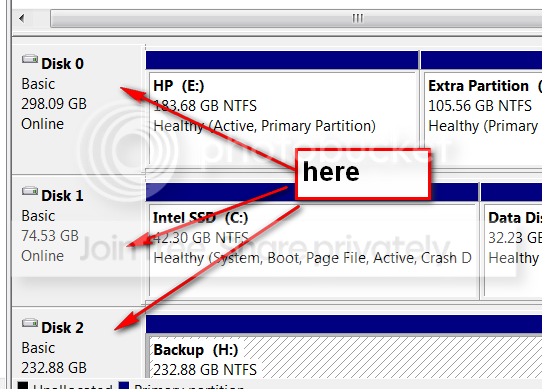
In Disk Manager, You have to right click on the left box of this drive (where it says Disk 0, Disk 1, etc). There you can initialize it.

2010-03-09_162020.png
 

My Computer

Computer Manufacturer/Model Number
HP, Dell, Gateway, Toshiba - 4 laptops and 2 desktops
OS
Vista, Windows7, Mint Mate, Zorin, Windows 8
CPU
from 1.6GHz Duo to i7
Monitor(s) Displays
2x HP w2207
Hard Drives
5x HDD, 7x SSD, 12x Externals
Keyboard
with trackball - no mices
Mouse
Trackball mice
Internet Speed
DSL 6000
ukadam,
do not activate the partition. MS assumes that the "activated" partition is the one to boot from. Using DiskManager, format the drive.

You might not be pleased with the drive letter that Windows assigned to your harddrive.

Personally, I use diskmanagement to assign the letter M to my DVD drive to "get it out of the way". Then remove any usb sticks or drives, and using DiskManagement change the drive letter for your second drive to the letter you desire.

Oh yes, I don't have a second hard drive handy but quite often using DiskPart you can mark a partition on your second drive as active without any problems.

Other tricks to play if this is a desktop is to simply disconnect your main drive and then using your Win7 DVD, shift+F10 to get to a command prompt and then using diskpart to set up that second drive. AFter that is finished, and with power off, reconnect your main drive. Now when win7 boots up there will be no complaints.
 

My Computer

Computer Manufacturer/Model Number
Toshiba Satellite S875D-S7239 laptop
OS
MS Windows 7 Ultimate SP1 64-bit
CPU
AMD A10-4600M
Motherboard
AMD Pumori (Socket FT1)
Memory
6.00 GB Dual-Channel DDR3 @ 798MHz (11-11-12-28)
Graphics Card(s)
AMD Radeon HD 7660G
Sound Card
High Definition Audio Device
Monitor(s) Displays
Generic PnP Monitor (1600x900@60Hz)
Screen Resolution
1600x900@60Hz
Hard Drives
SSD 119GB Corsair CSSD-V128GB2 ATA Device
Keyboard
Standard PS/2 Keyboard
Mouse
HP Wireless Optical Mobile Mouse Model FHA-3410
Internet Speed
What the local pub, local coffee shop offers.
Other Info
Optical Drive:MATSHITA BD-CMB UJ160B ATA Device


Also have an Asus ha1002xp netbook with Win 7 Ultimate installed.
cheers guys really appreciate the advice
 

My Computer

OS
windows 7
Back
Top