Hard Drives Disappear

odatkid

New member
Local time
2:01 AM
Messages
31
Hi All,
I have 3 drives installed on my PC (1) solid state drive for the O.S. Win 7 Pro; dual booting on a VHD Win 8 Pro (which I really like). The other two SATA drives are for storage (1) 500 gig partitioned in two and (1) 320 gig not partitioned.
Here's my problem: Periodically the SATA drives will dissappear and the only way to get them back is to shutdown my PC and disconnect them from the MOBO and then plug them back in. When I restart they reappear. This happpens from time to time but without a trigger that I'm aware of.
I've tested both drives and they are healthy and I'm at a loss why this happens.

Any ideas?

Any and all help is appreciated.

Thanks........Tom
 

My Computer

OS
7 Professional 64bit
CPU
AMD Phenom II X4 965 Black Edition Deneb 3.4GHz
Motherboard
ASUS M4A785TD-M EVO
Memory
8GB (Kingston DDR3 1333 2GB x4)
Graphics Card(s)
On Board ATI
Have you contacted ASUS support?

Have you checked ASUS downloads for your motherboard to see it there is a BIOS update that addresses this problem?

Have you tried other ports and/or cables?
 

My Computer

Computer type
PC/Desktop
Computer Manufacturer/Model Number
Ignatz Special; 4 speed manual gearbox; factory air conditioning; one of one
OS
Windows 7 Home Premium SP1, 64-bit
CPU
Intel Skylake i5-6600K, not overclocked
Motherboard
AsRock Z170M Extreme 4, micro ATX
Memory
8 GB HyperX DDR4-2666 (2 x 4 GB)
Graphics Card(s)
none; graphics are integrated on CPU
Sound Card
onboard: Realtek ALC1150; external: USB Behringer UF0-202
Monitor(s) Displays
Dell S2340M 23 inch IPS
Screen Resolution
1600 x 900
Hard Drives
System: Crucial MX100 series SSD, 128 GB;
Data: Samsung Spinpoint 103SJ, 1 TB;
Backup: WD Caviar Green WD30EZRX-00D8PB0, 3 TB
PSU
Rosewill SilentNight 500 watt fanless, semi-modular
Case
Antec Solo II
Cooling
Noctua NH-U12S; Noctua F12 intake, Noctua S12A exhaust
Keyboard
Microsoft 200 6JH-00001 USB
Mouse
Dell or Microsoft optical wired; USB
Antivirus
Microsoft Security Essentials and Malwarebytes Premium
Browser
Pale Moon
Other Info
All fans PWM; speeds at idle: CPU circa 500 rpm; intake circa 600 rpm; exhaust circa 600 rpm; CPU temps 27 idle and 47 C load in a warm room (27 C/81 F) when running Intel Extreme Tuning Utility stress test.
Tom: please post a screen shot of your Disk Management

Please also publish a Speccy report (file menu -> publish after Speccy gathers all info)

Is this an Asus machine or did you build it?
If Asus, please include model in your specs, otherwise indicate that it is home built.

Thanks,

Bill
.
 

My Computer

Computer type
Laptop
Computer Manufacturer/Model Number
HP Pavilion dv6-6c10us
OS
x64 (6.3.9600) Win8.1 Pro & soon dual boot x64 (6.1.7601) Win7_SP1 HomePrem
CPU
AMD A6-3420M APU with Radeon(tm) HD Graphics
Motherboard
Hewlett-Packard 1805
Memory
6.00 GB
Graphics Card(s)
AMD Radeon(TM) HD 6520G
Sound Card
(1) AMD High Definition Audio Device (2) IDT High Definiti
Monitor(s) Displays
HP W2072a 20" LCD (1600 x 900) @ 60 Hz
Screen Resolution
1366 x 768 x 32 bits (4294967296 colors) @ 60 Hz
Hard Drives
ST640LM0 00 HM641JI SATA Disk Device
Keyboard
Logitech k520 wireless KB
Mouse
Logitech m320 wireless mouse (bundled with KB)
Internet Speed
15/5 | 54 MB Wireless 'n'
Antivirus
Realtime: Defender or Avast | On-demand: Malwarebytes, ESET
Browser
IE 11 on Win8, IE 10 on win 7
Other Info
Media: [Gimp, Audacity, VLC] || Comm: [WEmail 2012, Skype] || Productivity: [OpenOffice,| Textpad] || Utils: [Sysinternals, cCleaner, Speccy, Defraggler]
Tom,

Please run Speccy again and this time, don't save the report... publish it from the Speccy file menu.
Copy the URL Speccy gives you, then
edit your post# 3 (Speccy text output) and delete the Speccy text report
Type something like Here's my Speccy output and link that text to the URL Speccy gave you.

There are two reasons for doing it this way
1) Privacy - Speccy strips out stuff before posting on the Piriform server
2) Readability.

Thanks
 

My Computer

Computer type
Laptop
Computer Manufacturer/Model Number
HP Pavilion dv6-6c10us
OS
x64 (6.3.9600) Win8.1 Pro & soon dual boot x64 (6.1.7601) Win7_SP1 HomePrem
CPU
AMD A6-3420M APU with Radeon(tm) HD Graphics
Motherboard
Hewlett-Packard 1805
Memory
6.00 GB
Graphics Card(s)
AMD Radeon(TM) HD 6520G
Sound Card
(1) AMD High Definition Audio Device (2) IDT High Definiti
Monitor(s) Displays
HP W2072a 20" LCD (1600 x 900) @ 60 Hz
Screen Resolution
1366 x 768 x 32 bits (4294967296 colors) @ 60 Hz
Hard Drives
ST640LM0 00 HM641JI SATA Disk Device
Keyboard
Logitech k520 wireless KB
Mouse
Logitech m320 wireless mouse (bundled with KB)
Internet Speed
15/5 | 54 MB Wireless 'n'
Antivirus
Realtime: Defender or Avast | On-demand: Malwarebytes, ESET
Browser
IE 11 on Win8, IE 10 on win 7
Other Info
Media: [Gimp, Audacity, VLC] || Comm: [WEmail 2012, Skype] || Productivity: [OpenOffice,| Textpad] || Utils: [Sysinternals, cCleaner, Speccy, Defraggler]
Hi and Thanks for the replies,

I want to be clear that the SSD boot drive never falters only the other two. I built this machine and the specs you requested are here.


This was done on 11/6/2012 on the Win 8 VHD:


Thank you again......Tom

P.S. I changed the sata cables out and the drives are working now; for how long is the question.
PPS: The new cables didn't help. The drives disconnected in about a hour. I unplugged them and plugged them back in and they have been working so far (about 24 hrs.) :confused:
 
Last edited:

My Computer

OS
7 Professional 64bit
CPU
AMD Phenom II X4 965 Black Edition Deneb 3.4GHz
Motherboard
ASUS M4A785TD-M EVO
Memory
8GB (Kingston DDR3 1333 2GB x4)
Graphics Card(s)
On Board ATI
Tom: Your Speccy report is from your boot into Win8. Please indicate whether this is a Win8 or a Win7 issue.

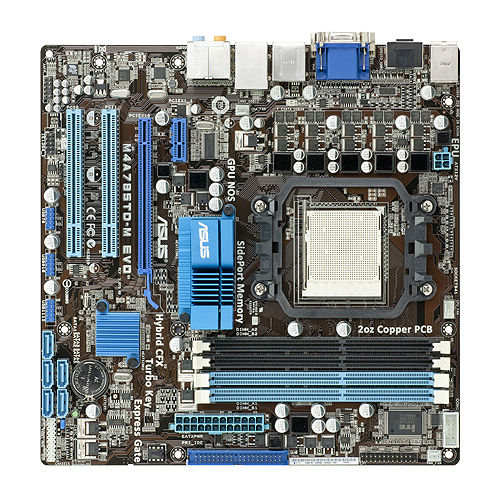
Please describe how the drives are cabled to the Asus M4A785TD-M EVO mobo
7RRvDLf40IArQod8_500.jpg


Please also provide a Disk management screenshot as previously requested
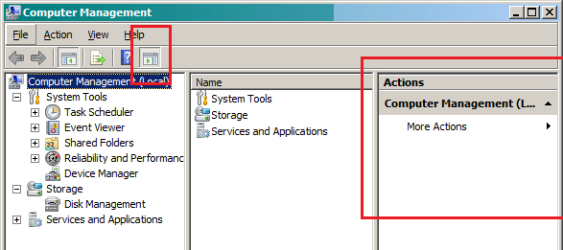
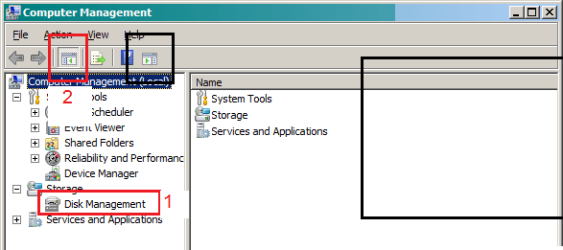
close the action pane and the navigation pane, then maximize the window - thanks
 

Attachments

  • dskman0g.png
    dskman0g.png
    9.9 KB · Views: 8
  • dskman1g.png
    dskman1g.png
    8.9 KB · Views: 6
  • dskman3g.png
    dskman3g.png
    15.9 KB · Views: 2
Last edited:

My Computer

Computer type
Laptop
Computer Manufacturer/Model Number
HP Pavilion dv6-6c10us
OS
x64 (6.3.9600) Win8.1 Pro & soon dual boot x64 (6.1.7601) Win7_SP1 HomePrem
CPU
AMD A6-3420M APU with Radeon(tm) HD Graphics
Motherboard
Hewlett-Packard 1805
Memory
6.00 GB
Graphics Card(s)
AMD Radeon(TM) HD 6520G
Sound Card
(1) AMD High Definition Audio Device (2) IDT High Definiti
Monitor(s) Displays
HP W2072a 20" LCD (1600 x 900) @ 60 Hz
Screen Resolution
1366 x 768 x 32 bits (4294967296 colors) @ 60 Hz
Hard Drives
ST640LM0 00 HM641JI SATA Disk Device
Keyboard
Logitech k520 wireless KB
Mouse
Logitech m320 wireless mouse (bundled with KB)
Internet Speed
15/5 | 54 MB Wireless 'n'
Antivirus
Realtime: Defender or Avast | On-demand: Malwarebytes, ESET
Browser
IE 11 on Win8, IE 10 on win 7
Other Info
Media: [Gimp, Audacity, VLC] || Comm: [WEmail 2012, Skype] || Productivity: [OpenOffice,| Textpad] || Utils: [Sysinternals, cCleaner, Speccy, Defraggler]
Tom, since this is Sevenforums, please boot into Win7 and we'll work that issue. If you also experience the problem when you boot into Win8, post on Eightforums.com. But let's see if we can't solve it on the main OS.

Your drives are listed in Speccy as

Standard Dual Channel PCI IDE Controller
ATA Channel 0
--> _NEC DVD_RW ND-2500A ATA Device
--> TSSTcorp CD/DVDW SH-S182M ATA Device

ATA Channel 1
--> WDC WD3200AAKS-75L9A0 ATA Device
--> WDC WD5001AALS-00L3B2 ATA Device
 

My Computer

Computer type
Laptop
Computer Manufacturer/Model Number
HP Pavilion dv6-6c10us
OS
x64 (6.3.9600) Win8.1 Pro & soon dual boot x64 (6.1.7601) Win7_SP1 HomePrem
CPU
AMD A6-3420M APU with Radeon(tm) HD Graphics
Motherboard
Hewlett-Packard 1805
Memory
6.00 GB
Graphics Card(s)
AMD Radeon(TM) HD 6520G
Sound Card
(1) AMD High Definition Audio Device (2) IDT High Definiti
Monitor(s) Displays
HP W2072a 20" LCD (1600 x 900) @ 60 Hz
Screen Resolution
1366 x 768 x 32 bits (4294967296 colors) @ 60 Hz
Hard Drives
ST640LM0 00 HM641JI SATA Disk Device
Keyboard
Logitech k520 wireless KB
Mouse
Logitech m320 wireless mouse (bundled with KB)
Internet Speed
15/5 | 54 MB Wireless 'n'
Antivirus
Realtime: Defender or Avast | On-demand: Malwarebytes, ESET
Browser
IE 11 on Win8, IE 10 on win 7
Other Info
Media: [Gimp, Audacity, VLC] || Comm: [WEmail 2012, Skype] || Productivity: [OpenOffice,| Textpad] || Utils: [Sysinternals, cCleaner, Speccy, Defraggler]
And while you're at it, please provide a new Speccy report when booted into Win7 - thanks
 

My Computer

Computer type
Laptop
Computer Manufacturer/Model Number
HP Pavilion dv6-6c10us
OS
x64 (6.3.9600) Win8.1 Pro & soon dual boot x64 (6.1.7601) Win7_SP1 HomePrem
CPU
AMD A6-3420M APU with Radeon(tm) HD Graphics
Motherboard
Hewlett-Packard 1805
Memory
6.00 GB
Graphics Card(s)
AMD Radeon(TM) HD 6520G
Sound Card
(1) AMD High Definition Audio Device (2) IDT High Definiti
Monitor(s) Displays
HP W2072a 20" LCD (1600 x 900) @ 60 Hz
Screen Resolution
1366 x 768 x 32 bits (4294967296 colors) @ 60 Hz
Hard Drives
ST640LM0 00 HM641JI SATA Disk Device
Keyboard
Logitech k520 wireless KB
Mouse
Logitech m320 wireless mouse (bundled with KB)
Internet Speed
15/5 | 54 MB Wireless 'n'
Antivirus
Realtime: Defender or Avast | On-demand: Malwarebytes, ESET
Browser
IE 11 on Win8, IE 10 on win 7
Other Info
Media: [Gimp, Audacity, VLC] || Comm: [WEmail 2012, Skype] || Productivity: [OpenOffice,| Textpad] || Utils: [Sysinternals, cCleaner, Speccy, Defraggler]
Thank you for your reply.
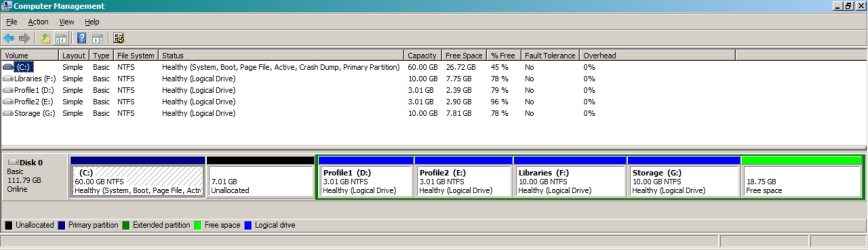
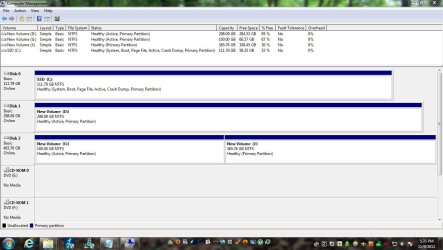
My new speccy report run from the Win 7 side can be found here. I've attached the screen capture of my disk management. For what it's worth I created the VHD for Win 8 on the SSD. The other two drives disconnect periodically on both win 7 AND win 8.

When I set my mobo Asus (M4A785TD-M EVO) for ACHI (for the SSD) the setting covers the first three sata ports so I have to connect the other two hard drives in 4th and 5th slots.
Incidentally the drives have worked seamlessly for the last 36 hours or more.
confused.gif

I really appreciate your help and hope I've provided all the info you need........Tom
 

Attachments

  • Capture.jpg
    Capture.jpg
    101.7 KB · Views: 9

My Computer

OS
7 Professional 64bit
CPU
AMD Phenom II X4 965 Black Edition Deneb 3.4GHz
Motherboard
ASUS M4A785TD-M EVO
Memory
8GB (Kingston DDR3 1333 2GB x4)
Graphics Card(s)
On Board ATI
Great Tom,

Just to be sure
Disk 1
- New Volume D:\

and

Disk 2
- New Volume G:\
- New Volume J:\

are both storage disks, you do not boot from those drives - correct?

Those drives need to be set inactive if only used for storage.
Only Disk 0 - SSD (C:\) should be active.

The following commands are based on the Disk Management screen shot you posted. Do not change the drives or it will invalidate the commands given below. When you're done - post a new disk management - thanks

In an elevated Command Prompt (right click, run as administrator)

diskpart

list disk
select disk 1
list disk

list part
select part 1
list part

inactive
detail part

list disk
select disk 2
list disk

list part
select part 1
list part

inactive
detail part

exit


You say you enabled AHCI and have been running stable. Take a look at this tutorial on AHCI,
but DO NOT change anything. Your system is stable for the moment.

Marking the two storage drives inactive won't destablize it, but mucking around in BIOS at this point might.

After I see the new Disk Management image and everything looks good, I'll ask someone to look at the AHCI configuration with you.

Oh and thanks for the additional information, it does help. You're doing great, kid

Bill
.
 

My Computer

Computer type
Laptop
Computer Manufacturer/Model Number
HP Pavilion dv6-6c10us
OS
x64 (6.3.9600) Win8.1 Pro & soon dual boot x64 (6.1.7601) Win7_SP1 HomePrem
CPU
AMD A6-3420M APU with Radeon(tm) HD Graphics
Motherboard
Hewlett-Packard 1805
Memory
6.00 GB
Graphics Card(s)
AMD Radeon(TM) HD 6520G
Sound Card
(1) AMD High Definition Audio Device (2) IDT High Definiti
Monitor(s) Displays
HP W2072a 20" LCD (1600 x 900) @ 60 Hz
Screen Resolution
1366 x 768 x 32 bits (4294967296 colors) @ 60 Hz
Hard Drives
ST640LM0 00 HM641JI SATA Disk Device
Keyboard
Logitech k520 wireless KB
Mouse
Logitech m320 wireless mouse (bundled with KB)
Internet Speed
15/5 | 54 MB Wireless 'n'
Antivirus
Realtime: Defender or Avast | On-demand: Malwarebytes, ESET
Browser
IE 11 on Win8, IE 10 on win 7
Other Info
Media: [Gimp, Audacity, VLC] || Comm: [WEmail 2012, Skype] || Productivity: [OpenOffice,| Textpad] || Utils: [Sysinternals, cCleaner, Speccy, Defraggler]
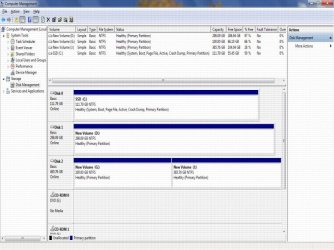
Hi Bill,
Thanks again for your response. I took away the "active" designation for my two storage drives, thanks to your instructions. As far as ACHI goes I believe I have it set up properly. Did the reg change and set the bios. I don't know if it's unique to this mobo but there are 5 SATA slots and the bios stipulates that if you set ACHI on the #1 port then ports 2 & 3 are also set to ACHI automatically. That leaves ports 4 & 5 open for non-ACHI and is where I have these drives connected.
Please note--the drives have worked perfectly now for the last 3 days or so:confused:.

I've attached the disk management pic.

Thanks again for your help........Tom
 

Attachments

  • Capture 11-11-2012.jpg
    Capture 11-11-2012.jpg
    71.5 KB · Views: 15
Last edited:

My Computer

OS
7 Professional 64bit
CPU
AMD Phenom II X4 965 Black Edition Deneb 3.4GHz
Motherboard
ASUS M4A785TD-M EVO
Memory
8GB (Kingston DDR3 1333 2GB x4)
Graphics Card(s)
On Board ATI
Oh dat kid - three days is promising. I'm glad things are more stable and thanks for updating the status. The fresh Disk Management looks fine.

Keep an eye on your system, post back any new occurrances. After you feel that this is satisfactorly resolved, please mark the thread as solved (just a little house keeping around here)

Yeah, I provided the AHCI tutorial as a reference in case you needed it.

Thanks,
Bill
.
 

My Computer

Computer type
Laptop
Computer Manufacturer/Model Number
HP Pavilion dv6-6c10us
OS
x64 (6.3.9600) Win8.1 Pro & soon dual boot x64 (6.1.7601) Win7_SP1 HomePrem
CPU
AMD A6-3420M APU with Radeon(tm) HD Graphics
Motherboard
Hewlett-Packard 1805
Memory
6.00 GB
Graphics Card(s)
AMD Radeon(TM) HD 6520G
Sound Card
(1) AMD High Definition Audio Device (2) IDT High Definiti
Monitor(s) Displays
HP W2072a 20" LCD (1600 x 900) @ 60 Hz
Screen Resolution
1366 x 768 x 32 bits (4294967296 colors) @ 60 Hz
Hard Drives
ST640LM0 00 HM641JI SATA Disk Device
Keyboard
Logitech k520 wireless KB
Mouse
Logitech m320 wireless mouse (bundled with KB)
Internet Speed
15/5 | 54 MB Wireless 'n'
Antivirus
Realtime: Defender or Avast | On-demand: Malwarebytes, ESET
Browser
IE 11 on Win8, IE 10 on win 7
Other Info
Media: [Gimp, Audacity, VLC] || Comm: [WEmail 2012, Skype] || Productivity: [OpenOffice,| Textpad] || Utils: [Sysinternals, cCleaner, Speccy, Defraggler]
Hi Bill,
Thanks again for all your help. This is a great forum. I'll be glad to mark this resolved for housekeeping purposes but I don't think we found out why this kept occurring. Incidentally everything has been fine for 5 days now and hopefully it will continue.

Thank you again.......Tom:D
 

My Computer

OS
7 Professional 64bit
CPU
AMD Phenom II X4 965 Black Edition Deneb 3.4GHz
Motherboard
ASUS M4A785TD-M EVO
Memory
8GB (Kingston DDR3 1333 2GB x4)
Graphics Card(s)
On Board ATI
Tom, sevenforums is the best resource I've found. There's lots out there, but this one cuts to the chase and solves problems very professionally. Thanks for marking the thread solved.

Keep an eye on your machine, you can "unsolve" the thread and post any new occurrances
- but let's hope you don't have to. Your experience and knowledge made this easy.

I think this covers the solution process - can you thik of anything else?
  • disconnect / reconnect sata cables
    new cables really didn't change the
  • configure AHCI in BIOS
    understanding teh posrts covered by AHCI is important
    confirm drive connections on mobo
  • Remove Active flag from the 2 secondary drives
Thanks,

Bill
.
 

My Computer

Computer type
Laptop
Computer Manufacturer/Model Number
HP Pavilion dv6-6c10us
OS
x64 (6.3.9600) Win8.1 Pro & soon dual boot x64 (6.1.7601) Win7_SP1 HomePrem
CPU
AMD A6-3420M APU with Radeon(tm) HD Graphics
Motherboard
Hewlett-Packard 1805
Memory
6.00 GB
Graphics Card(s)
AMD Radeon(TM) HD 6520G
Sound Card
(1) AMD High Definition Audio Device (2) IDT High Definiti
Monitor(s) Displays
HP W2072a 20" LCD (1600 x 900) @ 60 Hz
Screen Resolution
1366 x 768 x 32 bits (4294967296 colors) @ 60 Hz
Hard Drives
ST640LM0 00 HM641JI SATA Disk Device
Keyboard
Logitech k520 wireless KB
Mouse
Logitech m320 wireless mouse (bundled with KB)
Internet Speed
15/5 | 54 MB Wireless 'n'
Antivirus
Realtime: Defender or Avast | On-demand: Malwarebytes, ESET
Browser
IE 11 on Win8, IE 10 on win 7
Other Info
Media: [Gimp, Audacity, VLC] || Comm: [WEmail 2012, Skype] || Productivity: [OpenOffice,| Textpad] || Utils: [Sysinternals, cCleaner, Speccy, Defraggler]
Hi Bill,
Thanks once again for the reply. Seems I spoke too soon...the drives once again disappeared. I don't know what else to do but disconnect and reconnect them. How long they stay connected is a crap-shoot [sometimes for 12 hours and sometime for days]. It's important to note that BOTH drives always go out together leading me to believe that I have a configuration issue.:confused:

Any other ideas are greatly appreciated.

Thanks...............Tom
 

My Computer

OS
7 Professional 64bit
CPU
AMD Phenom II X4 965 Black Edition Deneb 3.4GHz
Motherboard
ASUS M4A785TD-M EVO
Memory
8GB (Kingston DDR3 1333 2GB x4)
Graphics Card(s)
On Board ATI
Back
Top