Harddisk Security Lock Error. HELP

anoble1

New member
Local time
10:34 AM
Messages
6
When I boot my laptop up it is giving me a Harddisk Security
SATA Port 0 Toshiba ****** LOCK

When I hit enter it says enter password.

What do I do? I don't have a password.
 

My Computer

Computer Manufacturer/Model Number
ACER Aspire 5532
OS
7 Home premium
CPU
1.6 TF-20
Memory
3GB
Hard Drives
Toshiba 160GB
drive lock is in bios, does your startup options include bios before prompting for password?
 

My Computer

OS
7 Pro
Yes, but I have tried every password. I don't have the "current password".
 

My Computer

Computer Manufacturer/Model Number
ACER Aspire 5532
OS
7 Home premium
CPU
1.6 TF-20
Memory
3GB
Hard Drives
Toshiba 160GB
If the password is being asked for at boot (not at the Windows login screen), then it is indeed a bios password. If you don't know it, your best bet is to clear the bios, which should be outlined in your motherboard manual. If you don't have the manual, you can supply us with the maker/model of your motherboard and someone here can tell you how. Often, you can reset to defaults from within the bios. If not, there will likely be a jumper or two contact points on the board that can be jumped to reset it.

How to fill out system specs:

http://www.sevenforums.com/general-discussion/8-forum-rules-info-please-read.html#post256049

James
 

My Computer

OS
Win7U 64 RTM
CPU
Q9550
Motherboard
GA-EP45-UD3R
Memory
8GB Gskill
Graphics Card(s)
ASUS|EAH4850/HTDI/1GD3/A
Sound Card
xfi Plat
Monitor(s) Displays
Dell 2405fpw
Screen Resolution
1920x1200
Hard Drives
Seagate & WD sata Drives
PSU
Antec
Case
Antec
Keyboard
MS Natural Ergonomic 4000
Mouse
Logitech MX610 USB Cordless
remove BIOS/CMOS battery to flush the password cache... other than that, you might need to buy a program that says it will remove that password.
 

My Computer

OS
7 Pro
I posted my specs. I can't find my laptop manual.
 

My Computer

Computer Manufacturer/Model Number
ACER Aspire 5532
OS
7 Home premium
CPU
1.6 TF-20
Memory
3GB
Hard Drives
Toshiba 160GB
Here is a link to your manual (pdf format):

Acer Support: Drivers & Support Documents - Notebook / Aspire / Aspire 5532

Unzip the pdf file and search from within the manual for the term 'password'. There will be many results (approx 20-30). Browse through them. You might also search on the term 'bios' to become familiar with the settings.

If your system won't open the pdf file, here's a link to foxit's free pdf reader (I advise to keep Adobe Acrobat off of your system, unless it's already there...):

http://www.foxitsoftware.com/pdf/reader/reader4.php

James
 

My Computer

OS
Win7U 64 RTM
CPU
Q9550
Motherboard
GA-EP45-UD3R
Memory
8GB Gskill
Graphics Card(s)
ASUS|EAH4850/HTDI/1GD3/A
Sound Card
xfi Plat
Monitor(s) Displays
Dell 2405fpw
Screen Resolution
1920x1200
Hard Drives
Seagate & WD sata Drives
PSU
Antec
Case
Antec
Keyboard
MS Natural Ergonomic 4000
Mouse
Logitech MX610 USB Cordless
Got it, can't find out how to reset the password though.
 

My Computer

Computer Manufacturer/Model Number
ACER Aspire 5532
OS
7 Home premium
CPU
1.6 TF-20
Memory
3GB
Hard Drives
Toshiba 160GB
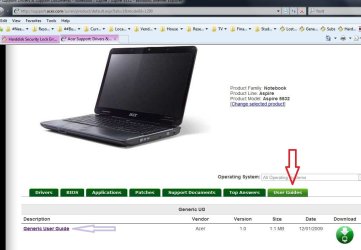
The link should have opend up to the guide page, but click on the User Guides tab, then click on Generic User Guide (as per the attached screenshot):

AcerGuide.JPG
 

My Computer

OS
Win7U 64 RTM
CPU
Q9550
Motherboard
GA-EP45-UD3R
Memory
8GB Gskill
Graphics Card(s)
ASUS|EAH4850/HTDI/1GD3/A
Sound Card
xfi Plat
Monitor(s) Displays
Dell 2405fpw
Screen Resolution
1920x1200
Hard Drives
Seagate & WD sata Drives
PSU
Antec
Case
Antec
Keyboard
MS Natural Ergonomic 4000
Mouse
Logitech MX610 USB Cordless
Got it, can't find out how to reset the password though.

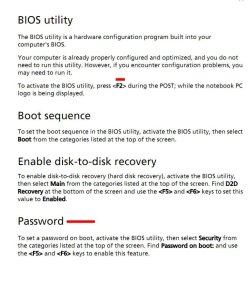
There is information on page 41 (on the PAGE, not the page the pdf reader says it's on...that is page 61 here). It looks like you can enable/disable with F5/F6 from within the bios on the Security page (you must press F2 to enter the bios at POST). If you are asked for a password to enter the bios, call Acer.

Acer Bios.JPG

James

PS -
Best not to edit your post as a new response, as it doesn't show up in subscriptions as a new post and you may go unnoticed until you or someone else posts to the thread).

James
 

My Computer

OS
Win7U 64 RTM
CPU
Q9550
Motherboard
GA-EP45-UD3R
Memory
8GB Gskill
Graphics Card(s)
ASUS|EAH4850/HTDI/1GD3/A
Sound Card
xfi Plat
Monitor(s) Displays
Dell 2405fpw
Screen Resolution
1920x1200
Hard Drives
Seagate & WD sata Drives
PSU
Antec
Case
Antec
Keyboard
MS Natural Ergonomic 4000
Mouse
Logitech MX610 USB Cordless
Back
Top