
HardDrive USB is no longer working

MoeX

New member
Member
VIP
Local time
3:05 PM
Messages
185
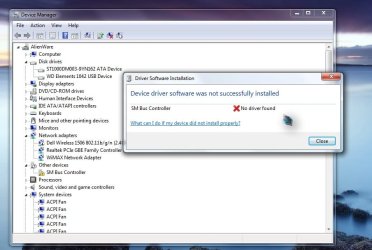
The HDD was working fine just today when i plugged it.. its no longer showing on my PC,I went in "device manager" and it was there so i gave "update driver" a try nothing worked also went in "disk managment" it was there 'see screenshot 2'
plus when i plug it the light flashes with a beep sound.
 

Attachments
  • Untitled.jpg
    Untitled.jpg
    64.9 KB · Views: 2
  • 2.jpg
    2.jpg
    86.8 KB · Views: 2

My Computer My Computer

Computer type
PC/Desktop
Computer Manufacturer/Model Number
AlienWare x51
OS
Windows 7 Home Premium 64bit SP1
CPU
Intel Core i7-3770 3.4GHz (8MB Cache)
Memory
8GB Dual Channel DDR3 at 1600MHz
Graphics Card(s)
Nvidia GeForce GTX 660 1.5GB
Sound Card
Realtek High Definiton Audio
Monitor(s) Displays
LG 3D HDTV 1080p
Screen Resolution
1920 x 1080
Hard Drives
1 TB
For some reason I had exactly the same problem yesterday. Now in my case I can take some of the blame as I was trying to get the USB drive to do some weird things and I also did some unspeakable atrocities to Windows, but anyway the way I got out of this was to initialize the drive in device manager. I left it as MBR as I need it to boot various other computers. The options to format were greyed out after initializing so I had to do that via diskpart in a command prompt.
Please note that formatting the drive will wipe everything that is on it!
Your uninstalled driver on Alienware is not necessarily a sign of a problem. Are you sure it was not there before you had trouble with the drive? If it wasn't you might want to give old System Restore a try........
 

My Computer My Computer

Computer type
PC/Desktop
OS
windows 7 ultimate x64
It is a Wertern Digital Elements. Right?

What is its capacity?

Was it formatted as a GPT drive?

Also note: While taking the snapshot of Windows Disk Management, go to the top tool bar and click on the two buttons to hide the Console Tree and Action Pane. This will give a full screen view without truncating any drive information. ( In the screenshot you posted, I can't read the capacity, Free Space, %used coloumns of the faulty drive :))

Would you mind posting a fresh screenshot? ( Don't try to initialise and obscure the Disk Map with the Initalise disk window. Again in the screenshot you posted, you could have moved that window a little up, so that one can see the full Disk Map of Disk 1.)
 
Last edited:

My Computer My Computer

OS
Windows 7 Home Premium 32 bit
Back
Top