
Solved Hardware-assisted Virtualization is Not Enabled

baumgrenze

New member
Installation Path Problem? Tried to Move XP Mode Folder

See my reply below. I got past the installation but followed MS suggested paths created a new problem.


I would like to download and use XP Mode.

I have Win 7/Pro x64 installed, authenticated, and running

Here are my system specs that might apply to my problem:

Board: Gigabyte Technology Co., Ltd. GA-EP35-DS3P
BIOS: Award Software International, Inc. F6 06/18/2009
Processor: Intel Core 2 Quad Q6600 (2.4 GHz) Quad Core
Controller: Intel P-35 ICH9R Controller 82801IR with AHCI and RAID Support


I downloaded the MS Hardware-Assisted Virtualization (HAV) Detection Tool and got the error message:


"Hardware-assisted virtualization is not enabled on this computer." This is a subtly different message than


"In the Advanced BIOS Features section of my MOBO manual I read that Virtualization Technology enables or disables Intel Virtualization Technology. Virtualization enhanced by Intel Virtualization Technology will allow a platform to run multiple operating systems and applications in independent partitions....."


I read that I might have to disable this feature, shut down (not just reboot) and then re-enable the feature and shut down and reboot again to really enable virtualization.


Virtual XP says that "hardware assisted virtualization" disabled in BIOS but it is enabled!


I tried this and I still get the same answer form the HAV tool. Is Intel Virtualization Technology 'fake hardware virtualization' in the way that Intel's RAID software is seen as 'fake RAID' or am I missing something? Perhaps it is as plain as what is left of the hair on the top of my head (not much) but all I can see is the trees, not the forest.

I read more carefully and discovered that I had authenticated but not validated by installation of Windows 7/Pro x64. Is there yet another step I've not yet discovered?

Thanks,


baumgrenze
 
Last edited:

My Computer

Computer type
PC/Desktop
Computer Manufacturer/Model Number
Custom built by GamePC/Solid Electric - Palo Alto - on 03/10/08
OS
Win 7 Pro 64
CPU
Intel Core 2 Quad Q6600 (2.4 GHz) Quad Core
Motherboard
Gigabyte GA-P35-DS3P Intel P35 ATX (rev. 2.1)
Memory
2 x Crucial 4GB Kit (2GBx2) DDR2 CT2KIT25664AA800
Graphics Card(s)
Sapphire Radeon HD 3870 PCIe 512 Mb
Sound Card
RealTek audio on MOBO + EDIROL UA-1EX
Monitor(s) Displays
Samsung S24A450BW 24" LED monitor
Screen Resolution
1600 x 1200 at 75 Hz
Hard Drives
2 Crucial 128 Gb SSD (CT128M550SSD1)
one mounted and running Win7/Pro x64
one disconnected containing only Win10/Pro upgrade - in process
1 1TB WD Caviar Black (WD1003FZEX-00MK2A0) (Data drive)
1 2TB Seagate 2TB (PN/ 9JB1N3-576 - ST2000DM001-1ER
PSU
Seasonic S12-HT 650W 80% Efficiency Power Supply
Case
Lian Li PC-B25B
Cooling
Gigabyte Silent-Pipe
Keyboard
Dell MS Comfort
Mouse
HP x4000 wireless
Internet Speed
Sonic FTTN @ 23 Mbps
Antivirus
Avast
Browser
SeaMonkey
Other Info
BIOS: Award Software International, Inc. F6 06/18/2009

System Specs - Updated on 09//16/19
Installation Path Problem? Tried to Move XP Mode Folder

I managed to get past this hurdle.

I downloaded and installed XP Mode and it was saved to "Program Files" not to "Program Files (x86)/Windows Virtual PC

I dragged the entire XP Mode folder to the latter.

I tried to open XP Mode and the system started to do the whole download from MS again, so I stopped and came here.

Are there some entries elsewhere that don't get moved with the files themselves, registry entries or .ini file entries?

Do I need to do a complete uninstall and reinstall? I still have the downloaded installation file for XP Mode that worked, I just don't want to dig a deeper hole than I already have.

Thanks,

baumgrenze
 
Last edited:

My Computer

Computer type
PC/Desktop
Computer Manufacturer/Model Number
Custom built by GamePC/Solid Electric - Palo Alto - on 03/10/08
OS
Win 7 Pro 64
CPU
Intel Core 2 Quad Q6600 (2.4 GHz) Quad Core
Motherboard
Gigabyte GA-P35-DS3P Intel P35 ATX (rev. 2.1)
Memory
2 x Crucial 4GB Kit (2GBx2) DDR2 CT2KIT25664AA800
Graphics Card(s)
Sapphire Radeon HD 3870 PCIe 512 Mb
Sound Card
RealTek audio on MOBO + EDIROL UA-1EX
Monitor(s) Displays
Samsung S24A450BW 24" LED monitor
Screen Resolution
1600 x 1200 at 75 Hz
Hard Drives
2 Crucial 128 Gb SSD (CT128M550SSD1)
one mounted and running Win7/Pro x64
one disconnected containing only Win10/Pro upgrade - in process
1 1TB WD Caviar Black (WD1003FZEX-00MK2A0) (Data drive)
1 2TB Seagate 2TB (PN/ 9JB1N3-576 - ST2000DM001-1ER
PSU
Seasonic S12-HT 650W 80% Efficiency Power Supply
Case
Lian Li PC-B25B
Cooling
Gigabyte Silent-Pipe
Keyboard
Dell MS Comfort
Mouse
HP x4000 wireless
Internet Speed
Sonic FTTN @ 23 Mbps
Antivirus
Avast
Browser
SeaMonkey
Other Info
BIOS: Award Software International, Inc. F6 06/18/2009

System Specs - Updated on 09//16/19
My Computer

Computer type
Laptop
Computer Manufacturer/Model Number
HP ENVY 17-1150eg
OS
Windows 10 Pro x64 EN-GB
CPU
1.6 GHz Intel Core i7-720QM Processor
Memory
6 GB
Graphics Card(s)
ATI Mobility Radeon HD 5850 Graphics
Sound Card
Beats sound system with integrated subwoofer
Monitor(s) Displays
17" laptop display, 22" LED and 32" Full HD TV through HDMI
Screen Resolution
1600*900 (1), 1920*1080 (2&3)
Hard Drives
Internal: 2 x 500 GB SATA Hard Disk Drive 7200 rpm
External: 2TB for backups, 3TB USB3 network drive for media
Cooling
As Envy runs a bit warm, I have it on a Cooler Master pad
Keyboard
Logitech diNovo Media Desktop Laser (bluetooth)
Mouse
Logitech Performance Mouse MX
Internet Speed
50/10 Mbps VDSL
Antivirus
Windows Defender 4.3.9431.0
Browser
Maxthon 3.5.2., IE11
Thank you for your reply, Kari,

Correct me if I am wrong, but XP Mode needs to be under "Program Files (x86)/Windows Virtual PC" and not under "Program Files."

I made the mistake of trusting the MS install routine suggested location for installing XP Mode and it ended up in the latter. I tried to open it and nothing happened. I went back to the tutorial and it pointed out the correct "..(x86).." location. That is why I moved it using Windows Explorer, drag-and-drop. I moved the whole directory.

As I said, now I could find and open it, but when I tried it started to download XP Mode all over again. That seemed a bad path to follow, so I stopped and asked for advice. Vaguely remembered past experience with XP suggested that simply moving a directory of installed files might not be sufficient. That is why I suggested that perhaps I need to delete and reinstall XP Mode to get it in the right place with all associated entries also properly made and accounted for. If this is the case, do I need to drag it back where it was first installed to uninstall it?

thanks

baumgrenze
 

My Computer

Computer type
PC/Desktop
Computer Manufacturer/Model Number
Custom built by GamePC/Solid Electric - Palo Alto - on 03/10/08
OS
Win 7 Pro 64
CPU
Intel Core 2 Quad Q6600 (2.4 GHz) Quad Core
Motherboard
Gigabyte GA-P35-DS3P Intel P35 ATX (rev. 2.1)
Memory
2 x Crucial 4GB Kit (2GBx2) DDR2 CT2KIT25664AA800
Graphics Card(s)
Sapphire Radeon HD 3870 PCIe 512 Mb
Sound Card
RealTek audio on MOBO + EDIROL UA-1EX
Monitor(s) Displays
Samsung S24A450BW 24" LED monitor
Screen Resolution
1600 x 1200 at 75 Hz
Hard Drives
2 Crucial 128 Gb SSD (CT128M550SSD1)
one mounted and running Win7/Pro x64
one disconnected containing only Win10/Pro upgrade - in process
1 1TB WD Caviar Black (WD1003FZEX-00MK2A0) (Data drive)
1 2TB Seagate 2TB (PN/ 9JB1N3-576 - ST2000DM001-1ER
PSU
Seasonic S12-HT 650W 80% Efficiency Power Supply
Case
Lian Li PC-B25B
Cooling
Gigabyte Silent-Pipe
Keyboard
Dell MS Comfort
Mouse
HP x4000 wireless
Internet Speed
Sonic FTTN @ 23 Mbps
Antivirus
Avast
Browser
SeaMonkey
Other Info
BIOS: Award Software International, Inc. F6 06/18/2009

System Specs - Updated on 09//16/19
Correct me if I am wrong, but XP Mode needs to be under "Program Files (x86)/Windows Virtual PC" and not under "Program Files."
Consider yourself corrected. That is wrong.

First some philosophical pondering...

If there's something, a procedure or such that the user does not know and of which the user has no prior experience or knowledge, and further when clear and logical, valid instructions exist, why do users still decide "I think that should go there instead" and do against these clear, valid instructions?

That being said, installing Windows XP Mode does not mean you install a program. It's just a virtual hard disk image (not a program) to be used with Windows Virtual PC and does not even ask where you want to place it. It will always be placed in C:\Program Files\Windows XP Mode folder, both on X86 and X64 systems.

As it is not a program, it of course cannot be run alone. Like any virtual appliance it needs a virtualization program to be run, in Windows XP Mode's case it needs Windows Virtual PC virtualization software.

As instructed in all tutorials I have seen, after you have downloaded the Windows XP Mode virtual hard disk, you need to download and install Windows Virtual PC (VPC). Only after installing VPC and a reboot can you launch the Windows XP Mode virtual machine.

An excellent tutorial from our admin Brink: http://www.sevenforums.com/tutorials/8247-windows-xp-mode-install-setup.html

My recommendation: uninstall XP Mode, and if you have already installed it, the VPC, too. Reboot. Now follow the instructions in above mentioned tutorial to the letter.

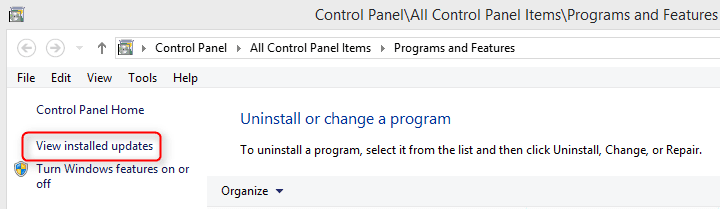
Please notice that when uninstalling Windows Virtual PC it cannot be found in Programs and Features list of installed software, but instead from Installed Updates:

2014-05-13_21h24_14.png

Although not a program as told above, Windows XP Mode virtual hard drive can be uninstalled from Programs and Features list of installed software.

Kari
 

My Computer

Computer type
Laptop
Computer Manufacturer/Model Number
HP ENVY 17-1150eg
OS
Windows 10 Pro x64 EN-GB
CPU
1.6 GHz Intel Core i7-720QM Processor
Memory
6 GB
Graphics Card(s)
ATI Mobility Radeon HD 5850 Graphics
Sound Card
Beats sound system with integrated subwoofer
Monitor(s) Displays
17" laptop display, 22" LED and 32" Full HD TV through HDMI
Screen Resolution
1600*900 (1), 1920*1080 (2&3)
Hard Drives
Internal: 2 x 500 GB SATA Hard Disk Drive 7200 rpm
External: 2TB for backups, 3TB USB3 network drive for media
Cooling
As Envy runs a bit warm, I have it on a Cooler Master pad
Keyboard
Logitech diNovo Media Desktop Laser (bluetooth)
Mouse
Logitech Performance Mouse MX
Internet Speed
50/10 Mbps VDSL
Antivirus
Windows Defender 4.3.9431.0
Browser
Maxthon 3.5.2., IE11
Thank you Kari for your patient and thorough answer.

I managed to get XP Mode up and running last night. I installed PhotoShop Elements 6 only to discover a problem. It would not authenticate. I sent in the S/N and I got the message "A problem was encountered while trying to send information over the internet." Today I learned that their servers were/are down. That sent me on a wild-goose-chase!

I now see that I should have tried installing all my legacy x86 software under Win7/Pro x64 just to see if it would work. The Windows Upgrade Advisor Report suggested I obtain 'paid updates' for all of the software because 'we don't have compatibility information about this version of the program.'

MS Office 2000 (Ver. 9.0.2720), Acrobat Professional 8.1, PhotoShop Elements 6.0, and Autosketch 9 all appear to install, open, and run just fine. The Adobe products have been a headache. I managed to get PSE authenticated earlier this evening when i installed it under Win7. Just a few minutes ago Acrobat Professional returned the
"A problem was encountered while trying to send information over the internet" message again. It must be difficult running a software company, trying to replace stand-alone desktops with 'cloud computing' and then encountering server problems.

I hope my story will help others to avoid the mistakes I made.

Thanks again for your patience.

baumgrenze
 

My Computer

Computer type
PC/Desktop
Computer Manufacturer/Model Number
Custom built by GamePC/Solid Electric - Palo Alto - on 03/10/08
OS
Win 7 Pro 64
CPU
Intel Core 2 Quad Q6600 (2.4 GHz) Quad Core
Motherboard
Gigabyte GA-P35-DS3P Intel P35 ATX (rev. 2.1)
Memory
2 x Crucial 4GB Kit (2GBx2) DDR2 CT2KIT25664AA800
Graphics Card(s)
Sapphire Radeon HD 3870 PCIe 512 Mb
Sound Card
RealTek audio on MOBO + EDIROL UA-1EX
Monitor(s) Displays
Samsung S24A450BW 24" LED monitor
Screen Resolution
1600 x 1200 at 75 Hz
Hard Drives
2 Crucial 128 Gb SSD (CT128M550SSD1)
one mounted and running Win7/Pro x64
one disconnected containing only Win10/Pro upgrade - in process
1 1TB WD Caviar Black (WD1003FZEX-00MK2A0) (Data drive)
1 2TB Seagate 2TB (PN/ 9JB1N3-576 - ST2000DM001-1ER
PSU
Seasonic S12-HT 650W 80% Efficiency Power Supply
Case
Lian Li PC-B25B
Cooling
Gigabyte Silent-Pipe
Keyboard
Dell MS Comfort
Mouse
HP x4000 wireless
Internet Speed
Sonic FTTN @ 23 Mbps
Antivirus
Avast
Browser
SeaMonkey
Other Info
BIOS: Award Software International, Inc. F6 06/18/2009

System Specs - Updated on 09//16/19
Error message you are getting usually means that there's no active Internet connection. Have you tried to surf the web from your XP Mode? Does Internet work on it?
 

My Computer

Computer type
Laptop
Computer Manufacturer/Model Number
HP ENVY 17-1150eg
OS
Windows 10 Pro x64 EN-GB
CPU
1.6 GHz Intel Core i7-720QM Processor
Memory
6 GB
Graphics Card(s)
ATI Mobility Radeon HD 5850 Graphics
Sound Card
Beats sound system with integrated subwoofer
Monitor(s) Displays
17" laptop display, 22" LED and 32" Full HD TV through HDMI
Screen Resolution
1600*900 (1), 1920*1080 (2&3)
Hard Drives
Internal: 2 x 500 GB SATA Hard Disk Drive 7200 rpm
External: 2TB for backups, 3TB USB3 network drive for media
Cooling
As Envy runs a bit warm, I have it on a Cooler Master pad
Keyboard
Logitech diNovo Media Desktop Laser (bluetooth)
Mouse
Logitech Performance Mouse MX
Internet Speed
50/10 Mbps VDSL
Antivirus
Windows Defender 4.3.9431.0
Browser
Maxthon 3.5.2., IE11
Kari,

Thanks for the reply.

When I installed Adobe software under Win7, when my internet connection was as good as it gets, one application (PSE) was registered and another (Acrobat Professional) returned the same error message. I'd done a Live Chat earlier in the day and was told, 'sorry, but our servers are down.' I did a search and it appears to be a common occurrence.

I'm pleased I don't need to use XP Mode. When time permits, I intend to uninstall it. Should I ever decide I need it again, thanks to your persistence I now know how to install it.

thanks,

baumgrenze
 

My Computer

Computer type
PC/Desktop
Computer Manufacturer/Model Number
Custom built by GamePC/Solid Electric - Palo Alto - on 03/10/08
OS
Win 7 Pro 64
CPU
Intel Core 2 Quad Q6600 (2.4 GHz) Quad Core
Motherboard
Gigabyte GA-P35-DS3P Intel P35 ATX (rev. 2.1)
Memory
2 x Crucial 4GB Kit (2GBx2) DDR2 CT2KIT25664AA800
Graphics Card(s)
Sapphire Radeon HD 3870 PCIe 512 Mb
Sound Card
RealTek audio on MOBO + EDIROL UA-1EX
Monitor(s) Displays
Samsung S24A450BW 24" LED monitor
Screen Resolution
1600 x 1200 at 75 Hz
Hard Drives
2 Crucial 128 Gb SSD (CT128M550SSD1)
one mounted and running Win7/Pro x64
one disconnected containing only Win10/Pro upgrade - in process
1 1TB WD Caviar Black (WD1003FZEX-00MK2A0) (Data drive)
1 2TB Seagate 2TB (PN/ 9JB1N3-576 - ST2000DM001-1ER
PSU
Seasonic S12-HT 650W 80% Efficiency Power Supply
Case
Lian Li PC-B25B
Cooling
Gigabyte Silent-Pipe
Keyboard
Dell MS Comfort
Mouse
HP x4000 wireless
Internet Speed
Sonic FTTN @ 23 Mbps
Antivirus
Avast
Browser
SeaMonkey
Other Info
BIOS: Award Software International, Inc. F6 06/18/2009

System Specs - Updated on 09//16/19
Back
Top