
- Local time
- 3:34 PM
- Messages
- 269
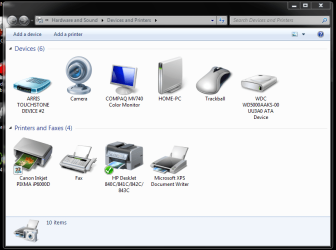
Hello, I just built a computer (Asus P7H55-M Pro and Core I5 661) and I installed a WD 500GB blue HD. I installed Win7 pro 32-bit and all seemsfine, but I found this (see pic).
It appears that the hard drive is a usb and it's not. I set the BIOS for AHCI and it is plugged into the SATA port. Not sure why this is popping up here. As you can see it is on the right hand side, top row. All my other win 7 systems does not do this for their drives.
Any one know how I can get rid of this?
Thanks
It appears that the hard drive is a usb and it's not. I set the BIOS for AHCI and it is plugged into the SATA port. Not sure why this is popping up here. As you can see it is on the right hand side, top row. All my other win 7 systems does not do this for their drives.
Any one know how I can get rid of this?
Thanks
Attachments
My Computer
- Computer type
- PC/Desktop
- Computer Manufacturer/Model Number
- Home Built
- OS
- Windows 10 Pro 64-bit
- CPU
- Core I7-6700
- Motherboard
- Asus Maximus VIII Hero
- Memory
- 8GB Corsair Dominator
- Graphics Card(s)
- Asus STRIX GTX 980Ti
- Monitor(s) Displays
- Asus PG278Q, Dell U2410
- Screen Resolution
- 2560 x 1440, 1920 x 1200
- Hard Drives
- 1 x Samsung 950 Pro 512GB
1 x 1TB HGST
- PSU
- 750W Seasonic
- Case
- Antec 900 v3
- Cooling
- Stock
- Internet Speed
- Cable Internet

