Hello and welcome raiden mate first can you update the specs mate as it is saying you have an Acer so which model Toshiba is it please?
Have you checked to power settings too and just what have you got it set to?
Sorry I meant to add before this started happening.
I got the Toshiba Laptop to turn on, now I am trying to use Windows Vista Recovery tool. What People do to there computer man. I will let you know how the process goes and if I get stuck.
Look raiden it sounds like a temp problem with the no go as it sounds very much like it has now cooled and the CPU or what can function.
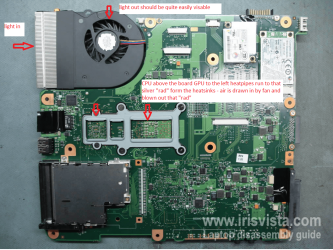
Check with Speccy and let me know. If the temps are CPU in excess of say 55C and the motherboard say 60C then you can check the cooling system very quickly by shining a very bright light into the exhaust vent aperture and then look into the fan aperture. You should see quite a bit of light shining through if not the little cooling "radiator" is probably chock full of crud.
Speccy - Download
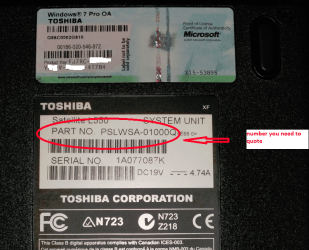
Most likely is the cause seeing it is a Vista machine anyway let me know the model number / version and as important the PART NO as in my pic. Underside of the machine.
I have a good Toshiba reference site I use for fixes where I can forestall getting info if need be.