Hardware not detected.

Phoenix32

New member
Local time
2:47 PM
Messages
8
Hi - just purchased a Gateway P7902h Laptop on the 30th - it came with 64 bit vista and I decided to upgrade the OS to Windows 7 (64x as well).
Ever since the install the laptop has been unable to detect my graphics card, a Geforce GTX 260M. Every time I open a driver installation program (Gateway site only has the drivers for Vista 64x so I tried those, then the Windows 7 64x ones from the Nvidia website.) I get a 'could not locate any drivers that are compatible with your hardware' error.
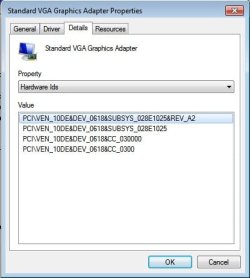
Looking through the Device Manager under Display Adapters, it only has the Standard VGA Graphics Adapter and not the actual card itself. Can anyone help?
 

My Computer

Computer Manufacturer/Model Number
Gateway P7902h
OS
Windows 7
CPU
Intel Core Duo2 P8700 @2.53 Ghz
Memory
4 GB DDR3
Graphics Card(s)
Geforce GTX 260M
Monitor(s) Displays
17"
Screen Resolution
1440x900
Hard Drives
500GB

My Computer

Computer Manufacturer/Model Number
Self Built
OS
Windows 7 ultimate 64 bit / XP Home sp3
CPU
intel Core 2 Duo E8400 3.0ghz
Motherboard
Asus P5ND bios 1401
Memory
8 gigs 1066 OCZ Fata1ty
Graphics Card(s)
EVGA GTX 580 Call of Duty Black Ops Edition
Sound Card
Creative Soundblaster Audigy 2zs
Monitor(s) Displays
Asus 24in LCD's 2MS X2
Screen Resolution
1920x1080p @60Hz
Hard Drives
WD Caviar 500 Black/ WD Caviar 200 Blue
PSU
OCZ 700W GameXtreme
Case
NZXT Apollo
Cooling
Corsair H50 CPU/120mm x3 /60mm x2 /Corsair Dominator Ram
Keyboard
Logitech Bluetooth Wireless MX5000
Mouse
Logitech Bluetooth Wireless MX1000
Internet Speed
Download 19.83 Upload 0.97
Other Info
Logitech Z2300 Speakers/ Bose Noise Cancelling Headphones/Avermedia PCI-e Hybrid TV Bravo/Epson NX415 all in one/ 4 Port Powered USB Hub/ LG 10x Bluray Burner /TSST Corp DVDRW External
Details.jpg
 

My Computer

Computer Manufacturer/Model Number
Gateway P7902h
OS
Windows 7
CPU
Intel Core Duo2 P8700 @2.53 Ghz
Memory
4 GB DDR3
Graphics Card(s)
Geforce GTX 260M
Monitor(s) Displays
17"
Screen Resolution
1440x900
Hard Drives
500GB
Force install the driver from Gateway that you downloaded.

To do so:

Right click standard vga, update driver software, browse, let me pick, have disk, browse. Find the .inf that's part of the driver install. It's where the file you downloaded extracted to.

If you want the latest Win 7 driver from NVidia to work, use this instead: NVIDIA MobilityModder - DriverHeaven.net
 

My Computer

Computer Manufacturer/Model Number
self built
OS
7600.20510 x86
CPU
P4 550 3.4 GHz HT running at 3.5 GHz
Motherboard
MSI PM8M3-V (MS-7211 v1.x) Micro-ATX mainboard
Memory
OCZ 2 GB(2x1GB) DDR400mHz running @ 414 mHz
Graphics Card(s)
HIS Radeon HD 3850 IceQ 3 Turbo HDMI Dual DL-DVI AGP
Sound Card
MOTU Traveler firewire studio interface 192 kHz 24 bit
Monitor(s) Displays
22" widescreen Acer X223W LCD, 17" Compaq P75 CRT
Screen Resolution
1680x1050 and 1280x1024
Hard Drives
SATA I x2 WD, 400 GB and 120 GB, SATA 2 WD Caviar Black 1 TB
PSU
350W generic
Case
Cybertronpc, it glows blue
Cooling
stock cpu fan, Ice-Q 3 gpu and system, many case fans
Keyboard
Logitch Classical Keyboard 200
Mouse
Logitech Mediaplay cordless
Internet Speed
1792/448 kbits/sec
Other Info
SATA II PCI fake RAID adapter, 1 GB Readyboost, original ATI Remote Wonder (even works with WMC perfectly), Logitech Rumblepad 2 game controller x2
Alright - tried the up-to-date drivers from the invidia site after running the mobility modder - setup didn't give me the error as it usually did and it did run through to the installation complete message, but that didn't seem to resolve anything. I rebooted as I figured it'd need to do so in order to register the new drivers but anything that caused me errors due to lack of a graphics card is still doing the same. Tried the 2nd route then with the force install of the Gateway .inf for Vista 64x but it gave me an error message detailing the lack of support for Windows 7.
 

My Computer

Computer Manufacturer/Model Number
Gateway P7902h
OS
Windows 7
CPU
Intel Core Duo2 P8700 @2.53 Ghz
Memory
4 GB DDR3
Graphics Card(s)
Geforce GTX 260M
Monitor(s) Displays
17"
Screen Resolution
1440x900
Hard Drives
500GB
There's more than one .inf. Try another. Make sure you're actually clicking on it when choosing in the navigation pane.
 

My Computer

Computer Manufacturer/Model Number
self built
OS
7600.20510 x86
CPU
P4 550 3.4 GHz HT running at 3.5 GHz
Motherboard
MSI PM8M3-V (MS-7211 v1.x) Micro-ATX mainboard
Memory
OCZ 2 GB(2x1GB) DDR400mHz running @ 414 mHz
Graphics Card(s)
HIS Radeon HD 3850 IceQ 3 Turbo HDMI Dual DL-DVI AGP
Sound Card
MOTU Traveler firewire studio interface 192 kHz 24 bit
Monitor(s) Displays
22" widescreen Acer X223W LCD, 17" Compaq P75 CRT
Screen Resolution
1680x1050 and 1280x1024
Hard Drives
SATA I x2 WD, 400 GB and 120 GB, SATA 2 WD Caviar Black 1 TB
PSU
350W generic
Case
Cybertronpc, it glows blue
Cooling
stock cpu fan, Ice-Q 3 gpu and system, many case fans
Keyboard
Logitch Classical Keyboard 200
Mouse
Logitech Mediaplay cordless
Internet Speed
1792/448 kbits/sec
Other Info
SATA II PCI fake RAID adapter, 1 GB Readyboost, original ATI Remote Wonder (even works with WMC perfectly), Logitech Rumblepad 2 game controller x2
The Vista pack from Gateway only had the one .inf file, nvac.inf - should I try the newer driver versions from Nvidia instead? Said folder has 24 or so and in each .inf there is about 4-5 options with the same name (Geforce GTX 260M - all of which have given me uncompatable windows version errors thus far although I've just started) - am I going to have to go through 125+ trials and errors to get one to work?

EDIT: I deleted the folder this setup had initially created when I tried the Gateway pack and so it wasn't modded. You can prob ignore the above for a bit.
 

My Computer

Computer Manufacturer/Model Number
Gateway P7902h
OS
Windows 7
CPU
Intel Core Duo2 P8700 @2.53 Ghz
Memory
4 GB DDR3
Graphics Card(s)
Geforce GTX 260M
Monitor(s) Displays
17"
Screen Resolution
1440x900
Hard Drives
500GB
Am I on the right path? Been trying a bunch of the inf's in random order hoping to get lucky - Once I pick one and go through the installation options it ends up at a page that says

'Windows found driver software for your device but encountered an error while attempting to install it.

NVIDIA GeForce 260M GTX

A service installation section in this INF is invald'
 

My Computer

Computer Manufacturer/Model Number
Gateway P7902h
OS
Windows 7
CPU
Intel Core Duo2 P8700 @2.53 Ghz
Memory
4 GB DDR3
Graphics Card(s)
Geforce GTX 260M
Monitor(s) Displays
17"
Screen Resolution
1440x900
Hard Drives
500GB
Give me a link to the x64 driver from Gateway. I'll look and advise. In the meantime, clear machine of all previous stuff/folders you've been trying so we can start fresh.
 

My Computer

Computer Manufacturer/Model Number
self built
OS
7600.20510 x86
CPU
P4 550 3.4 GHz HT running at 3.5 GHz
Motherboard
MSI PM8M3-V (MS-7211 v1.x) Micro-ATX mainboard
Memory
OCZ 2 GB(2x1GB) DDR400mHz running @ 414 mHz
Graphics Card(s)
HIS Radeon HD 3850 IceQ 3 Turbo HDMI Dual DL-DVI AGP
Sound Card
MOTU Traveler firewire studio interface 192 kHz 24 bit
Monitor(s) Displays
22" widescreen Acer X223W LCD, 17" Compaq P75 CRT
Screen Resolution
1680x1050 and 1280x1024
Hard Drives
SATA I x2 WD, 400 GB and 120 GB, SATA 2 WD Caviar Black 1 TB
PSU
350W generic
Case
Cybertronpc, it glows blue
Cooling
stock cpu fan, Ice-Q 3 gpu and system, many case fans
Keyboard
Logitch Classical Keyboard 200
Mouse
Logitech Mediaplay cordless
Internet Speed
1792/448 kbits/sec
Other Info
SATA II PCI fake RAID adapter, 1 GB Readyboost, original ATI Remote Wonder (even works with WMC perfectly), Logitech Rumblepad 2 game controller x2
On a related note, when I go to the Device Manager - > Standard VGA Graphics Adapter -> Properties - > Update Driver - > Browse - > Let Me Pick - > It now has 5 NVIDIA GeForce 260M GTX's listed under the show compatible hardware box alongside the Standard VGA Graphics Adapter - dunno if that makes a difference or not
 

My Computer

Computer Manufacturer/Model Number
Gateway P7902h
OS
Windows 7
CPU
Intel Core Duo2 P8700 @2.53 Ghz
Memory
4 GB DDR3
Graphics Card(s)
Geforce GTX 260M
Monitor(s) Displays
17"
Screen Resolution
1440x900
Hard Drives
500GB
Clear machine of all previous extracted folders.

Extract the setup from the link you gave me.

Copy and paste my attachment (extract from .rar first, can't attach .inf here) directly over existing .inf.

Now try to force install as previously directed.
 

Attachments

My Computer

Computer Manufacturer/Model Number
self built
OS
7600.20510 x86
CPU
P4 550 3.4 GHz HT running at 3.5 GHz
Motherboard
MSI PM8M3-V (MS-7211 v1.x) Micro-ATX mainboard
Memory
OCZ 2 GB(2x1GB) DDR400mHz running @ 414 mHz
Graphics Card(s)
HIS Radeon HD 3850 IceQ 3 Turbo HDMI Dual DL-DVI AGP
Sound Card
MOTU Traveler firewire studio interface 192 kHz 24 bit
Monitor(s) Displays
22" widescreen Acer X223W LCD, 17" Compaq P75 CRT
Screen Resolution
1680x1050 and 1280x1024
Hard Drives
SATA I x2 WD, 400 GB and 120 GB, SATA 2 WD Caviar Black 1 TB
PSU
350W generic
Case
Cybertronpc, it glows blue
Cooling
stock cpu fan, Ice-Q 3 gpu and system, many case fans
Keyboard
Logitch Classical Keyboard 200
Mouse
Logitech Mediaplay cordless
Internet Speed
1792/448 kbits/sec
Other Info
SATA II PCI fake RAID adapter, 1 GB Readyboost, original ATI Remote Wonder (even works with WMC perfectly), Logitech Rumblepad 2 game controller x2
I love you. Thanks a million.
Now if only I had come here before reinstalling my OS 3 times as Gateway support intructed ><
 

My Computer

Computer Manufacturer/Model Number
Gateway P7902h
OS
Windows 7
CPU
Intel Core Duo2 P8700 @2.53 Ghz
Memory
4 GB DDR3
Graphics Card(s)
Geforce GTX 260M
Monitor(s) Displays
17"
Screen Resolution
1440x900
Hard Drives
500GB
You're welcome.

In the future, you may add these lines in appropriate sections for any driver version.


This section >>> [NVIDIA.Mfg.NTamd64.6.0]

%NVIDIA_G98.DEV_0618.1% = nv_G9x_HD, PCI\VEN_10DE&DEV_0618&SUBSYS_028E1025

This section >>> ; Localizable Strings

NVIDIA_G98.DEV_0618.1 = "NVIDIA GeForce 260M GTX"

(Hint: Try on latest from NVidia's site :p)
 

My Computer

Computer Manufacturer/Model Number
self built
OS
7600.20510 x86
CPU
P4 550 3.4 GHz HT running at 3.5 GHz
Motherboard
MSI PM8M3-V (MS-7211 v1.x) Micro-ATX mainboard
Memory
OCZ 2 GB(2x1GB) DDR400mHz running @ 414 mHz
Graphics Card(s)
HIS Radeon HD 3850 IceQ 3 Turbo HDMI Dual DL-DVI AGP
Sound Card
MOTU Traveler firewire studio interface 192 kHz 24 bit
Monitor(s) Displays
22" widescreen Acer X223W LCD, 17" Compaq P75 CRT
Screen Resolution
1680x1050 and 1280x1024
Hard Drives
SATA I x2 WD, 400 GB and 120 GB, SATA 2 WD Caviar Black 1 TB
PSU
350W generic
Case
Cybertronpc, it glows blue
Cooling
stock cpu fan, Ice-Q 3 gpu and system, many case fans
Keyboard
Logitch Classical Keyboard 200
Mouse
Logitech Mediaplay cordless
Internet Speed
1792/448 kbits/sec
Other Info
SATA II PCI fake RAID adapter, 1 GB Readyboost, original ATI Remote Wonder (even works with WMC perfectly), Logitech Rumblepad 2 game controller x2
reinstalling my OS 3 times as Gateway support intructed ><

That's not so swift of them.

You can run the setup.exe or similar (I dunno I deleted already) to get the control panel installed after force method.
 

My Computer

Computer Manufacturer/Model Number
self built
OS
7600.20510 x86
CPU
P4 550 3.4 GHz HT running at 3.5 GHz
Motherboard
MSI PM8M3-V (MS-7211 v1.x) Micro-ATX mainboard
Memory
OCZ 2 GB(2x1GB) DDR400mHz running @ 414 mHz
Graphics Card(s)
HIS Radeon HD 3850 IceQ 3 Turbo HDMI Dual DL-DVI AGP
Sound Card
MOTU Traveler firewire studio interface 192 kHz 24 bit
Monitor(s) Displays
22" widescreen Acer X223W LCD, 17" Compaq P75 CRT
Screen Resolution
1680x1050 and 1280x1024
Hard Drives
SATA I x2 WD, 400 GB and 120 GB, SATA 2 WD Caviar Black 1 TB
PSU
350W generic
Case
Cybertronpc, it glows blue
Cooling
stock cpu fan, Ice-Q 3 gpu and system, many case fans
Keyboard
Logitch Classical Keyboard 200
Mouse
Logitech Mediaplay cordless
Internet Speed
1792/448 kbits/sec
Other Info
SATA II PCI fake RAID adapter, 1 GB Readyboost, original ATI Remote Wonder (even works with WMC perfectly), Logitech Rumblepad 2 game controller x2
Help

torrentg (or anyone else who knows whats going on), i've seen where you fixed a bunch of people's problems with NVIDIA drivers not being signed or the GPU not being recognized, and was wondering if the fix you posted was graphic card specific. I'm running a GeForce 9800m GS 512mb on my Asus G50VT, and its all sorts of messed up. I've tried all sorts of fixes found on other sites and nothin has worked. Any help you can give would be greatly appreciated
 

My Computer

Computer Manufacturer/Model Number
Asus G50VT
OS
Windows 7
Back
Top