
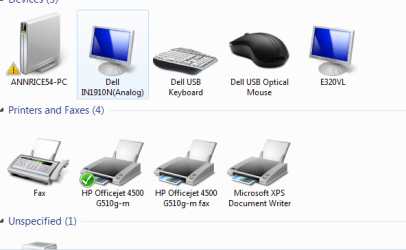
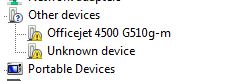
Hi everyone. My problem is that I having a problem with device and printer settings in Windows 7. In the device and printer folder I am getting an error message stating that the Officejet 4500 needs a driver. I have installed and reinstalled the driver several times yet I still recieve the error. In the device manager I have exclamation signs saying the drivers need to be install. I have printed and uploaded a picture, so that is just wrong. My question is how do remove the error message from the device and printer folder and the exclamation points from device manager? I have uploaded a picture of what I am trying to solve. I am using Windows 7 X64 and I have it installed as a network printer.
Any assistance will be appreciated. deanie44
Any assistance will be appreciated. deanie44
Attachments
My Computer
- Computer Manufacturer/Model Number
- INSPIRON 560MT
- OS
- windows 7 X64
- CPU
- Intel(R) Pentium(4) CPU 3.06 GHz
- Memory
- 4 GB OF RAM
- Sound Card
- REALTEK HD AUDIO
- Monitor(s) Displays
- Dell Generic Monitor and Vizio E320VL LCD TV
- Screen Resolution
- 1280 X 720
- Hard Drives
- 1 TB SATA II HARDDRIVE
- Keyboard
- Dell generic keyboard
- Internet Speed
- 16 Mbp
