Hardware trouble shooting help

Lowlife

New member
Local time
6:35 PM
Messages
7
The other day out of no where my computer froze. Tried to reboot and would not load windows. Ran start up repair and after 60 hours windows could not repair it. Tried to reinstall windows the hard drive would not show up, it was detected in bios but would not show up to install windows.

I ordered a new hard drive.

Installed the hard drive, after many problems some my fault some random windows errors windows finally installed. Started loading drivers. Had most of them installed and had to do something else, turned computer off.

When I cane back windows could not load. Reinstalled again. Installed drivers again rebooted several times in the process. Computer was "laggy" so I rebooted again. Wouldn't boot. Went to reinstall windows again. Windows says the hard drive is going to fail soon and will not install on that drive. (this is a brand new drive.)

Used a Ubuntu flash drive to check memory. All 4 first time. There was an error on test 7. Pulled one checked again same errors. Went through pulling each one then put them in one by one testing memory one module at a time. All 4 have errors on test 7.

I assume the mother board is the only option?

Motherboard = an old 770ta-ud3
1st hard drive = spinpoint f3
New hard drive = western digital blue
Graphics = sapphire tech HD 4850
Chip = AMD Athlon 630
Ram = G Skills 4 x 2GB
 

My Computer

Computer type
PC/Desktop
OS
Oklahoma
CPU
AMD Athlon x4 630
Motherboard
Gigabyte GA-77TA-UD3
Memory
G.SKILL Ripjaws Series 8GB (4 x 2GB)
Graphics Card(s)
SAPPHIRE Radeon HD 4850 512MB
Hard Drives
SAMSUNG Spinpoint F3 1TB 7200 RPM
Western Digital WD Blue WD10EZEX 1TB
Antivirus
MSC
Browser
Chrome
Hello and welcome Lowlife (what a username I'm sure you're not:)) mate make a bootable memtest disk up and set the BIOS to boot from the optical insert the disk and Save and exit BIOS the memtest will boot the machine and start the test. and run the test.
It takes some time and you need to do at least 8 passes unless you start to get red errors straight way. Then you may as well get some new RAM.

But before you do that try reseating the sticks first though - just worth a try

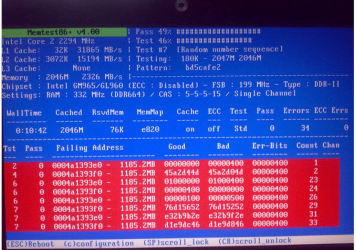
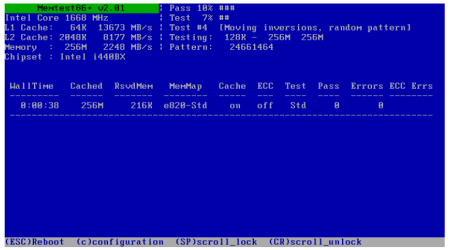
Memtest86+ - Advanced Memory Diagnostic Tool

a couple of screens for how it looks.
 

Attachments

  • MEM.PNG
    MEM.PNG
    11.6 KB · Views: 0
  • MEM2.PNG
    MEM2.PNG
    270.2 KB · Views: 1

My Computer

Computer type
PC/Desktop
Computer Manufacturer/Model Number
Own build (new) Desk1 / Asus ROG Win 7 / Desk2 1st build
OS
Desk1 7 Home Prem / Desk2 10 Pro / Main lap Asus ROG 10 Pro 2 laptop Toshiba 7 Pro Asus P2520 7 & 10
CPU
Desk1 i5 3750K / Laptop i7 GTX 860M / Desk2 i5 2500
Motherboard
Desk1 Asus P877-V / Desk2 Gigabyte H67 UD3H / Laptop ?
Memory
Desk1 8GB (1866) / Desk2 16GB (1333) / Laptop 8Gb DDR3
Graphics Card(s)
Desk 1& 2NVidia GTX 650 & Laptops on board Intel
Sound Card
Desk 1 & 2 -XONAR DG Realtek High Def audio Laptop
Monitor(s) Displays
Desk 1 Benq HD 2450 / Desk2 Philips 24" / Laptop 17.5"
Screen Resolution
1920x1080 D1 & D2 & Laptop 1
Hard Drives
Desk1 Samsung 120GB 830 SSD
Asus ROG 256GB 850 Pro SSD
Desk2 Samsung 840 256 SSD
Toshiba 120GB EVO
PSU
Desk 1 Corsair HX 1050/ Laptop ? / Desk 2 Corsair HX 650
Case
Desk 1 Cooler HAF XM ? Toshiba laptop / Desk2 Coolermaster
Cooling
Fans on all Desk1 -2 Desk2 - all Coolermasters 5 Laptop ?
Keyboard
Desk 1 MS Sidewinder X6 Desk 2 MS Sidewinder X 4
Mouse
Desk 1&2 - Gigabyte MS 900 gamer - laptop - Logitec wireless
Internet Speed
ADSL2+
Other Info
One other Desktop (tester) and spare Toshba laptop both with SSD's
Running Kaspersky 2016 ISS on all machines config'd identically
Logitec audio stereo systems on each machine (x3)
Canon MG5250MFC
Router/modem TP-Link running WPA2SK
I did run "memtest86", first on all 4 memory modules. started showing errors on test 7 "random numbers". I pulled one module tested 3 modules, same results, pulled another module, tested 2 modules same results, pulled another module, tested 1 module same results. Then I put the first 3 modules in one at a time same results on each one.

If all 4 memory modules are bad then something else had to cause it to go bad.

If it was just the memory why are TWO hard drives messing up also?

I am stumped here.
 

My Computer

Computer type
PC/Desktop
OS
Oklahoma
CPU
AMD Athlon x4 630
Motherboard
Gigabyte GA-77TA-UD3
Memory
G.SKILL Ripjaws Series 8GB (4 x 2GB)
Graphics Card(s)
SAPPHIRE Radeon HD 4850 512MB
Hard Drives
SAMSUNG Spinpoint F3 1TB 7200 RPM
Western Digital WD Blue WD10EZEX 1TB
Antivirus
MSC
Browser
Chrome
You would be best testing one module at a time just in case one may be good.

Memory can go for various reasons and it is still the most volotile piece of hardware in a system today overclocking can shorten the lifetime of a module incorrect shutdowns power spikes and others.

does not mean your hard drives are messing up although it may appear so.

The data when read into memory and addressed and then transferred to th hard drive is probably corrupted and therefore cause the error in the installation giving the impression of the hard drive is at fault as hard drives can give similar errors when they are failing or have failed.

My advice if you have 1GB memory sticks or more spare that are compatible with your mothrboard then install one or two sticks and try the installation again if successful that confirms no issue with the hard drive sepecially with it being new.
 

My Computer

Computer Manufacturer/Model Number
HP Compaq 6715B
OS
Windows 7 Ultimate x64
CPU
AMD turion 64x2 TL-64 2.2Ghz
Motherboard
HC030
Memory
Sodimm DDR2 4GB
Graphics Card(s)
ATI Radeon 1250 128MB IGP
Hard Drives
Fujitsu Siemens 500GB sata 3.0 Gb/s
All 4 tested bad one at a time. I will have to find some memory to test with, Thanks for the suggestion.
 

My Computer

Computer type
PC/Desktop
OS
Oklahoma
CPU
AMD Athlon x4 630
Motherboard
Gigabyte GA-77TA-UD3
Memory
G.SKILL Ripjaws Series 8GB (4 x 2GB)
Graphics Card(s)
SAPPHIRE Radeon HD 4850 512MB
Hard Drives
SAMSUNG Spinpoint F3 1TB 7200 RPM
Western Digital WD Blue WD10EZEX 1TB
Antivirus
MSC
Browser
Chrome
Here are the possible reasons I can think of that you could see the symptoms you do:

  • Power Supply: faulty power to the motherboard, causing multiple failures, faulty power to RAM slots, faulty power to hard disk drives.
  • Motherboard: Faulty board , certainly, but it could also be a bad Checksum, BIOS setting error, or connection problem (short circuit).
  • Bad component not mentioned, like an optical drive.
The power supply can be (rough) tested with a multimeter. Do you own one? Otherwise you could borrow one to switch out temporarily.


As for the motherboard try these:


  • Clean out the case and motherboard with compressed air.
  • Remove and re-seat all installed components. Double check all wired connections
  • Go into the BIOS settings and restore Defaults. Be sure to write down all your preferred settings first so you can reset them after restarting. This will address any BIOS setting problem.
  • Perform a ClearCMOS procedure to re-enumerate the devices. See your motherboard manual for instructions.
As for components, disconnect all the other drives and externally connected devices except keyboard and mouse and test.


It seems highly unlikely that you were unlucky enough to have two bad hard drives, and even more unlikely that all 4 RAM sticks failed in the same area at once. My gut feeling is that these are symptoms and not the real problem.


Let us know what you find.
 

My Computer

Computer type
PC/Desktop
Computer Manufacturer/Model Number
Home Built - Jan 2013
OS
Windows 7 64 Bit Home Premium SP1
CPU
i7-3820
Motherboard
Asus P9X79-PRO - Bios 4608
Memory
GSkill F3-14900CL9Q - 16GB
Graphics Card(s)
EVGA GeForce GTX660 - Driver 352.86
Sound Card
On board Realtek ALC898
Monitor(s) Displays
Acer S271HL
Screen Resolution
1920 x 1080
Hard Drives
#1- Samsung 840 Pro Series
#2- Western Digital WD1002FAEX Sata3 Black
#3- Western Digital WD1002FAEX Sata3 Black
PSU
Corsair CMPSU-850TX-V2 - 850 watt (by Seasonic)
Case
Corsair Obsidian 550D
Cooling
Standard 3 120mm case fans, Cooler Master Hyper 212 EVO
Keyboard
MS KC-0405
Mouse
Intellimouse 5-button
Internet Speed
56 Mbits/Sec (on a good day)
Antivirus
Avast & Malwarebytes
Browser
Firefox
Other Info
Asus DVD - DRW-24B1ST 24X
All 4 tested bad one at a time. I will have to find some memory to test with, Thanks for the suggestion.

You are welcome and keep us updated on how it goes.
 

My Computer

Computer Manufacturer/Model Number
HP Compaq 6715B
OS
Windows 7 Ultimate x64
CPU
AMD turion 64x2 TL-64 2.2Ghz
Motherboard
HC030
Memory
Sodimm DDR2 4GB
Graphics Card(s)
ATI Radeon 1250 128MB IGP
Hard Drives
Fujitsu Siemens 500GB sata 3.0 Gb/s
Here are the possible reasons I can think of that you could see the symptoms you do:

  • Power Supply: faulty power to the motherboard, causing multiple failures, faulty power to RAM slots, faulty power to hard disk drives.
  • Motherboard: Faulty board , certainly, but it could also be a bad Checksum, BIOS setting error, or connection problem (short circuit).
  • Bad component not mentioned, like an optical drive.
The power supply can be (rough) tested with a multimeter. Do you own one? Otherwise you could borrow one to switch out temporarily.


As for the motherboard try these:


  • Clean out the case and motherboard with compressed air.
  • Remove and re-seat all installed components. Double check all wired connections
  • Go into the BIOS settings and restore Defaults. Be sure to write down all your preferred settings first so you can reset them after restarting. This will address any BIOS setting problem.
  • Perform a ClearCMOS procedure to re-enumerate the devices. See your motherboard manual for instructions.
As for components, disconnect all the other drives and externally connected devices except keyboard and mouse and test.


It seems highly unlikely that you were unlucky enough to have two bad hard drives, and even more unlikely that all 4 RAM sticks failed in the same area at once. My gut feeling is that these are symptoms and not the real problem.


Let us know what you find.

Case is clean, pretty OCD about that.
Removed everything but board, power supply, memory, one optical drive
first thing I did was restore "optimal settings" in BIOS, updated BIOS later, cleared CMOS many times.
I am waiting for a multimeter to be delivered actually, for another project.

I am trying to find some memory to test with. If the power supply was bad would the memory test bad even when everything was just working "ok" a few minutes earlier?
 

My Computer

Computer type
PC/Desktop
OS
Oklahoma
CPU
AMD Athlon x4 630
Motherboard
Gigabyte GA-77TA-UD3
Memory
G.SKILL Ripjaws Series 8GB (4 x 2GB)
Graphics Card(s)
SAPPHIRE Radeon HD 4850 512MB
Hard Drives
SAMSUNG Spinpoint F3 1TB 7200 RPM
Western Digital WD Blue WD10EZEX 1TB
Antivirus
MSC
Browser
Chrome
RAM needs steady power to operate correctly. Any dip in voltage or amperage to the RAM slots will cause/mimic data errors.

Here is the multimeter test I like to do: I find a spare power connector and connect the meter to the 12v (yellow) line and ground (black). Then I run the PC as usual - starting, shutting down, opening programs (not in your case, of course) and watch the meter on the desk the whole time. The voltage should be at least 12v and remain rock steady. Any fluctuation more than a tenth of a volt is cause for concern.
 

My Computer

Computer type
PC/Desktop
Computer Manufacturer/Model Number
Home Built - Jan 2013
OS
Windows 7 64 Bit Home Premium SP1
CPU
i7-3820
Motherboard
Asus P9X79-PRO - Bios 4608
Memory
GSkill F3-14900CL9Q - 16GB
Graphics Card(s)
EVGA GeForce GTX660 - Driver 352.86
Sound Card
On board Realtek ALC898
Monitor(s) Displays
Acer S271HL
Screen Resolution
1920 x 1080
Hard Drives
#1- Samsung 840 Pro Series
#2- Western Digital WD1002FAEX Sata3 Black
#3- Western Digital WD1002FAEX Sata3 Black
PSU
Corsair CMPSU-850TX-V2 - 850 watt (by Seasonic)
Case
Corsair Obsidian 550D
Cooling
Standard 3 120mm case fans, Cooler Master Hyper 212 EVO
Keyboard
MS KC-0405
Mouse
Intellimouse 5-button
Internet Speed
56 Mbits/Sec (on a good day)
Antivirus
Avast & Malwarebytes
Browser
Firefox
Other Info
Asus DVD - DRW-24B1ST 24X
The thing about that though is when I boot into Ubuntu from a USB drive everything works "OK". All the ram modules error out at the same spot in the test. Test 7 random number generator I believe. I will test the power supply at this point it could be anything it just doesn't make any since.

When I tested ram I tested each one individually and they all past all the test to the same point. It seems if it was a flaky power supply they wouldn't all error at the same time every time.
 

My Computer

Computer type
PC/Desktop
OS
Oklahoma
CPU
AMD Athlon x4 630
Motherboard
Gigabyte GA-77TA-UD3
Memory
G.SKILL Ripjaws Series 8GB (4 x 2GB)
Graphics Card(s)
SAPPHIRE Radeon HD 4850 512MB
Hard Drives
SAMSUNG Spinpoint F3 1TB 7200 RPM
Western Digital WD Blue WD10EZEX 1TB
Antivirus
MSC
Browser
Chrome
I agree on all points, particularly the strange part. That is why you need to do some strange tests ;).

It does not make any more or less sense that every stick, tested individually, would fail at the same point because of bad RAM either.

It could be an error in the RAM controller too (And that could be voltage related). I'm not familiar with that AMD system, but I believe that the controller is on the motherboard, not in the CPU. If the PS is OK and the memory controller is throwing up errors then that could mean a bad motherboard, and, of course, we want it to be anything but that!
 

My Computer

Computer type
PC/Desktop
Computer Manufacturer/Model Number
Home Built - Jan 2013
OS
Windows 7 64 Bit Home Premium SP1
CPU
i7-3820
Motherboard
Asus P9X79-PRO - Bios 4608
Memory
GSkill F3-14900CL9Q - 16GB
Graphics Card(s)
EVGA GeForce GTX660 - Driver 352.86
Sound Card
On board Realtek ALC898
Monitor(s) Displays
Acer S271HL
Screen Resolution
1920 x 1080
Hard Drives
#1- Samsung 840 Pro Series
#2- Western Digital WD1002FAEX Sata3 Black
#3- Western Digital WD1002FAEX Sata3 Black
PSU
Corsair CMPSU-850TX-V2 - 850 watt (by Seasonic)
Case
Corsair Obsidian 550D
Cooling
Standard 3 120mm case fans, Cooler Master Hyper 212 EVO
Keyboard
MS KC-0405
Mouse
Intellimouse 5-button
Internet Speed
56 Mbits/Sec (on a good day)
Antivirus
Avast & Malwarebytes
Browser
Firefox
Other Info
Asus DVD - DRW-24B1ST 24X
You know, I forgot to ask: are all of the parts in this PC 'old'? Or have you recently upgraded anything (excepting the new HDD)?
 

My Computer

Computer type
PC/Desktop
Computer Manufacturer/Model Number
Home Built - Jan 2013
OS
Windows 7 64 Bit Home Premium SP1
CPU
i7-3820
Motherboard
Asus P9X79-PRO - Bios 4608
Memory
GSkill F3-14900CL9Q - 16GB
Graphics Card(s)
EVGA GeForce GTX660 - Driver 352.86
Sound Card
On board Realtek ALC898
Monitor(s) Displays
Acer S271HL
Screen Resolution
1920 x 1080
Hard Drives
#1- Samsung 840 Pro Series
#2- Western Digital WD1002FAEX Sata3 Black
#3- Western Digital WD1002FAEX Sata3 Black
PSU
Corsair CMPSU-850TX-V2 - 850 watt (by Seasonic)
Case
Corsair Obsidian 550D
Cooling
Standard 3 120mm case fans, Cooler Master Hyper 212 EVO
Keyboard
MS KC-0405
Mouse
Intellimouse 5-button
Internet Speed
56 Mbits/Sec (on a good day)
Antivirus
Avast & Malwarebytes
Browser
Firefox
Other Info
Asus DVD - DRW-24B1ST 24X
I added 2 x 2 GB of memory several months ago. Everything else is about 2 years old.
 

My Computer

Computer type
PC/Desktop
OS
Oklahoma
CPU
AMD Athlon x4 630
Motherboard
Gigabyte GA-77TA-UD3
Memory
G.SKILL Ripjaws Series 8GB (4 x 2GB)
Graphics Card(s)
SAPPHIRE Radeon HD 4850 512MB
Hard Drives
SAMSUNG Spinpoint F3 1TB 7200 RPM
Western Digital WD Blue WD10EZEX 1TB
Antivirus
MSC
Browser
Chrome
When you add RAM top a system it is important that the specs of the new and old RAM match exactly. This is particularly important when it comes to RAM voltage. Some odd things start happening when you mix-and-match RAM.

Are all 4 sticks the same spec?

Since the new sticks were installed months ago and the problem (I assume) started recently then this may not be relevant, but we see a lot of RAM errors posted here caused by mis-matched sticks, so I got to ask.
 

My Computer

Computer type
PC/Desktop
Computer Manufacturer/Model Number
Home Built - Jan 2013
OS
Windows 7 64 Bit Home Premium SP1
CPU
i7-3820
Motherboard
Asus P9X79-PRO - Bios 4608
Memory
GSkill F3-14900CL9Q - 16GB
Graphics Card(s)
EVGA GeForce GTX660 - Driver 352.86
Sound Card
On board Realtek ALC898
Monitor(s) Displays
Acer S271HL
Screen Resolution
1920 x 1080
Hard Drives
#1- Samsung 840 Pro Series
#2- Western Digital WD1002FAEX Sata3 Black
#3- Western Digital WD1002FAEX Sata3 Black
PSU
Corsair CMPSU-850TX-V2 - 850 watt (by Seasonic)
Case
Corsair Obsidian 550D
Cooling
Standard 3 120mm case fans, Cooler Master Hyper 212 EVO
Keyboard
MS KC-0405
Mouse
Intellimouse 5-button
Internet Speed
56 Mbits/Sec (on a good day)
Antivirus
Avast & Malwarebytes
Browser
Firefox
Other Info
Asus DVD - DRW-24B1ST 24X
all of the ram are the same brand, model, part number. the only difference is the batch is was made.

I will do some more tests later this evening.
 

My Computer

Computer type
PC/Desktop
OS
Oklahoma
CPU
AMD Athlon x4 630
Motherboard
Gigabyte GA-77TA-UD3
Memory
G.SKILL Ripjaws Series 8GB (4 x 2GB)
Graphics Card(s)
SAPPHIRE Radeon HD 4850 512MB
Hard Drives
SAMSUNG Spinpoint F3 1TB 7200 RPM
Western Digital WD Blue WD10EZEX 1TB
Antivirus
MSC
Browser
Chrome
Back
Top