
Solved Has Geforce driver v368.39 broken Windows Update?

Rally

New member
Member
Local time
3:13 PM
Messages
45
Location
By the sea
Hi. Since upgrading Geforce driver to v368.39 Windows update is unbelievably slow and I mean hours to download updates. This Geforce driver gave me issues with one of my games too (well documented and fixed by rolling back the driver). Although the game was fixed Windows Update is not. It is still slow and holds up my internet for days while it 'downloads'. Any idea what might have gone wrong and how to fix?
 

My Computer My Computer

At a glance

Windows 7 Ultimate 64 bit 7600 SP1AMD FX4350 quad core 4.2MHz unlocked2 x 4Gb and 2 x 2Gb = 12Gb running at 1600MHzGeForce GTX960
Computer type
PC/Desktop
Computer Manufacturer/Model Number
Self built like Trigger's broom
OS
Windows 7 Ultimate 64 bit 7600 SP1
CPU
AMD FX4350 quad core 4.2MHz unlocked
Motherboard
Asus M5A99X EVO R2.0
Memory
2 x 4Gb and 2 x 2Gb = 12Gb running at 1600MHz
Graphics Card(s)
GeForce GTX960
Sound Card
On board
Monitor(s) Displays
Acer S220HQL LED backlit
Screen Resolution
1920 x 1080
Hard Drives
WD10EURS-630AB1 1TB
PSU
Corsair TX650
Case
CiT Jupiter
Cooling
be quiet! Dark Rock Pro C1
Keyboard
Genius USB wired
Mouse
Logitech G402 wired
Internet Speed
Up to 16Mb but provided by Sky so probably not that much
Antivirus
MSE
Other Info
2 x internal SATA DVD-RW
Canon LiDE 110 USB flatbed scanner
Epson WF-2010 wireless printer
Netgear WNDA3100v2 wireless dongle
Hi,
Doubt it I was using it for a long time
Just recently I loaded 368.81 instead just because it was around for a month before a new driver was released again :)
I hate installing new drivers every week and NVidia has been doing that way too often but 368.39 was a pretty good one so I kept it.

If anything make sure you have KB3172605 installed.
 

My Computer My Computer

At a glance

Win-7-Pro64bit 7-H-Prem-64biti7-5930K 2nd i9-9940x both water blocked VRM'...Trident-z 3200C14 2nd Trident-z 3600C16EVGA 1080ti ftw3 2nd Titan Xp both water blocked
Computer type
PC/Desktop
Computer Manufacturer/Model Number
Custom assembled by me :}
OS
Win-7-Pro64bit 7-H-Prem-64bit
CPU
i7-5930K 2nd i9-9940x both water blocked VRM's too
Motherboard
ASUS SABERTOOTH X99 2nd ASUS x299 Apex
Memory
Trident-z 3200C14 2nd Trident-z 3600C16
Graphics Card(s)
EVGA 1080ti ftw3 2nd Titan Xp both water blocked
Sound Card
Built-in Realtek
Monitor(s) Displays
1-AOC G2460PG 24"G-Sync 144Hz/ 2nd 1-ASUS VG248QE 24" 144Hz
Screen Resolution
1920 x 1080 144Hz
Hard Drives
2-Samsung M.2 Evo & Evo Plus
2-Samsung 850 EVO 500GB SSD's/ 3-2.5 W.D. Black 1tb-&3-1tb/3-3.5 WD Black 1tb hdd's
PSU
EVGA SuperNOVA 1000-P2 2nd 1200-P2
Case
2-Corsair Obsidian Series 450D Black ATX Mid Tower
Cooling
Custom water loops
Keyboard
Logitech G710+/ 2nd Logitech G910
Mouse
2-RedDragon M901 Perdition 16400 dpi Gaming mouse = wired
Internet Speed
Comcast Ping 19ms 89.31mbps download speed 6.12mbps upload
Antivirus
Malwarebytes Pro/ Superantispyware Pro
Browser
FireFox & Pale moon
Other Info
2nd ASUS X299 Apex/Intel i9-9940x with Custom water loop/7H-Prem-x64/Corsair 450D case/Ram Trident-z 3600C16 4x8gb / Samsung970Evo plus 500gb SSD/Dual ssd EZ swap evo/PSU EVGA SuperNova 1200w-P2 80+Platinum/GPU Titan Xp /8-ML-140 on push-pull on 2-280GTX rads
NVIDIA should at least release drivers every month to cover up many issues and fix them. I'm glad there are still people who would download their latest drivers every few weeks.
 

My Computer My Computer

At a glance

Windows 7 Home Premium 64-BITAMD A8 7200P8GB 1600mhzRadeon R5 (APU) + Radeon R5 M230 2GB Dual Gra...
Computer type
PC/Desktop
Computer Manufacturer/Model Number
ASUS X550ZE
OS
Windows 7 Home Premium 64-BIT
CPU
AMD A8 7200P
Motherboard
N/A
Memory
8GB 1600mhz
Graphics Card(s)
Radeon R5 (APU) + Radeon R5 M230 2GB Dual Graphics
Sound Card
Realtek ALC269 with SonicMaster
Monitor(s) Displays
Laptop Display
Screen Resolution
1920 x 1080 @60hz
Hard Drives
WDC WD50 00LPVX-80V0TT0 (500GB)
PSU
Laptop Charger
Mouse
ARMAGGEDON TEXTRON SCORPION 7
Internet Speed
100 mbps DOWN / 50 mbps UP
Antivirus
Windows Defender
Browser
Mozzila FireFox, Valve Steam in-game internet browser
Hi,

If anything make sure you have KB3172605 installed.

I downloaded this KB and it is exactly the same. No progress and nothing on the progress indicator.
 

My Computer My Computer

At a glance

Windows 7 Ultimate 64 bit 7600 SP1AMD FX4350 quad core 4.2MHz unlocked2 x 4Gb and 2 x 2Gb = 12Gb running at 1600MHzGeForce GTX960
Computer type
PC/Desktop
Computer Manufacturer/Model Number
Self built like Trigger's broom
OS
Windows 7 Ultimate 64 bit 7600 SP1
CPU
AMD FX4350 quad core 4.2MHz unlocked
Motherboard
Asus M5A99X EVO R2.0
Memory
2 x 4Gb and 2 x 2Gb = 12Gb running at 1600MHz
Graphics Card(s)
GeForce GTX960
Sound Card
On board
Monitor(s) Displays
Acer S220HQL LED backlit
Screen Resolution
1920 x 1080
Hard Drives
WD10EURS-630AB1 1TB
PSU
Corsair TX650
Case
CiT Jupiter
Cooling
be quiet! Dark Rock Pro C1
Keyboard
Genius USB wired
Mouse
Logitech G402 wired
Internet Speed
Up to 16Mb but provided by Sky so probably not that much
Antivirus
MSE
Other Info
2 x internal SATA DVD-RW
Canon LiDE 110 USB flatbed scanner
Epson WF-2010 wireless printer
Netgear WNDA3100v2 wireless dongle
Hi,
Did it install and ask you to restart the machine or is it just searching away still ?

If it did install ?
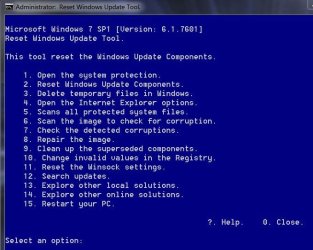
Try using this to reset the update system it's very good,
Use Option 2 on the list after right clicking it and select run as administrator
https://gallery.technet.microsoft.com/scriptcenter/Reset-Windows-Update-Agent-d824badc

Download it to your downloads folder
Right click it and select Extract all to the downloads folder.
Then right click ResetWUEng and select run as administrator
Follow the rest of the prompts
Press any key to continue
Type 2 for that Option on the list and the Enter key to reset update services..
Press y for Yes and then the Enter key I believe twice
After it has completed
Type 15 for that option and the Enter key to restart the machine.
Should say will restart in 60 seconds save your work.... press any key to continue.
After restart go to windows updates and manually check for updates shouldn't take a few minutes.
Reset win updates eng.JPG
 

My Computer My Computer

At a glance

Win-7-Pro64bit 7-H-Prem-64biti7-5930K 2nd i9-9940x both water blocked VRM'...Trident-z 3200C14 2nd Trident-z 3600C16EVGA 1080ti ftw3 2nd Titan Xp both water blocked
Computer type
PC/Desktop
Computer Manufacturer/Model Number
Custom assembled by me :}
OS
Win-7-Pro64bit 7-H-Prem-64bit
CPU
i7-5930K 2nd i9-9940x both water blocked VRM's too
Motherboard
ASUS SABERTOOTH X99 2nd ASUS x299 Apex
Memory
Trident-z 3200C14 2nd Trident-z 3600C16
Graphics Card(s)
EVGA 1080ti ftw3 2nd Titan Xp both water blocked
Sound Card
Built-in Realtek
Monitor(s) Displays
1-AOC G2460PG 24"G-Sync 144Hz/ 2nd 1-ASUS VG248QE 24" 144Hz
Screen Resolution
1920 x 1080 144Hz
Hard Drives
2-Samsung M.2 Evo & Evo Plus
2-Samsung 850 EVO 500GB SSD's/ 3-2.5 W.D. Black 1tb-&3-1tb/3-3.5 WD Black 1tb hdd's
PSU
EVGA SuperNOVA 1000-P2 2nd 1200-P2
Case
2-Corsair Obsidian Series 450D Black ATX Mid Tower
Cooling
Custom water loops
Keyboard
Logitech G710+/ 2nd Logitech G910
Mouse
2-RedDragon M901 Perdition 16400 dpi Gaming mouse = wired
Internet Speed
Comcast Ping 19ms 89.31mbps download speed 6.12mbps upload
Antivirus
Malwarebytes Pro/ Superantispyware Pro
Browser
FireFox & Pale moon
Other Info
2nd ASUS X299 Apex/Intel i9-9940x with Custom water loop/7H-Prem-x64/Corsair 450D case/Ram Trident-z 3600C16 4x8gb / Samsung970Evo plus 500gb SSD/Dual ssd EZ swap evo/PSU EVGA SuperNova 1200w-P2 80+Platinum/GPU Titan Xp /8-ML-140 on push-pull on 2-280GTX rads
The KB 'said' it was installing for a couple of seconds and then went straight on to checking for updates without restarting.

I downloaded and ran the reset program following the instructions above. This went well and WU has clearly been reset. Now when I run WU it just stays at the 'checking for updates' stage for ages without any progress on the progress bar just as before. Below this it now says that 'Updates were installed: never'.

I have disabled auto updating for now as it slows my computer.
 

My Computer My Computer

At a glance

Windows 7 Ultimate 64 bit 7600 SP1AMD FX4350 quad core 4.2MHz unlocked2 x 4Gb and 2 x 2Gb = 12Gb running at 1600MHzGeForce GTX960
Computer type
PC/Desktop
Computer Manufacturer/Model Number
Self built like Trigger's broom
OS
Windows 7 Ultimate 64 bit 7600 SP1
CPU
AMD FX4350 quad core 4.2MHz unlocked
Motherboard
Asus M5A99X EVO R2.0
Memory
2 x 4Gb and 2 x 2Gb = 12Gb running at 1600MHz
Graphics Card(s)
GeForce GTX960
Sound Card
On board
Monitor(s) Displays
Acer S220HQL LED backlit
Screen Resolution
1920 x 1080
Hard Drives
WD10EURS-630AB1 1TB
PSU
Corsair TX650
Case
CiT Jupiter
Cooling
be quiet! Dark Rock Pro C1
Keyboard
Genius USB wired
Mouse
Logitech G402 wired
Internet Speed
Up to 16Mb but provided by Sky so probably not that much
Antivirus
MSE
Other Info
2 x internal SATA DVD-RW
Canon LiDE 110 USB flatbed scanner
Epson WF-2010 wireless printer
Netgear WNDA3100v2 wireless dongle
Hi,
If the update did not ask to restart it did not install
If the update system is still stalling although you switched the traditional setting and restarted the machine
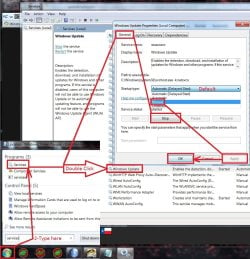
Double check the windows update service is indeed Stopped and if not stop it and switch to Manual,
service stop windows update.jpg


Make sure KB3020369 is installed if not manually install it this is the main article page with all versions,
https://support.microsoft.com/en-us/kb/3020369
These other links do prompt you to download as soon as you click on them just to give you a heads up :)

Win-7 32 bit
https://download.microsoft.com/down...B0A-35769CBBE6B0/Windows6.1-KB3020369-x86.msu
Win-7 64 bit
https://download.microsoft.com/down...020-EC41D56B074F/Windows6.1-KB3020369-x64.msu

Then manually install KB3172605 main article page with all versions,
https://support.microsoft.com/en-us/kb/3172605
KB3172605
Win-7 32 bit
https://download.microsoft.com/down...A9C-6B30C3E1735A/Windows6.1-KB3172605-x86.msu

Win-7 64 bit
https://download.microsoft.com/down...67F-C713F7821374/Windows6.1-KB3172605-x64.msu

After switch your windows update settings back to what you had prior and manually check for updates and the rest should show up shortly.
 
Last edited:

My Computer My Computer

At a glance

Win-7-Pro64bit 7-H-Prem-64biti7-5930K 2nd i9-9940x both water blocked VRM'...Trident-z 3200C14 2nd Trident-z 3600C16EVGA 1080ti ftw3 2nd Titan Xp both water blocked
Computer type
PC/Desktop
Computer Manufacturer/Model Number
Custom assembled by me :}
OS
Win-7-Pro64bit 7-H-Prem-64bit
CPU
i7-5930K 2nd i9-9940x both water blocked VRM's too
Motherboard
ASUS SABERTOOTH X99 2nd ASUS x299 Apex
Memory
Trident-z 3200C14 2nd Trident-z 3600C16
Graphics Card(s)
EVGA 1080ti ftw3 2nd Titan Xp both water blocked
Sound Card
Built-in Realtek
Monitor(s) Displays
1-AOC G2460PG 24"G-Sync 144Hz/ 2nd 1-ASUS VG248QE 24" 144Hz
Screen Resolution
1920 x 1080 144Hz
Hard Drives
2-Samsung M.2 Evo & Evo Plus
2-Samsung 850 EVO 500GB SSD's/ 3-2.5 W.D. Black 1tb-&3-1tb/3-3.5 WD Black 1tb hdd's
PSU
EVGA SuperNOVA 1000-P2 2nd 1200-P2
Case
2-Corsair Obsidian Series 450D Black ATX Mid Tower
Cooling
Custom water loops
Keyboard
Logitech G710+/ 2nd Logitech G910
Mouse
2-RedDragon M901 Perdition 16400 dpi Gaming mouse = wired
Internet Speed
Comcast Ping 19ms 89.31mbps download speed 6.12mbps upload
Antivirus
Malwarebytes Pro/ Superantispyware Pro
Browser
FireFox & Pale moon
Other Info
2nd ASUS X299 Apex/Intel i9-9940x with Custom water loop/7H-Prem-x64/Corsair 450D case/Ram Trident-z 3600C16 4x8gb / Samsung970Evo plus 500gb SSD/Dual ssd EZ swap evo/PSU EVGA SuperNova 1200w-P2 80+Platinum/GPU Titan Xp /8-ML-140 on push-pull on 2-280GTX rads
ThrashZone, you sure have gone to a lot of trouble to help me. I appreciate this.

I played with your suggestion (disabling, restarting, re-enabling etc) I even reinstalled KB3172605 and the news is that I just did a manual update and it seems to have worked :). Currently there are no more updates available so I will leave it a week and then set it to check automatically

If all goes to plan I will mark this as solved but in the meantime I have left rep for you :thumbsup:. Thanks.
 

My Computer My Computer

At a glance

Windows 7 Ultimate 64 bit 7600 SP1AMD FX4350 quad core 4.2MHz unlocked2 x 4Gb and 2 x 2Gb = 12Gb running at 1600MHzGeForce GTX960
Computer type
PC/Desktop
Computer Manufacturer/Model Number
Self built like Trigger's broom
OS
Windows 7 Ultimate 64 bit 7600 SP1
CPU
AMD FX4350 quad core 4.2MHz unlocked
Motherboard
Asus M5A99X EVO R2.0
Memory
2 x 4Gb and 2 x 2Gb = 12Gb running at 1600MHz
Graphics Card(s)
GeForce GTX960
Sound Card
On board
Monitor(s) Displays
Acer S220HQL LED backlit
Screen Resolution
1920 x 1080
Hard Drives
WD10EURS-630AB1 1TB
PSU
Corsair TX650
Case
CiT Jupiter
Cooling
be quiet! Dark Rock Pro C1
Keyboard
Genius USB wired
Mouse
Logitech G402 wired
Internet Speed
Up to 16Mb but provided by Sky so probably not that much
Antivirus
MSE
Other Info
2 x internal SATA DVD-RW
Canon LiDE 110 USB flatbed scanner
Epson WF-2010 wireless printer
Netgear WNDA3100v2 wireless dongle
Hi,
Yes disabling windows update service was a bad idea = My Bad :o
I replaced that last screen shot to switch to manual instead :)

Many thanks for the rep very much appreciated :)
Let us know how it goes
Cheers.
 

My Computer My Computer

At a glance

Win-7-Pro64bit 7-H-Prem-64biti7-5930K 2nd i9-9940x both water blocked VRM'...Trident-z 3200C14 2nd Trident-z 3600C16EVGA 1080ti ftw3 2nd Titan Xp both water blocked
Computer type
PC/Desktop
Computer Manufacturer/Model Number
Custom assembled by me :}
OS
Win-7-Pro64bit 7-H-Prem-64bit
CPU
i7-5930K 2nd i9-9940x both water blocked VRM's too
Motherboard
ASUS SABERTOOTH X99 2nd ASUS x299 Apex
Memory
Trident-z 3200C14 2nd Trident-z 3600C16
Graphics Card(s)
EVGA 1080ti ftw3 2nd Titan Xp both water blocked
Sound Card
Built-in Realtek
Monitor(s) Displays
1-AOC G2460PG 24"G-Sync 144Hz/ 2nd 1-ASUS VG248QE 24" 144Hz
Screen Resolution
1920 x 1080 144Hz
Hard Drives
2-Samsung M.2 Evo & Evo Plus
2-Samsung 850 EVO 500GB SSD's/ 3-2.5 W.D. Black 1tb-&3-1tb/3-3.5 WD Black 1tb hdd's
PSU
EVGA SuperNOVA 1000-P2 2nd 1200-P2
Case
2-Corsair Obsidian Series 450D Black ATX Mid Tower
Cooling
Custom water loops
Keyboard
Logitech G710+/ 2nd Logitech G910
Mouse
2-RedDragon M901 Perdition 16400 dpi Gaming mouse = wired
Internet Speed
Comcast Ping 19ms 89.31mbps download speed 6.12mbps upload
Antivirus
Malwarebytes Pro/ Superantispyware Pro
Browser
FireFox & Pale moon
Other Info
2nd ASUS X299 Apex/Intel i9-9940x with Custom water loop/7H-Prem-x64/Corsair 450D case/Ram Trident-z 3600C16 4x8gb / Samsung970Evo plus 500gb SSD/Dual ssd EZ swap evo/PSU EVGA SuperNova 1200w-P2 80+Platinum/GPU Titan Xp /8-ML-140 on push-pull on 2-280GTX rads
Re-enabled auto update notification today and all looks to be good :thumbsup: .
Marked post as solved. Thanks again ThrashZone.
 

My Computer My Computer

At a glance

Windows 7 Ultimate 64 bit 7600 SP1AMD FX4350 quad core 4.2MHz unlocked2 x 4Gb and 2 x 2Gb = 12Gb running at 1600MHzGeForce GTX960
Computer type
PC/Desktop
Computer Manufacturer/Model Number
Self built like Trigger's broom
OS
Windows 7 Ultimate 64 bit 7600 SP1
CPU
AMD FX4350 quad core 4.2MHz unlocked
Motherboard
Asus M5A99X EVO R2.0
Memory
2 x 4Gb and 2 x 2Gb = 12Gb running at 1600MHz
Graphics Card(s)
GeForce GTX960
Sound Card
On board
Monitor(s) Displays
Acer S220HQL LED backlit
Screen Resolution
1920 x 1080
Hard Drives
WD10EURS-630AB1 1TB
PSU
Corsair TX650
Case
CiT Jupiter
Cooling
be quiet! Dark Rock Pro C1
Keyboard
Genius USB wired
Mouse
Logitech G402 wired
Internet Speed
Up to 16Mb but provided by Sky so probably not that much
Antivirus
MSE
Other Info
2 x internal SATA DVD-RW
Canon LiDE 110 USB flatbed scanner
Epson WF-2010 wireless printer
Netgear WNDA3100v2 wireless dongle
Back
Top