Hi. This has been happening sometimes and I still wonder why it does this. I have Win 7 Home Premium 64-bit.
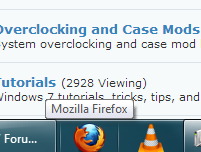
What happens is that at some point, when I click on a program, it will think as if I have the pointer pointed onto that program.
Here is a picture of what I mean:
I don't know why it happens at a certain point when I use my laptop for many hours. My only workaround is to end the explorer.exe task and re-open the processor.
I don't know it this happens to anyone else...
My Computer
Computer Manufacturer/Model Number
Toshiba / Satellite L655D-S5109
OS
Windows 7 Home premium 64-bit
CPU
AMD Turion™ II P540 Dual-Core
Memory
4gb
Graphics Card(s)
ATI Mobility Radeon HD 4200 Series
Sound Card
Conexant SmartAudio HD (No Wave out aka Stereo Mix >_< )
Monitor(s) Displays
1
Hard Drives
500gb Toshiba ATA Device (system - main)
500gb WD MyPastport Portable Hard Drive
Sorry for my confusion. You said, "What happens is that at some point, when I click on a program, it will think as if I have the pointer pointed onto that program." Which program were you clicking on in your picture? Was it Firefox or something else? If Firefox then I think that's a normal display to see the tooltip appear. You could try changing the "mouse hover time" to see if that makes any difference.
This method contains steps that tell you how to modify the registry. However, serious problems might occur if you modify the registry incorrectly. Therefore, make sure that you follow these steps carefully. For added protection, back up the registry before you modify it. The easiest way is to create a new system restore point before editing the registry.
This previous Forum thread may also provide some help:
There's another tooltip setting called AutoPopDelay. This is set to a default value of 5000 milliseconds (5 seconds) and that's how long the tooltip stays displayed. This is what I could find on changing the AutoPopDelay setting:
But if you were clicking on some other program (not Firefox) and the Mozilla Firefox tooltip appeared, another possibility (since you say this happens after using your laptop for many hours) is overheating. Make sure your laptop's vents are free from dust build up and nothing is obstructing the airflow. Make sure your laptop is on a firm surface and not a pillow, bedspread, or even your lap. A cooling pad may help to lower temperatures.