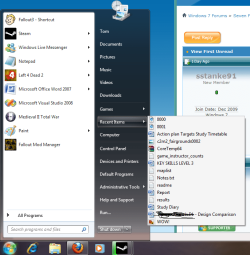
Have a strange problem with "Recent Items"

JohnMa

New member
Local time
1:16 AM
Messages
5
Hello all,

I'm brand new to this forum, so sorry if i post in the wrong place :D

I just discovered that my "Recent Items" list does not show video and audio files..

Now why is this?
I have two computers, a stationary with win7 x64 RC, and a new laptop Acer Travelmate 8471G that I have used the upgrade option from vista to win7, x86.

In neither of these two computers the "Recent Items" list does not show audio or video files.

If I type shell:recent, in Run. The Recent Items folder opens up, but there is no video or audio files there either.

Why is this? And is there something I can do that makes windows also save audio and video to this list?

And what is the deal with the "Recent Items" list in -Start- sorts everything by name, and not by 'last opened'? Can see that there is many that has the same problem, but where is the logic? :sarc:

Anyway, I hope there is someone that can help me with my first problem? With the audio and video files?

-
John
 

My Computer

OS
Microsoft Windows 7 Professional 64-bit 7601 Multiprocessor Free Service Pack 1
CPU
Intel(R) Core(TM)2 CPU 6600 @ 2.40GHz
Motherboard
ASUSTeK Computer INC. P5W DH Deluxe
Memory
6,00 GB
Graphics Card(s)
(1) ATI Radeon HD 4800 Series (2) LogMeIn Mirror Driver
Sound Card
(1) AMD High Definition Audio Device (2) High Definition A
Screen Resolution
1920 x 1080 x 32 bits (4294967296 colors) @ 60 Hz
Hard Drives
(1) INTEL SSDSA2M080G2GC (2) Stash (3) USB Device
Internet Speed
Fiberoptics 40 Mbit
Recent Items is for programs, not files. If you have it enabled, there are links on the right side of the Start Menu to access them.
 

My Computer

Computer Manufacturer/Model Number
DIY
OS
W7x64 Pro, SuSe 12.1/** W7 x64 Pro, XP MCE
CPU
Phenom II 1090T w/Noctua NH-D14 /**4400+ X2 w/CM Hyper TX 3
Motherboard
ASRock 890FX Deluxe 4/**A8N-SLI
Memory
2 x 2GB Patriot PGS34g1600LLKA/**4x1GB Corsair VS
Graphics Card(s)
EVGA GTX460 SC/**EVGA 8800GTS
Sound Card
Asus Xonar D2X/**Xonar D1
Monitor(s) Displays
Acer X233H, Dell E152FPc /**LG M237-WD
Screen Resolution
1920x1080 & 1024x768/**1980x1080
Hard Drives
WDC 2TB, 1.5TB, 1TB, 500GB,Seagate 500GB , Maxtor 80GB /**500GB Seagate & WDC 1TB Black
PSU
CM RS600 w/ APC BX1000G/**Antec 500 TP w/ APC BX1000
Case
HAF922/**Antec 1040IIB
Cooling
3x200mm, 1x140 and 1x120mm/**5x80mm fans
Keyboard
Logitech Media USB/**Saitek Eclipse
Mouse
Cordless Trackman Wheel/**Ditto
Internet Speed
3.3Mbps
Other Info
SB 560 5.1 w/ Sennheiser RS140/**Creative T20 speakers, Dvico FusionHDTV7 Gold RT, Cisco E3000, HP 5510V AIO, Linksys E3000, Belkin F5U237 hub and **F5D8055 adapter
(** = 2nd rig)
The list of 'Recent Items' in the middle section of the task bar is for recently accessed documents of any type.
I have no idea why it isn't showing audio/video files. Does it show text/Word documents or pictures?
A screenshot may be of use.
EDIT:Mine looks like this.
 

Attachments

  • Recent items.png
    Recent items.png
    49.4 KB · Views: 33
Last edited:

My Computer

Computer Manufacturer/Model Number
Self Built
OS
Windows 7 Home Premium x64(desktop), Windows 7 Professional x86(laptop)
CPU
AMD Phenom II x4 965 @ 3.40GHz Black Edition
Motherboard
ASUS M4A785TD-V Evo
Memory
4GB Corsair XMS3 DDR3
Graphics Card(s)
Sapphire HD 5770 1024MB
Monitor(s) Displays
22" Viewsonic VX2260 Widescreen LCD
Screen Resolution
1900x1080 (1080p)
Hard Drives
Samsung Spinpoint F3 1TB SATA, 32MB Cache, 7200 RPM
PSU
600W OCZ StealthXStream
Case
Antec 902 Ultimate Gaming Case
Cooling
Stock - CPU, GPU, PSU, 3x120MMcase fans 1x200mm case fan
Keyboard
Saitek Eclipse II
Mouse
Roccat Kova Gaming Mouse
Yes, I know that I can see the links on the right side of the start menu.
http://www.sevenforums.com/tutorials/2013-recent-items-turn-off.html

That's why I asked my second question- :rolleyes:
And what is the deal with the "Recent Items" list in -Start- sorts everything by name, and not by 'last opened'? Can see that there is many that has the same problem, but where is the logic?

But I'm not talking about the Recent programs, but the "Recent Items". That list is not for programs, because there are photos, PDF's, documents etc. that is listed there. But NOT video and audio files as previous windows have done.
 

My Computer

OS
Microsoft Windows 7 Professional 64-bit 7601 Multiprocessor Free Service Pack 1
CPU
Intel(R) Core(TM)2 CPU 6600 @ 2.40GHz
Motherboard
ASUSTeK Computer INC. P5W DH Deluxe
Memory
6,00 GB
Graphics Card(s)
(1) ATI Radeon HD 4800 Series (2) LogMeIn Mirror Driver
Sound Card
(1) AMD High Definition Audio Device (2) High Definition A
Screen Resolution
1920 x 1080 x 32 bits (4294967296 colors) @ 60 Hz
Hard Drives
(1) INTEL SSDSA2M080G2GC (2) Stash (3) USB Device
Internet Speed
Fiberoptics 40 Mbit
The list of 'Recent Items' in the middle section of the task bar is for recently accessed documents of any type.
I have no idea why it isn't showing audio/video files. Does it show text/Word documents or pictures?
A screenshot may be of use.
EDIT:Mine looks like this.

Mine looks as your does.. There is photos, pictures, pdf.. even cd/dvd image..
But no video or audio
 
Last edited:

My Computer

OS
Microsoft Windows 7 Professional 64-bit 7601 Multiprocessor Free Service Pack 1
CPU
Intel(R) Core(TM)2 CPU 6600 @ 2.40GHz
Motherboard
ASUSTeK Computer INC. P5W DH Deluxe
Memory
6,00 GB
Graphics Card(s)
(1) ATI Radeon HD 4800 Series (2) LogMeIn Mirror Driver
Sound Card
(1) AMD High Definition Audio Device (2) High Definition A
Screen Resolution
1920 x 1080 x 32 bits (4294967296 colors) @ 60 Hz
Hard Drives
(1) INTEL SSDSA2M080G2GC (2) Stash (3) USB Device
Internet Speed
Fiberoptics 40 Mbit
Back
Top