Solved have I been hacked on Chrome browser?

i was referring to the delete part of roguekiller, As for the trojan, i found several trojans with similar names but not the exact name of the one found in your system, i then done a search into "Ticket.Zip" Do you know what it is?
From what i read it can be a spam email that people pretending to be airlines can send you with the option to download your flight ticket, thats all i could gather on it, perhaps another member could shed some light.
 

My Computer My Computer

At a glance

Windows 7 Home Premium 64BitAMD A6-3420M 1.5GHZ OC - 2.0GHZ4GB DDR3 1600MHZAMD RADEON 6520G+AMD RADEON HD7470M 1GB DDR3
Computer type
Laptop
Computer Manufacturer/Model Number
Packard Bell
OS
Windows 7 Home Premium 64Bit
CPU
AMD A6-3420M 1.5GHZ OC - 2.0GHZ
Memory
4GB DDR3 1600MHZ
Graphics Card(s)
AMD RADEON 6520G+AMD RADEON HD7470M 1GB DDR3
Screen Resolution
1366x768
Hard Drives
500GB SATA
Internet Speed
18Mb Unlimited
Antivirus
AVAST!
Browser
MOZILLA FIREFOX
I have no recollection of what ticket.zip was or came from, none at all.
I searched our email accounts and nothing comes up.
 

My Computer My Computer

At a glance

Windows 7 Ultimate x64
OS
Windows 7 Ultimate x64
C:\Users\Tricia\Pictures\Downloads look in there and see if its still there.
 

My Computer My Computer

At a glance

Windows 7 Home Premium 64BitAMD A6-3420M 1.5GHZ OC - 2.0GHZ4GB DDR3 1600MHZAMD RADEON 6520G+AMD RADEON HD7470M 1GB DDR3
Computer type
Laptop
Computer Manufacturer/Model Number
Packard Bell
OS
Windows 7 Home Premium 64Bit
CPU
AMD A6-3420M 1.5GHZ OC - 2.0GHZ
Memory
4GB DDR3 1600MHZ
Graphics Card(s)
AMD RADEON 6520G+AMD RADEON HD7470M 1GB DDR3
Screen Resolution
1366x768
Hard Drives
500GB SATA
Internet Speed
18Mb Unlimited
Antivirus
AVAST!
Browser
MOZILLA FIREFOX
I looked, it is gone.
 

My Computer My Computer

At a glance

Windows 7 Ultimate x64
OS
Windows 7 Ultimate x64
Looks like we could be done here for the moment, If there are any further problems, please post back here in this thread, thank you for your time and co-operation. Take care
Michael
 

My Computer My Computer

At a glance

Windows 7 Home Premium 64BitAMD A6-3420M 1.5GHZ OC - 2.0GHZ4GB DDR3 1600MHZAMD RADEON 6520G+AMD RADEON HD7470M 1GB DDR3
Computer type
Laptop
Computer Manufacturer/Model Number
Packard Bell
OS
Windows 7 Home Premium 64Bit
CPU
AMD A6-3420M 1.5GHZ OC - 2.0GHZ
Memory
4GB DDR3 1600MHZ
Graphics Card(s)
AMD RADEON 6520G+AMD RADEON HD7470M 1GB DDR3
Screen Resolution
1366x768
Hard Drives
500GB SATA
Internet Speed
18Mb Unlimited
Antivirus
AVAST!
Browser
MOZILLA FIREFOX
Are you monitoring your browser Add-On's in its tools tab to assure that only Flash player is enabled? This is where I start. Nothing else is really needed unless you know for sure it's required to display a page in your browser, like a Reader.

Then visit Control Panel>Programs and Features to see that only programs you know and use are installed. Uninstall all others - google or ask back first if unsure.

Next establish a Clean Boot from Troubleshooting Steps for Windows 7 for best performance.

Once MBAM reports back after a full Updated scan to be clean, I always run SUPERAntiSpyware to root out any spyware from the registry where it can hide even if you uninstall it in Programs and features.

Most important is to have a perfect baseline install and use only the tools and methods which work best for Win7, which are compiled in these same steps for Clean Reinstall - Factory OEM Windows 7.
 
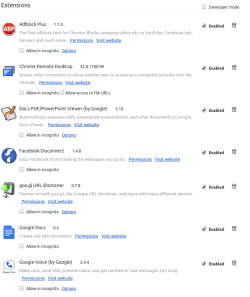
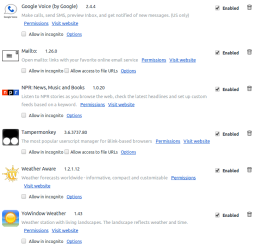
With Chrome, I had it synced with my other PCs.
So in the tools, they all have the same ones enabled.
And lots of them.
I reinstalled chrome and it is not synced. Chrome wants me to log in.
Do you think syncing chrome across multiple pcs is an issue?
 

Attachments

  • tools1.png
    tools1.png
    39 KB · Views: 0
  • tools2.png
    tools2.png
    32.3 KB · Views: 0

My Computer My Computer

At a glance

Windows 7 Ultimate x64
OS
Windows 7 Ultimate x64
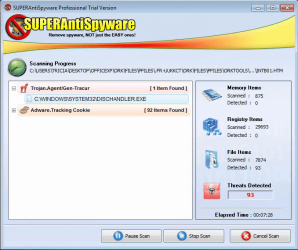
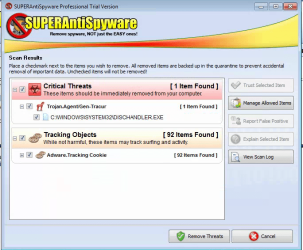
So far superantispyware says it has found 93 threats, mostly tracking and one trojan.agent.
 

Attachments

  • sas1.png
    sas1.png
    87.1 KB · Views: 15

My Computer My Computer

At a glance

Windows 7 Ultimate x64
OS
Windows 7 Ultimate x64
Log
SUPERAntiSpyware Scan Log
SUPERAntiSpyware | Remove Malware | Remove Spyware - AntiMalware, AntiSpyware, AntiAdware!

Generated 02/14/2014 at 01:50 PM

Application Version : 5.7.1018

Core Rules Database Version : 11041
Trace Rules Database Version: 8853

Scan type : Quick Scan
Total Scan Time : 00:08:53

Operating System Information
Windows 7 Ultimate 32-bit, Service Pack 1 (Build 6.01.7601)
UAC On - Limited User

Memory items scanned : 875
Memory threats detected : 0
Registry items scanned : 29693
Registry threats detected : 0
File items scanned : 10110
File threats detected : 93

Adware.Tracking Cookie
C:\Users\Tricia\AppData\Roaming\Microsoft\Windows\Cookies\tricia@apmebf[1].txt [ /apmebf ]
C:\Users\Tricia\AppData\Roaming\Microsoft\Windows\Cookies\tricia@mediaplex[1].txt [ /mediaplex ]
C:\Users\Tricia\AppData\Roaming\Microsoft\Windows\Cookies\XQS0MGYL.txt [ /serving-sys.com ]
C:\Users\Tricia\AppData\Roaming\Microsoft\Windows\Cookies\3R111W3L.txt [ /www.googleadservices.com ]
C:\Users\Tricia\AppData\Roaming\Microsoft\Windows\Cookies\0K9US7X6.txt [ /c.atdmt.com ]
C:\Users\Tricia\AppData\Roaming\Microsoft\Windows\Cookies\SI10WRJU.txt [ /revsci.net ]
C:\Users\Tricia\AppData\Roaming\Microsoft\Windows\Cookies\MJ45RN34.txt [ /accounts.google.com ]
C:\Users\Tricia\AppData\Roaming\Microsoft\Windows\Cookies\RTV6MIZ6.txt [ /demandmedia.trc.taboola.com ]
C:\Users\Tricia\AppData\Roaming\Microsoft\Windows\Cookies\9GVS4F80.txt [ /doubleclick.net ]
C:\Users\Tricia\AppData\Roaming\Microsoft\Windows\Cookies\BKKLLYW2.txt [ /nwpc.revenuewire.net ]
C:\Users\Tricia\AppData\Roaming\Microsoft\Windows\Cookies\AMR6OG6V.txt [ /demandmedia.trc.taboola.com ]
C:\Users\Tricia\AppData\Roaming\Microsoft\Windows\Cookies\JT3B4EN2.txt [ /dmtracker.com ]
C:\Users\Tricia\AppData\Roaming\Microsoft\Windows\Cookies\W90YCQWA.txt [ /accounts.google.com ]
C:\Users\Tricia\AppData\Roaming\Microsoft\Windows\Cookies\V8Y1JJN6.txt [ /interclick.com ]
C:\Users\Tricia\AppData\Roaming\Microsoft\Windows\Cookies\Low\E493RCWY.txt [ /microsoftsto.112.2o7.net ]
C:\Users\Tricia\AppData\Roaming\Microsoft\Windows\Cookies\Low\Q73YVRM4.txt [ /mediaplex.com ]
C:\Users\Tricia\AppData\Roaming\Microsoft\Windows\Cookies\Low\5XCNAKSW.txt [ /media6degrees.com ]
C:\Users\Tricia\AppData\Roaming\Microsoft\Windows\Cookies\Low\7BTX93JV.txt [ /serving-sys.com ]
C:\Users\Tricia\AppData\Roaming\Microsoft\Windows\Cookies\Low\615UQWYK.txt [ /zedo.com ]
C:\Users\Tricia\AppData\Roaming\Microsoft\Windows\Cookies\Low\DG2H73NR.txt [ /ru4.com ]
C:\Users\Tricia\AppData\Roaming\Microsoft\Windows\Cookies\Low\U4Y9ZRVJ.txt [ /ads.pubmatic.com ]
C:\Users\Tricia\AppData\Roaming\Microsoft\Windows\Cookies\Low\[email protected][2].txt [ /h.atdmt.com ]
C:\Users\Tricia\AppData\Roaming\Microsoft\Windows\Cookies\Low\8BEYCMOK.txt [ /pointroll.com ]
C:\Users\Tricia\AppData\Roaming\Microsoft\Windows\Cookies\Low\Z4S0X9R6.txt [ /advertising.com ]
C:\Users\Tricia\AppData\Roaming\Microsoft\Windows\Cookies\Low\[email protected][1].txt [ /www.googleadservices.com ]
C:\Users\Tricia\AppData\Roaming\Microsoft\Windows\Cookies\Low\4IGR4XS5.txt [ /adtechus.com ]
C:\Users\Tricia\AppData\Roaming\Microsoft\Windows\Cookies\Low\CJVEI5S7.txt [ /survey.g.doubleclick.net ]
C:\Users\Tricia\AppData\Roaming\Microsoft\Windows\Cookies\Low\WA9Q4M7F.txt [ /media.adfrontiers.com ]
C:\Users\Tricia\AppData\Roaming\Microsoft\Windows\Cookies\Low\W3G1NCCB.txt [ /ads.pointroll.com ]
C:\Users\Tricia\AppData\Roaming\Microsoft\Windows\Cookies\Low\tricia@statcounter[1].txt [ /statcounter.com ]
C:\Users\Tricia\AppData\Roaming\Microsoft\Windows\Cookies\Low\tricia@tribalfusion[2].txt [ /tribalfusion.com ]
C:\Users\Tricia\AppData\Roaming\Microsoft\Windows\Cookies\Low\Z00ZH6WY.txt [ /lucidmedia.com ]
C:\Users\Tricia\AppData\Roaming\Microsoft\Windows\Cookies\Low\V83ABE6G.txt [ /fastclick.net ]
C:\Users\Tricia\AppData\Roaming\Microsoft\Windows\Cookies\Low\BB6HX20V.txt [ /c1.adform.net ]
C:\Users\Tricia\AppData\Roaming\Microsoft\Windows\Cookies\Low\ZKPNBR38.txt [ /c.atdmt.com ]
C:\Users\Tricia\AppData\Roaming\Microsoft\Windows\Cookies\Low\56PKGP2N.txt [ /revsci.net ]
C:\Users\Tricia\AppData\Roaming\Microsoft\Windows\Cookies\Low\SOOGKD2U.txt [ /imrworldwide.com ]
C:\Users\Tricia\AppData\Roaming\Microsoft\Windows\Cookies\Low\T3CUEZLQ.txt [ /demandmedia.trc.taboola.com ]
C:\Users\Tricia\AppData\Roaming\Microsoft\Windows\Cookies\Low\MS4LGKAC.txt [ /adform.net ]
C:\Users\Tricia\AppData\Roaming\Microsoft\Windows\Cookies\Low\J5L5KZC7.txt [ /doubleclick.net ]
C:\Users\Tricia\AppData\Roaming\Microsoft\Windows\Cookies\Low\2P8MPJJL.txt [ /ads.yahoo.com ]
C:\Users\Tricia\AppData\Roaming\Microsoft\Windows\Cookies\Low\1TSXRILB.txt [ /collective-media.net ]
C:\Users\Tricia\AppData\Roaming\Microsoft\Windows\Cookies\Low\VMHRUBY9.txt [ /overture.com ]
C:\Users\Tricia\AppData\Roaming\Microsoft\Windows\Cookies\Low\PRM1P1NH.txt [ /smartadserver.com ]
C:\Users\Tricia\AppData\Roaming\Microsoft\Windows\Cookies\Low\5UZXWB6C.txt [ /demandmedia.trc.taboola.com ]
C:\Users\Tricia\AppData\Roaming\Microsoft\Windows\Cookies\Low\5E9RPX0B.txt [ /questionmarket.com ]
C:\Users\Tricia\AppData\Roaming\Microsoft\Windows\Cookies\Low\C0DE8VUK.txt [ /www.burstnet.com ]
C:\Users\Tricia\AppData\Roaming\Microsoft\Windows\Cookies\Low\Y4DBC5UZ.txt [ /dmtracker.com ]
C:\Users\Tricia\AppData\Roaming\Microsoft\Windows\Cookies\Low\CMJ7YY1B.txt [ /atdmt.com ]
C:\Users\Tricia\AppData\Roaming\Microsoft\Windows\Cookies\Low\83PUTEGA.txt [ /interclick.com ]
C:\Users\Tricia\AppData\Roaming\Microsoft\Windows\Cookies\Low\I7WVXI6T.txt [ /track.adform.net ]
C:\Users\Tricia\AppData\Roaming\Microsoft\Windows\Cookies\Low\[email protected][2].txt [ /c1.atdmt.com ]
C:\Users\Tricia\AppData\Roaming\Microsoft\Windows\Cookies\Low\IISILUR4.txt [ /casalemedia.com ]
C:\Users\Tricia\AppData\Roaming\Microsoft\Windows\Cookies\Low\[email protected][1].txt [ /at.atwola.com ]
C:\Users\Tricia\AppData\Roaming\Microsoft\Windows\Cookies\Low\tricia@specificclick[1].txt [ /specificclick.net ]
.imrworldwide.com [ C:\USERS\TRICIA\APPDATA\LOCAL\GOOGLE\CHROME\USER DATA\DEFAULT\COOKIES ]
.doubleclick.net [ C:\USERS\TRICIA\APPDATA\LOCAL\GOOGLE\CHROME\USER DATA\DEFAULT\COOKIES ]
statse.webtrendslive.com [ C:\USERS\TRICIA\APPDATA\LOCAL\GOOGLE\CHROME\USER DATA\DEFAULT\COOKIES ]
.serving-sys.com [ C:\USERS\TRICIA\APPDATA\LOCAL\GOOGLE\CHROME\USER DATA\DEFAULT\COOKIES ]
.collective-media.net [ C:\USERS\TRICIA\APPDATA\LOCAL\GOOGLE\CHROME\USER DATA\DEFAULT\COOKIES ]
.insightexpressai.com [ C:\USERS\TRICIA\APPDATA\LOCAL\GOOGLE\CHROME\USER DATA\DEFAULT\COOKIES ]
.eyeviewads.com [ C:\USERS\TRICIA\APPDATA\LOCAL\GOOGLE\CHROME\USER DATA\DEFAULT\COOKIES ]
.media6degrees.com [ C:\USERS\TRICIA\APPDATA\LOCAL\GOOGLE\CHROME\USER DATA\DEFAULT\COOKIES ]
.serving-sys.com [ C:\USERS\TRICIA\APPDATA\LOCAL\GOOGLE\CHROME\USER DATA\DEFAULT\COOKIES ]
.insightexpressai.com [ C:\USERS\TRICIA\APPDATA\LOCAL\GOOGLE\CHROME\USER DATA\DEFAULT\COOKIES ]
.collective-media.net [ C:\USERS\TRICIA\APPDATA\LOCAL\GOOGLE\CHROME\USER DATA\DEFAULT\COOKIES ]
.ads.pointroll.com [ C:\USERS\TRICIA\APPDATA\LOCAL\GOOGLE\CHROME\USER DATA\DEFAULT\COOKIES ]
.collective-media.net [ C:\USERS\TRICIA\APPDATA\LOCAL\GOOGLE\CHROME\USER DATA\DEFAULT\COOKIES ]
.atdmt.com [ C:\USERS\TRICIA\APPDATA\LOCAL\GOOGLE\CHROME\USER DATA\DEFAULT\COOKIES ]
.doubleclick.net [ C:\USERS\TRICIA\APPDATA\LOCAL\GOOGLE\CHROME\USER DATA\DEFAULT\COOKIES ]
accounts.google.com [ C:\USERS\TRICIA\APPDATA\LOCAL\GOOGLE\CHROME\USER DATA\DEFAULT\COOKIES ]

Trojan.Agent/Gen-Tracur
C:\WINDOWS\SYSTEM32\DISCHANDLER.EXE

 

Attachments

  • sas2.png
    sas2.png
    97.7 KB · Views: 15

My Computer My Computer

At a glance

Windows 7 Ultimate x64
OS
Windows 7 Ultimate x64
There is no way for anyone here to know whether it is or isn't the legitimate file, without comparing a hash of your file with the legitimate one from klite codec pack.

Plugins and addons expand the attack surface of browsers, and browsers are already a cesspool of vulnerabilities. I see you have Java 7 installed. Why do you need that? If you have a reason for local use (programming or custom application), you should disable in browser. If you have a web application that requires it, turn security level all the way up. After either change, click apply and then ok. If you needed it for a specific web application, confirm it still works at this time. If it doesn't you can place it in the exception list under the security tab, if you are 100% certain it is a legitimate application. If you cannot specifically name a reason for needing Java then delete it. Java and Adobe Flash are huge targets for exploits.

Please make sure all your browsers and necessary plugins are up-to-date.

Also, I see you have Adobe Reader installed. This is big target for exploits, as well. You should disable Javascript and enable protected view.

Finally, I think you should sandbox your browser. This is especially useful if you use webmail(Gmail, Yahoo, etc) for email services.
-------------------------------------------------------------

Java
- Disable in Browser:
Control Panel > Java > Security Tab and uncheck "Enable in Browser"

- Turn Up Security Settings:
Control Panel > Java > Security Tab and move Security Level to High

Adobe Reader
- Enable Protected View:
Open Reader > Edit > Preferences > Security (Enhanced) > check "All files" for the Protected View section

- Disable JavaScript:
Open Reader > Edit > Preferences > JavaScript > uncheck “Enable Acrobat JavaScript”
 
Last edited:

My Computer My Computer

At a glance

W7 x64i5
Computer type
PC/Desktop
Computer Manufacturer/Model Number
Custom
OS
W7 x64
CPU
i5
Motherboard
Gigabyte 277-UD3H
Java dont need will remove it.
A programmer friend uses Java all the time, so I tended to install Java, but I dont use it.
He was always trying to get me to learn Java. And I wrote a few programs for practice.

Chrome is sandboxed at least according to Google.
https://www.google.com/intl/en/chrome/browser/features.html#security

Before the malware was cleared off of here, my experience was the malware revealed itself only when Chrome started up.
When I ran IE11, nothing was too bad even with PC infected.
Start up chrome and it was like who pulled the power plug, PC visibly groaning under the weight of the malware.
 

My Computer My Computer

At a glance

Windows 7 Ultimate x64
OS
Windows 7 Ultimate x64
Malware tries to do different things, and they are not always made by experts. As such, the tasks it is trying to accomplish and methods utilized to complete said tasks vary widely. The system could just be pinging home to a C&C server until remote control is initiated. The malware could also have triggers and schedules for tasks like keylogging, deletion, data manipulation, etc. It is difficult to say what the binary is trying to accomplish without a deeper investigation. It seems that Chrome was causing some action to be taken or breaking an action already occurring, though. Malware is designed, generally, to be stealthy. Slowing someone's computer down not usually the goal.

Anyways, you are correct Chrome does sandbox. Chrome's sandbox seems to do a pretty good job for drive-by attacks. Any action does require the user to opt-in to putting themselves at risk. However, it does not have the same affect as Sandobxie or a Virtual Machine. While each tab has its own process instance in a rooted jail, when you download a .pdf or other file you are letting it exit the sandbox. If most of your files are not quickly discarded, then it is not a big deal. If you do open, view, then quickly delete files you might be better served running a program like Sandboxie that will sandbox the browser session and subsequent downloads/views without placing any files permanently on the drive. Another option is doing questionably safe actions inside of a VM created in VirtualBox. In either use case, files can be permitted onto the host system, if desired. These steps may be overboard for you.

Another option to consider is a host-based intrusion prevention system. Essentially, network connections and system calls outside of normal working state must be approved. This is an excellent idea, but it is not simply point and click setup. Generally, a training period is used to acclimate the HIPS with normal working behavior, after which security will be enforced. All abnormal system interactions will be stopped, assuming the HIPS is covering all the right mechanisms. In the past their have been gaps in their system call coverage, but generally they are much more secure than AV alone. Comodo firewall has a built in HIPS system that can be activated, and it is free to use. If you wanted to go this route I would suggest a full system re-image, because regardless of what point and click scanners say you can never say with 100% certainty that you are not still infected. In an enterprise environment, I would have re-imaged your machine.

On the less complicated side of things, I would highly suggest the Adblock Plus and ScriptBlock addons for Chrome. If you use script block, please be conservative with what you allow. I think it will surprise you how many connections those two plugins prevent on popular websites.
 
Last edited:

My Computer My Computer

At a glance

W7 x64i5
Computer type
PC/Desktop
Computer Manufacturer/Model Number
Custom
OS
W7 x64
CPU
i5
Motherboard
Gigabyte 277-UD3H
What issues are you still having?

Please download and save FRST 64bit or FRST 32 bit to your Desktop.


CLICK HERE to determine whether you're running 32-bit or 64-bit for Windows.

  • Right click to run as administrator (XP users click run after receipt of Windows Security Warning - Open File). When the tool opens click Yes to disclaimer.
  • Press Scan button.
  • It will produce a log called FRST.txt in the same directory the tool is run from.
  • Please Attach the logs in your next reply.
  • The first time the tool is run it generates another log (Addition.txt - also located in the same directory as FRST.exe/FRST64.exe). Please also paste that along with the FRST.txt into your reply.
 

My Computer My Computer

At a glance

Windows 7 Home Premium 64bit.
Computer type
PC/Desktop
OS
Windows 7 Home Premium 64bit.
So far now no problems anymore.
I am happy with it for now.
I posted this from another PC using chrome remote desktop into the one which had a problem.
 

My Computer My Computer

At a glance

Windows 7 Ultimate x64
OS
Windows 7 Ultimate x64
Ok, have a good day. :)
 

My Computer My Computer

At a glance

Windows 7 Home Premium 64bit.
Computer type
PC/Desktop
OS
Windows 7 Home Premium 64bit.
So far now no problems anymore.
I am happy with it for now.
I posted this from another PC using chrome remote desktop into the one which had a problem.

Glad we got your problem sorted! Anything else you need just ask!
Take care and have a good one!
 

My Computer My Computer

At a glance

Windows 7 Home Premium 64BitAMD A6-3420M 1.5GHZ OC - 2.0GHZ4GB DDR3 1600MHZAMD RADEON 6520G+AMD RADEON HD7470M 1GB DDR3
Computer type
Laptop
Computer Manufacturer/Model Number
Packard Bell
OS
Windows 7 Home Premium 64Bit
CPU
AMD A6-3420M 1.5GHZ OC - 2.0GHZ
Memory
4GB DDR3 1600MHZ
Graphics Card(s)
AMD RADEON 6520G+AMD RADEON HD7470M 1GB DDR3
Screen Resolution
1366x768
Hard Drives
500GB SATA
Internet Speed
18Mb Unlimited
Antivirus
AVAST!
Browser
MOZILLA FIREFOX
sdowney717 if your problem is fixed please mark this thread Solved.
 

My Computer My Computer

At a glance

Windows 10 Pro. 64/ version 1709 Windows 7 Pr...Intel i7-6800K @ 4.3Corsair Platinum 16 gig @2400EVGA GTX 1070 OC
Computer type
PC/Desktop
Computer Manufacturer/Model Number
Home made Desktop
OS
Windows 10 Pro. 64/ version 1709 Windows 7 Pro/64
CPU
Intel i7-6800K @ 4.3
Motherboard
ASUS X-99 Deluxe II
Memory
Corsair Platinum 16 gig @2400
Graphics Card(s)
EVGA GTX 1070 OC
Monitor(s) Displays
Asus 27" LED LCD/VE278Q
Screen Resolution
1920-1080 or 1280-720 HDMI
Hard Drives
INTEL SSD 730-240 Gb Sata 3.0/
PSU
EVGA Platium 1200W
Case
Phanteks Luxe Tempered Glass 8 fans/ one radiator
Cooling
XSPC/ Water Cooled CPU
Keyboard
Das 4 Professional
Mouse
Logitech M705/MX Anywhere 2-S
Internet Speed
100 mbits
Antivirus
Microsoft Security Essentials/ Malwarebytes Premium 3.0/ SAS
Browser
I.E. 11 default/Firefox/ ISP Time Warner Cable/Spectrum
Other Info
LG BluRay Burner/
Sound system-KLipsch-THX/
Icy Dock ssd Hot Swap bays.
Back
Top