have i been hacked????? PLEASE HELP....

7tech

New member
Local time
4:23 PM
Messages
46
:mad2:

Hello,
I know that if you do the netstat -ano cmd command and get a established connection while there is no internet use then is means you have been hacked.
Is this true?
I did the command and i had 3 or 4 established connections and there was no internet connection active on any system on the network.
have i been hacked?
if so then what do i do to close the established connection and stop this from happening again?

Please help....
Thanks in advance for any help.

:mad2:
 

My Computer

OS
Windows 7
There will always be some connections present when you do that. You can use netstat -b to see all connections currently being used along with the names of the programs. This YouTube post explains how you can use netstat -b to check for malware or spyware. YouTube - How-to: Use NETSTAT.EXE to detect spyware/malware

Or the netstat -ano one which explains how to figure out if you are being hacked or not. The problem with this command is that it only shows you the IP's being used but it doesn't show any program names. It's kind of hard to understand. YouTube - How to Detect If your pc has been hacked or not

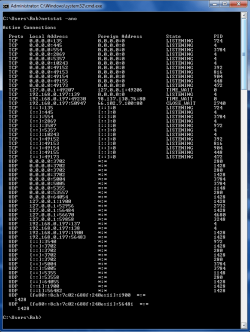
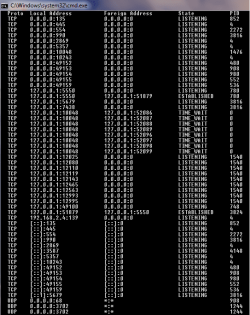
Maybe if I post my netstat -ano read out with everything now turned off. Not much showing up there that I don't know about.

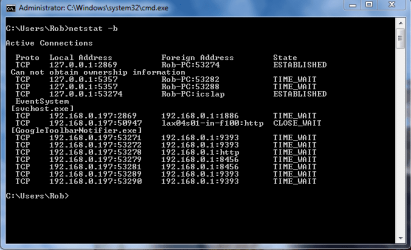
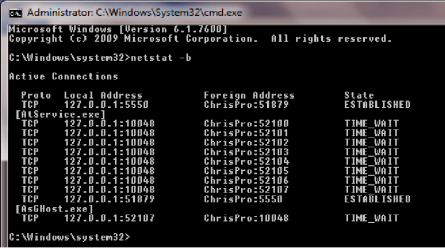
The next picture is with netstat -b which tells you what the connections are. The first four are my modem along with my pc name. Then a couple more for the svchost.exe processes. After that it's Google tool bar info.

If you can post these screen shots we can probably figure out what those other IP's are for.
 

Attachments

  • netstat -ano everything off.PNG
    netstat -ano everything off.PNG
    22.7 KB · Views: 309
  • netstat -b everything off.PNG
    netstat -b everything off.PNG
    15.2 KB · Views: 225
Last edited:

My Computer

Computer type
PC/Desktop
Computer Manufacturer/Model Number
Home built
OS
Windows 7 Ult, Windows 8.1 Pro,
CPU
Q9650-4.275GHz, E8600 4.5GHz, E6750-3.8GHz
Motherboard
Evga 780i FTW
Memory
G.Skill PC2 9600 1200Mhz 5 5 5 15 2T
Graphics Card(s)
GTX480
Sound Card
Asus Xonar D2
Monitor(s) Displays
HannsG
Screen Resolution
1680X1050
Hard Drives
GSkill Phoenix Pro 120GB SSD
PSU
ThermalTake Toughpower 1000Watt modular
Case
ThermalTake XaserV
Cooling
Xigmatek S1283
Keyboard
Logitech G15
Mouse
Logitech G9
Internet Speed
T1
Thanks, here are the post you asked for (image below):
does this mean hacked?
 

Attachments

  • ano.png
    ano.png
    59.3 KB · Views: 200
  • b.png
    b.png
    36.7 KB · Views: 101

My Computer

OS
Windows 7
You would need to expand the first windows and post it differently for me to see the entries but the second one looks clean although they are both hard to read. All I see there are entries for your modem and your own IP.
 

My Computer

Computer type
PC/Desktop
Computer Manufacturer/Model Number
Home built
OS
Windows 7 Ult, Windows 8.1 Pro,
CPU
Q9650-4.275GHz, E8600 4.5GHz, E6750-3.8GHz
Motherboard
Evga 780i FTW
Memory
G.Skill PC2 9600 1200Mhz 5 5 5 15 2T
Graphics Card(s)
GTX480
Sound Card
Asus Xonar D2
Monitor(s) Displays
HannsG
Screen Resolution
1680X1050
Hard Drives
GSkill Phoenix Pro 120GB SSD
PSU
ThermalTake Toughpower 1000Watt modular
Case
ThermalTake XaserV
Cooling
Xigmatek S1283
Keyboard
Logitech G15
Mouse
Logitech G9
Internet Speed
T1
  • Like
Reactions: Dom
Here is a re-attach...
i think that is better sorry for inconvenience
 

Attachments

  • ano.png
    ano.png
    10.8 KB · Views: 163
  • b.png
    b.png
    16 KB · Views: 111

My Computer

OS
Windows 7
The -b readout is good, the first one shows a bunch of listening ports and your modem connection so nothing to worrie about there. I don't see anything but your machine and your modem connection. If you are worried about being hacked then run malware bytes and super anti spyway and run the scans. :)

http://www.malwarebytes.org/mbam.php

http://www.superantispyware.com/
 

My Computer

Computer type
PC/Desktop
Computer Manufacturer/Model Number
Home built
OS
Windows 7 Ult, Windows 8.1 Pro,
CPU
Q9650-4.275GHz, E8600 4.5GHz, E6750-3.8GHz
Motherboard
Evga 780i FTW
Memory
G.Skill PC2 9600 1200Mhz 5 5 5 15 2T
Graphics Card(s)
GTX480
Sound Card
Asus Xonar D2
Monitor(s) Displays
HannsG
Screen Resolution
1680X1050
Hard Drives
GSkill Phoenix Pro 120GB SSD
PSU
ThermalTake Toughpower 1000Watt modular
Case
ThermalTake XaserV
Cooling
Xigmatek S1283
Keyboard
Logitech G15
Mouse
Logitech G9
Internet Speed
T1
Back
Top