Have question about RundII32

jonnyhillow

Banned
Local time
3:15 AM
Messages
637
Location
NJ native & NC
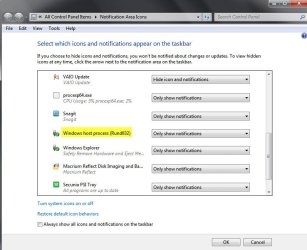
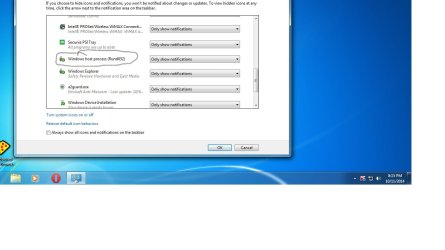
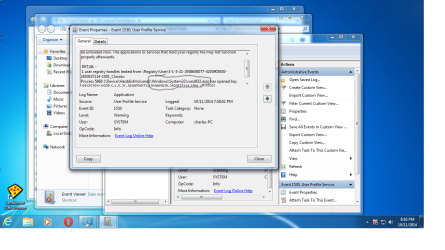
I saw this in the following screenshots , one in my customize screen and one in event viewer . What is this and is it normal?

Thanks
 

Attachments

  • Untitled.jpg
    Untitled.jpg
    67.2 KB · Views: 5
  • Untitled.png
    Untitled.png
    138.6 KB · Views: 4

My Computer

Computer type
Laptop
Computer Manufacturer/Model Number
Asus laptop U56E
OS
Microsoft Windows 7 Home Premium 64-bit 7601 Multiprocessor Free Service Pack 1
CPU
Intel(R) Core(TM) i5-2430M CPU @ 2.40GHz
Motherboard
ASUSTeK Computer Inc. U56E
Memory
6.00 GB
Graphics Card(s)
Intel(R) HD Graphics 3000
Sound Card
(1) High Definition Audio Device (2) High Definition Audio
Screen Resolution
1366 x 768 x 32 bits (4294967296 colors) @ 60 Hz
Hard Drives
WDC WD6400BPVT-80HXZT3
The rundll32 is a valid part of Windows, and normally shouldn’t be a threat. It is used by Windows to launch (run) .dll files. This Microsoft forum article, especially the second answer by SpiritX, has more info:

what is Windows host process (Rundll32) ? - Microsoft Community

I've also attached a screenshot of my own with the same rundll showing. As long as you've run full scans with your anti-virus of choice and perhaps some free on-demand scanners like Malwarebytes, SuperAntispyware, ESET Online Scanner, etc, you should be OK if all scans came back clear.

rundll.jpg
 

My Computer

Computer type
Laptop
Computer Manufacturer/Model Number
Sony Vaio VPCEB47GM Laptop
OS
Win 7 Pro 64-bit
CPU
Intel i5 2.4 Ghz
Memory
8GB DDR3
Graphics Card(s)
Intel HD 3000
Sound Card
IDT High Definition
Monitor(s) Displays
15.6 WGXA Anti-Glare LED
Screen Resolution
1280x800
Hard Drives
640Gb 7200rpm
Antivirus
MSE
Browser
Opera (primary) with IE9 backup
Back
Top