Just recently finished installing new Gigabyte GA-Z77X-D3H mobo into existing case and new installation of Win 64bit on a new HDD. I have two HDDs - C and D and two CD/DVD optical drives which should be E & F but am only seeing E - that is, only one of the drives (in both Device Manager, Disk Management and Explorer).
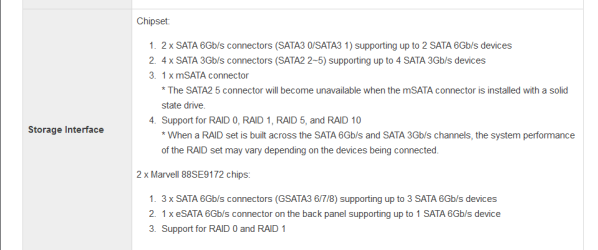
I have proved, by swapping the SATA leads over, that both optical drives work - and their LEDS both blink when I am booting up. They are connected, respectively to SATA ports 6 & 7 on the mobo. Both optical drives worked with the previous MSI mobo before it gave up the ghost. FYI, my HDD 'D' drive holds the previous OS so is effectively not acccessible, though it is visible.
When I go into BIOS Features / Boot Option Priorities / Boot Option #1 or #2, I can see:
PO: WDC WD10EZRX-00A8LBO
SATA PM: TSSTCORP CDDVCW SH-S
However, when I go into CD/DVD ROM Drive BBS Priorities / Boot Option #1 or #2, I see:
SATA PM: TSSTCORP CDDVCW SH-S
SATA PS: TSSTCORP CDDVCW SH-S
From this, it would appear that the BIOS is seeing both of the optical drives
I don't know if it is of any relevance, but under CSM support / Display Boot Option Control it is set for Legacy Only.
Any assistance to see and use both optical drives will be appreciated.
Thanks Pedro
I have proved, by swapping the SATA leads over, that both optical drives work - and their LEDS both blink when I am booting up. They are connected, respectively to SATA ports 6 & 7 on the mobo. Both optical drives worked with the previous MSI mobo before it gave up the ghost. FYI, my HDD 'D' drive holds the previous OS so is effectively not acccessible, though it is visible.
When I go into BIOS Features / Boot Option Priorities / Boot Option #1 or #2, I can see:
PO: WDC WD10EZRX-00A8LBO
SATA PM: TSSTCORP CDDVCW SH-S
However, when I go into CD/DVD ROM Drive BBS Priorities / Boot Option #1 or #2, I see:
SATA PM: TSSTCORP CDDVCW SH-S
SATA PS: TSSTCORP CDDVCW SH-S
From this, it would appear that the BIOS is seeing both of the optical drives
I don't know if it is of any relevance, but under CSM support / Display Boot Option Control it is set for Legacy Only.
Any assistance to see and use both optical drives will be appreciated.
Thanks Pedro
My Computer
At a glance
Win 8 Pro 64 bit OEMIntel i7 -3770 3.4Ghz Socket 1155 8MB Cache32Gb DDR3 1600Gigabyte ATI Radeon 7850 HD 975Mhz 2Gb PCIE 3.00
- Computer type
- PC/Desktop
- Computer Manufacturer/Model Number
- Home build
- OS
- Win 8 Pro 64 bit OEM
- CPU
- Intel i7 -3770 3.4Ghz Socket 1155 8MB Cache
- Motherboard
- Gigabyte GA-Z77X-UDH5H
- Memory
- 32Gb DDR3 1600
- Graphics Card(s)
- Gigabyte ATI Radeon 7850 HD 975Mhz 2Gb PCIE 3.00
- Sound Card
- on board
- Monitor(s) Displays
- Lenovo ThinkVision L220x Wide Screen
- Screen Resolution
- 1920 x 1200
- Hard Drives
- 2 x 500 Gb Crucial M4 SSD
External Samsung 1Tb USB3
- PSU
- Seasonic X-Series 850W
- Case
- Corsair Carbide 400R
- Cooling
- Noctua NH-C12P SE14
- Keyboard
- Microsoft Wireless Comfort Keyboard 5000
- Mouse
- Microsoft Wireless Mouse 5000
- Internet Speed
- Down 37mbps Up 8.5mbps
- Antivirus
- Norton 360 Premium
- Browser
- IE 11
- Other Info
- 2 x Samsung SH-224 Optical Drives
1 NXZT USB3 5.25" Aperture Card Reader / 2 x USB3
Edimax N300 Wireless PCI-E Express Adapter
Logitech HD 1080P Webcam
Hauppauge WinTV V7 Adapter
Zoom modem