
Have Ubuntu, Need Windows

TheAmazingCorey

New member
Local time
7:34 AM
Messages
26
Location
Buras, LA
Hello all,

Sorry I haven't been on lately.

Here's my problem. I just got a new HP G61 Laptop. Well out the box it was running like crap. It was loaded with all of HP's crapware. So I did a fresh install of Windows 7. Well last night I was trying to resize my partitions. Well they had a 150mb Partition labeled System and I deleted it. After that I couldn't boot into Windows. So I used an Ubuntu Live CD I had to boot into Ubuntu and from there I was able to see my Windows Directories and I backed up all my data and did an Ubuntu install. So now I'm trying to make my USB Thumb Drive bootable with the Windows 7 ISO I have to do a fresh install of Windows. But this has to be done from inside Ubuntu, b/c that is the only OS I have on here right now. Does anyone know how to go about doing this. Any help IS GREATLY APPRECIATED.


Thank You,
TheAmazingCorey
 

My Computer

Computer Manufacturer/Model Number
HP G61 Laptop
OS
Windows 7 Ultimate (64-bit)
CPU
AMD Sempron M100 (2.00 GHz)
Memory
3.00 GB (2.75 GB Usable)
Monitor(s) Displays
15.6" Widescreen Laptop Monitor
Screen Resolution
1366 X 768
Hard Drives
Western Digital 250 GB 2.5 HDD
Internet Speed
1.5 MB down 768 MB up DSL Connection
http://www.sevenforums.com/tutorials/2432-usb-windows-7-installation-key-drive-create.html

Some flash sticks make it easier. You can just format stick primary, copy the extracted ISO files into the root, then boot under HD's on BIOS shortcut key given on first bootup screen for Boot Menu.

If you want to avoid the 100mb System Reserved partition, pre-format the HD using a partition manager like free Partition Wizard CD.

You could have recovered the deleted MBR into Win7 partition by booting the Win7 installer Repair console to run Startup Repair up to 3 separate times with reboots to write the MBR to Win7 partition. Keep the bootable USB installer to use for such repairs in the future, or make a Win7 repair CD in backup center.
 
If you want to keep Ubuntu...post here and I will guide you to having both of them
 

My Computer

Computer Manufacturer/Model Number
Compal JFT02 (Custom Build Laptop)
OS
Windows 7 Home Premium x64 - Mac OS X 10.6.4 x64
CPU
Intel Core 2 Duo T9300 2.5 GHz
Motherboard
JFT02
Memory
4GB Kingston DDR2-800
Graphics Card(s)
NVIDIA Geforce 8600M GT (512MB Model)
Sound Card
Realtek HD Audio
Monitor(s) Displays
WUXGA Standard Laptop Display
Screen Resolution
1680*1050
Hard Drives
Toshiba 320GB 5400RPM Laptop HD
PSU
Standard Laptop Power Supply
Case
Standard Laptop Case
Cooling
Standard Laptop Cooling
Keyboard
Standard Laptop 105 Key-Keyboard
Mouse
Synaptics Touchpad
Internet Speed
Verizion Online DSL 3360/864 kbs (dl/up)
http://www.sevenforums.com/tutorials/2432-usb-windows-7-installation-key-drive-create.html

Some flash sticks make it easier. You can just format stick primary, copy the extracted ISO files into the root, then boot under HD's on BIOS shortcut key given on first bootup screen for Boot Menu.

If you want to avoid the 100mb System Reserved partition, pre-format the HD using a partition manager like free Partition Wizard CD.

You could have recovered the deleted MBR into Win7 partition by booting the Win7 installer Repair console to run Startup Repair up to 3 separate times with reboots to write the MBR to Win7 partition. Keep the bootable USB installer to use for such repairs in the future, or make a Win7 repair CD in backup center.

I checked out that guide, but thats for doing it on a windows system. i need to do it inside Ubuntu.

Thanks
 

My Computer

Computer Manufacturer/Model Number
HP G61 Laptop
OS
Windows 7 Ultimate (64-bit)
CPU
AMD Sempron M100 (2.00 GHz)
Memory
3.00 GB (2.75 GB Usable)
Monitor(s) Displays
15.6" Widescreen Laptop Monitor
Screen Resolution
1366 X 768
Hard Drives
Western Digital 250 GB 2.5 HDD
Internet Speed
1.5 MB down 768 MB up DSL Connection
If you want to keep Ubuntu...post here and I will guide you to having both of them

That would be b/c I am trying to learn Linux right now. I wouldn't mind doing a dual boot.
 

My Computer

Computer Manufacturer/Model Number
HP G61 Laptop
OS
Windows 7 Ultimate (64-bit)
CPU
AMD Sempron M100 (2.00 GHz)
Memory
3.00 GB (2.75 GB Usable)
Monitor(s) Displays
15.6" Widescreen Laptop Monitor
Screen Resolution
1366 X 768
Hard Drives
Western Digital 250 GB 2.5 HDD
Internet Speed
1.5 MB down 768 MB up DSL Connection
there is no application in ubuntu that I know of that can mount an ISO image for the purpose of copying the files to a flash drive.
Brasero can burn bootable windows install ISOs, even windows 7.
Also I have never been able to recover a ubuntu installation after re-installing windows. I've always had to reinstall ubuntu after reinstalling windows, so I would definitely be interested in knowing how to reinstall grub2 for the karmic distro of ubuntu.
if you reinstall windows then reinstall ubuntu, grub will handle the dual boot. I use it all the time.
 
there is no application in ubuntu that I know of that can mount an ISO image for the purpose of copying the files to a flash drive.
Brasero can burn bootable windows install ISOs, even windows 7.
Also I have never been able to recover a ubuntu installation after re-installing windows. I've always had to reinstall ubuntu after reinstalling windows, so I would definitely be interested in knowing how to reinstall grub2 for the karmic distro of ubuntu.
if you reinstall windows then reinstall ubuntu, grub will handle the dual boot. I use it all the time.
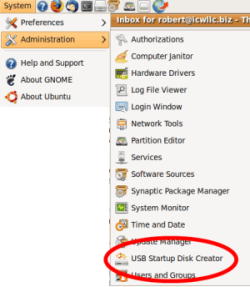
Is this what you are needing?

Ubuntu_usb_disk_01.png

Cheers!
Robert
 

My Computer

OS
...
Hello all,

Sorry I haven't been on lately.

Here's my problem. I just got a new HP G61 Laptop. Well out the box it was running like crap. It was loaded with all of HP's crapware. So I did a fresh install of Windows 7. Well last night I was trying to resize my partitions. Well they had a 150mb Partition labeled System and I deleted it. After that I couldn't boot into Windows. So I used an Ubuntu Live CD I had to boot into Ubuntu and from there I was able to see my Windows Directories and I backed up all my data and did an Ubuntu install. So now I'm trying to make my USB Thumb Drive bootable with the Windows 7 ISO I have to do a fresh install of Windows. But this has to be done from inside Ubuntu, b/c that is the only OS I have on here right now. Does anyone know how to go about doing this. Any help IS GREATLY APPRECIATED.


Thank You,
TheAmazingCorey

Hmm, sounds familiar. I have a Compaq laptop that had the same HP bloatware. I removed MOST of the bloat but left some there - until the warranty runs out.

I wanted to set up a dual boot BUT here is the problem: the way HP loads their laptops uses all of the available partitions - boot (that was the 150mb partition you deleted), Windows partition (the C:\ drive), a recovery partition (hidden) that has the Windows 7 installtion files, and an HP utilities partition (this is what is accessed when you run the HP utilities for recover, etc.).

I've tried partition utilities but I've never been able to create a non-ntfs/FAT partitoin to load Linux without deleting one existing partition.

Thank you HP - :mad2:

If you do away with the HP utilities partition then you can shrink the C:\ NTFS partition to make room for Linux.

As you removed the Windows boot partition, one solution is to back up your files then do a full restore using the HP utilites. This will return the laptop to as-delivered-new condition, bloatware and all. Delete the bloat junk, use a partition software, delete the HP utiliy partition, shrink the C:\ partition, reboot, then reboot again to load Linux. I use GRUB as my boot loader on an XP / Win7 / Linux box with no more problems.

Good luck.

Regards,
GEWB
 

My Computer

Computer type
PC/Desktop
Computer Manufacturer/Model Number
(7 different computers booting up to 10 systems)
OS
Linux Mint / XP / Win7 Home, Pro, Ultimate / Win8.1 / Win10
Other Info
Four desktops, two laptops, one notebook and one tablet
To free up a Primary partition, you can delete the 100mb System Reserved partition at any time using a 3rd party partition manager like free Partition Wizard bootable CD.

Then mark the Win7 partition Active using the PW CD.

Next boot the Win7 DVD, click through to recovery tools list and run Startup Repair up to 3 separate times with reboots to write the MBR to Win7 partition.

Most tech enthusiasts find an installer in their version of Win7 to clean reinstall using the license key stickered to the computer. This is the only real way to overcome the corruption the bloatware causes, even after uninstalling it.

You can unlock all versions in any installer by deleting the ei.cfg file in Sources folder, then recompile the ISO to burn to DVD: http://www.sevenforums.com/tutorials/32055-bootable-iso-create-installation-files.html

http://www.sevenforums.com/tutorials/1649-clean-install-windows-7-a.html
 
Thanks everyone for your help, for the moment I went ahead and just did away with Ubuntu and reformatted and did a strait Windows install, but I'm getting a new PC soon (this is actually my grandma's) and when I do I will be dual booting Linux and Windows. But thank you all for your help.

TheAmazingCorey
 

My Computer

Computer Manufacturer/Model Number
HP G61 Laptop
OS
Windows 7 Ultimate (64-bit)
CPU
AMD Sempron M100 (2.00 GHz)
Memory
3.00 GB (2.75 GB Usable)
Monitor(s) Displays
15.6" Widescreen Laptop Monitor
Screen Resolution
1366 X 768
Hard Drives
Western Digital 250 GB 2.5 HDD
Internet Speed
1.5 MB down 768 MB up DSL Connection
Back
Top