
Have you ever seen this problem?

JJangyver

New member
Local time
1:26 AM
Messages
8
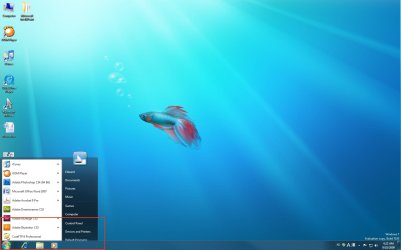
I attach a capture screen with Win 7.
Click the start button, then it shows programs window usually.
However, as you see my image, it shows the half of window screen.
I can't turn off my computer because it hide menus.

Very strange.

Spec
Windows 7(64bit, Ultimate version)
CPU: i7 2.66Ghz
Mother Board: EVGA 3 way SLi
RAM: 6G
Video:nVidia 9800GT
PSU:Corsair 1000W
 

Attachments
  • win7.jpg
    win7.jpg
    89.1 KB · Views: 33

My Computer

OS
Windows 7 Ultimate
CPU
Intel i7 2.66GHz
Motherboard
EVGA X58 SLi
Memory
Corsair DDR3 6G
Graphics Card(s)
nVidia 512MB 9800GT
Sound Card
Sound Blaster
Monitor(s) Displays
HP W2207h + Dell 20
Hard Drives
Western Digital 1T
Western Digital 500GB
PSU
Corsair 1000W
Case
HP Blackbird
Well you could try right clicking the start orb, click properties, customize, and increase the number of recent programs to display to something like 18. This should resize your start menu and make it bigger which might help. Or just toggling display recent programs on and off might reset the start menu to a more reasonable size.

That fish is looking kind of lonely. Maybe it's time to move to the RTM version. :D
 

My Computer

Computer Manufacturer/Model Number
HP DV8t quad
OS
Windows 7 Ultimate x64 (Retail)
CPU
i7-Q 720
Motherboard
Motherboard Chipset Intel Ibex Peak-M PM55, Intel Lynnfield
Memory
6 GB
Graphics Card(s)
nVidia GeForce GT 230M (1GB)
Sound Card
IDT High Definition Audio CODEC
Monitor(s) Displays
18.4 inch HP Infinity FHD (Samsung 184HT03-001)
Screen Resolution
1920 x 1080
Hard Drives
Hitachi 500GB 7200 rpm (x2)
Seagate FreeAgent 1.5 TB External USB (x2)
Thermaltake BlacX eSATA/USB 2.0 3.5/2.5 HD dock
Cooling
Zalman NC-2000 notebook cooling pad
Keyboard
laptop
Mouse
Logitech VX Revolution
Other Info
Backup Unit: Lenovo T61p
Hey just a quick question for you, has the betta fish still got his 7 bubbles.
 

My Computer

Computer Manufacturer/Model Number
Self Build 64bit
OS
Vista Ult64, Win7600
CPU
Intel Core 2 Quad Q6600 @ 2400 MHz 64bit OS
Motherboard
Asus P5E3 Deluxe WiFi @p 64 bit OS
Memory
4096 MB DDR3-SDRAM
Graphics Card(s)
ATI Radeon HD 3870 Series x2 Crossfired
Sound Card
Realtek on board
Monitor(s) Displays
Samsung SyncMaster - 23 inches
Screen Resolution
1680x1050 pixels at 60 Hz in True Colors
Hard Drives
Hitachi (250 GB)/Samsung 750 GB. /Barracuda 160 GB.
My Book 1 TB external..
PSU
Cooler Master 1000w
Case
Cooler Master Cosmos 1000.
Cooling
Fans and fresh air,
Keyboard
Wireless
Mouse
Wireless
Internet Speed
Never fast enough
Other Info
I use a Magnum.
Restart (hard reset). That might fix it.

If not, try resizing desktop, moving taskbar, etc.

Also, change the icon size.

~Lordbob
 

My Computer

Computer Manufacturer/Model Number
Hera
OS
Windows 7 Ultimate x64, Mint 9
CPU
Intel i5-2500k
Motherboard
ASUS P8P67 Pro
Memory
2x 4Gb Corsair VENGEANCE DDR3-1600
Graphics Card(s)
NVidia GeForce N260GTX Twin Frozr
Sound Card
Realtek HD OnBoard Audio
Monitor(s) Displays
ASUS 24" Monitor
Screen Resolution
1920x1080
Hard Drives
G.SKILL Phoenix Series 60GB SATA II MLC Internal Solid State Drive (SSD)
SAMSUNG Spinpoint F3R 1TB 7200 RPM 32MB Cache SATA II
PSU
Cooler Master Real Power Pro 750W
Case
Cooler Master Haf 932
Cooling
Fans
Keyboard
Razer Tarantula
Mouse
Razer Lachesis
Internet Speed
not fast enough
Back
Top