
Solved Having an issue installing ESU

riffwraith

New member
Member
VIP
Local time
3:22 AM
Messages
240
Hi :)

Sometime back, I purchased an ESU vol license for two W7 machines. I installed on one machine following the instructions given, and all is well.

I can't install on the second machine.

1. Open an elevated Command Prompt.
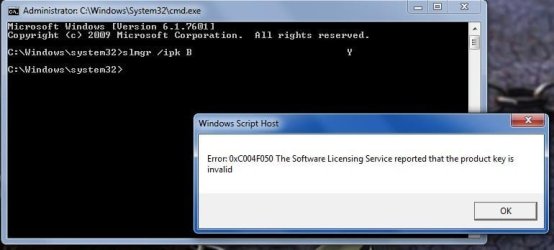
2 Type slmgr /ipk <ESU key> and select Enter.

And that gives me this:

(below)

The CSP Partner I purchased from is either unwilling or unable to help, and MS wants $500 to fix this.

Any ideas on where I should be looking?

Thanks in advance.
 

Attachments
  • esu.jpg
    esu.jpg
    43.7 KB · Views: 1

My Computer

Computer type
PC/Desktop
Computer Manufacturer/Model Number
Custom
OS
W7 64 Ult
CPU
Intel Core i9-7940x
Motherboard
ASUS x299 TUF
Memory
GSkill 128GB
Graphics Card(s)
AMD Radeon RX 560
Sound Card
RME
Screen Resolution
1920x1080
Hard Drives
5
PSU
BeQuiet!
Case
BeQuiet!
Keyboard
HyperX
Mouse
Logitech
Browser
IE - what else is there?
R U sure you purchased 2 computer key & not single license key?
 

My Computer

Computer type
PC/Desktop
Computer Manufacturer/Model Number
HP Desktop & Compaq Laptop
OS
Win 10 x64, Linux Lite, Win 7 x64, BlackArch, & Kali
Hard Drives
Samsung 850 Pro 256Gb,
Hitachi HDD 1Tb,
Crucial MX SSD 250Gb
Segate 3Tb USB 3.0 Ext. Backup HDD
Internet Speed
150Mbps dn, 20Mbps up
Antivirus
Avast Free, Malwarebytes Anti-Exploit & Anti-Ransomware
Browser
Firefox, Chrome, Opera, & VPN
Yes.
 

My Computer

Computer type
PC/Desktop
Computer Manufacturer/Model Number
Custom
OS
W7 64 Ult
CPU
Intel Core i9-7940x
Motherboard
ASUS x299 TUF
Memory
GSkill 128GB
Graphics Card(s)
AMD Radeon RX 560
Sound Card
RME
Screen Resolution
1920x1080
Hard Drives
5
PSU
BeQuiet!
Case
BeQuiet!
Keyboard
HyperX
Mouse
Logitech
Browser
IE - what else is there?

My Computer

Computer type
PC/Desktop
Computer Manufacturer/Model Number
medionl/Aspire 6930G/acer x55a
OS
W7 home premium 32bit/W7HP 64bit/w10 tp insider ring
CPU
E5300 dual core
Motherboard
medion MS7366
Memory
3gb
Graphics Card(s)
Nvidia Geforce 7100 Nforce 630i
Monitor(s) Displays
avixc
Internet Speed
n (isp resticted to 72)
Antivirus
mse/pands
Browser
palemoon
Other Info
Belkin Fd7050 n USB using Railink RT2870 drivers, more upto date
Hi

Can you make sure that all pre-requisite Updates are installed, most important are the latest Service stack updates.


Well, this was a mini rabbit hole I went down :)

First, it appears as tho I do not have the prereqs... I thought I checked this already :/

Second, there is an update that can not be installed. I get an error while trying to install. Update failed, error 80092004

Tried searching for a solution, and I found the answer here:

Windows 7 won't Update. Error Code 80092004

mr108's post led me to the right place; I d/led and installed the proper updates from the cat page, and that enabled me to install the aforementioned update, and several others. Now, the ESU process works; I no longer get the error I was before, but instead get, "xxx has installed successfully".

Then I did the other step, which worked without issue.

Thank you!
 

My Computer

Computer type
PC/Desktop
Computer Manufacturer/Model Number
Custom
OS
W7 64 Ult
CPU
Intel Core i9-7940x
Motherboard
ASUS x299 TUF
Memory
GSkill 128GB
Graphics Card(s)
AMD Radeon RX 560
Sound Card
RME
Screen Resolution
1920x1080
Hard Drives
5
PSU
BeQuiet!
Case
BeQuiet!
Keyboard
HyperX
Mouse
Logitech
Browser
IE - what else is there?
There it is again. KB4490628 missing. KB4490628 became virtually unavailable at Windows Update on Patch Day August 2019. The concept of putting SSUs last in the update queue fails when an SSU becomes an actual prerequiste.

Regards, VZ
 

My Computer

Computer type
PC/Desktop
OS
Windows 7 Home Premium
Back
Top