having issues with user name profile change

bimfi

New member
Member
Local time
2:39 PM
Messages
29
I recently changed the user name profile of my laptop. Prior to the change, my user name was: C:\user\oldlaptop\... and it would have a padlock on it. I assumed that this meant it was an administrator account. Now, when I search in C:\user, I find both the new user name (newlaptop) AND the previous user name (oldlaptop) with a padlock attached to each of them. There are also two other folders in the User folder. One is Public, which I believe needs to be there, and the other is Default. The Default folder is greyed out.
When I go into User Accounts, all I see is Newlaptop. It is an administrator account. Can I delete the oldlaptop user folder or should I take some other steps first to see if it is still in use?
 

My Computer

OS
windows 7
If you are nearly out of room on the hard drive, then you can remove the user profile (folders/files). Otherwise, just leave it.

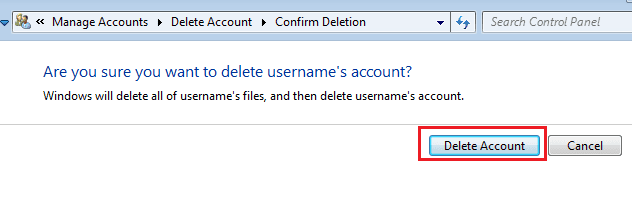
If you opt to remove the folder/files, let Windows do it.
Restart the computer
Log on to an admin account that you plan to keep

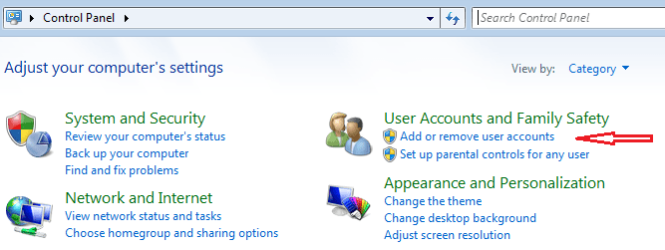
Start > Control Panel > Add or remove user accounts

CP-User1.png


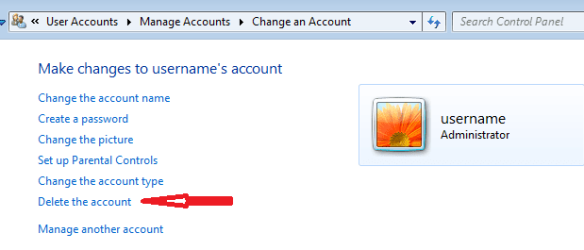
Select the account to the removed...
...and then select Delete the account.

CP-User2.png


CP-User3.png


CP-User4.png
 

My Computer

Computer type
Laptop
Computer Manufacturer/Model Number
Employer provided Dell Latitude
OS
W7 Pro SP1 64bit
CPU
i7
Memory
8GB
Graphics Card(s)
Intel HD Graphics
Hard Drives
crappy SSD
Antivirus
Employer mandated Symantec Endpoint Protection
Browser
Pale Moon 64bit, IE11 64bit & Chrome 64bit
I would look in the oldlaptop user folder and see what data is in there.
If you store your User data on the C (OS) partition, there may be some data in there you do not want to lose.
When an account name is changed, it does not change the account's user profile folder name in C:\Users.
I did not think an Account Name change would create a new User folder...but it did create a new User folder for you.

Take a look at this tutorial about changing an Account Name and User Folder name.
http://www.sevenforums.com/tutorials/147545-user-profile-folder-change-user-account-folder-name.html
 

My Computer

Computer type
PC/Desktop
Computer Manufacturer/Model Number
home built
OS
Multi-Boot W7_Pro_x64 W8.1_Pro_x64 W10_Pro_x64 +Linux_VMs +Chromium_VM
CPU
AMD Athlon II x4 620
Motherboard
Gigabyte GA-MA785G-UD3H
Memory
6GB GSkill DDR2 800
Graphics Card(s)
AMD 4670 GPU + AMD 4200 IGP
Sound Card
on board Realtek ALC889A
Monitor(s) Displays
RCA 40" LCD TV, Insignia 32" LCD TV, HP 15" LCD monitor
Screen Resolution
1680 x 1050
Hard Drives
OCZ Vertex 3 120GB,
Samsung F3 1TB (3),
Several others - WD, Seagate, Hitachi, ...
PSU
Corsair 500 W
Case
Rosewill mid tower
Cooling
CM 90mm rifle
Keyboard
Gyration wireless, Logitech wireless, Dell USB wired
Mouse
Gyration wireless, Logitech wireless, V7 USB wired
Internet Speed
Spectrum - 100Mbps D / 10Mbps U
Antivirus
Avast, MBAM3, EMET, WinPatrol
Browser
Pale Moon, Firefox, IE
Other Info
2 multi-boot PC's
Mainly HTPC/Office/Gen purpose (no gaming).
Trendnet USB KVM.
LG DVD burner/Blue Ray Player.
Tray system for removable SATA backup drives.

Not currently OCd, under-volted.
I use Hybrid sleep, rarely re-boot or shutdown.

Hauppauge HD-PVR, Avermedia PCIe TV Tuner, Hauppauge PCI TV Tuner.
I would look in the oldlaptop user folder and see what data is in there.
If you store your User data on the C (OS) partition, there may be some data in there you do not want to lose.
When an account name is changed, it does not change the account's user profile folder name in C:\Users.
I did not think an Account Name change would create a new User folder...but it did create a new User folder for you.

Take a look at this tutorial about changing an Account Name and User Folder name.
http://www.sevenforums.com/tutorials/147545-user-profile-folder-change-user-account-folder-name.html

That is the link I used to make the change. Did I follow it to a "tee", I don't know. Some weird stuff happened at the end, when I rebooted. As for the data in the oldlaptop user folder, I'm not sure if it is a holdover from before the change or a backup of new data. I will investigate.
 

My Computer

OS
windows 7
OK, cool you found the tutorial and used it!
Maybe Shawn (Brink), the tutorial author will see this thread and have some ideas, he always does :)
 

My Computer

Computer type
PC/Desktop
Computer Manufacturer/Model Number
home built
OS
Multi-Boot W7_Pro_x64 W8.1_Pro_x64 W10_Pro_x64 +Linux_VMs +Chromium_VM
CPU
AMD Athlon II x4 620
Motherboard
Gigabyte GA-MA785G-UD3H
Memory
6GB GSkill DDR2 800
Graphics Card(s)
AMD 4670 GPU + AMD 4200 IGP
Sound Card
on board Realtek ALC889A
Monitor(s) Displays
RCA 40" LCD TV, Insignia 32" LCD TV, HP 15" LCD monitor
Screen Resolution
1680 x 1050
Hard Drives
OCZ Vertex 3 120GB,
Samsung F3 1TB (3),
Several others - WD, Seagate, Hitachi, ...
PSU
Corsair 500 W
Case
Rosewill mid tower
Cooling
CM 90mm rifle
Keyboard
Gyration wireless, Logitech wireless, Dell USB wired
Mouse
Gyration wireless, Logitech wireless, V7 USB wired
Internet Speed
Spectrum - 100Mbps D / 10Mbps U
Antivirus
Avast, MBAM3, EMET, WinPatrol
Browser
Pale Moon, Firefox, IE
Other Info
2 multi-boot PC's
Mainly HTPC/Office/Gen purpose (no gaming).
Trendnet USB KVM.
LG DVD burner/Blue Ray Player.
Tray system for removable SATA backup drives.

Not currently OCd, under-volted.
I use Hybrid sleep, rarely re-boot or shutdown.

Hauppauge HD-PVR, Avermedia PCIe TV Tuner, Hauppauge PCI TV Tuner.
To add more confusion to this problem, when I open windows explorer, then expand the network icon, I get numerous displays on the right column. These are broken down into: “computer (2)”; Media Devices (2); Network Infrastructure (1); and Storage (1). What concerns me is the Media Device section. Here it shows an icon of a device with a film clip and musical note. It has two names; newlaptop PLUS oldlaptop separated by a colon.

I need to find out where inside of this laptop I can go to permanently remove this pesky user name.
The computer section shows two icons. One is the new name of my laptop and the other is the WD My Book Live NAS. Both of these display the correct names.

So, if anyone else has had a problem like this, and had it fixed, I would sure like to know how it was done.
I hope that this was not too vague. Let me know.
 
Last edited:

My Computer

OS
windows 7
If the laptop was set up under one Admin user name, Win7 assumes its the owner and will never completely remove it for security reasons. The best you can do is correctly change the name and then just ignore the old name wherever it appears until time to Clean Reinstall.
 
No, you were not too vague, but posting some screenshots of what you are seeing would probably be easier than you typing out all of that descriptive text. Here is the tutorial from posting screenshots inline with your post's text (like I did earlier in this thread): http://www.sevenforums.com/tutorials/9733-screenshots-files-upload-post-seven-forums.html

You might want to post a screenshot that:
...lists all of the current users
...shows the explorer screen that you described above
...any other anomalies that you have observed.
 

My Computer

Computer type
Laptop
Computer Manufacturer/Model Number
Employer provided Dell Latitude
OS
W7 Pro SP1 64bit
CPU
i7
Memory
8GB
Graphics Card(s)
Intel HD Graphics
Hard Drives
crappy SSD
Antivirus
Employer mandated Symantec Endpoint Protection
Browser
Pale Moon 64bit, IE11 64bit & Chrome 64bit
Open up a command prompt . Inside the command prompt paste the text below and press enter

wmic useraccount get name,sid >%UserProfile%\Desktop\UserAcounts.txt

The UserAccounts.txt file will be on the Desktop . Upload that file with your reply

   Note
To Paste inside the command prompt right click on an empty space and choose Paste , Ctrl+V will not work
 

My Computer

Computer Manufacturer/Model Number
Custom Built
OS
Windows 7 Ultimate 32-Bit & Windows 7 Ultimate 64-Bit
CPU
Intel Core i7 CPU 950 @ 3.07GHz
Motherboard
ASUS P6T DELUXE V2
Memory
OCZ 6GB (3 x 2GB) 240-Pin DDR3 SDRAM DDR3 1600 OCZ3X1600R2
Graphics Card(s)
ATI Radeon HD 5700 Series
Sound Card
OnBoard
Hard Drives
WD6400AACS-00M3B0 (640GB SATA )
PSU
CORSAIR 850w
Case
NZXT LEXA
Cooling
Intel Stock Heatsink Fan
Keyboard
Microsoft Wireless Laser Keyboard 7000
Mouse
Microsoft Wireless Laser Mouse 7000
Back
Top