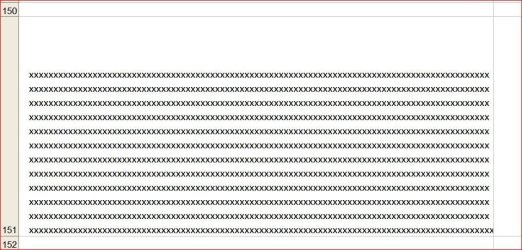
Very limited experience with Excel...have a multi page workbook but can't figure out how to auto format existing text to fit in cells so there is no space either on top or bottom of the cell.
Only way I can get this so far is to manually move the bottom line of the text box up to the bottom of the actual text in box. But this causes the print out to overlap sometimes of the text lines in print view.
Is there a way to 'auto-format' individual cells to fit the text in the cell without leaving alot of space above or below the lines, or top/bottom lines, of the cell.
Only way I can get this so far is to manually move the bottom line of the text box up to the bottom of the actual text in box. But this causes the print out to overlap sometimes of the text lines in print view.
Is there a way to 'auto-format' individual cells to fit the text in the cell without leaving alot of space above or below the lines, or top/bottom lines, of the cell.
Attachments

My Computer
- Computer type
- PC/Desktop
- Computer Manufacturer/Model Number
- Self built
- OS
- Windows 7 Pro 64bit SP1
- CPU
- AMD FX-6100 Six-Core Processor
- Motherboard
- M5A78L-M LX PLUS
- Memory
- 2ea Corsair-1333MHz-PC3-10666-240-pin-CMX4GX3M1A1333C9
- Graphics Card(s)
- NVIDIA GeForce GT 630 - 1023MB (EVGA)
- Sound Card
- OnBoard Via High Def Audio
- Monitor(s) Displays
- Samsung 204B main - ASUS VS228 secondary
- Screen Resolution
- 1920x1080 main - 1920x1080 secondary
- Hard Drives
- Samsung SSD 840 128GB Win7 Pro 64bit - Western Digital WDC 465GB - Seagate 640GB Sata B/U - Maxtor 500GB Sata B/U - Maxtor 200GB Sata
- PSU
- Antec 650 watt
- Cooling
- Multiple case fans
- Keyboard
- MS USB dual Wireless Keyboard - IntelliType Pro
- Mouse
- MS USB dual Wireless Mouse - IntelliPoint
- Internet Speed
- Cox Cable
- Antivirus
- Bitdefender IS 2014
- Browser
- FireFox Primary - IE 11
- Other Info
- Hauppaguge Win TV HVR-1250 (Model 22xxx, Hybrid ATSC/QAM)
Samsung HD103SI USB 1TB Desktop Drive - Backup & Disk Image storage