Solved Having problems Installing on Dell C521

sandstorm1

New member
Local time
11:03 PM
Messages
4
Location
Dolan Springs, Arizona
Ok so I recovered an old Dell C521 desktop machine that no one wanted. I ordered new memory for it (ddr2 2 x 2Gb ), a new dvdrw, and a Seagate Barracuda 2 Tb Hard drive. Every thing works except I can not get it to install Windows 7 Ultimate x64. I get to the "Where do you want to install windows?" screen and it gives me 2 unallocated spaces (232.9 GB & 1630.1 GB) and it will not let me format or anything on either. All I get is "Windows is unable to install to the selected location. Error:0x80300024. Help!!! I can not seem to get past this point. It must have something to do with the size as I put in an old 500 GB hard drive and it loaded and runs great. Advice??? :confused:
 

My Computer

Computer type
Laptop
Computer Manufacturer/Model Number
HP Pavilion g7-1365dx
OS
windows 7 x64
Motherboard
dell
Hello and welcome sandstorm mate just how many drives are in the machine and / or have you prepared that drive?

I would if I were you and if you have use of another machine do a wipe of that drive as it seems like it has two partitions on it already. That my friend is going to take a very long time ith a drive of that size.

Now you can do that using the clean all in the command prompt http://www.sevenforums.com/tutorials/52129-disk-clean-clean-all-diskpart-command.html

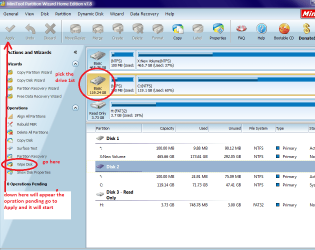
or use the disk wipe with the Partition Wizard Best Free Partition Manager Freeware and free partition magic for Windows 7, Windows 8, Windows Vista and Windows XP 32 bit & 64 bit. MiniTool Free Partition Manager Software Home Edition. in my pic is only an example of what to do.

The alternative is to get another drive 2TB is quite big really unless you plan on saving a lot of data and prepare it http://www.sevenforums.com/tutorials/113967-ssd-alignment.html I know it says SSD but it will work on spinners.
Best bet is if you want a real fast boot is get a small SSD and use the large spinner for backup stuff and storage .
 

Attachments

  • WIPE.PNG
    WIPE.PNG
    58.3 KB · Views: 0

My Computer

Computer type
PC/Desktop
Computer Manufacturer/Model Number
Own build (new) Desk1 / Asus ROG Win 7 / Desk2 1st build
OS
Desk1 7 Home Prem / Desk2 10 Pro / Main lap Asus ROG 10 Pro 2 laptop Toshiba 7 Pro Asus P2520 7 & 10
CPU
Desk1 i5 3750K / Laptop i7 GTX 860M / Desk2 i5 2500
Motherboard
Desk1 Asus P877-V / Desk2 Gigabyte H67 UD3H / Laptop ?
Memory
Desk1 8GB (1866) / Desk2 16GB (1333) / Laptop 8Gb DDR3
Graphics Card(s)
Desk 1& 2NVidia GTX 650 & Laptops on board Intel
Sound Card
Desk 1 & 2 -XONAR DG Realtek High Def audio Laptop
Monitor(s) Displays
Desk 1 Benq HD 2450 / Desk2 Philips 24" / Laptop 17.5"
Screen Resolution
1920x1080 D1 & D2 & Laptop 1
Hard Drives
Desk1 Samsung 120GB 830 SSD
Asus ROG 256GB 850 Pro SSD
Desk2 Samsung 840 256 SSD
Toshiba 120GB EVO
PSU
Desk 1 Corsair HX 1050/ Laptop ? / Desk 2 Corsair HX 650
Case
Desk 1 Cooler HAF XM ? Toshiba laptop / Desk2 Coolermaster
Cooling
Fans on all Desk1 -2 Desk2 - all Coolermasters 5 Laptop ?
Keyboard
Desk 1 MS Sidewinder X6 Desk 2 MS Sidewinder X 4
Mouse
Desk 1&2 - Gigabyte MS 900 gamer - laptop - Logitec wireless
Internet Speed
ADSL2+
Other Info
One other Desktop (tester) and spare Toshba laptop both with SSD's
Running Kaspersky 2016 ISS on all machines config'd identically
Logitec audio stereo systems on each machine (x3)
Canon MG5250MFC
Router/modem TP-Link running WPA2SK
Ok so I recovered an old Dell C521 desktop machine that no one wanted. I ordered new memory for it (ddr2 2 x 2Gb ), a new dvdrw, and a Seagate Barracuda 2 Tb Hard drive. Every thing works except I can not get it to install Windows 7 Ultimate x64. I get to the "Where do you want to install windows?" screen and it gives me 2 unallocated spaces (232.9 GB & 1630.1 GB) and it will not let me format or anything on either. All I get is "Windows is unable to install to the selected location. Error:0x80300024. Help!!! I can not seem to get past this point. It must have something to do with the size as I put in an old 500 GB hard drive and it loaded and runs great. Advice??? :confused:

Hi sandstorm1,

Welcome to the Seven forums.

In addition to what ICit2lol rightly suggested, you can also check this solved thread below which would be of help to you:

http://www.sevenforums.com/installation-setup/16826-error-0x80300024.html

Hope it helps.
 

My Computer

Computer type
PC/Desktop
OS
Winndows 7 32 bit
Ok so I recovered an old Dell C521 desktop machine that no one wanted. I ordered new memory for it (ddr2 2 x 2Gb ), a new dvdrw, and a Seagate Barracuda 2 Tb Hard drive.

Is the new HDD Sata 3, as your old Dell will be Sata 1/2.
 

My Computer

OS
ME/XP/Vista/Win7
What you may need is no more than Diskpart Clean Command which clears the boot sector to resolve many installation problems. Diskpart Clean All is overkill.

In addition I'd define an Active partition as shown in step 2 of SSD - HDD Optimize for Windows Reinstallation.

If it still fails reset the BIOS to defaults, set SATA controller to AHCI to try install. Set HDD first to boot, use Dell F12 key to trigger installer.

Does the DVD then request to "Press Any Key to boot Disk?" If not the installer or ISO is bad. Where did you get it? How is it burned? How is it being activated?
 
Still Having problems Installing on Dell C521

Good Morning ICit2lol & SandeepP,and others,
OK in that machine, it is the only drive as the Dell C521 only allows for 2 SATA items to be hooked up. In this case SATA 0 is the Hard Drive and SATA 1 is the DVD R/W. Yes I used Mini Tool Partition Wizard Home Edition to create, format(NTFS) and label the drive. I agree that this is one of the best programs that is out there and the price is right also! :D What I have done for now is that I took a WD 500 Gb hard drive that I had in my external drive and installed it into the C521 and that took Windows 7 Ultimate X64 with no problems. That tells me that everything else in the C521 is working. We have other machines here that are usually on, what with 3 other adults,each of us having our own lappys plus my brother's home built desktop, so the drive is not a do or die situation. More like a challenge. Until I figure this out, the 2 Tb drive is in the external enclosure. The 3 of us are basically retired computer shop owners. in other words we closed the store front and work "at our leisure" on machines for most of the Senior Citizens here in our little piece of the desert, usually for free as money is tight for all these days. My background is in Hardware, My wives is in Programming, and my brother's is in filling in the cracks. I'm Storm, She is Sandy, Hence you have Sandstorm Computers. ;) anyway back to the topic, we went to the Seagate site and downloaded their tools that claim to be able to fix the problem...Nope, didn't work.
I did read and try the things that Driecken posted and the replies that others here posted to him, again Nope, didn't work.:cry:
the whole reason that we wanted such a big drive is that we keep records of most of the machines that we have worked on over the years, (DRIVERS, parts, etc.), and our own stuff. Even tho we have off site back up it is nice to have them on a separate machine in a separate building away from the house. (we had a fire 18 months ago & lost everything and are just now able to help people again.
Soooo having said all that, in-between the "Honey-Do-Lists" and working on some of the old machines that the people here have and for some reason are still working fairly well for the most part (them 90 y/o ladies love their solitaire games), I will still be looking for a way to make that drive work in the C521.
for theog here is the link with the specs for this drive: http://www.newegg.com/Product/Product.aspx?Item=N82E16822148834
Thanks for the advice but still looking into why the problem presists.

 
Last edited:

My Computer

Computer type
Laptop
Computer Manufacturer/Model Number
HP Pavilion g7-1365dx
OS
windows 7 x64
Motherboard
dell
Good Morning gregrocker
I use Derik's Boot & Nuke a program that has several options for wiping entire drives. I chose "D.O.D. Short" which is 3 passes of zeros to wipe the drive. The questions that you are asking have all been done. My Windows 7 disk is an OEM and is working good, as is all other hardware. As for activation, I have to be able to get it to install before I can activate it. Like I said in my original post, I believe it may be a size limitation on the board\chipset. one of the things I did notice is that the BIOS is from 2007 and might need to be flashed with a more current one. the reason that I have not done that yet, is that I keep reading that on this particular board there is an 80% chance it will make the board toast. I do not have another board for it, nor do I really want to buy one.
But thank you for your reply.
 

My Computer

Computer type
Laptop
Computer Manufacturer/Model Number
HP Pavilion g7-1365dx
OS
windows 7 x64
Motherboard
dell
I can't find any specifics, right now, but I remember some of the old Dimension's having maximum hard drive capacity. The fact the 500GB works and the 2TB doesn't sort of goes along with this.

I didn't see anything in any of the BIOS versions that mention anything about supporting hard drive sizes. 2007 is the last BIOS update that Dell issued. The Dimension line was discontinued in 2006 or 7 (replaced by the Inspiron Desktop line) and no further updates will ever be issued.
 

My Computer

Computer type
PC/Desktop
Computer Manufacturer/Model Number
My Own Build
OS
Windows 10 64 bit
CPU
Intel i7 6700K
Motherboard
ASUS ROG Maximus VIII Hero
Memory
16GB Corsair Dominator
Graphics Card(s)
Intel CPU Graphics
Sound Card
RealTek
Monitor(s) Displays
27" Dell S2719dgf
Screen Resolution
2560X1440
Hard Drives
1 TB Samsung 850 EVO SSD for Win 10 Pro
500GB Samsung 850 EVO SSD for Win 10 Insider
2 TB drive for backup
PSU
EVGA Supernova 750G2
Case
BeQuiet Silent Base 600
Cooling
Deepcool Captain 120EX
Keyboard
Microsoft Wireless 2000
Mouse
Microsoft wireless
Internet Speed
100 MB/sec (Cable)
Antivirus
Microsoft Defender and Malwarebytes
Browser
Edge/Firefox
Other Info
Cakewalk (Sonar) by BandLab and Studio One 4.1 Pro recording studio software. MOTU 896Mk3 Hybrid recording interface, Frontier Tranzport wireless control unit, Behringer X-Touch Control Surface.
Five USB connected optical drives for CD Audio production using Nero BurningROM
Good Morning gregrocker
I use Derik's Boot & Nuke a program that has several options for wiping entire drives. I chose "D.O.D. Short" which is 3 passes of zeros to wipe the drive. The questions that you are asking have all been done. My Windows 7 disk is an OEM and is working good, as is all other hardware. As for activation, I have to be able to get it to install before I can activate it. Like I said in my original post, I believe it may be a size limitation on the board\chipset. one of the things I did notice is that the BIOS is from 2007 and might need to be flashed with a more current one. the reason that I have not done that yet, is that I keep reading that on this particular board there is an 80% chance it will make the board toast. I do not have another board for it, nor do I really want to buy one.
But thank you for your reply.

Hi sandstorm1,

Thanks for your reply. There is a possibility it might not support 2 TB harddrive on this system. Maximum harddrive that we have checked on this system is 500 Gb.

However, you can still update BIOS from the link below and check if it helps in resolving this issue:

http://downloads.dell.com/bios/DMC521-010111.EXE

Hope it helps.
 

My Computer

Computer type
PC/Desktop
OS
Winndows 7 32 bit
Back
Top