
Solved Having trouble with a pink tint on my screen?

kaptainkry

New member
Local time
3:31 AM
Messages
2
Location
United States
It's something I done, I know that for sure. I have an Asus X54C laptop (got it not too long ago) and I wanted to take a picture of something to show my friend, and I lost my phone! So I decided to use the laptop camera, but couldn't remember what to press to make the software start up. Stupid me, I pressed FN key and pressed all the keys AROUND what I thought was the key. All of a sudden when I pressed a certain button (couldn't remember which one it was. I safely stroked all the keys with and without FN and couldn't find a way to reverse it). So my problem is I have a pink tint on the screen... I restarted the computer nothing happened. I did do a color calibration and that did seem to fix things, getting rid of the pink tint, until I closed my laptop lid and it goes on lock or I restart the computer. Anyone got any tips? It's a copy of Windows 7 that came with the laptop with all the preloaded Asus programs. I will put an image/image link below of it. You might not can see the pink tint since it's a screenshot, but if you can it will SLIGHTLY be in any WHITE areas and if you tilt the screen back you can really see it. It just shades every white think pink.
   Note
I just calibrated the color to check the photo to see if you can see the pink... you can't! But in the image, just try to think that there's a slight pink shade in all the white parts. And everything's a bit darker!
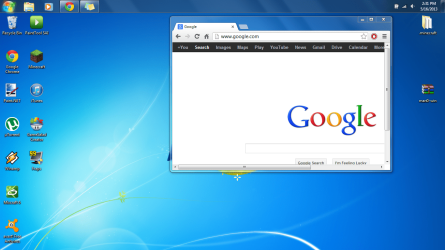
stock.PNG
 

My Computer My Computer

At a glance

Windows 7 Home Premium x64Intel Core i3-2370M CPU 2.40 GHzDDR3 4GB RAM
Computer type
Laptop
Computer Manufacturer/Model Number
Asus
OS
Windows 7 Home Premium x64
CPU
Intel Core i3-2370M CPU 2.40 GHz
Motherboard
Uknown Double Sided Motherboard
Memory
DDR3 4GB RAM
Hard Drives
500GB Standard Notebook Hardrive
Old 300GB I use as an external
Antivirus
Avast! Free Internet Security
Browser
Google Chrome

My Computer My Computer

At a glance

Windows 7 Ultimate Retail Box (64-bit install...AMD FX-8350 CPU v1.15 (or 1.0F) BIOS was requ...8G CAS-7 G-Skill DDR3 @1333 (2 fours) [mobo n...Radeon HD 7950 [3 gigs of GDDR5] MSI Twin Fro...
Computer type
PC/Desktop
Computer Manufacturer/Model Number
Self Built Custom
OS
Windows 7 Ultimate Retail Box (64-bit installed) + Service Pack 1
CPU
AMD FX-8350 CPU v1.15 (or 1.0F) BIOS was required!
Motherboard
MSI 890FXA-GD70
Memory
8G CAS-7 G-Skill DDR3 @1333 (2 fours) [mobo nonOC max rec'd]
Graphics Card(s)
Radeon HD 7950 [3 gigs of GDDR5] MSI Twin Frozr model
Sound Card
Realtek High Definition Audio (onboard mobo, ALC-889 chip)
Monitor(s) Displays
2 WS LED Monitors: One LG One Viewsonic
Screen Resolution
1920 by 1080
Hard Drives
SSD for OS: Samsung 840 Pro
SSD for VM and utilities: Adata SX900
7200 RPM SATA HDs for the rest: Hitachi and Seagate
PSU
Corsair TX850 - 850W max, in service since August 2010.
Case
Thermaltake Armor A90
Cooling
Thermaltake Spin Q CPU Cooler, in service since August 2010
Keyboard
Logitech G11
Mouse
Logitech M310 Wireless
Internet Speed
100 Megabit broadband supposedly upgraded from 50 (Cable)
Antivirus
Bitdefender Internet Security 2014 suite
Browser
Pale Moon 64-bit main, also IceDragon, Opera, and Maxthon.
Other Info
CompTIA A+ certified (220-800 series) in July 2013.
weird, sounds like you changed the screen's hardware options. I didn't thought it was possible on a laptop.

Hmmm... since you told the model... let's have a look at the manual... http://dlcdnet.asus.com/pub/ASUS/nb/K54C/E6591_eManual_K54L_K54LY_Z106.pdf

Hah!

page 43, seems like you tinkered with Fn+C and activated the "Splendid Video Intelligent Technology".

Fn+C:Toggles “Splendid Video Intelligent Technology” function ON and OFF. This allows switching between different display color enhancement modes in order to improve contrast, brightness, skin tone, and color saturation for red, green, and blue independently. You can see the current mode through the onscreen display (OSD).
 

My Computer My Computer

At a glance

Win 7 Pro 64-bit 7601AMD Phenom 9650 QuadCore, revision DR-B35 GB yes I run 2x 2GB and 1x 1GB, different b...NVIDIA GeForce 9800 GT 512 Mb, unknown manufa...
Computer type
PC/Desktop
Computer Manufacturer/Model Number
custom built
OS
Win 7 Pro 64-bit 7601
CPU
AMD Phenom 9650 QuadCore, revision DR-B3
Motherboard
ASUS M4A78
Memory
5 GB yes I run 2x 2GB and 1x 1GB, different brand, spank me.
Graphics Card(s)
NVIDIA GeForce 9800 GT 512 Mb, unknown manufacturer.
Sound Card
Crappy Realtek Integrated Audio
Monitor(s) Displays
Fujitsu Siemens P19-3P
Screen Resolution
1280 x 1024 x 32 bits @ 60 Hz Oh yeah, 4:3 rocks!
Hard Drives
(1) MAXTOR S TM3320613AS SATA Disk Device (2) STM35004 18AS SATA Disk Device (3) TOSHIBA USB 2.5"-HDD
PSU
whatever, around 450w
Case
Scavenged from old company PC, 10+ years old
Cooling
CPU fan, GPU fan, case fan, nothing fancy
Keyboard
Microsoft, PS/2, white.
Mouse
Optical, logitec.
Internet Speed
effective max speeds: 70-ish kB/s down 30-ish kB/s up
Antivirus
Avira, free edition.
Browser
Firefox with FXChrome to make it look like Google Chrome :P
Other Info
Was discarded by previous owner due to "horrible performance".
Was running Win Xp from a IDE drive. Yeah. Was a pain.
SATA II drive and Win7 and it zips away! Yay!
page 43, seems like you tinkered with Fn+C and activated the "Splendid Video Intelligent Technology".
Thanks so much! This fixed my problem :)! Now I know which button to avoid now :party:
 

My Computer My Computer

At a glance

Windows 7 Home Premium x64Intel Core i3-2370M CPU 2.40 GHzDDR3 4GB RAM
Computer type
Laptop
Computer Manufacturer/Model Number
Asus
OS
Windows 7 Home Premium x64
CPU
Intel Core i3-2370M CPU 2.40 GHz
Motherboard
Uknown Double Sided Motherboard
Memory
DDR3 4GB RAM
Hard Drives
500GB Standard Notebook Hardrive
Old 300GB I use as an external
Antivirus
Avast! Free Internet Security
Browser
Google Chrome
RTM wins again! A phone call or live tech chat would have been faster than bobafett 10 hrs later. :p

Anyone can read a manual! :sarc:
 

My Computer My Computer

At a glance

Windows 7 Ultimate Retail Box (64-bit install...AMD FX-8350 CPU v1.15 (or 1.0F) BIOS was requ...8G CAS-7 G-Skill DDR3 @1333 (2 fours) [mobo n...Radeon HD 7950 [3 gigs of GDDR5] MSI Twin Fro...
Computer type
PC/Desktop
Computer Manufacturer/Model Number
Self Built Custom
OS
Windows 7 Ultimate Retail Box (64-bit installed) + Service Pack 1
CPU
AMD FX-8350 CPU v1.15 (or 1.0F) BIOS was required!
Motherboard
MSI 890FXA-GD70
Memory
8G CAS-7 G-Skill DDR3 @1333 (2 fours) [mobo nonOC max rec'd]
Graphics Card(s)
Radeon HD 7950 [3 gigs of GDDR5] MSI Twin Frozr model
Sound Card
Realtek High Definition Audio (onboard mobo, ALC-889 chip)
Monitor(s) Displays
2 WS LED Monitors: One LG One Viewsonic
Screen Resolution
1920 by 1080
Hard Drives
SSD for OS: Samsung 840 Pro
SSD for VM and utilities: Adata SX900
7200 RPM SATA HDs for the rest: Hitachi and Seagate
PSU
Corsair TX850 - 850W max, in service since August 2010.
Case
Thermaltake Armor A90
Cooling
Thermaltake Spin Q CPU Cooler, in service since August 2010
Keyboard
Logitech G11
Mouse
Logitech M310 Wireless
Internet Speed
100 Megabit broadband supposedly upgraded from 50 (Cable)
Antivirus
Bitdefender Internet Security 2014 suite
Browser
Pale Moon 64-bit main, also IceDragon, Opera, and Maxthon.
Other Info
CompTIA A+ certified (220-800 series) in July 2013.
RTM wins again! A phone call or live tech chat would have been faster than bobafett 10 hrs later. :p

Anyone can read a manual! :sarc:

bobafett helped him!! :rolleyes:
 

My Computer My Computer

At a glance

Windows 10 Pro X64Intel(R) Core(TM) i5-3570K CPU OC@ 4.5GHZ Turbo8.00 GB DDR3 1600MhzMSI Gaming X GTX 1070
Computer type
PC/Desktop
Computer Manufacturer/Model Number
Dude Build
OS
Windows 10 Pro X64
CPU
Intel(R) Core(TM) i5-3570K CPU OC@ 4.5GHZ Turbo
Motherboard
MSI Z77A-G45 Gaming
Memory
8.00 GB DDR3 1600Mhz
Graphics Card(s)
MSI Gaming X GTX 1070
Sound Card
Realtek High Definition
Monitor(s) Displays
Dell S23O9W, HP L1710
Screen Resolution
DELL-1920 x 1080 HP-1280 x1024
Hard Drives
Crucial m4 256 SSD, WD 7200RPM 500GB WD 1TB
PSU
Seasonic X650 GOLD
Case
Zalman Z12
Cooling
Antec Kuhler 920
Keyboard
Logitech
Mouse
MSI DS100 Interceptor
Internet Speed
50 down and 5 up
Antivirus
MSE
Browser
Chrome, IE 11
Other Info
Logitech X-620 Speakers
RTM wins again! A phone call or live tech chat would have been faster than bobafett 10 hrs later. :p

Anyone can read a manual! :sarc:
then why didn't you?
troll_2956879_thumb.jpg


A resolution was found so you shouldn't criticize other peoples solutions.
 

My Computer My Computer

At a glance

Windows 7 Ultimate x64 SP1Intel Q6600 @ 2.6Ghz4Gb DDR2 Corsair Dominator @ 800Mhz 5-5-5-15EVGA 560 GTX SC FTW 1GB
Computer type
PC/Desktop
Computer Manufacturer/Model Number
Custom Build
OS
Windows 7 Ultimate x64 SP1
CPU
Intel Q6600 @ 2.6Ghz
Motherboard
Evga NF78-CK-132-A 3-Way SLI
Memory
4Gb DDR2 Corsair Dominator @ 800Mhz 5-5-5-15
Graphics Card(s)
EVGA 560 GTX SC FTW 1GB
Sound Card
Realtek HD 7.1 Audio, Plantronics GameCom780 7.1 Headset
Monitor(s) Displays
Dell S2409W
Screen Resolution
1920 x 1080
Hard Drives
SanDisk SDSSDHII-120G-G25 120GB SSD
Samsung 7200RPM 750Gb SATA
Samsung 850 EVO 120GB SSD
Western Digital Green 1TB 7200RPM
PSU
Xigmatek 750W Quad sli quad core 80% eff
Case
Antec 900 Gaming Case
Cooling
Zalman CNPS9700-NT NVIDIA Tritium
Keyboard
Logitech generic keyboard, MS wireless keyboard
Mouse
Razor Lachesis Banshee V2 Blue, 4000DPI, MS wireless mouse
Internet Speed
152Mb Virgin Media Fibre Optic
Antivirus
Microsoft Security Essentials
Browser
Google Chrome
Other Info
Wireless Gaming Receiver for Windows, Wireless Xbox 360 Pad
Thanks so much! This fixed my problem :)! Now I know which button to avoid now :party:
Awesome :geek:. If that "Splendid video technology" is a program/utility, I'd get rid of it asap from Control Panel ---> Program and Features --> its name in the program list.
Also the same for any other of their ASUS utilities that you don't think you will need (hint: nothing is really needed)

So that a child/pet/friend does not screw up stuff again by pressing buttons at random.
 

My Computer My Computer

At a glance

Win 7 Pro 64-bit 7601AMD Phenom 9650 QuadCore, revision DR-B35 GB yes I run 2x 2GB and 1x 1GB, different b...NVIDIA GeForce 9800 GT 512 Mb, unknown manufa...
Computer type
PC/Desktop
Computer Manufacturer/Model Number
custom built
OS
Win 7 Pro 64-bit 7601
CPU
AMD Phenom 9650 QuadCore, revision DR-B3
Motherboard
ASUS M4A78
Memory
5 GB yes I run 2x 2GB and 1x 1GB, different brand, spank me.
Graphics Card(s)
NVIDIA GeForce 9800 GT 512 Mb, unknown manufacturer.
Sound Card
Crappy Realtek Integrated Audio
Monitor(s) Displays
Fujitsu Siemens P19-3P
Screen Resolution
1280 x 1024 x 32 bits @ 60 Hz Oh yeah, 4:3 rocks!
Hard Drives
(1) MAXTOR S TM3320613AS SATA Disk Device (2) STM35004 18AS SATA Disk Device (3) TOSHIBA USB 2.5"-HDD
PSU
whatever, around 450w
Case
Scavenged from old company PC, 10+ years old
Cooling
CPU fan, GPU fan, case fan, nothing fancy
Keyboard
Microsoft, PS/2, white.
Mouse
Optical, logitec.
Internet Speed
effective max speeds: 70-ish kB/s down 30-ish kB/s up
Antivirus
Avira, free edition.
Browser
Firefox with FXChrome to make it look like Google Chrome :P
Other Info
Was discarded by previous owner due to "horrible performance".
Was running Win Xp from a IDE drive. Yeah. Was a pain.
SATA II drive and Win7 and it zips away! Yay!
Hi there.... I'm having the same issue on my Dell xps desktop.
 

My Computer My Computer

At a glance

UtahWindows 7 Home Premium 64 bit
Computer type
PC/Desktop
Computer Manufacturer/Model Number
Dell XPS 8500
OS
UtahWindows 7 Home Premium 64 bit
Antivirus
Nod32
Browser
Chrome
Hi. the OP had a laptop so not quite the same issue but try the monitor on another system or try another monitor on yours that will tell you if its the monitor or the computer at fault.
 

My Computer My Computer

At a glance

win 10
Computer type
PC/Desktop
Computer Manufacturer/Model Number
dell xps 9000
OS
win 10
thanks..... no other system or monitor to test :(
 

My Computer My Computer

At a glance

UtahWindows 7 Home Premium 64 bit
Computer type
PC/Desktop
Computer Manufacturer/Model Number
Dell XPS 8500
OS
UtahWindows 7 Home Premium 64 bit
Antivirus
Nod32
Browser
Chrome
No friends or family to test your monitor on their computer.
 

My Computer My Computer

At a glance

win 10
Computer type
PC/Desktop
Computer Manufacturer/Model Number
dell xps 9000
OS
win 10
no

would it be the monitor? It'd only certain areas (that move as I move the browser)

also itunes is bordered in pink too
 

My Computer My Computer

At a glance

UtahWindows 7 Home Premium 64 bit
Computer type
PC/Desktop
Computer Manufacturer/Model Number
Dell XPS 8500
OS
UtahWindows 7 Home Premium 64 bit
Antivirus
Nod32
Browser
Chrome
If I had to guess without testing would say monitor. Can try updating graphics driver
 

My Computer My Computer

At a glance

win 10
Computer type
PC/Desktop
Computer Manufacturer/Model Number
dell xps 9000
OS
win 10
I'm posting to this thread addressing the pink blue green tint monitor display problem in spite of the caveat that the last post was 314 days prior because my friend had the same problem, which was quickly and simply resolved by viewing the Windows 7 Ultimate performance section which 'suggested' that 'I' adjust the visual effects which took my friend all of 20 seconds to do, to return his monitor functionality to 'normal'... I concluded, long ago, that such issues often survive the product support, that financial constraints often force many to continue the use of the equipment well past it's MTBF time line. So. hey, you, yeah you in the year 2047, hope you found a solution for your TRS-80 and, if you did, buy your Mom a box of candy from See's...
 

My Computer My Computer

At a glance

Windows 7 Ultimate x32Pentium Dual Core CPU T4400 2.20 GHz4GB (LOL! 2.98 really)Mobile Intel(R) 4 Series Express Chipset Family
Computer Manufacturer/Model Number
Toshiba U505-2002
OS
Windows 7 Ultimate x32
CPU
Pentium Dual Core CPU T4400 2.20 GHz
Motherboard
References to a motherboard on this PC do not exist.
Memory
4GB (LOL! 2.98 really)
Graphics Card(s)
Mobile Intel(R) 4 Series Express Chipset Family
Sound Card
High Definition Audio Device
Monitor(s) Displays
Generic PnP Display: Great Wall Flat Panel
Hard Drives
1x100GB, 70GB available, external 500GB, various USB 'sticks'
PSU
Jeez, Lousie! can I paste my device manager listings?
Case
Yes, black.
Cooling
Yes.
Back
Top