
Having trouble with screen resolution and graphic card

Ilene

New member
Local time
8:35 AM
Messages
6
Location
Atlantic City, N.J.
Hello,
I was having trouble with a new program and the tech told me I had to upgrade my video card driver.
After that my screen became HUGE and I could hardly use my computer.
So I kept changing the resolution and used up all the options.
Now the screen is at least readable but my pictures are too wide and stretched out.
As a retoucher I haven't been able to do any work for the past three days.
I tried doing a system restore but that didn't work.
Also, I am now getting this error message: requires an open GL-2.0 compatible video card to run.
I'm really upset because even Photoshop is giving me an error message about the video card and I really need that program for work.
PLEASE PLEASE HELP!
Thank You
 
Last edited by a moderator:

My Computer My Computer

At a glance

Windows 7 Home Premium 64 bitPhysical Memory 8 gigs Virutal Memory 16 gigs
Computer Manufacturer/Model Number
Dell XPS-7100
OS
Windows 7 Home Premium 64 bit
Memory
Physical Memory 8 gigs Virutal Memory 16 gigs
what is the 'new program' you were having trouble with?

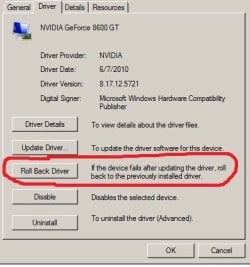
...if you tried upgrading you video driver and it seems to be giving you fits--just 'roll it back' to the previous version
 

Attachments

  • Capture.JPG
    Capture.JPG
    30.6 KB · Views: 8

My Computer My Computer

At a glance

win7 ultimate 32bitcore2 Extreme QX6850-OCd to 3.15 GHz4 GBNVidia 8600 GT
Computer Manufacturer/Model Number
SALEON model 2.2b
OS
win7 ultimate 32bit
CPU
core2 Extreme QX6850-OCd to 3.15 GHz
Motherboard
ASUS P5G41-M LE
Memory
4 GB
Graphics Card(s)
NVidia 8600 GT
Monitor(s) Displays
23" acer
Hard Drives
one SATA 250GB partitioned equally in half
one SATA 160GB-internal storage
PSU
500W Thermaltake
Case
mini tower
Trouble with Screen Resolution

It's called Perfect Photo Suite 6.
Another friend said he had no trouble and my computer was fine until I tried to upgrade that video card.
 

My Computer My Computer

At a glance

Windows 7 Home Premium 64 bitPhysical Memory 8 gigs Virutal Memory 16 gigs
Computer Manufacturer/Model Number
Dell XPS-7100
OS
Windows 7 Home Premium 64 bit
Memory
Physical Memory 8 gigs Virutal Memory 16 gigs
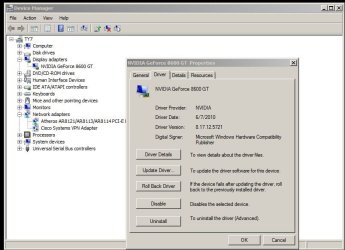
Where do I go to get that window?
 

My Computer My Computer

At a glance

Windows 7 Home Premium 64 bitPhysical Memory 8 gigs Virutal Memory 16 gigs
Computer Manufacturer/Model Number
Dell XPS-7100
OS
Windows 7 Home Premium 64 bit
Memory
Physical Memory 8 gigs Virutal Memory 16 gigs
just roll back the driver (don't forget to reset your screen res to what it was before)--and use Photoshop-at least you'll be functional

here's a link to the tech specs for Perfect Photo Suite

http://www.ononesoftware.com/products/suite/specs.html

to get to that window--type Device into the start/search window--select Device Manager--click the + sign next to display adapter--select the listed adapter--right click--select properties--click on driver tab
 

Attachments

  • Capture.JPG
    Capture.JPG
    59.6 KB · Views: 11

My Computer My Computer

At a glance

win7 ultimate 32bitcore2 Extreme QX6850-OCd to 3.15 GHz4 GBNVidia 8600 GT
Computer Manufacturer/Model Number
SALEON model 2.2b
OS
win7 ultimate 32bit
CPU
core2 Extreme QX6850-OCd to 3.15 GHz
Motherboard
ASUS P5G41-M LE
Memory
4 GB
Graphics Card(s)
NVidia 8600 GT
Monitor(s) Displays
23" acer
Hard Drives
one SATA 250GB partitioned equally in half
one SATA 160GB-internal storage
PSU
500W Thermaltake
Case
mini tower
How do I know what the screen resolution was before?
I tried all of them and the closest to normal I got was what I have now.
But the photos are still all stretched out.
Do I do that before I roll back or after?
 

My Computer My Computer

At a glance

Windows 7 Home Premium 64 bitPhysical Memory 8 gigs Virutal Memory 16 gigs
Computer Manufacturer/Model Number
Dell XPS-7100
OS
Windows 7 Home Premium 64 bit
Memory
Physical Memory 8 gigs Virutal Memory 16 gigs
before!
 

My Computer My Computer

At a glance

win7 ultimate 32bitcore2 Extreme QX6850-OCd to 3.15 GHz4 GBNVidia 8600 GT
Computer Manufacturer/Model Number
SALEON model 2.2b
OS
win7 ultimate 32bit
CPU
core2 Extreme QX6850-OCd to 3.15 GHz
Motherboard
ASUS P5G41-M LE
Memory
4 GB
Graphics Card(s)
NVidia 8600 GT
Monitor(s) Displays
23" acer
Hard Drives
one SATA 250GB partitioned equally in half
one SATA 160GB-internal storage
PSU
500W Thermaltake
Case
mini tower
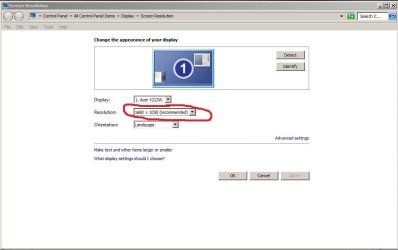
roll back driver first--then reset to monitor's native resolution (windows should show 'recommended')

specifications for the program you want to run require--"OpenGL 2.0 compatible video card with 256 MB dedicated video RAM, 1280x800 resolution"
see this link for how to determine what version of open GL your machine is running

http://www.ononesoftware.com/support/607/
 

Attachments

  • Capture.JPG
    Capture.JPG
    43.2 KB · Views: 8

My Computer My Computer

At a glance

win7 ultimate 32bitcore2 Extreme QX6850-OCd to 3.15 GHz4 GBNVidia 8600 GT
Computer Manufacturer/Model Number
SALEON model 2.2b
OS
win7 ultimate 32bit
CPU
core2 Extreme QX6850-OCd to 3.15 GHz
Motherboard
ASUS P5G41-M LE
Memory
4 GB
Graphics Card(s)
NVidia 8600 GT
Monitor(s) Displays
23" acer
Hard Drives
one SATA 250GB partitioned equally in half
one SATA 160GB-internal storage
PSU
500W Thermaltake
Case
mini tower
Well after going back and forth with a tech for a week I finally called Dell.
And the Indian guy tried to scam me into paying $200 to fix my screen.
I told him I didn't have that kind of money to spend right now so he finally did it for free.
It literally took him TWENTY SECONDS to upgrade my drivers. What a racket!
So the good news is all my images are back to looking normal.
But the bad news is that program is still not working right.
And I'm much too nervous to start fooling around with the drivers again
 

My Computer My Computer

At a glance

Windows 7 Home Premium 64 bitPhysical Memory 8 gigs Virutal Memory 16 gigs
Computer Manufacturer/Model Number
Dell XPS-7100
OS
Windows 7 Home Premium 64 bit
Memory
Physical Memory 8 gigs Virutal Memory 16 gigs
Well after going back and forth with a tech for a week I finally called Dell.
And the Indian guy tried to scam me into paying $200 to fix my screen.
I told him I didn't have that kind of money to spend right now so he finally did it for free.
It literally took him TWENTY SECONDS to upgrade my drivers. What a racket!
So the good news is all my images are back to looking normal.
But the bad news is that program is still not working right.
And I'm much too nervous to start fooling around with the drivers again

What display adapter do you have? It'll be listed as the Display Adapter in the Device Manager control panel.

Most of the ones listed for the Studio XPS 7100 are from AMD. I hope that you're not using integrated graphics, although that might explain your problem.
 

My Computer My Computer

At a glance

Windows 7 Pro X64 SP1Intel Core I7-3930k16 GB Gskill DDR3-2133eVGA GTX680
Computer Manufacturer/Model Number
homegrown
OS
Windows 7 Pro X64 SP1
CPU
Intel Core I7-3930k
Motherboard
Asus P9X79 Pro
Memory
16 GB Gskill DDR3-2133
Graphics Card(s)
eVGA GTX680
Sound Card
Creative X-Fi Titanium
Monitor(s) Displays
As PA246Q
Screen Resolution
1920 X 1200
Hard Drives
Corsair Force GT, 120 GB
WDC 1.5TB Caviar Black
PSU
PCP&C Silencer 750 Crossfire
Case
Silverstone FT02
Cooling
Noctua NH-D14
Keyboard
cheap Logitech USB
Mouse
Microsoft Intellimouse Explorer (old optical) USB
Internet Speed
6Mb cable
Other Info
Pioneer BDR-205
Samsung SH-203B
Monsoon 5.1 speakers
It says ATI Radeon HD 5670
 

My Computer My Computer

At a glance

Windows 7 Home Premium 64 bitPhysical Memory 8 gigs Virutal Memory 16 gigs
Computer Manufacturer/Model Number
Dell XPS-7100
OS
Windows 7 Home Premium 64 bit
Memory
Physical Memory 8 gigs Virutal Memory 16 gigs
Back
Top