Trying to setup home network with same machines but with 2 of the desktops recently upgraded to Win7 Pro. Here's the breakdown:
2 Desktops running new W7 Pro systems - (hardwired)
1 Desktop running XP Pro SP3 - (hardwired)
2 laptops running XP Home Ed SP3 (Wireless)
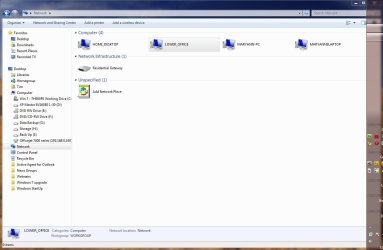
Attached is a shot of what the main desktop (Home_Desktop W7 Pro) finds in Networks (allnetworks.jpg):
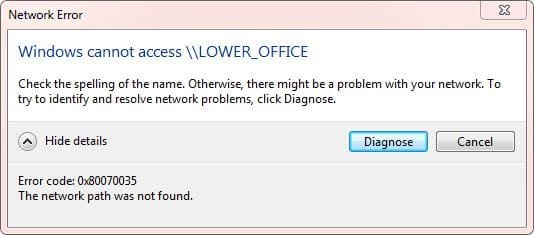
Home_Desktop finds all but one laptop (RoadWorrior) but... will not connect to Lower_Office...I get the attached error window (network.jpg)
No issues connecting to MaryAnn-PC (Win 7 Pro SP3) and/or Maryannslaptop (XP HE SP3)
However...from Lower_Office XP Pro desktop...I can connect and move files back and forth from Home_Desktop...?...but can not connect from Home_Desktop to Lower_office as network.jpg indicates ?
The laptop (RoadWarrior) will not connect or be found either..but want to concentrate on above desktop issue first.
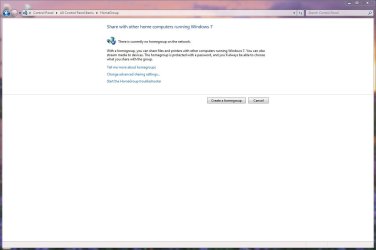
NOTE: I have not done anything with W7 "HomeGroup" at this point. Appears to me to be only for W7 machines ?
Here's ipcongif /all on problem machines:
Microsoft Windows XP [Version 5.1.2600]
(C) Copyright 1985-2001 Microsoft Corp.
C:\Documents and Settings\Tim>ipconfig /all
Windows IP Configuration
Host Name . . . . . . . . . . . . : LOWER_OFFICE
Primary Dns Suffix . . . . . . . :
Node Type . . . . . . . . . . . . : Unknown
IP Routing Enabled. . . . . . . . : No
WINS Proxy Enabled. . . . . . . . : No
Ethernet adapter Local Area Connection:
Connection-specific DNS Suffix . :
Description . . . . . . . . . . . : NVIDIA nForce 10/100/1000 Mbps Ether
net
Physical Address. . . . . . . . . : 00-15-58-69-CA-D9
Dhcp Enabled. . . . . . . . . . . : Yes
Autoconfiguration Enabled . . . . : Yes
IP Address. . . . . . . . . . . . : 192.168.0.2
Subnet Mask . . . . . . . . . . . : 255.255.255.0
Default Gateway . . . . . . . . . : 192.168.0.1
DHCP Server . . . . . . . . . . . : 192.168.0.1
DNS Servers . . . . . . . . . . . : 192.168.0.1
Lease Obtained. . . . . . . . . . : Wednesday, March 10, 2010 9:51:36 AM
Lease Expires . . . . . . . . . . : Thursday, March 11, 2010 9:47:45 AM
C:\Documents and Settings\Tim>
********************************************************************************************
Microsoft Windows [Version 6.1.7600]
Copyright (c) 2009 Microsoft Corporation. All rights reserved.
C:\Users\Tim>ipconfig /all
Windows IP Configuration
Host Name . . . . . . . . . . . . : Home_Desktop
Primary Dns Suffix . . . . . . . :
Node Type . . . . . . . . . . . . : Hybrid
IP Routing Enabled. . . . . . . . : No
WINS Proxy Enabled. . . . . . . . : No
Ethernet adapter Local Area Connection:
Connection-specific DNS Suffix . :
Description . . . . . . . . . . . : Realtek PCIe GBE Family Controller
Physical Address. . . . . . . . . : 90-E6-BA-54-94-87
DHCP Enabled. . . . . . . . . . . : Yes
Autoconfiguration Enabled . . . . : Yes
Link-local IPv6 Address . . . . . : fe80::b55c:4e1e:d47e:ecf5%11(Preferred)
IPv4 Address. . . . . . . . . . . : 192.168.0.4(Preferred)
Subnet Mask . . . . . . . . . . . : 255.255.255.0
Lease Obtained. . . . . . . . . . : Wednesday, March 10, 2010 9:59:49 AM
Lease Expires . . . . . . . . . . : Thursday, March 11, 2010 9:59:48 AM
Default Gateway . . . . . . . . . : 192.168.0.1
DHCP Server . . . . . . . . . . . : 192.168.0.1
DHCPv6 IAID . . . . . . . . . . . : 244377274
DHCPv6 Client DUID. . . . . . . . : 00-01-00-01-12-EC-16-29-90-E6-BA-54-94-87
DNS Servers . . . . . . . . . . . : 192.168.0.1
NetBIOS over Tcpip. . . . . . . . : Enabled
Tunnel adapter isatap.{78E58B9A-43A9-47D9-A48D-A5FB5F486411}:
Media State . . . . . . . . . . . : Media disconnected
Connection-specific DNS Suffix . :
Description . . . . . . . . . . . : Microsoft ISATAP Adapter
Physical Address. . . . . . . . . : 00-00-00-00-00-00-00-E0
DHCP Enabled. . . . . . . . . . . : No
Autoconfiguration Enabled . . . . : Yes
Tunnel adapter Local Area Connection* 9:
Connection-specific DNS Suffix . :
Description . . . . . . . . . . . : Teredo Tunneling Pseudo-Interface
Physical Address. . . . . . . . . : 00-00-00-00-00-00-00-E0
DHCP Enabled. . . . . . . . . . . : No
Autoconfiguration Enabled . . . . : Yes
IPv6 Address. . . . . . . . . . . : 2001:0:4137:9e76:2ca6:2f70:3f57:fffb(Pref
erred)
Link-local IPv6 Address . . . . . : fe80::2ca6:2f70:3f57:fffb%13(Preferred)
Default Gateway . . . . . . . . . : ::
NetBIOS over Tcpip. . . . . . . . : Disabled
C:\Users\Tim>
Thanks..
2 Desktops running new W7 Pro systems - (hardwired)
1 Desktop running XP Pro SP3 - (hardwired)
2 laptops running XP Home Ed SP3 (Wireless)
Attached is a shot of what the main desktop (Home_Desktop W7 Pro) finds in Networks (allnetworks.jpg):
Home_Desktop finds all but one laptop (RoadWorrior) but... will not connect to Lower_Office...I get the attached error window (network.jpg)
No issues connecting to MaryAnn-PC (Win 7 Pro SP3) and/or Maryannslaptop (XP HE SP3)
However...from Lower_Office XP Pro desktop...I can connect and move files back and forth from Home_Desktop...?...but can not connect from Home_Desktop to Lower_office as network.jpg indicates ?
The laptop (RoadWarrior) will not connect or be found either..but want to concentrate on above desktop issue first.
NOTE: I have not done anything with W7 "HomeGroup" at this point. Appears to me to be only for W7 machines ?
Here's ipcongif /all on problem machines:
Microsoft Windows XP [Version 5.1.2600]
(C) Copyright 1985-2001 Microsoft Corp.
C:\Documents and Settings\Tim>ipconfig /all
Windows IP Configuration
Host Name . . . . . . . . . . . . : LOWER_OFFICE
Primary Dns Suffix . . . . . . . :
Node Type . . . . . . . . . . . . : Unknown
IP Routing Enabled. . . . . . . . : No
WINS Proxy Enabled. . . . . . . . : No
Ethernet adapter Local Area Connection:
Connection-specific DNS Suffix . :
Description . . . . . . . . . . . : NVIDIA nForce 10/100/1000 Mbps Ether
net
Physical Address. . . . . . . . . : 00-15-58-69-CA-D9
Dhcp Enabled. . . . . . . . . . . : Yes
Autoconfiguration Enabled . . . . : Yes
IP Address. . . . . . . . . . . . : 192.168.0.2
Subnet Mask . . . . . . . . . . . : 255.255.255.0
Default Gateway . . . . . . . . . : 192.168.0.1
DHCP Server . . . . . . . . . . . : 192.168.0.1
DNS Servers . . . . . . . . . . . : 192.168.0.1
Lease Obtained. . . . . . . . . . : Wednesday, March 10, 2010 9:51:36 AM
Lease Expires . . . . . . . . . . : Thursday, March 11, 2010 9:47:45 AM
C:\Documents and Settings\Tim>
********************************************************************************************
Microsoft Windows [Version 6.1.7600]
Copyright (c) 2009 Microsoft Corporation. All rights reserved.
C:\Users\Tim>ipconfig /all
Windows IP Configuration
Host Name . . . . . . . . . . . . : Home_Desktop
Primary Dns Suffix . . . . . . . :
Node Type . . . . . . . . . . . . : Hybrid
IP Routing Enabled. . . . . . . . : No
WINS Proxy Enabled. . . . . . . . : No
Ethernet adapter Local Area Connection:
Connection-specific DNS Suffix . :
Description . . . . . . . . . . . : Realtek PCIe GBE Family Controller
Physical Address. . . . . . . . . : 90-E6-BA-54-94-87
DHCP Enabled. . . . . . . . . . . : Yes
Autoconfiguration Enabled . . . . : Yes
Link-local IPv6 Address . . . . . : fe80::b55c:4e1e:d47e:ecf5%11(Preferred)
IPv4 Address. . . . . . . . . . . : 192.168.0.4(Preferred)
Subnet Mask . . . . . . . . . . . : 255.255.255.0
Lease Obtained. . . . . . . . . . : Wednesday, March 10, 2010 9:59:49 AM
Lease Expires . . . . . . . . . . : Thursday, March 11, 2010 9:59:48 AM
Default Gateway . . . . . . . . . : 192.168.0.1
DHCP Server . . . . . . . . . . . : 192.168.0.1
DHCPv6 IAID . . . . . . . . . . . : 244377274
DHCPv6 Client DUID. . . . . . . . : 00-01-00-01-12-EC-16-29-90-E6-BA-54-94-87
DNS Servers . . . . . . . . . . . : 192.168.0.1
NetBIOS over Tcpip. . . . . . . . : Enabled
Tunnel adapter isatap.{78E58B9A-43A9-47D9-A48D-A5FB5F486411}:
Media State . . . . . . . . . . . : Media disconnected
Connection-specific DNS Suffix . :
Description . . . . . . . . . . . : Microsoft ISATAP Adapter
Physical Address. . . . . . . . . : 00-00-00-00-00-00-00-E0
DHCP Enabled. . . . . . . . . . . : No
Autoconfiguration Enabled . . . . : Yes
Tunnel adapter Local Area Connection* 9:
Connection-specific DNS Suffix . :
Description . . . . . . . . . . . : Teredo Tunneling Pseudo-Interface
Physical Address. . . . . . . . . : 00-00-00-00-00-00-00-E0
DHCP Enabled. . . . . . . . . . . : No
Autoconfiguration Enabled . . . . : Yes
IPv6 Address. . . . . . . . . . . : 2001:0:4137:9e76:2ca6:2f70:3f57:fffb(Pref
erred)
Link-local IPv6 Address . . . . . : fe80::2ca6:2f70:3f57:fffb%13(Preferred)
Default Gateway . . . . . . . . . : ::
NetBIOS over Tcpip. . . . . . . . : Disabled
C:\Users\Tim>
Thanks..
Attachments
My Computer
- Computer type
- PC/Desktop
- Computer Manufacturer/Model Number
- Self built
- OS
- Windows 7 Pro 64bit SP1
- CPU
- AMD FX-6100 Six-Core Processor
- Motherboard
- M5A78L-M LX PLUS
- Memory
- 2ea Corsair-1333MHz-PC3-10666-240-pin-CMX4GX3M1A1333C9
- Graphics Card(s)
- NVIDIA GeForce GT 630 - 1023MB (EVGA)
- Sound Card
- OnBoard Via High Def Audio
- Monitor(s) Displays
- Samsung 204B main - ASUS VS228 secondary
- Screen Resolution
- 1920x1080 main - 1920x1080 secondary
- Hard Drives
- Samsung SSD 840 128GB Win7 Pro 64bit - Western Digital WDC 465GB - Seagate 640GB Sata B/U - Maxtor 500GB Sata B/U - Maxtor 200GB Sata
- PSU
- Antec 650 watt
- Cooling
- Multiple case fans
- Keyboard
- MS USB dual Wireless Keyboard - IntelliType Pro
- Mouse
- MS USB dual Wireless Mouse - IntelliPoint
- Internet Speed
- Cox Cable
- Antivirus
- Bitdefender IS 2014
- Browser
- FireFox Primary - IE 11
- Other Info
- Hauppaguge Win TV HVR-1250 (Model 22xxx, Hybrid ATSC/QAM)
Samsung HD103SI USB 1TB Desktop Drive - Backup & Disk Image storage