JavaScript is disabled. For a better experience, please enable JavaScript in your browser before proceeding.
You are using an out of date browser. It may not display this or other websites correctly.
You should upgrade or use an
alternative browser .
Having trouble with WD 500 GB external after using diskpart clean
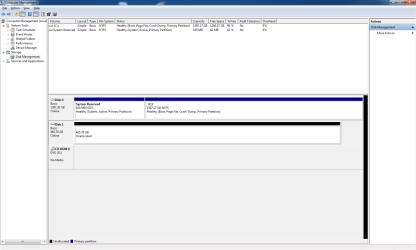
After trying to use the diskpart to clean and then allocate a partition on my External HDD that ended up not working, now I can't get the drive to load any of the data I did store on it before. (Part of the 500 GB HDD is set for use with 360 but only 16GB). Now I can't get the drive to load other than when in the Computer Management>Disk Management and it shows up as Disk 1 but unallocated. I attached a screen shot of the Computer Manager.
Screen Shot.png
29.7 KB
· Views: 10
Windows 7 x64 Home Premium i3 530@ 2.93GHz, 2926 MHz 16 GB ATI Radeon 5770 HD (Overclocked) Home Build Windows 7 x64 Home Premium i3 530@ 2.93GHz, 2926 MHz Gigabyte P55A-UD3 16 GB ATI Radeon 5770 HD (Overclocked) Onboard Samsung 22" 1680x1050 1 TB Western Digital Black Rosewell On box 3.5" fans Microsoft Ergonomic Pixxo Wireless Wireless Cable Tier 3 Server
New member
Thread Starter
Also Disk 1 is the external HDD
Windows 7 x64 Home Premium i3 530@ 2.93GHz, 2926 MHz 16 GB ATI Radeon 5770 HD (Overclocked) Home Build Windows 7 x64 Home Premium i3 530@ 2.93GHz, 2926 MHz Gigabyte P55A-UD3 16 GB ATI Radeon 5770 HD (Overclocked) Onboard Samsung 22" 1680x1050 1 TB Western Digital Black Rosewell On box 3.5" fans Microsoft Ergonomic Pixxo Wireless Wireless Cable Tier 3 Server
New member
Thread Starter
Also Disk 1 is the external HDD
Last edited: Jul 17, 2012
Windows 7 x64 Home Premium i3 530@ 2.93GHz, 2926 MHz 16 GB ATI Radeon 5770 HD (Overclocked) Home Build Windows 7 x64 Home Premium i3 530@ 2.93GHz, 2926 MHz Gigabyte P55A-UD3 16 GB ATI Radeon 5770 HD (Overclocked) Onboard Samsung 22" 1680x1050 1 TB Western Digital Black Rosewell On box 3.5" fans Microsoft Ergonomic Pixxo Wireless Wireless Cable Tier 3 Server
New member
Thread Starter
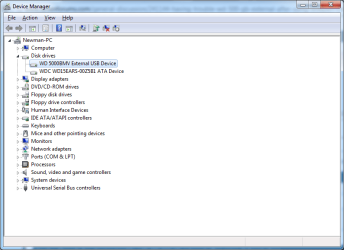
Screen Shot of Device Manger
Screen Shot.png
21.4 KB
· Views: 4
Windows 7 x64 Home Premium i3 530@ 2.93GHz, 2926 MHz 16 GB ATI Radeon 5770 HD (Overclocked) Home Build Windows 7 x64 Home Premium i3 530@ 2.93GHz, 2926 MHz Gigabyte P55A-UD3 16 GB ATI Radeon 5770 HD (Overclocked) Onboard Samsung 22" 1680x1050 1 TB Western Digital Black Rosewell On box 3.5" fans Microsoft Ergonomic Pixxo Wireless Wireless Cable Tier 3 Server
R.I.P.
Guru
Gold Member
VIP
So what exactly are you trying to do ?
Windows 10 Pro x64 Intel Core i7 6700K GSkill TridentZ RGB 16GB 3600 16-16-16-36 EVGA GTX 980 Ti SC x2 PC/Desktop Skylake Special #666 Windows 10 Pro x64 Intel Core i7 6700K Asus Sabertooth Z170 Mark 1 GSkill TridentZ RGB 16GB 3600 16-16-16-36 EVGA GTX 980 Ti SC x2 Realtek High Definition AOC G2460PG 1920 x 1080 144Hz Samsung 860 Pro 256GB, Seagate Barracuda 4TB x2 EVGA 1000 P2, EVGA White Custom Braided Cables Corsair Vengeance C70 Gunmetal Black Corsair H100i v2, Corsair ML120 x2, Thermal Grizzly Kryonaut Logitech G910 Orion Spectrum Logitech G700s Verizon Fios Quantum Gateway 75/75 Windows Defender, Malwarebytes Free 3.8.3 Chrome Corsair SP120 x4, LG Blu-ray Drive, Durabrand HT-395 100 Watt Dolby Digital Amp, Corsair H2100 Wireless 7.1 Headset
New member
Thread Starter
So what exactly are you trying to do ?
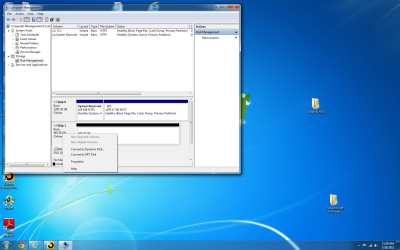
When I try and right click to assign it a letter I don't get the option. I'll take a screen shot of what is available. And if I did wipe it, is there anything I can do to fix it?
Screen Shot.png
316.9 KB
· Views: 10
Windows 7 x64 Home Premium i3 530@ 2.93GHz, 2926 MHz 16 GB ATI Radeon 5770 HD (Overclocked) Home Build Windows 7 x64 Home Premium i3 530@ 2.93GHz, 2926 MHz Gigabyte P55A-UD3 16 GB ATI Radeon 5770 HD (Overclocked) Onboard Samsung 22" 1680x1050 1 TB Western Digital Black Rosewell On box 3.5" fans Microsoft Ergonomic Pixxo Wireless Wireless Cable Tier 3 Server