HD folders don't show from C drive (SSD)

twcinnh

New member
Member
Local time
10:05 PM
Messages
16
Location
Bow, NH
I have win 7 Pro installed on a SSD. My work files are stored on a 2nd hard drive. Don't know what I did, but all the files on the 2nd hard drive show from that drive, but when I try to change the location of the default desktop to the file on the 2nd hard drive, that file doesn't show.

Anytime I'm in something that is stored on the SSD, I am unable to locate certain files on the hard drive setup for use (ex My documents, desktop, etc.)

I suspect I've changed permissions or something.

Would appreciate some help. It's not all folders that don't show, just some.

Regards,

Tom C
 

My Computer My Computer

At a glance

windows 7 professionalIntel i716 GB
OS
windows 7 professional
CPU
Intel i7
Motherboard
Asus p8Z68 Gen3
Memory
16 GB
Sound Card
Asus
PSU
Corsair 850W
Case
Corsair 650D
Just to clarify, I was attempting to move user files onto the 2nd Hard Drive. Now the folders on that drive I wanted to use do not appear when trying to change the location of the user files. Tom C
 

My Computer My Computer

At a glance

windows 7 professionalIntel i716 GB
OS
windows 7 professional
CPU
Intel i7
Motherboard
Asus p8Z68 Gen3
Memory
16 GB
Sound Card
Asus
PSU
Corsair 850W
Case
Corsair 650D
Tom,

I'm a bit confused by the description of the problem. To me it sounds like a 'Library' issue? Is that correct?

Please have a look at these tutorials and see if any help:

http://www.sevenforums.com/tutorials/18629-user-folders-change-default-location.html
http://www.sevenforums.com/tutorials/264-libraries-personal-public-user-folders.html

An additional thought : are you attempting to access these user folders using a shortcut on your desktop? If so, the problem could be that the shorcut is not pointing to the folder location on the 2nd HDD.

It might help if you attach some screen capture images to illustrate the problem a bit better.

Regards,
Golden
 

My Computer My Computer

At a glance

Windows 10 Pro x64 ; Xubuntu x64Intel i7 860 @ 2.80 GHz O/C'ed to 4.0GHz16GB Corsair Vengance DDR3 @ 661 MHz Dual Cha...EVGA NVidia GTX 560 1024MB
Computer type
PC/Desktop
Computer Manufacturer/Model Number
Golden Mk. I.4
OS
Windows 10 Pro x64 ; Xubuntu x64
CPU
Intel i7 860 @ 2.80 GHz O/C'ed to 4.0GHz
Motherboard
Gigabyte P55A-UD3R Rev.1. Award BIOS F13
Memory
16GB Corsair Vengance DDR3 @ 661 MHz Dual Channel (9-9-9-24)
Graphics Card(s)
EVGA NVidia GTX 560 1024MB
Sound Card
Realtek Integrated
Monitor(s) Displays
Dual Samsung SyncMaster 2494HS
Screen Resolution
1920*1080 and 1920*1080
Hard Drives
1*Samsung 840 EVO 120GB SSD;
1*OCZ Vertex 2 60GB SSD;
2*Samsung F3 SpinPoint 1TB in RAID0;
1*Samsung F1 SpinPoint 1TB;
2*Western Digital 1TB External USB 3.0
1*Western Digital 500GB External USB 3.0
1*Seagate 500GB External USB 2.0
PSU
Thermaltake ToughPower QFan 750W
Case
Thermaltake Element S VK60001W2Z
Cooling
Corsair H60 Water Cooling, 2*230mm and 2*80mm case fans
Keyboard
Logitech G110
Mouse
Logitech MX518
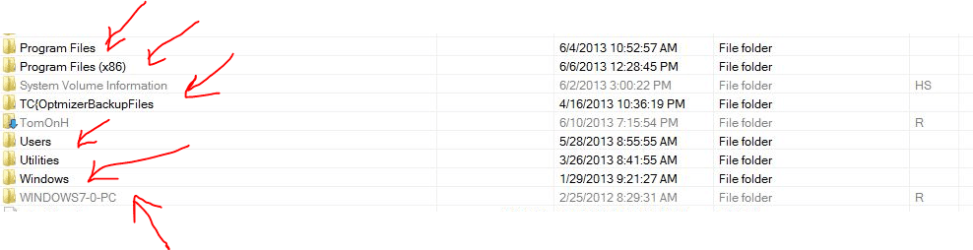
Ok, here are 2 images. The C-DriveImage was taken with Windows Explorer which is installed on the C Drive. The 2nd image, H-DriveImage was from FreeCommander, which is installed on the H Drive.

Regards, Tom C

Attachments are the images
 

My Computer My Computer

At a glance

windows 7 professionalIntel i716 GB
OS
windows 7 professional
CPU
Intel i7
Motherboard
Asus p8Z68 Gen3
Memory
16 GB
Sound Card
Asus
PSU
Corsair 850W
Case
Corsair 650D
OK, don't see the attachments. I'll provide a link to them in a bit.

Tom C
 

My Computer My Computer

At a glance

windows 7 professionalIntel i716 GB
OS
windows 7 professional
CPU
Intel i7
Motherboard
Asus p8Z68 Gen3
Memory
16 GB
Sound Card
Asus
PSU
Corsair 850W
Case
Corsair 650D

My Computer My Computer

At a glance

windows 7 professionalIntel i716 GB
OS
windows 7 professional
CPU
Intel i7
Motherboard
Asus p8Z68 Gen3
Memory
16 GB
Sound Card
Asus
PSU
Corsair 850W
Case
Corsair 650D

My Computer My Computer

At a glance

Windows 10 Pro x64 ; Xubuntu x64Intel i7 860 @ 2.80 GHz O/C'ed to 4.0GHz16GB Corsair Vengance DDR3 @ 661 MHz Dual Cha...EVGA NVidia GTX 560 1024MB
Computer type
PC/Desktop
Computer Manufacturer/Model Number
Golden Mk. I.4
OS
Windows 10 Pro x64 ; Xubuntu x64
CPU
Intel i7 860 @ 2.80 GHz O/C'ed to 4.0GHz
Motherboard
Gigabyte P55A-UD3R Rev.1. Award BIOS F13
Memory
16GB Corsair Vengance DDR3 @ 661 MHz Dual Channel (9-9-9-24)
Graphics Card(s)
EVGA NVidia GTX 560 1024MB
Sound Card
Realtek Integrated
Monitor(s) Displays
Dual Samsung SyncMaster 2494HS
Screen Resolution
1920*1080 and 1920*1080
Hard Drives
1*Samsung 840 EVO 120GB SSD;
1*OCZ Vertex 2 60GB SSD;
2*Samsung F3 SpinPoint 1TB in RAID0;
1*Samsung F1 SpinPoint 1TB;
2*Western Digital 1TB External USB 3.0
1*Western Digital 500GB External USB 3.0
1*Seagate 500GB External USB 2.0
PSU
Thermaltake ToughPower QFan 750W
Case
Thermaltake Element S VK60001W2Z
Cooling
Corsair H60 Water Cooling, 2*230mm and 2*80mm case fans
Keyboard
Logitech G110
Mouse
Logitech MX518
Just to update. I found the ownership and properties unsuccessful. So, I used a month old image to get back where I was. Thank you for your help, I did become much more knowledgeable about something I wasn't familiar with. I guess I need to be paying more attention there. Thank you again, Tom C
 

My Computer My Computer

At a glance

windows 7 professionalIntel i716 GB
OS
windows 7 professional
CPU
Intel i7
Motherboard
Asus p8Z68 Gen3
Memory
16 GB
Sound Card
Asus
PSU
Corsair 850W
Case
Corsair 650D
:thumbsup:
 

My Computer My Computer

At a glance

Windows 10 Pro x64 ; Xubuntu x64Intel i7 860 @ 2.80 GHz O/C'ed to 4.0GHz16GB Corsair Vengance DDR3 @ 661 MHz Dual Cha...EVGA NVidia GTX 560 1024MB
Computer type
PC/Desktop
Computer Manufacturer/Model Number
Golden Mk. I.4
OS
Windows 10 Pro x64 ; Xubuntu x64
CPU
Intel i7 860 @ 2.80 GHz O/C'ed to 4.0GHz
Motherboard
Gigabyte P55A-UD3R Rev.1. Award BIOS F13
Memory
16GB Corsair Vengance DDR3 @ 661 MHz Dual Channel (9-9-9-24)
Graphics Card(s)
EVGA NVidia GTX 560 1024MB
Sound Card
Realtek Integrated
Monitor(s) Displays
Dual Samsung SyncMaster 2494HS
Screen Resolution
1920*1080 and 1920*1080
Hard Drives
1*Samsung 840 EVO 120GB SSD;
1*OCZ Vertex 2 60GB SSD;
2*Samsung F3 SpinPoint 1TB in RAID0;
1*Samsung F1 SpinPoint 1TB;
2*Western Digital 1TB External USB 3.0
1*Western Digital 500GB External USB 3.0
1*Seagate 500GB External USB 2.0
PSU
Thermaltake ToughPower QFan 750W
Case
Thermaltake Element S VK60001W2Z
Cooling
Corsair H60 Water Cooling, 2*230mm and 2*80mm case fans
Keyboard
Logitech G110
Mouse
Logitech MX518
If you still want to move your user files to the HDD, post back and we'll tell you the best strategy to do that.
 

My Computer My Computer

At a glance

Vista, Windows7, Mint Mate, Zorin, Windows 8from 1.6GHz Duo to i7
Computer Manufacturer/Model Number
HP, Dell, Gateway, Toshiba - 4 laptops and 2 desktops
OS
Vista, Windows7, Mint Mate, Zorin, Windows 8
CPU
from 1.6GHz Duo to i7
Monitor(s) Displays
2x HP w2207
Hard Drives
5x HDD, 7x SSD, 12x Externals
Keyboard
with trackball - no mices
Mouse
Trackball mice
Internet Speed
DSL 6000
Thank you. I've already printed out the instruction on the site. Regards, Tom C
 

My Computer My Computer

At a glance

windows 7 professionalIntel i716 GB
OS
windows 7 professional
CPU
Intel i7
Motherboard
Asus p8Z68 Gen3
Memory
16 GB
Sound Card
Asus
PSU
Corsair 850W
Case
Corsair 650D
Back
Top