HD Free space MORE than Available "preparing your desktop" every login

absurd6

New member
Local time
12:38 PM
Messages
6
HD Free space MORE than Available "preparing your desktop" every login

Since last reboot I have the following issues, an can not find good info on google to fix them.

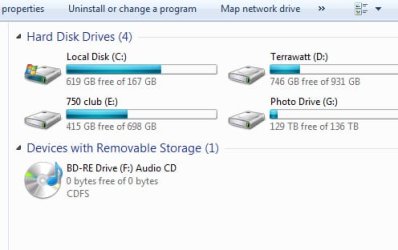
HD: Reads 628gb free of 167gb. It is a 180gb solid state Intel drive.

Profile: All profile settings do not load, when I log in every time I get "Preparing your desktop" Can not pin to the bottom bar. No programs show on start bar window above "all programs". Random characters show in windows explorer next to date column.

Other than that runs fine (For now), I created a new profile and that one functions properly.

How can I restore my original login to working order, all data is still there...

Also, why does then HD show almost 500gb free beyond its total capacity?

Thanks
JB
 

My Computer My Computer

At a glance

Windows 7 Ultimate 64 bit
OS
Windows 7 Ultimate 64 bit
If you could post a screen shot of your Disk Management, it would help to clear things. Click on the round Windows Button in the lower left corner of the screen. Type "Disk Management" (without quotes) in the line above the button and hit enter. The Disk Management will pop up. Expand all columns so the print can be read. Follow this tutorial
http://www.sevenforums.com/tutorials/9733-screenshots-files-upload-post-seven-forums.html to use your Snipping Tool to post a screen shot of your Disk Management. Thanks,
 

My Computer My Computer

At a glance

Windows 7 Home Premium 32-Bit - Build 7600 SP1Intel Core i3-2120 3.30GhzKingston 4 GB DDR3 1333 mhzAMD Radeon HD6670
Computer type
PC/Desktop
Computer Manufacturer/Model Number
Custom Build
OS
Windows 7 Home Premium 32-Bit - Build 7600 SP1
CPU
Intel Core i3-2120 3.30Ghz
Motherboard
Asus P8Z68-V LX Intel Z68 Socket H2 ATX
Memory
Kingston 4 GB DDR3 1333 mhz
Graphics Card(s)
AMD Radeon HD6670
Sound Card
Sound Blaster Audigy SE 24-Bit
Monitor(s) Displays
Asus VE228
Screen Resolution
1440 X 900
Hard Drives
OCZ Vertex 3 120 GB Sata 3 SSD ==
Kingston SH103/S3 120 G Hyper X 120 GB SSD ==
Western Digital 500 GB Caviar Green 7200 RPM ==
PSU
Corsair CX600M == 600 Watt
Case
NZXT Apollo - Silver with Clear Side Panel
Cooling
Three 120 mm Fans
Keyboard
Microsoft Natural 4000
Mouse
Microsoft Custom Optical 3000
Internet Speed
AT&T Fiber Optic Wireless Network
Antivirus
Microsoft Security Essentials
Browser
Chrome
Other Info
120 mm Blue LED Fan -- Three Blue LED Lazer Light Sticks
Thanks for quick response

Here's the requested screen shot.

disk 2 is primary on this list.
Disks 0,1 are internal, disk 3 external

Here it shows correctly that its free space is about 62gb, my computer still shows 623gb

Thanks for the help!
JB
 

Attachments

  • Untitled-1.jpg
    Untitled-1.jpg
    101.6 KB · Views: 32

My Computer My Computer

At a glance

Windows 7 Ultimate 64 bit
OS
Windows 7 Ultimate 64 bit
Here's the requested screen shot.

disk 2 is primary on this list.
Disks 0,1 are internal, disk 3 external

Here it shows correctly that its free space is about 62gb, my computer still shows 623gb

Thanks for the help!
JB

Everything I see on C: drive shows 62 GB free. Things look OK. What makes you think it is 623 GB free? Tell me again, using the drive letters, what is the problem. Thanks,
 

My Computer My Computer

At a glance

Windows 7 Home Premium 32-Bit - Build 7600 SP1Intel Core i3-2120 3.30GhzKingston 4 GB DDR3 1333 mhzAMD Radeon HD6670
Computer type
PC/Desktop
Computer Manufacturer/Model Number
Custom Build
OS
Windows 7 Home Premium 32-Bit - Build 7600 SP1
CPU
Intel Core i3-2120 3.30Ghz
Motherboard
Asus P8Z68-V LX Intel Z68 Socket H2 ATX
Memory
Kingston 4 GB DDR3 1333 mhz
Graphics Card(s)
AMD Radeon HD6670
Sound Card
Sound Blaster Audigy SE 24-Bit
Monitor(s) Displays
Asus VE228
Screen Resolution
1440 X 900
Hard Drives
OCZ Vertex 3 120 GB Sata 3 SSD ==
Kingston SH103/S3 120 G Hyper X 120 GB SSD ==
Western Digital 500 GB Caviar Green 7200 RPM ==
PSU
Corsair CX600M == 600 Watt
Case
NZXT Apollo - Silver with Clear Side Panel
Cooling
Three 120 mm Fans
Keyboard
Microsoft Natural 4000
Mouse
Microsoft Custom Optical 3000
Internet Speed
AT&T Fiber Optic Wireless Network
Antivirus
Microsoft Security Essentials
Browser
Chrome
Other Info
120 mm Blue LED Fan -- Three Blue LED Lazer Light Sticks
Did you just install the SSD? If you did just install it why isn't it on SATA port 1 making it Disk 0.

If you just installed it and then installed Windows on it did you disconnect the other drives from the system when installing Windows?
 

My Computer My Computer

At a glance

7 x64
OS
7 x64
This i think is a small symptom of a much larger issue.

This screen shows it saying 619gb free now. Also the date format has been changed to 24 hour scale.

I have made no changes to the setup for about 4 months.

*Update*

just ran an avast full boot scan, system found many many corrupted "zip", "7zip" files, exe files. All were in a folder on my desktop.

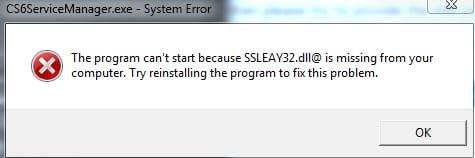
Now im get a missing DLL error SSLEAY32.dll for CS6ServicesManager.exe.

Also, since these issues started, the font rendering has gone from smooth to very blockey in web browsers, but fine everywhere else.

I think I am watching this solid state drive eat itself.
 

Attachments

  • Untitled-2.jpg
    Untitled-2.jpg
    19.9 KB · Views: 9
  • Untitled-3.jpg
    Untitled-3.jpg
    10.8 KB · Views: 7
  • Untitled-4.jpg
    Untitled-4.jpg
    12.7 KB · Views: 6
Last edited:

My Computer My Computer

At a glance

Windows 7 Ultimate 64 bit
OS
Windows 7 Ultimate 64 bit
*Update*

I can also no longer run checkdisk.

Access Denied
 

Attachments

  • Untitled-5.jpg
    Untitled-5.jpg
    22.4 KB · Views: 6

My Computer My Computer

At a glance

Windows 7 Ultimate 64 bit
OS
Windows 7 Ultimate 64 bit

My Computer My Computer

At a glance

Windows 7 Home Premium 32-Bit - Build 7600 SP1Intel Core i3-2120 3.30GhzKingston 4 GB DDR3 1333 mhzAMD Radeon HD6670
Computer type
PC/Desktop
Computer Manufacturer/Model Number
Custom Build
OS
Windows 7 Home Premium 32-Bit - Build 7600 SP1
CPU
Intel Core i3-2120 3.30Ghz
Motherboard
Asus P8Z68-V LX Intel Z68 Socket H2 ATX
Memory
Kingston 4 GB DDR3 1333 mhz
Graphics Card(s)
AMD Radeon HD6670
Sound Card
Sound Blaster Audigy SE 24-Bit
Monitor(s) Displays
Asus VE228
Screen Resolution
1440 X 900
Hard Drives
OCZ Vertex 3 120 GB Sata 3 SSD ==
Kingston SH103/S3 120 G Hyper X 120 GB SSD ==
Western Digital 500 GB Caviar Green 7200 RPM ==
PSU
Corsair CX600M == 600 Watt
Case
NZXT Apollo - Silver with Clear Side Panel
Cooling
Three 120 mm Fans
Keyboard
Microsoft Natural 4000
Mouse
Microsoft Custom Optical 3000
Internet Speed
AT&T Fiber Optic Wireless Network
Antivirus
Microsoft Security Essentials
Browser
Chrome
Other Info
120 mm Blue LED Fan -- Three Blue LED Lazer Light Sticks
I have avast 7.0.1466

Did a full scan while in windows & full boot up scan. No issues.
Also did a scan with malwarebytes, no issues.

I think the main drive lost some important user data. How do you recover a corrupted user account?
 

My Computer My Computer

At a glance

Windows 7 Ultimate 64 bit
OS
Windows 7 Ultimate 64 bit
So that this damaging infection cannot spread, work in boot mode until you confirm with WDO it is disinfected, then repair System files. Those steps plus everything else that can be done to start Win7 is here: Troubleshooting Windows 7 Failure to Start

If you're not going to move Win7 HD into Disk0 then you must first mark Disk0 Inactive as it will otherwise derail the boot files onto itself during Startup Repairs. Install or repair will rewrite the System boot files to the first Active partition which is the reason we like to see the OS HD in that slot.
 
Thanks for the reply's.

*Update*

When booting to safe mode Disk Management shows my C drive as Disk 0 BUT***
When booting normal it shows as Disk 2.

should that be alarming?

I've run sfc /scannow about 10 times. each time it logs more fixes but still says there are more errors it could not fix.

Thinking of doing a restore at this point.

I can not work on this PC now, all files have messed up permissions on my 2ndary drives and are stuck "READ ONLY"

Thanks for the help

JB
 

My Computer My Computer

At a glance

Windows 7 Ultimate 64 bit
OS
Windows 7 Ultimate 64 bit
Since E is marked Active, that could be the source of your trouble. I think this was discussed before, but you need to take the Active off the E partition. Use this tutorial http://www.sevenforums.com/tutorials/197157-partition-mark-inactive.html If you had all of your drives plugged in when you installed Win 7, you could have gotten some files that should be on C: on the E drive. Make E inactive and see how that works
 

My Computer My Computer

At a glance

Windows 7 Home Premium 32-Bit - Build 7600 SP1Intel Core i3-2120 3.30GhzKingston 4 GB DDR3 1333 mhzAMD Radeon HD6670
Computer type
PC/Desktop
Computer Manufacturer/Model Number
Custom Build
OS
Windows 7 Home Premium 32-Bit - Build 7600 SP1
CPU
Intel Core i3-2120 3.30Ghz
Motherboard
Asus P8Z68-V LX Intel Z68 Socket H2 ATX
Memory
Kingston 4 GB DDR3 1333 mhz
Graphics Card(s)
AMD Radeon HD6670
Sound Card
Sound Blaster Audigy SE 24-Bit
Monitor(s) Displays
Asus VE228
Screen Resolution
1440 X 900
Hard Drives
OCZ Vertex 3 120 GB Sata 3 SSD ==
Kingston SH103/S3 120 G Hyper X 120 GB SSD ==
Western Digital 500 GB Caviar Green 7200 RPM ==
PSU
Corsair CX600M == 600 Watt
Case
NZXT Apollo - Silver with Clear Side Panel
Cooling
Three 120 mm Fans
Keyboard
Microsoft Natural 4000
Mouse
Microsoft Custom Optical 3000
Internet Speed
AT&T Fiber Optic Wireless Network
Antivirus
Microsoft Security Essentials
Browser
Chrome
Other Info
120 mm Blue LED Fan -- Three Blue LED Lazer Light Sticks
Back
Top