HD Spins Down Frequently

Warhaven

New member
Local time
7:49 AM
Messages
10
My system has two drives, a 1TB Samsung Spinpoint F1 that has all my backup and whatnot, and my boot drive, which is a 500GB Hitachi Deskstar P7K500. Here's the problem: My boot drive keeps spinning down every 10 minutes or so, regardless of what I'm doing, and despite any power saving options to the contrary. It doesn't do this under Windows Vista, so I'm not inclined to believe the HD is failing.

In any event, you can see how this might cause problems when gaming, as a game will stall while the HD spins up again to access cache or whatever -- which usually leads to the game quitting unexpectedly. I have the latest drivers and firmware for my motherboard installed.

Any suggestions?

[edit]

It just donned on me to try turning off the "Put HD to sleep" option, but if anyone has some other suggestions for me to try when I get home, I'm all ears.

Thanks,
-Rob
 

My Computer

Computer Manufacturer/Model Number
Custom
OS
Windows 7 x64 Professional
CPU
Phenom II 720 BE
Motherboard
Gigabyte GA-MA790FXT-UD5P
Memory
8 GB OCZ Reaper HPC DDR3 1600
Graphics Card(s)
Sapphire Radeon 4870 1GB x2 CrossFire
Sound Card
Onboard
Monitor(s) Displays
Samsung 2253LW 22"
Screen Resolution
1680 x 1050
Hard Drives
Hitachi Deskstar P7K500 500GB
Samsung Spinpoint F1 1TB
PSU
Antec TPQ-850
Case
Antec 900
Cooling
ZEROtherm BTF90
Keyboard
Apple Aluminium
Mouse
Logitech Optical Mouse
Other Info
Catalyst 9.10
Hello Rob, and welcome to Seven Forums.

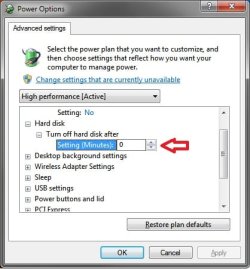
Have you already tried having it set to more than 10 minutes?

Power_Options.jpg

Hope this helps,
Shawn
 

My Computer

Computer type
PC/Desktop
Computer Manufacturer/Model Number
Self built custom
OS
64-bit Windows 11 Pro for Workstations
CPU
Intel i7-8700K OC'd to 5 GHz
Motherboard
ASUS ROG Maximus XI Formula Z390
Memory
64 GB (4x16GB) G.SKILL TridentZ RGB DDR4 3600 MHz
Graphics Card(s)
ASUS ROG-STRIX-GTX1080TI-O11G-GAMING
Sound Card
Integrated
Monitor(s) Displays
2 x Samsung Odyssey G7 27"
Screen Resolution
2560x1440
Hard Drives
1TB Samsung 990 PRO M.2,
4TB Samsung 990 PRO PRO M.2,
TerraMaster F8 SSD Plus NAS
PSU
Seasonic Prime Titanium 850W
Case
Thermaltake Core P3
Cooling
Corsair Hydro H115i
Keyboard
Logitech wireless K800
Mouse
Logitech MX Master 4
Internet Speed
2 Gb/s Download and 100 Mb/s Upload
Antivirus
Malwarebyte Anti-Malware Premium
Browser
Google Chrome
Other Info
Logitech Z625 speaker system,
Logitech BRIO 4K Pro webcam,
HP Color LaserJet Pro MFP M477fdn,
APC SMART-UPS RT 1000 XL - SURT1000XLI,
Galaxy S23 Plus phone
Thanks for the response. The problem isn't the time length, it's the fact that the drive is spinning down while a process is accessing the drive, causing the process to halt and wait for the drive to immediately spin up again -- which would, for example, cause WoW to crash.

If there's disc access, it shouldn't be spinning down the drive at all. In any event, I've simply turned it off (set to 0) and that solved the problem.
 

My Computer

Computer Manufacturer/Model Number
Custom
OS
Windows 7 x64 Professional
CPU
Phenom II 720 BE
Motherboard
Gigabyte GA-MA790FXT-UD5P
Memory
8 GB OCZ Reaper HPC DDR3 1600
Graphics Card(s)
Sapphire Radeon 4870 1GB x2 CrossFire
Sound Card
Onboard
Monitor(s) Displays
Samsung 2253LW 22"
Screen Resolution
1680 x 1050
Hard Drives
Hitachi Deskstar P7K500 500GB
Samsung Spinpoint F1 1TB
PSU
Antec TPQ-850
Case
Antec 900
Cooling
ZEROtherm BTF90
Keyboard
Apple Aluminium
Mouse
Logitech Optical Mouse
Other Info
Catalyst 9.10
I've found that turning this off works best. Like you anytime something needed to access the drive that spinned down, it would cause a delay (as expected) for the drive to spin back up. I got tired of waiting as well.
 

My Computer

Computer type
PC/Desktop
Computer Manufacturer/Model Number
Self built custom
OS
64-bit Windows 11 Pro for Workstations
CPU
Intel i7-8700K OC'd to 5 GHz
Motherboard
ASUS ROG Maximus XI Formula Z390
Memory
64 GB (4x16GB) G.SKILL TridentZ RGB DDR4 3600 MHz
Graphics Card(s)
ASUS ROG-STRIX-GTX1080TI-O11G-GAMING
Sound Card
Integrated
Monitor(s) Displays
2 x Samsung Odyssey G7 27"
Screen Resolution
2560x1440
Hard Drives
1TB Samsung 990 PRO M.2,
4TB Samsung 990 PRO PRO M.2,
TerraMaster F8 SSD Plus NAS
PSU
Seasonic Prime Titanium 850W
Case
Thermaltake Core P3
Cooling
Corsair Hydro H115i
Keyboard
Logitech wireless K800
Mouse
Logitech MX Master 4
Internet Speed
2 Gb/s Download and 100 Mb/s Upload
Antivirus
Malwarebyte Anti-Malware Premium
Browser
Google Chrome
Other Info
Logitech Z625 speaker system,
Logitech BRIO 4K Pro webcam,
HP Color LaserJet Pro MFP M477fdn,
APC SMART-UPS RT 1000 XL - SURT1000XLI,
Galaxy S23 Plus phone
Back
Top