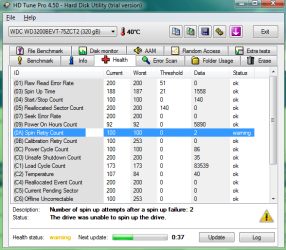
HD Tune: Spin Drive Warning

Yusifer

New member
Local time
6:46 PM
Messages
35
Location
Quebec, Canada
What's this mean? o0
 

Attachments

  • meep.png
    meep.png
    26.2 KB · Views: 97

My Computer

Computer Manufacturer/Model Number
Dell 1545
OS
Windows 7 64-bit
CPU
2.0GHZ
Motherboard
Intel Core 2 Duo P7350
Memory
4.0GB SDRAM
Graphics Card(s)
256MB Mobility Radeon HD 4550
Sound Card
Sound Blaster
Monitor(s) Displays
15"
Hard Drives
300GB
Keyboard
Integrated
Mouse
Integrated
Internet Speed
2,500kb/down; 800kb/up
Other Info
I hate Dell. I have a laptop.

My Computer

Computer Manufacturer/Model Number
ATX Custom Build 2012
OS
Windows 7 Enterprise x64 SP1
CPU
Intel Core i3-2100 @ 3.10GHz
Motherboard
Intel DH67CL desktop ATX
Memory
10 GB DDR3
Graphics Card(s)
Asus EAH5450 series (Radeon)
Monitor(s) Displays
Samsung SyncMaster 226BW, Samsung Syncmaster P2450H
Screen Resolution
226BW: 1680 x 1050 & P2450H: 1920 x 1080
Hard Drives
Western Digital 320 GB sata (boot), Samsung 640 GB sata, Seagate 2 TB sata (data)
PSU
Cooler Master Extreme Power Plus 500W
Case
Thermaltake V3 Black Edition
Cooling
stock cooling with added intake fan
Keyboard
HP Wireless Elite Keyboard Wireless Keyboard
Mouse
Microsoft Touch
Internet Speed
Comcast Cable business class <=18Mb {averages 12Mb}
Other Info
Optical drives: LG SuperMulti Blue, HP DVD 1260T
Other: Kensington Bluetooth Receiver
Network: Buffalo Wireless N USB, DLink N router/DLink Ethernet Switch/DLink Xtreme N wireless bridge
Printer: HP Photosmart Plus, HP Officejet Pro 8600 Plus
PCs: HP dv6-3040us (7 x64 SP1), HP DM4-2165dx (7 x64 SP1), HP Pavilion zv6130us (7 x86), Apple Macbook Air (Lion)
************
Hello,

1) A Spin retry event is logged each time the drive was unable to spin its platters up to the rated rotation speed in the due time. Spin-up attempt was aborted and retried. Theoretically, it may indicate a problem in the hdd mechanical system but can also be caused by a loose power connector.

2) I see from your picture that the hdd had 2 spin retries. Thats not a big deal. HDD aren't perfect devices and are designed to recover from ocassional errors. A momentary power loss or case movement may have caused it.

3) Hdtune is not 100% reliable. Download and run the manufacturer's diagnostics, you can even try Speedfan, that'll give you a better idea.

4) Check your cable connections. Also, always keep critical data backed up. Also, best to make a system image of the C: drive (windows partition) from which you can restore, using a tool like Macrium Reflect. These things should be done irrespective of what HDtune says.

 

My Computer

Computer Manufacturer/Model Number
Too many to describe...
OS
Windows 7 x64 pro/ Windows 7 x86 Pro/ XP SP3 x86
Back
Top