HD5750 No sound problem

Saint

New member
Local time
4:42 AM
Messages
10
hi, well i just installed this new graphics card called HD5750, on my windows 7 OS. i installed the drivers from the CD that came with the graphics card, however i have absolutely no sound at all. does anyone know how come?
 

My Computer

OS
windows 7
CPU
Intel pentium 4 (3.45 GHz)
Motherboard
FUJITSU Siemens D1826-G, intel i915P/i915G chipset
Memory
2.0 GB DDR
Graphics Card(s)
Radeon HD 5750
Sound Card
Creative Audigy Audio Processor (WDM)
Hard Drives
120GB Seagate ST3120022A ATA
ATI cards onboard Audio controller only allows sound output through the HDMI port... if you have speakers or headphones then you would also need to have a separate sound card or enable your motherboards onboard sound controller.
 

My Computer

Computer Manufacturer/Model Number
Home Built
OS
Windows 7 Ultimate x64 RTM
CPU
AMD Athlon II X2 240 @ 3.2Ghz
Motherboard
Gigabyte GA-MA785GMT-UD2H
Memory
6GB Mushkin DDR3 PC-1333
Graphics Card(s)
ATI Radeon HD 4200 IGP Hybrid CrossFireX w\ Sapphire HD3450
Sound Card
Onboard Realtek HD audio controller
Monitor(s) Displays
D-SUB: LG W2343T-PF 23" LCD HDMI: LG 32LH20 32" LCD
Screen Resolution
1920*1080
Hard Drives
WD Caviar Green 1TB SATA3
PSU
Cooler Master Elite Power 400W
Case
Cooler Master Elite 360
Cooling
AMD Stock :)
Keyboard
Crappy wirelss logitech
Mouse
crappy wireless logitech
Internet Speed
792k
ok, so how would i enable my motherboards onboard sound controller.
 

My Computer

OS
windows 7
CPU
Intel pentium 4 (3.45 GHz)
Motherboard
FUJITSU Siemens D1826-G, intel i915P/i915G chipset
Memory
2.0 GB DDR
Graphics Card(s)
Radeon HD 5750
Sound Card
Creative Audigy Audio Processor (WDM)
Hard Drives
120GB Seagate ST3120022A ATA
in the BIOS.... you will need to reboot, and during the POST hit the delete key, once in the bios look for Integrated Peripherals option, and in there you should have the option of enabling onboard sound IF you have it(its very common so you probably do). Save and exit bios and once in windows it will tell you it found new hardware, install drivers. If you happen to know the make of your board we can the latest drivers before we do anything else
 

My Computer

Computer Manufacturer/Model Number
Home Built
OS
Windows 7 Ultimate x64 RTM
CPU
AMD Athlon II X2 240 @ 3.2Ghz
Motherboard
Gigabyte GA-MA785GMT-UD2H
Memory
6GB Mushkin DDR3 PC-1333
Graphics Card(s)
ATI Radeon HD 4200 IGP Hybrid CrossFireX w\ Sapphire HD3450
Sound Card
Onboard Realtek HD audio controller
Monitor(s) Displays
D-SUB: LG W2343T-PF 23" LCD HDMI: LG 32LH20 32" LCD
Screen Resolution
1920*1080
Hard Drives
WD Caviar Green 1TB SATA3
PSU
Cooler Master Elite Power 400W
Case
Cooler Master Elite 360
Cooling
AMD Stock :)
Keyboard
Crappy wirelss logitech
Mouse
crappy wireless logitech
Internet Speed
792k
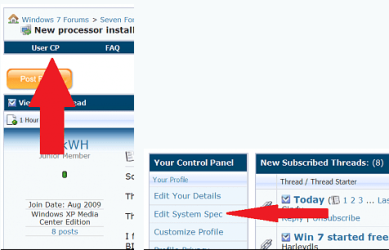
Welcome to seven forums. How to list your system specs so others can easily check them. Thanks. Fabe usercp 1.png
 

My Computer

Computer Manufacturer/Model Number
Self Built
OS
Windows 7 ultimate 64 bit / XP Home sp3
CPU
intel Core 2 Duo E8400 3.0ghz
Motherboard
Asus P5ND bios 1401
Memory
8 gigs 1066 OCZ Fata1ty
Graphics Card(s)
EVGA GTX 580 Call of Duty Black Ops Edition
Sound Card
Creative Soundblaster Audigy 2zs
Monitor(s) Displays
Asus 24in LCD's 2MS X2
Screen Resolution
1920x1080p @60Hz
Hard Drives
WD Caviar 500 Black/ WD Caviar 200 Blue
PSU
OCZ 700W GameXtreme
Case
NZXT Apollo
Cooling
Corsair H50 CPU/120mm x3 /60mm x2 /Corsair Dominator Ram
Keyboard
Logitech Bluetooth Wireless MX5000
Mouse
Logitech Bluetooth Wireless MX1000
Internet Speed
Download 19.83 Upload 0.97
Other Info
Logitech Z2300 Speakers/ Bose Noise Cancelling Headphones/Avermedia PCI-e Hybrid TV Bravo/Epson NX415 all in one/ 4 Port Powered USB Hub/ LG 10x Bluray Burner /TSST Corp DVDRW External
in the BIOS.... you will need to reboot, and during the POST hit the delete key, once in the bios look for Integrated Peripherals option, and in there you should have the option of enabling onboard sound IF you have it(its very common so you probably do). Save and exit bios and once in windows it will tell you it found new hardware, install drivers. If you happen to know the make of your board we can the latest drivers before we do anything else

i tried it, and it was already enabled.
 

My Computer

OS
windows 7
CPU
Intel pentium 4 (3.45 GHz)
Motherboard
FUJITSU Siemens D1826-G, intel i915P/i915G chipset
Memory
2.0 GB DDR
Graphics Card(s)
Radeon HD 5750
Sound Card
Creative Audigy Audio Processor (WDM)
Hard Drives
120GB Seagate ST3120022A ATA

My Computer

OS
windows 7
CPU
Intel pentium 4 (3.45 GHz)
Motherboard
FUJITSU Siemens D1826-G, intel i915P/i915G chipset
Memory
2.0 GB DDR
Graphics Card(s)
Radeon HD 5750
Sound Card
Creative Audigy Audio Processor (WDM)
Hard Drives
120GB Seagate ST3120022A ATA

My Computer

Computer Manufacturer/Model Number
Home Built
OS
Windows 7 Ultimate x64 RTM
CPU
AMD Athlon II X2 240 @ 3.2Ghz
Motherboard
Gigabyte GA-MA785GMT-UD2H
Memory
6GB Mushkin DDR3 PC-1333
Graphics Card(s)
ATI Radeon HD 4200 IGP Hybrid CrossFireX w\ Sapphire HD3450
Sound Card
Onboard Realtek HD audio controller
Monitor(s) Displays
D-SUB: LG W2343T-PF 23" LCD HDMI: LG 32LH20 32" LCD
Screen Resolution
1920*1080
Hard Drives
WD Caviar Green 1TB SATA3
PSU
Cooler Master Elite Power 400W
Case
Cooler Master Elite 360
Cooling
AMD Stock :)
Keyboard
Crappy wirelss logitech
Mouse
crappy wireless logitech
Internet Speed
792k
should be there now :)
 

My Computer

OS
windows 7
CPU
Intel pentium 4 (3.45 GHz)
Motherboard
FUJITSU Siemens D1826-G, intel i915P/i915G chipset
Memory
2.0 GB DDR
Graphics Card(s)
Radeon HD 5750
Sound Card
Creative Audigy Audio Processor (WDM)
Hard Drives
120GB Seagate ST3120022A ATA
you have a sound card installed so you should be getting sound...
 

My Computer

Computer Manufacturer/Model Number
Home Built
OS
Windows 7 Ultimate x64 RTM
CPU
AMD Athlon II X2 240 @ 3.2Ghz
Motherboard
Gigabyte GA-MA785GMT-UD2H
Memory
6GB Mushkin DDR3 PC-1333
Graphics Card(s)
ATI Radeon HD 4200 IGP Hybrid CrossFireX w\ Sapphire HD3450
Sound Card
Onboard Realtek HD audio controller
Monitor(s) Displays
D-SUB: LG W2343T-PF 23" LCD HDMI: LG 32LH20 32" LCD
Screen Resolution
1920*1080
Hard Drives
WD Caviar Green 1TB SATA3
PSU
Cooler Master Elite Power 400W
Case
Cooler Master Elite 360
Cooling
AMD Stock :)
Keyboard
Crappy wirelss logitech
Mouse
crappy wireless logitech
Internet Speed
792k
you have a sound card installed so you should be getting sound...

yea i know.. i got sound with my old graphics card but not with the new one :S
 

My Computer

OS
windows 7
CPU
Intel pentium 4 (3.45 GHz)
Motherboard
FUJITSU Siemens D1826-G, intel i915P/i915G chipset
Memory
2.0 GB DDR
Graphics Card(s)
Radeon HD 5750
Sound Card
Creative Audigy Audio Processor (WDM)
Hard Drives
120GB Seagate ST3120022A ATA
hi, well i just installed this new graphics card called HD5750, on my windows 7 OS. i installed the drivers from the CD that came with the graphics card, however i have absolutely no sound at all. does anyone know how come?

have you checked the default device in volume mixer ?

right click on your speaker icon and have a look in playback devices
if you have sound playing it will show in the volume bars next to the default device


cheers brad
 

My Computer

Computer type
PC/Desktop
Computer Manufacturer/Model Number
my own build
OS
xp/vista/win7/win8/10 tech preview
CPU
PHENOM II X4 Quad Core 965 Black Edition CPU, 3.40 GHz
Motherboard
GA-MA790FXT-UD5P
Memory
G.Skill 8GB (4x XMS3 2GB) PC-12800 (1600MHz
Graphics Card(s)
nvidia 9500 gt
Sound Card
on board
Monitor(s) Displays
T231H / X243H ACER
Screen Resolution
1980/1080
Hard Drives
Hitachi 500 samsung1terabyte wd 750
PSU
550 watt
Case
cooler master
Cooling
stock
Keyboard
microsoft
Mouse
logitech
Internet Speed
20000 dl 1020 ul exetel
Other Info
booting xp32 2x dual pci-e digital tv tuners
xp pro v 1xusb2 digital tv tuner
vista ultimate 64
win7 64 win8 64
hi, well i just installed this new graphics card called HD5750, on my windows 7 OS. i installed the drivers from the CD that came with the graphics card, however i have absolutely no sound at all. does anyone know how come?

have you checked the default device in volume mixer ?

right click on your speaker icon and have a look in playback devices
if you have sound playing it will show in the volume bars next to the default device


cheers brad

yes it shows a green bar going up and down.. :S
 

My Computer

OS
windows 7
CPU
Intel pentium 4 (3.45 GHz)
Motherboard
FUJITSU Siemens D1826-G, intel i915P/i915G chipset
Memory
2.0 GB DDR
Graphics Card(s)
Radeon HD 5750
Sound Card
Creative Audigy Audio Processor (WDM)
Hard Drives
120GB Seagate ST3120022A ATA
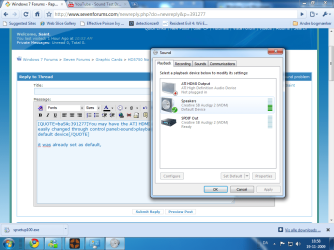
You may have the ATI HDMI audio set to default output device... easily changed through control panel>sound>playback Tab set the creative card as default device
 

My Computer

Computer Manufacturer/Model Number
Home Built
OS
Windows 7 Ultimate x64 RTM
CPU
AMD Athlon II X2 240 @ 3.2Ghz
Motherboard
Gigabyte GA-MA785GMT-UD2H
Memory
6GB Mushkin DDR3 PC-1333
Graphics Card(s)
ATI Radeon HD 4200 IGP Hybrid CrossFireX w\ Sapphire HD3450
Sound Card
Onboard Realtek HD audio controller
Monitor(s) Displays
D-SUB: LG W2343T-PF 23" LCD HDMI: LG 32LH20 32" LCD
Screen Resolution
1920*1080
Hard Drives
WD Caviar Green 1TB SATA3
PSU
Cooler Master Elite Power 400W
Case
Cooler Master Elite 360
Cooling
AMD Stock :)
Keyboard
Crappy wirelss logitech
Mouse
crappy wireless logitech
Internet Speed
792k
You may have the ATI HDMI audio set to default output device... easily changed through control panel>sound>playback Tab set the creative card as default device

it was already set as default, i also tried the other one. but still didn't work
 

Attachments

  • Untitled.png
    Untitled.png
    76.5 KB · Views: 126

My Computer

OS
windows 7
CPU
Intel pentium 4 (3.45 GHz)
Motherboard
FUJITSU Siemens D1826-G, intel i915P/i915G chipset
Memory
2.0 GB DDR
Graphics Card(s)
Radeon HD 5750
Sound Card
Creative Audigy Audio Processor (WDM)
Hard Drives
120GB Seagate ST3120022A ATA
right click the SB audigy entry(the one that is checked) go to properties>Levels Tab check that. Also what speaker set are using? any chance they are turned off or power unplugged?
 

My Computer

Computer Manufacturer/Model Number
Home Built
OS
Windows 7 Ultimate x64 RTM
CPU
AMD Athlon II X2 240 @ 3.2Ghz
Motherboard
Gigabyte GA-MA785GMT-UD2H
Memory
6GB Mushkin DDR3 PC-1333
Graphics Card(s)
ATI Radeon HD 4200 IGP Hybrid CrossFireX w\ Sapphire HD3450
Sound Card
Onboard Realtek HD audio controller
Monitor(s) Displays
D-SUB: LG W2343T-PF 23" LCD HDMI: LG 32LH20 32" LCD
Screen Resolution
1920*1080
Hard Drives
WD Caviar Green 1TB SATA3
PSU
Cooler Master Elite Power 400W
Case
Cooler Master Elite 360
Cooling
AMD Stock :)
Keyboard
Crappy wirelss logitech
Mouse
crappy wireless logitech
Internet Speed
792k
right click the SB audigy entry(the one that is checked) go to properties>Levels Tab check that. Also what speaker set are using? any chance they are turned off or power unplugged?

i removed the mute icon from some of the stuff in levels, i still can't hear anything. the speakers are Logitech, its not unplugged because it has a green light showing which means they are on. :S
 

My Computer

OS
windows 7
CPU
Intel pentium 4 (3.45 GHz)
Motherboard
FUJITSU Siemens D1826-G, intel i915P/i915G chipset
Memory
2.0 GB DDR
Graphics Card(s)
Radeon HD 5750
Sound Card
Creative Audigy Audio Processor (WDM)
Hard Drives
120GB Seagate ST3120022A ATA
lol that was weird... i always had it plugged in at this place above the graphics card and it worked earlier, now i tried setting it to one below the graphics card and it worked. anyways thanks for your support. lol
 

My Computer

OS
windows 7
CPU
Intel pentium 4 (3.45 GHz)
Motherboard
FUJITSU Siemens D1826-G, intel i915P/i915G chipset
Memory
2.0 GB DDR
Graphics Card(s)
Radeon HD 5750
Sound Card
Creative Audigy Audio Processor (WDM)
Hard Drives
120GB Seagate ST3120022A ATA
Back
Top